When I’m blocking out a painting, I usually do it like this:
Use lasso tool to select a region
Edit → Fill with Foreground Color (with a shortcut)
Rinse and repeat
But is it possible to just skip step 2? In other words, I want a lasso tool that fills the selected region with foreground color automatically every time I make a selection.
Krita has the ‘enclose-and-fill’ tool, but it seems to be a very smart tool that tries to find the regions enclosed by lineart and fill them… which isn’t what I’m trying to do. I just need it to fill the whole selected region. Is it possible?
I know there is a Shape Fill brush, but it has its issue… first of all unlike lasso tool, it doesn’t support ‘hold Ctrl to draw straight line.’ And it doesn’t have anti-alias or feather, making everything pixelated…
The first is a brush preset called “Shapes Fill”. You’d use it like you would the lasso tool, but the shape will fill itself in as you draw. This can be a little cumbersome however, as the fill can get in your way while drawing.
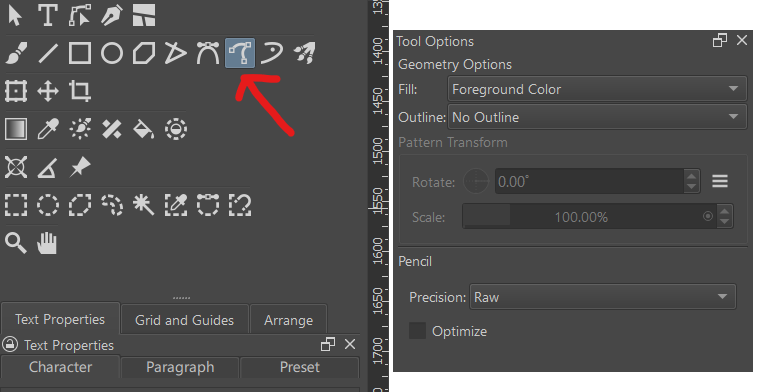
The second option, and my preferred choice for things like this, is the “Free Hand Path Tool”. Once selected, open the Tool Options Docker to set things up correctly (the screen shot below, shows you where the tool is, and how I like to set it up for use). I have the “Fill” option set to my “Foreground Color”, so that my main color is used for the fill, and I have the “Outline” option set to “No Outline”, so Krita won’t outline the shape you draw with the brush you have selected. I set the Precision to Raw, but you can use Curve. Just be aware that if the Curve setting is high, it can overcorrect your angles.
I just wish it had a less confusing icon. It implies to be some kind of Tool to create curves node by node, but it only traces the cursor path much like the Freehand Selection Tool…my brain just refuses to associate the icon with the tool.