Just curious…
Is there any MATCH COLOUR option like Photoshop , inside Krita ?
Here is a video example of what I am talking about .

If yes,then how can I access that or I can make something like this possible inside krita ?
Just curious…
Is there any MATCH COLOUR option like Photoshop , inside Krita ?
Here is a video example of what I am talking about .
If yes,then how can I access that or I can make something like this possible inside krita ?
If you now describe, for those who do not know PS what this function does, the chance to get an answer will certainly be much higher…
Michelist
Well, you could read this and you might find something you need:
seems to be this
Yes,you are right.
I should have been more specific.
So I have edited my post and added a video link for better understanding.
I hope now it will be more helpful.
Thanks.
I have checked ,but not able to find something specific.
I have edited my post and added a video link for better understanding.
I want to find that kind of simple option inside krita.
Exactly  !
!
There is color transfer filter, but I have not tested it.
Thanks.
I will check it.
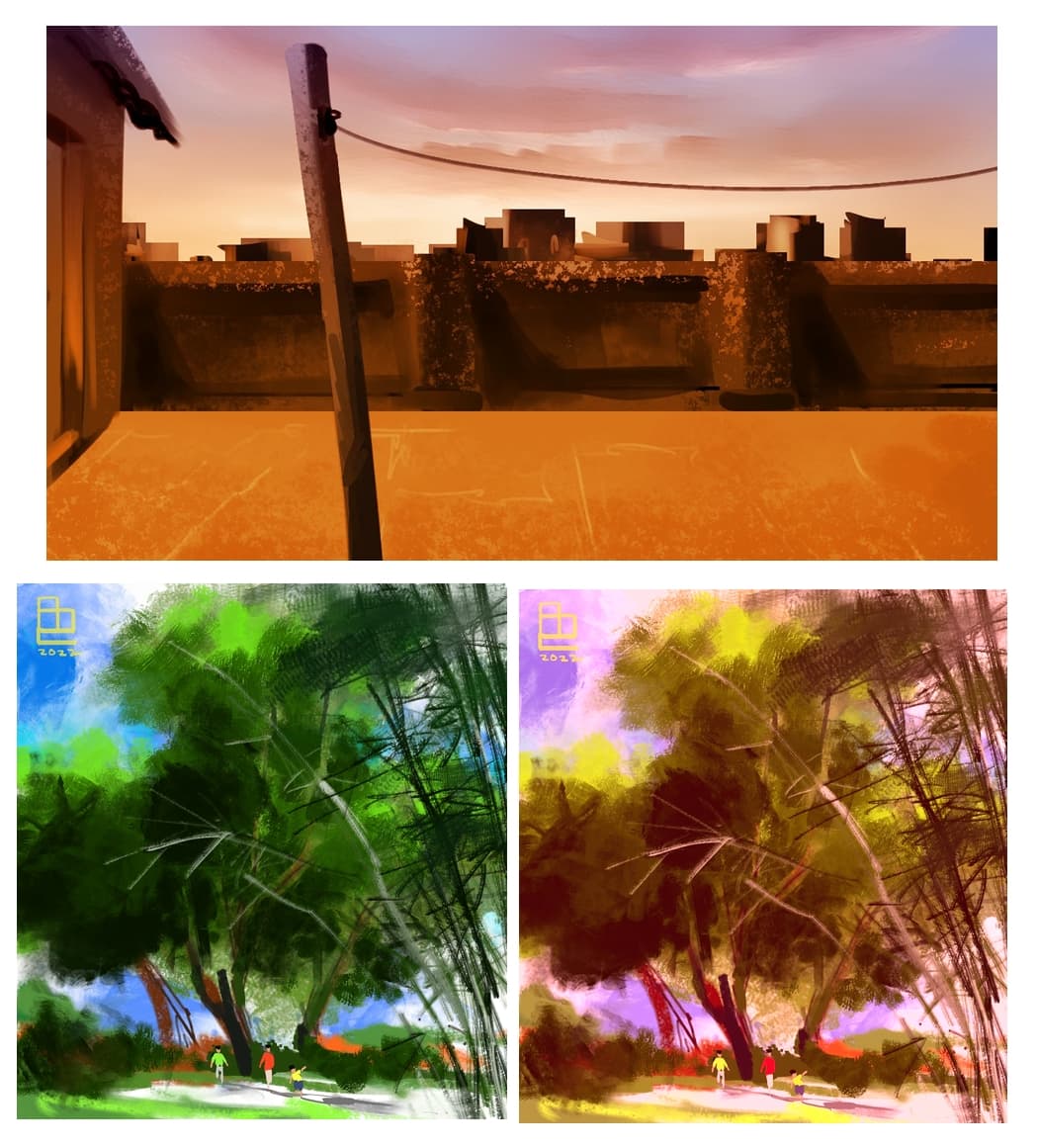
Okay,I have tested out the colour transfer filter.
Here is the result.
Image on the top was used as reference image .
The main problem I am facing here that I can’t pick any layer from my original working file, as a reference image,
I have to open the reference image separately from the colour transfer window and only then it is going to work and in Krita 5,the filter is taking almost 2-3 minutes to finish a single colour transfer process !
So each time if I have to open a file separately to check out other colour options,things may get little complex and time consuming.
There is obvoiusly a setting for saving presets,but saving presets can actually lead to remembering more and more options,It can be really difficult specially if someone is trying to experiment and use photobashing !
So is there any way we can use this colour transfer filter directly from the original file ?
Have you tried Transfer Colors [Historgram] from G`Mic filter set?
Thanks for this input .
I have tried that out.
But compared to this G"Mic plug in,the colour transfer filter is producing much better results.
I feel I am trying to find a way,where I can have advanced options like this G"Mic plug in,but results like colour transfer filter.
In this way I can work with a single but multi layered file, without keep opening too many files to get desired result.
As a last resort. I know it is not the Krita itself.
Though, scikit-image produces pretty good results:
https://scikit-image.org/docs/dev/auto_examples/color_exposure/plot_histogram_matching.html?highlight=histogram
However, you need to do a bit of python magic.
Thanks a lot !
I will go through this and check if I’m capable enough to use it .
Because I have got “below zero” level knowledge and understanding about coding  !
!
but thanks again for showing that another way exists .
This topic was automatically closed 15 days after the last reply. New replies are no longer allowed.