Hi.
I sometime use multiple softwares like Krita ,Medibang pro,firealpaca to create certain artworks.
I have always used common PSD format to export and import files between these softwares.
So far I had faced no problem,but lately certain issues are coming up.
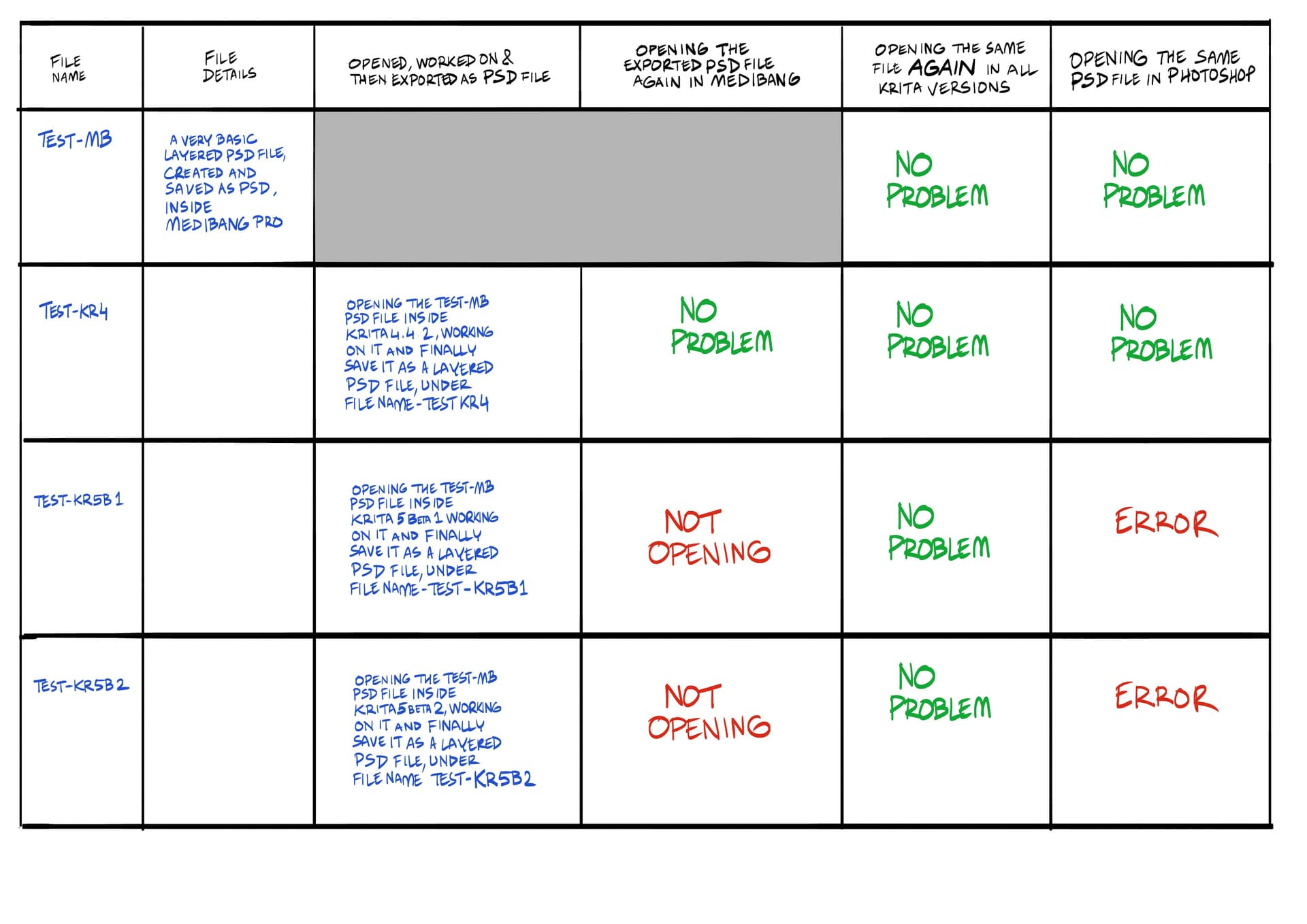
When I am exporting a layered psd file from medibang pro and importing them into different versions of krita,I am facing no problem importing them.
I can work on them inside Krita and save/export a new PSD file with ease.
But problem starts,when I try to import those files( saved as PSD inside Krita) again in medibang pro.
PSD file saved in KRITA 4.4.2,opening easily inside Medibang pro with no problem.
But PSD files saved inside KRITA 5 BETA 1 & 2,are not importing inside medibang pro (drag and drop not even opening the file and when I am trying to open it via file >open,medibang pro is shutting down).
Therefore, I have further tested those files inside Photoshop also.
PSD files made/saved in KRITA 4.4.2,opening inside photoshop without any problem.
But PSD files made/saved in KRITA 5 BETA 1 & 2,giving these error msg inside Photoshop and not opening.
So I am little confused now.
Because if PSD file exported from Medibang was the issue,then why importing it inside in KRITA 4.4.2 and then exporting a PSD file via the same Krita version is not creating any problem ?!!
So what can be the exact problem ?
I have saved all those PSD files separately.
They are all made with simple standard layers,without using any special layers.
In case someone wants to check them,I can provide .
The second error message says that there is a problematic blending mode. I think you have layer which has a blending mode that is not implemented in Photoshop yet.
Can you share these files?
Generally Krita uses a reverse engineered way to decode photoshop’s PSD file format. Many features which may be present in krita may not translate well in photoshop which does not have these features and vice versa. Krita gives you a warning dialog box before you save in PSD format. This lists down the things which are not going to be saved. But it should remove all those incompatible things and convert anything to raster layer while saving to PSD file. Based on the errors, I suspect this is a version difference or something is changed the way photoshop parses psd.
@amyspark worked in implementing Photoshop’s (non-standard) way of saving tiff, so I am pinging them here to give some clues.
I can surely share those files.
Let me know how and where to forward them .
The strange part is I am only using 3-4 normal layers in that PSD file ,nothing special.
Yet the blending error is happening,whenever I am exporting them from Krita 5 Beta 1 and 2.
Whenever I am exporting the same file as psd format from Krita 4.4.2,Photoshop is not showing any such error !
I am using same saving parameters for all krita version.
But the Problems are starting whenever I am trying to exporting/saving PSD inside Krita 5 beta versions.
There have quite a few refactorings to the PSD file format support in Krita 5, so it might even be best to just create a bug on bugs.kde.org with, preferably the file before it was loaded into and saved from Krita, so we can save it and test.
Thanks for responding so fast !
I will surely check it out how to report a bug.
I am not even sure if it is a bug or some technical fault from my side.
So I tried to check it in every way possible,before reporting it here.
I have also tried to make a crude check sheet of the main problems I faced.
Can you please check it (whenever possible) and let me know exactly which file I should forward ?
Here is the check sheet :-
@raghukamath@halla , Just made another random test with an old version of Paint tool sai.
The exported PSD file from Krita 5 beta is opening without any trouble ,yet it is not opening in Medibang pro or Photoshop !!
I am not even sure what is happening !!
PSD is a really hairy format (there’s a lot of duplication, for instance), so it might be that we’re saving everything that Sai understands, but medibang and modern PS are looking for different data and thus think the file is corrupt when it cannot find it.
We can only figure out what is up once we have a test file to work with and a bug report to track this bug.
Thanks.
I totally understund your explanation now.
But yesterday,I had a small panic attack,when I had finished a detailed comics page inside Krita 5 and was not able to open it in other required softwares !!
Now I have a little better understanding how to handle it,till we can find the desired solution.
I have checked the bug reporting link and honestly I find it little difficult to fill up all the details properly.
Is there any way,where I can forward my files to a certain email address via using wetransfer ?
Thanks again for responding !
@ari , importing and exporting PSD files is not predictable. Every application you use to send them or open rhem treats them differently. I used to export PSD’s from Clip Studio Paint and I would get a warning that some data might be lost. When I opened them in another app my texture overlay layers had disappeared.
Don’t make assumptions about PSD’s. You’ll have to export snd import with all your art apps to know the score.
Thanks @anon63336650 .
You are right and for those reasons only, I try to learn a new trick everyday !
But here what confused me, that the old version of KRITA (4.4.2) was handling everything smoothly.
Be it supporting exported PSD files from other softwares and also importing them in PSD formats properly.
Within this year, Along with Medibang,firealpaca,paint tool sai ,I have even tested with Photoshop cs5,cs6 ,CC and I have faced no such PSD import export problem between these softwares and krita.
But this new problem is mainly happening with Krita 5 beta versions.
So now I need to learn some new tricks to handle the new problems from more upgraded version of Krita…till it gets solved !
@ari , I wouldn’t bother to test PSD file import and export with Krita 5 Beta. Beta releases are incomplete and unpredictable. You did see “at your own risk” beside the download link, right? I took a look at 5 Beta and one of my favourite tools wasn’t behaving properly. I wasn’t bothered because I’m sure Kr 5.0.0 will implement the tool properly. I’ve been through the beta process many times. I probably won’t upgrade until 5.0.1 is released because it will be a bug fix. There’s no point in testing PSD’s until 5.0.0 is released. Your older Installations of Krita handled PSD’s properly, right?
But how would developers know about bugs in beta versions if no one checked them or reported them? Now thanks to @ari we can explore what is wrong and fix it. Otherwise we might’ve not know, especially since Krita opens those files fine. Not everyone has other programs around to check. For example I’m using Linux, I don’t have Photoshop license and I couldn’t make Medibang to work on Linux last time I tried.
It’s good to have a stable version of Krita somewhere around to do work if someone works, to not waste time on bugs when making a painting for a client or an employer, but it’s good to check out beta and nightly versions of Krita as well, to check if the next stable won’t break a big feature you need to use in your work, for example. Like here, psd export. If it’s caught during the beta process, it can be fixed before the stable release, which means, before you trust it. Otherwise if it’s not caught, it can be caught after the release and then land on a big pile of all bugs to fix “someday” (ok, psd export might have a bit higher priority, but still - there would be no rush unlike if it’s reported as a regression during beta testing period).
@anon63336650 ,I fully agree with your point.
I should be more careful when I am using beta version of a software.
But I always like to experiment with new features inititially and pushing the limits gradually.
If any beta version stays significantly stable after a month of experimentation,I start to use it in my professional work occasionally.
I have personally enjoyed the enhanced brush performances and also the new brush bundles in Krita 5 beta,along with the new animation & storyboard features.
Being honest,even in this situation,I would love to use Krita 5 beta than the stable Krita 4.4 + versions.
Obviously this new PSD problem was a surprise,but nowadays most of the raster graphic softwares support direct copy-paste among opened layers.
So even if I can’t get a proper PSD output,I can still move it to other softwares by simple copy -pasting,unless the layer structure is too complex.
But I will try to remember your warning in future !
@tiar,I feel everybody likes to approach a new software in their own way.
So @anon63336650 is also right to wait for the final stable version,if he feels like that !
I believe he just tried to remind me about the fine print wriiten under every new beta version.
Which I was forgetting,before this PSD problem popped up.
Yes,it is also true that if people don’t make enough experiments with new versions,it will remain as “not properly tested”. Because success of a software also depends on to find out how well it supports the other common softwares and universal formats.
It’s not possible for the developers to check out these aspects properly,because they are already burdened with the huge workload of internal fine tuning .
So I agree,more experimentations,more help !
By the way,I saw this somewhere,have you tried to install Medibang via WINE in linux ?
It worked for some individuals.


 !
!
 !!
!! !
! Now thanks to