For clarification, I don’t mean Canvas Only mode. I’m using a Samsung Galaxy Tab S9 FE+ and on the latest play store version in my region (5.1.5).
I want to have Krita start in fullscreen mode because it hides all the native android UI (Navigation Buttons, Taskbar, System Bar) and is much cleaner to work in.
If this doesn’t exist yet, could we get an option for it in the future updates?
It cannot be started in fullscreen mode, even it clicking full screen mode, upon startup krita will ignore and you have to uncheck and recheck it again.
Yeah, it is a bit confusing. But on the One UI 6 (Samsung Tablets) theres a feature called the taskbar and I find it useful however, it takes up a non-trivial amount of vertical space when in landscape mode. Going fullscreen from View → Fullscreen Mode (Check box) hides this task bar and all other native Android UI elements, and fills the entire screen with the Krita interfaces.
However, Krita (currently) does not remember this option and I was wondering if there was an option or a possibility of it being added in the future.
It’s sad to see that such an easy to implement option that would improve so much the user experience on Android, gets so much push back. If you solve everything with “you can just press a button” you end up with a workflow that involves pressing 15 buttons before you can start drawing.
The full screen mode already exists.
The ability for Krita to remember some settings already exists.
The need for full screen mode on Android exists, otherwise you get navigation bars limiting your screen.
Why not allow Krita to open on Full Screen mode and make it easier to use for everyone? Not all tablets or phones are from Samsung and have the option to set it up natively… It should be the default, at least on Android.
I think it slipped your mind, that there are different tablets out there, which could all be set up in different ways by their respective producer, to work differently. And there could be users, which don’t want to start the app in fullscreen. And as there is already a button for this feature. You as a user has to configure you tool as you need it.
It is not possible to have a configuration that pleases all users.
If krita is configured as you want it. And the setting is also saved. You don’t have to do that ever again, so your point with clicking a button would elongate your workflow is, in my humble opinion, not really relevant.
Maybe the new android developer will see this feature request and will fix the problem, who knows🤷♂️
So you think manufactures and users are responsible for Krita to have a feature that every other competent software already has? That’s the mentality that keeps this program from dominating and actually getting support.
If krita is configured as you want it. And the setting is also saved. You don’t have to do that ever again, so your point with clicking a button would elongate your workflow is, in my humble opinion, not really relevant.
What is that even supposed to mean? Krita right now doesn’t let me set it up to start in full screen, so it DOES NOT remember my previous setting. You’re either lying or you didn’t even understand the issue.
I doubt any developer will do anything about it, even if the solution is easy to implement, because of people like you shutting down other people’s issues that you don’t even understand as “irrelevant”…
@Tassker I’m sorry this is so frustrating for you. The Android version is a ported version of Krita desktop, it’s not truly a mobile-ready version.
A dev recently joined the Krita team to work on the Android version. You can follow that person by clicking the follow button on their profile. That’s what I do to keep current.
In case the developer reads this (which will be harder considering the previous comments dismissing the issue as “irrelevant”, from people who obviously don’t use the Android version):
All we need is the app to open in full screen. This is something ClipStudioPaint, Sketchbook and other apps already do by default.
AND if you’re a gigachad, you can also add an option to “open in full screen” in “Configure Krita > Genral > Windows” in case someone for some reason doesn’t want this as default.
The feature is already implemented. It is just not saved. So the feature request itself is wrong and should be changed to “save my configuration to display krita to be displayed i fullscreen on start” or something like this. That is all I am saying.
Here let me rephrase the request for you so that we all can agree to this.
Userstory
As a Android-user I want to start krita in fullscreen-mode, when I previously used the fullscreen-button.
Current behavior
Krita does not remember, that the user pressed the button and starts normally with android-menu-bars.
Wanted behavior
If I previously pressed the fullscreen-button it should be saved in the user preferences and krita should be started in fullscreen the next-time the user starts krita.
I think it is because this fullscreen-button was specifically created for android-user, that they just forgot to add this setting to be saved. Maybe some user requested the feature to make the app fullscreen and was not specific enough, so the contributor only added the fullscreen-button, which is why it is crucial to be specific in your feature request.
So please calm down and breathe. No one said this feature is not needed. Or that your opinion, that it should be implemented, was dismissed.
We are all krita-artists so no need to feel offended. Have a nice day!
You absolutely were dismissive above, using words like “Still not sure what the problem is” or “your point is … not really relevant”. Even adding a dismissive emojis like “I don’t really know ”.
You may be trying to help, but saying “there is already this thing” when that’s not what the person is asking for shuts down the conversation. For example, the button you suggest as easy to access needs the status bar to be active. The whole point of full screen mode is to have less bars, so that’s not really a solution. So I need to go to view > full screen mode every time I use Krita to not have the navigation bar below, when other apps already open in full screen mode.
Anyways, hopefully this is added at some point, as it seems fairly straightforward to implement.
I didn’t see this feature request, but it annoyed me personally, so making the application fullscreen on Android by default is already implemented and waiting for inclusion. It’s the obviously correct thing for an application like Krita to do and it’s what pretty much every other application of the sort does.
I see no need to make this a setting, there’s nothing spectacularly useful in Android’s ambient UI that it needs to be there all the time. To the contrary, there’s stuff that may be right in the way of your palm and will minimize Krita on accident. I don’t think any other application makes this user-configurable either.
I don’t like the condescending tone here either. Nor do I need a simple issue spelled out to me as a two-page user story. Both are not productive.
I’d also appreciate getting mentioned directly so that I actually get notified and can respond, not just linked to or wished upon.
Great news, thank you so much! I have to look into making feature requests in KDE, I wish I could use my Github Copilot there too.
I was skeptical when I was told there was only one dev working on the Android version, but I’m amazed at how quickly and cleanly you made it work in only three days! Thank you again, and please keep it up!
Ah, I see. So you are the new developer, nice to know! Well, I thought it would be difficult to make it fullscreen on start. And I thought reusing already implemented features would be simpler.
I’m sorry, if it looked condescending to any of you. English is not my native language so I am just stating facts and I try to make my points as clear as possible. I did not try to offend any of you.


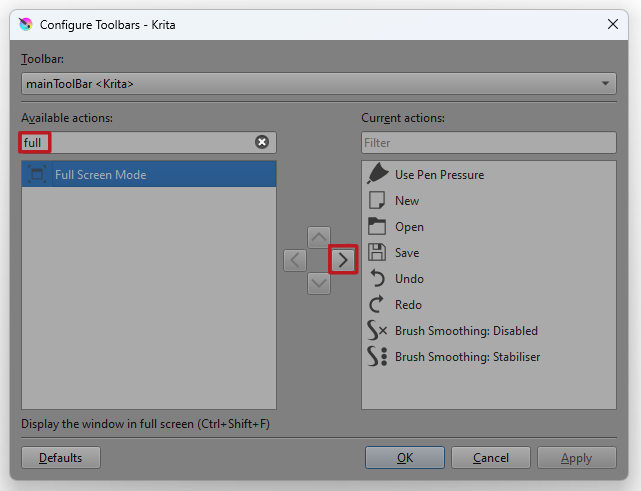

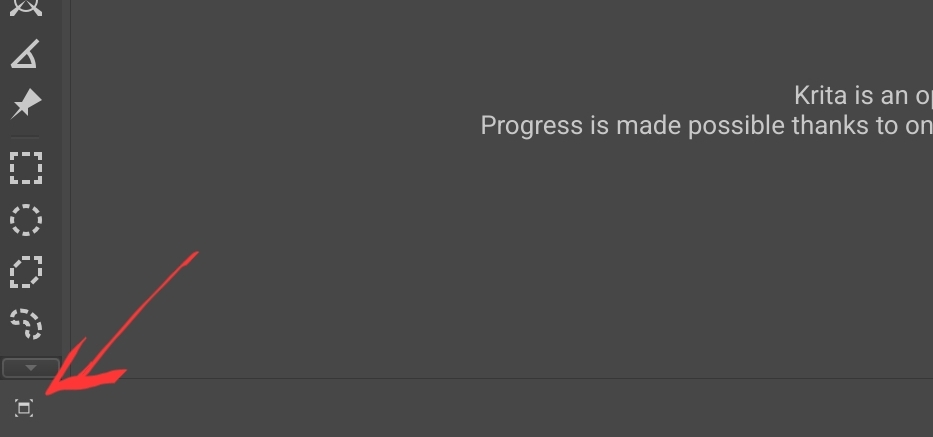
 ”.
”.