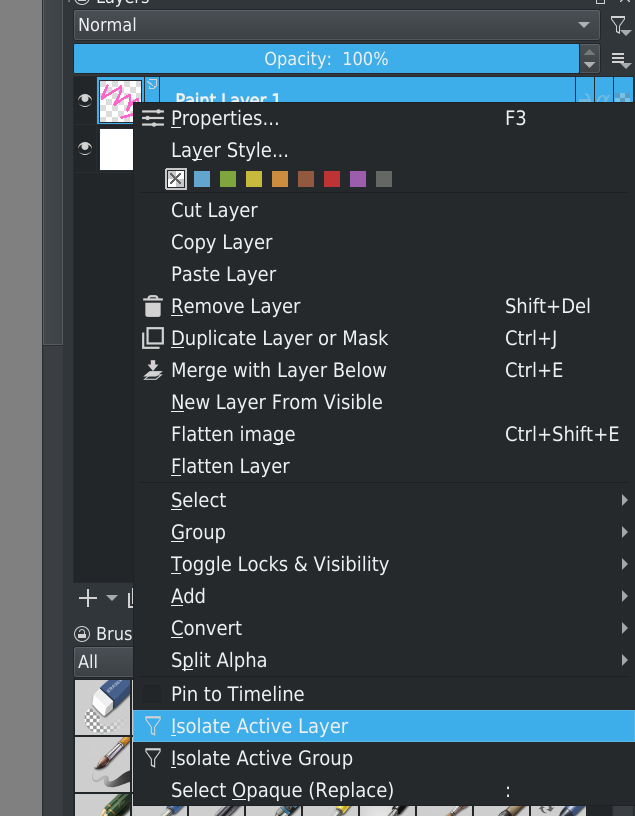
I upgraded yesterday to Krita 5.2. However, I find it doesn’t allow me to isolate a layer as I did previously by right clicking the layer and choosing ‘isolate.’ Can anyone help?
 Hello @Hope and welcome to the forum!
I would isolate layers by right-clicking on the layer and choosing “Isolate Active Layer”, is there something different to prior versions? I’m asking because I mean there are more ways to isolate layers iirc.
Edit: Found this in the manual, are you looking for this?
Michelist
Thanks - I revised my original msg to add that prior to the 5.2 release I right-clicked; have been working with Krita for about 4 yrs and now this method no longer works after the download. Wasn’t sure if it was a bug in the new release. I haven’t gotten into other means of isolating. The isolation tab is there and I clicked it - but nothing happened.
I must confess that since I have not needed this function before, I do not know what has to happen when I select this option. But since you say it doesn’t behave now like it used to, it seems to be a bug.
Could you please go to bugs.kde.org and report this bug there? For this you would have to register there, preferably not with a mail address that is important to you, as the address given there is public, I have set up an address for this at Yahoo, this is quick and easy to do there, but have never had spam delivered to that account. Here you can find a short instruction to create a bug report.
The important thing is to describe how the bug looks to you, what to do to replicate it, and finally what you expect to work correctly. In your case this is an easy task, since the bug is easy to explain. Please also make sure to enter the correct version number, a version 5.2 does not exist, you will probably use 5.0.2. And after you have filed this bug please come back and post a link to the filed bug here in the forum, so it is easier to find.
You can also wait to see if someone else here can tell you if the way this function is used has been changed (which I think is unlikely), or if they can offer you a workaround.
Michelist
Michelist
For me this is the most important function to add to my shortcut list. I use the key ‘z’ to trigger this event and through the shortcut I have not noticed a issue with it yet.