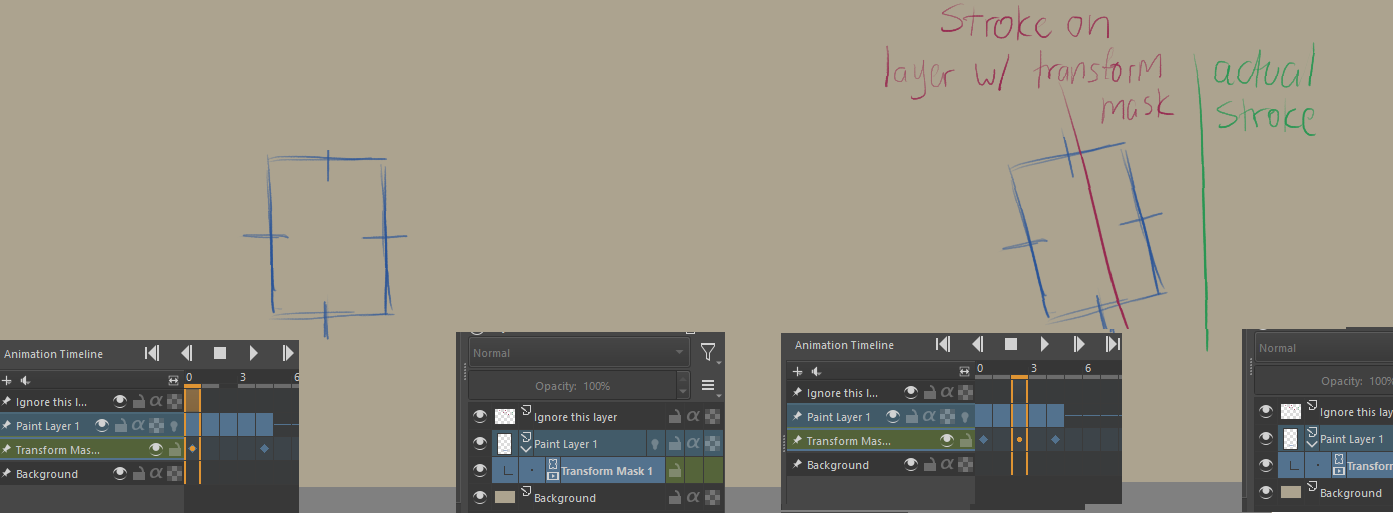
I’m struggling with an issue while animating, which I can’t find a solution for.
When animating I like to preserve some lines as they are and in stead move them around via transform masks, as my brush strokes are way too inconsistent for minor movements.
When I try to edit the line for a specific keyframe while the transform mask is doing its job, I find that my stroke input is applied based on the transformation itself as shown in the example below.
I’m trying to place a vertical line, however it gets rotated because the transformation mask is rotated.
I know the workaround is to merge the mask so it becomes a keyframe layer, however I’d like to preserve the mask and still be able to erase sections of the layer with input NOT based on the mask’s positioning.
Does anybody have any ideas or workarounds they could suggest?
I realize this may be an inherent problem with how masks work, but it’s a pain trying to make changes this way.
i’ve been running into this a lot. my budget fix is to disable the transform mask to be able to work on the frame. it’s not a good solution, it moves everything around, but mostly works. it would be nice to have a toggle switch to “ignore” the transform masks to make marks where the cursor is.
@globset What you seem to want is an option/switch to ignore the effects of the mask for new paint applied to a layer but still apply the transform for any paint previously applied.
If so, that would be very complicated and I can’t personally understand the purpose of it.
i use a lot of transform masks for animating, but there’s times you want to change or edit something in a frame or multiple frames. with the masks on, it’s unpredictable where the marks go, but with the masks off, everything moves to their original position. i thought it would be nice to keep things in their position from the mask and also be able to edit/draw on a frame. i know it’s not going to happen, but it would be helpful for animating with transform masks. if i had to pick an animation feature to get attention, this would not be it at all. i would really like to see an option to make all keyframes in animation curves have bezier curves without having to click every dot and apply manually, but i’m also very thankful for the animation features in the first place.
but, does it work to disable the transform mask when making the adjustments and the re-enabling the mask when you’re done adjusting? or does that not work? i’m curious because i make lots of ‘work arounds’ to use the animation features and i really want to find a good work flow with how it is already set up. i know how busy the developers are, i never want to push them to do more when this is already a very amazing piece of software. but a couple little things here and there could make it a more amazing piece of software for animation. the roots are already in place.
Sorry for the late response globset. I was away for a few weeks. I will give it a shot when the opportunity arises and I’ll let you know if that’s convenient or doable.
Hey Globset, it worked out although being a bit wonky.
I discovered that if I disable the mask, make a selection of the outline and then turn the mask on, I can transform the selection and get real-time changes on the mask-affected layer.