
Since I have gotten the new version with a pack of watercolor bundles. I have been experiencing this weird transparent marks exclusively on my canvas.
I have recently updated it to 4.4.8 and it still seems to have no improvement
1 Like
 Hello and welcome to the forum @Ms.Crystal!
This looks like a UI scaling problem, you can try the setting suggested in the screenshot (you can find it under “Settings” >> “Configure Krita” >> “General” in the “Window”-Tab), or with your operating system set the UI scaling to “even” values, so 100%, 200%. I think 150% would also work but values like 125% or 175% will cause such “phenomena”.
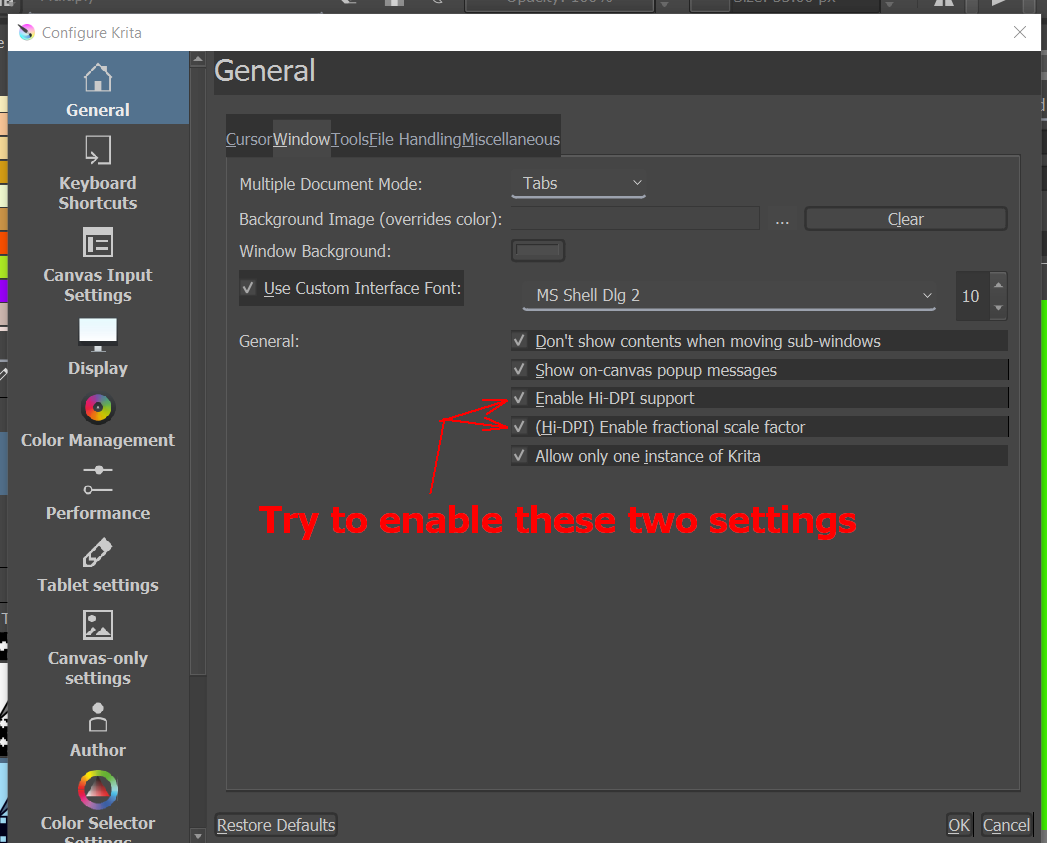
@All: If I am totally wrong, please correct me.
Michelist
1 Like
Hello! And thank you for your help and the warm welcome! Unfortunately both settings were already enabled so it didn’t result in a greater result(the only one that wasn’t enabled setting was the first one)
That is a pity! Well, wait a bit, I think there will be other users on the subject, and they may have tips that are not known to me. Since this is a very international forum, it occasionally takes a little time until the earth has turned to the right side and the users have time for the forum, are awake, are back from work 
Michelist
1 Like
Thank you for the kind words and I’ll definitely wait for the answer ^v^
While I can still use the canvas those transparent lines make the process distracting and hard on the eye
Why is your topic title about moving the pen around?
Does this happen while painting?
Did you make the Background layer that colour by specifying the colour in the Content tab of the ‘Create new document’ window, or did you start with a white background and flood fill it with colour?
Are they there as soon as you create a new image?
If you unlock the Background layer and paint on it, does that cover the marks?
If you paint on layer 1, does that cover the marks?
Hello! I’ll try answering everything in order:
It does happen while painting, those transparent lines show up if I move the cursor or use the pen
The background layer comes from the content tab/create new document
No, they arent. If I create a new layer pra use other commands outside canvas like using the scroll bar those white lines disappear, however they come back as soon as I move my cursor on the canvas(yes it happens with a mouse too)
I haven’t tried it yet, I’ll check it out and update it here
No, it doesn’t
I have the same issue on Linux (Manjaro with KDE), it’s not only the canvas though. I have gaps all over the UI where you can see through and see the windows in the background or the desktop.
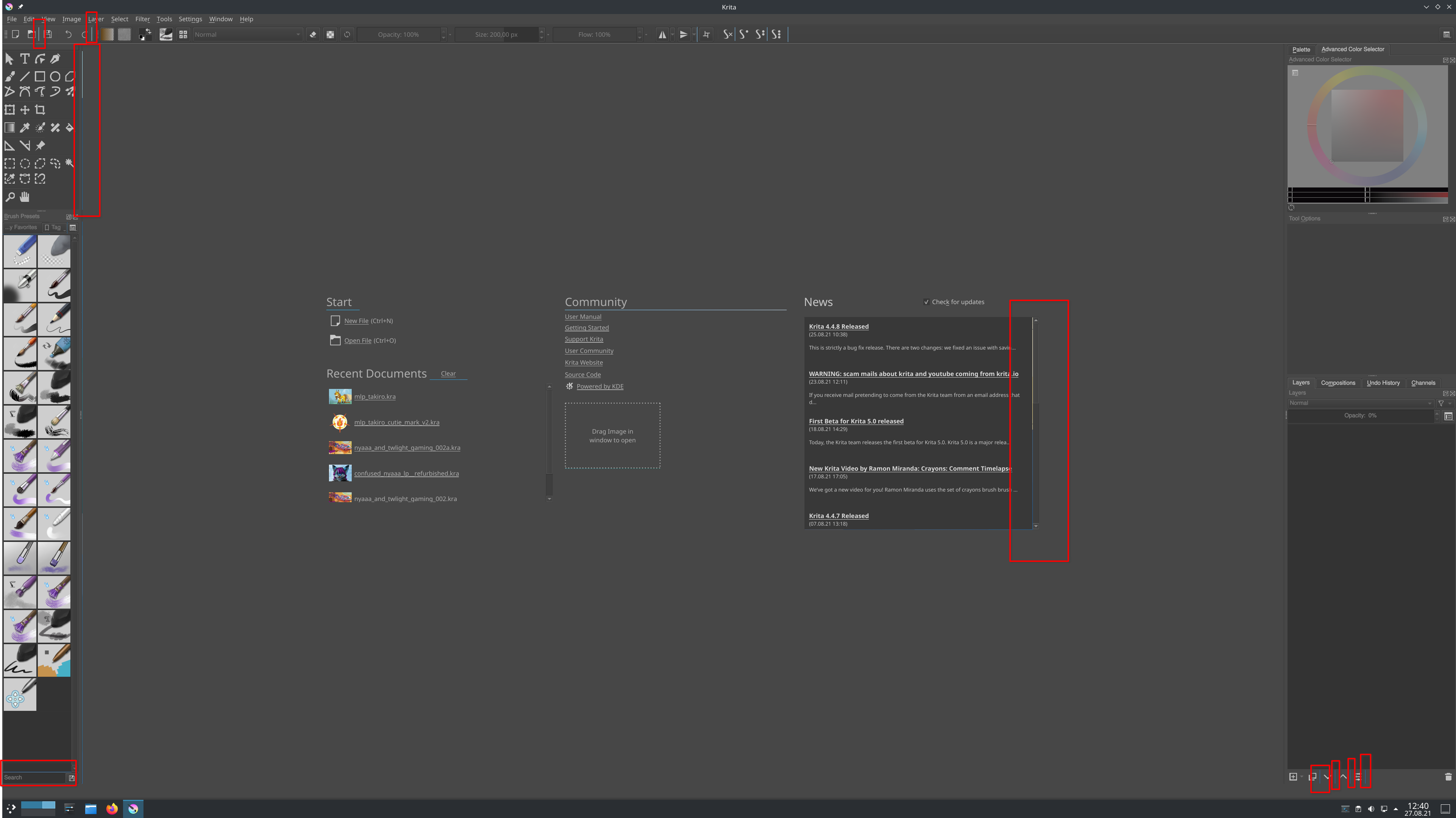
It happens in the the brush presets test area too, there it’s even worse for me, sometimes to a degree that it’s unusable because you can’t see anything but lines, it depends on the brushes.

I was able to identify UI scaling as the culprit, the only fix I know of is to turn it off, but then my Krita interface is too small on my 4k screens, too small to read anything without getting eye strain and too small to click anything without making it a test of accuracy and patience.
I confirmed this on multiple occasions when others reported it on this forum, I think I even filed a bug report but there doesn’t seem to be any fix or anything other disabling system UI scaling.
And yes, the lines appear as you paint. Moving the cursor is fine, but as soon as you paint, the lines appear.
1 Like
@Ms.Crystal Which operating system are you using?
@Takiro The monitor used by Ms.Crystal is not a high resolution one so would it help to turn off UI scaling in that case or even turn off Hi-DPI support?
1 Like
I use a Windows 10 notebook
Good question. I don’t have this issue on my laptop with just 1080p resolution (Hi-DPI support is still enabled, I think that’s just the default) but it could be just a coincidence. There seem to be enough people who don’t have this problem despite having high resolution screens and UI scaling at least I don’t see this issue mentioned often. That’s probably one of the reasons why this is till unfixed, because it’s hard to reproduce.
@Ms.Crystal I suggest that you try turning off Hi-DPI support and UI fractional scale factor then restart krita.
It can’t do any harm and if it makes things worse then turn them back on again.
Also, can you try Settings → Configure Krita → Display then try switching between Open GL and Direct 3D then press OK and restart krita.
If that doesn’t help (if it gets worse, switch it back and restart), then in the same settings place, disable Canvas Graphics Acceleration then restart (even though it’s not supposed to need a restart for that).
Can you also do Help > Show system information for bug reports and copy-paste the entire contents of the resulting window into a reply here?
Even if none of that helps, it may provide information that could be useful, now or in the future.
Can you remember which was the last version that didn’t have this problem?
1 Like
Disabling Canvas Hardware Acceleration only makes it worse for me, worse than on the screenshot by @Ms.Crystal and then it happens also while just moving the cursor, not just when painting.
I can’t say anything about a working version because I only got my 4k displays about a year ago, when I upgraded all my gear and had to use system UI scaling. It could be that it never worked but I didn’t notice because I never had to use UI scaling before. I can only say that it happens since the day I use UI scaling.
By the way, the “Enable Hi-DPI support” setting doesn’t seem to have any effect on my system. No matter if it is set or not, Krita looks the same. I remember reading somewhere that it’s not supported by Linux itself.
Changing from OpenGL to Direct 3D seemed to have worked! Although I’ll still keep this thread updated in case something weird happens again
The last version I used without that issue was 4.4.5
Since the issue seems to be solved, would you still want the bug report? Please let me know
Thank you for your patience and help, Crystal
@Ms.Crystal As a community, we mostly get there eventually
Please do update this topic if anything else related to this happens again.
Also, could you please do this:
because that will give detailed information about your graphics components and it may be useful information now or later.
As for a bug report, I think @Takiro is best placed to answer that, having had previous experience.
I checked but it doesn’t seem the bug was reported on kde yet. I was busy yesterday but jut now created a bug report, I included this thread as one example.
I just found out that disabling the setting (Hi-DPI) Enable fractional scale factor should prevent those random lines from appearing.
This topic was automatically closed 7 days after the last reply. New replies are no longer allowed.