I sometimes need to pick very specific colour values. Most of the time this happens when working in CMYK directly.
As long as I use Kita’s colour dialogues (eg. the specific colour docker) everything is fine, but if I try to set up a fill layer things start to get messy.
Since I am using Krita on MacOS, I am forced to use the native Mac colour dialogue to choose a fill layer’s colour (at least as far as I could find out), but that one keeps messing up my colour values.
For example, let’s say I need these colour values:

Everything looks fine until I go back and edit that colour. As you can see the colour values are all messed up:
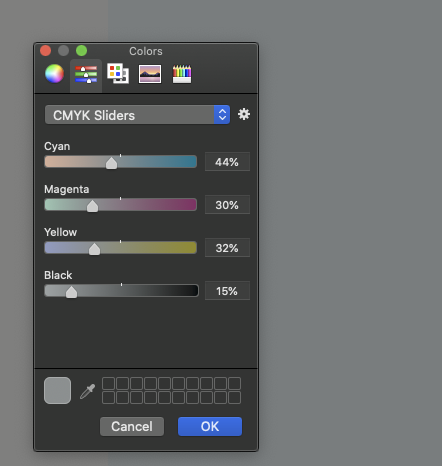
Sampling the colour with Krita’s Colour Sampler Tool will confirm that the CMYK values are not the ones I have originally input into the fileds:
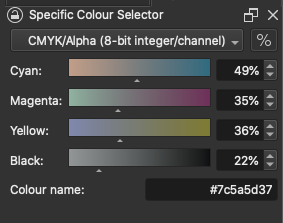
Weirdly enough, they also don’t match the values in the the MacOS colour dialogue.
I did make sure that the selected profile is the same for the document and the colour dialogue.
I my example, the document uses ECI Coated v2 and so does the colour picker.

As a side note, I know this a discussion that has been going on and Mac users never seem to be happy with any choice you make, but I really don’t like the native Mac colour dialogue. I’d much rather use Krita’s. It would be really wonderful if I could just choose which one to use in the preferences.
BTW. the profile support on the MacOS colour picker seems buggy in my opinion. I have to click several time on the profile I want to use to actually select it and it keeps changing all the colours.
Anyway, this is a separate topic. Right now, my issue is that anything that will rely on the MacOS colour picker will give me messed up color values.
