
Hello! I’m trying to figure out how to export recordings and I keep getting this popup when exporting. Kind of lost.
 Hello @flime194 and welcome to the forum!
We need more information from you, beginning with the standard information each new support request should at least provide:
What is your OS?
Which exact version number of Krita do you use?
From where do you have your copy of Krita?
Please post a screenshot from your recording parameters, so draw the recorder docker open so we can see every setting in it, if needed pull it over your canvas and draw it open so any setting and path can be seen.
Furthermore, we need a screenshot from your export settings to render your video.
By the way, if you want to export in 4k or other insane settings, then this is your issue, reduce it to 1080P.
Michelist
1 Like
Hi Michelist
My OS is Windows 10.
I just updated Krita to 5.2.13, and I downloaded it from the official site.
Here’s my entire workspace:
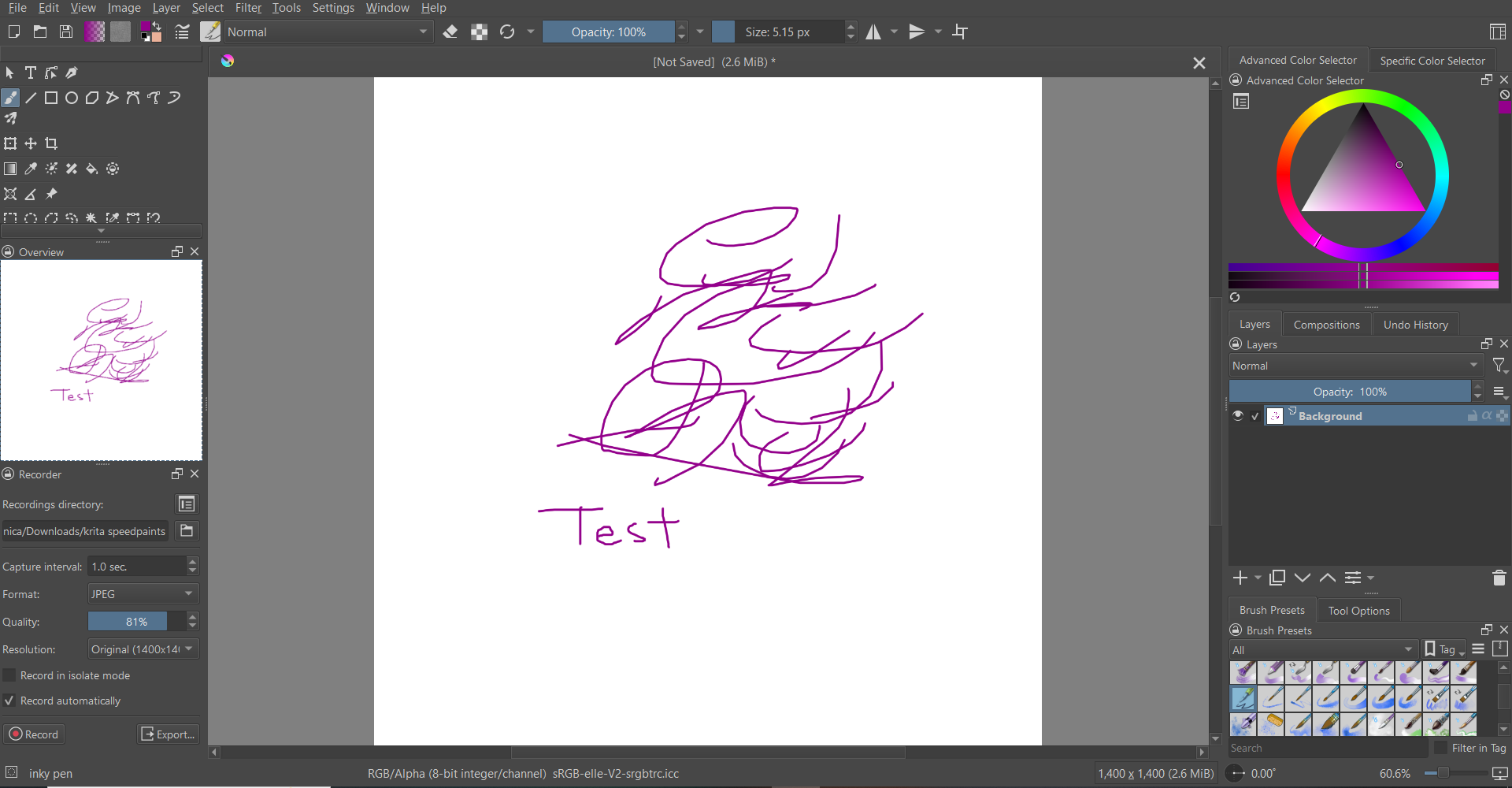

After updating Krita to 5.2.13, I tried exporting again and it displayed something different:
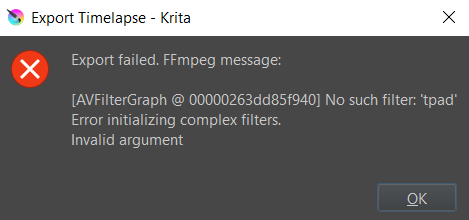
If I interpret your settings correctly, the only thing that looks not normal is the fact that you don’t seem to use Krita’s original FFmpeg, everything else looks normal - for me. In the case that you use Krita from Krita’s homepage, and not the Epic, Microsoft or PortableApps.com version of Krita, can you try to set c:\Program Files\Krita (x64)\bin\ffmpeg.exe as the FFmpeg version/renderer to use (and in the case that you use the Steam version use the path c:\Program Files (x86)\Steam\steamapps\common\Krita\krita\bin\ffmpeg.exe)?
If that doesn’t work, you can also try rendering to MKV to see if there is a problem with MP4 for some reason.
And please check the file names of your screenshots. Do they start with 0000000 or 0000001, or even something completely different? Are the file names consecutive? This is important and must be ensured.
Michelist
In changed the title and your fist post since this is not about speedpainting (the painting technique) but about the time lapsed recording.
Could you try it without Resize being checked? Your recording is smaller than what the resize option shows and I’m not sure you can make the recording bigger than the original.
And like michelsit mentioned it’s better to use the ffmpeg that comes with Krita instead of your own unless you have good reasons to do otherwise.
OMG thank you so much Michelist and Takiro!!! I changed the ffmpeg to Krita’s original one, the one you listed, and it finally works!! Tbh im not sure why I had a non-Krita ffmpeg LOL.
Thanks again, I’ve been trying to figure this out forever <3
1 Like
I’m happy this solved your issue, and you can render your videos now.
Would you mark this topic as solved, please? So you can show other help seeking users that they may find a solution here, and other helpers see that their action in this topic is no longer urgently needed, so they may help others if they want to.
Thank you!
Michelist
This topic was automatically closed 4 days after the last reply. New replies are no longer allowed.