Type of device* : Drawing tablet no screen
Brand and version of the device: XP-pen G960S PLUS
System** : Windows 11 home
* graphics tablet/display tablet/2-in-1 laptop/Android tablet
** Windows/Linux/Mac/Android, + version (you’ll find it in Help -> Show system information for bug reports)
Description of the issue (you can include screenshots):
So, I want to try digital arts and want to focus on animation, but here comes the issue, I brought this G960S today, and downloaded the latest drivers and using updated Krita version.
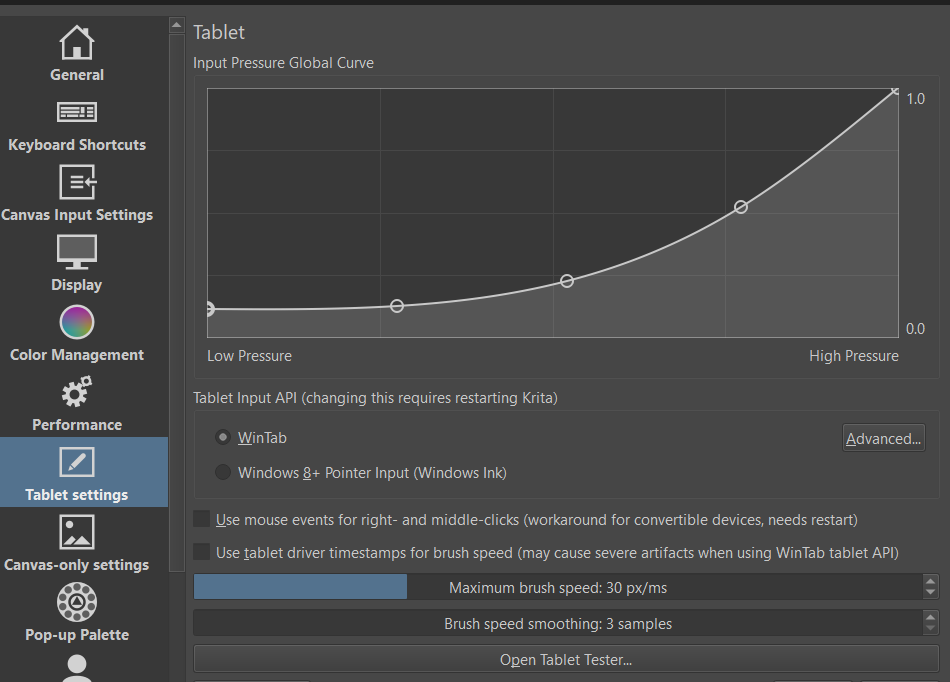
In Pentablet software (XP-PEN), it does detect pressure sensitivity, but when comes krita it can’t take advantage of it. I tried switching the API’s wintab and other option Win 8 + pointer input, but none works. Here let me provide some samples. I also tried adjusting curve.
I did manged to solve it, but I am struggling with the curve. The pressure sensetivity works but where needed low pressure it’s hard, and where hard it’s low.
Make sure your tablet driver and firmware (two separate things) are up to date.
Make sure Krita and tablet work in the same mode (Windows Ink or WinTab) – looks like you’re now aligned on WinTab, this is good. Krita needs restarting if you switch this setting.
I would suggest to keep your driver pressure curve linear, i.e. straight line that goes from low-left to high-right.
In Krita also start with the same straight line pressure curve, then start adjusting it to fix specific problems.
Regarding pressure curve behavior:
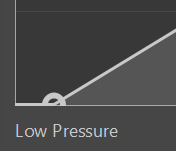
If your curve starts above zero on the left, then you will always draw with some pressure even if barely touching the tablet. THIS IS UNUSUAL, I would only use it if your pen is broken.
If the pressure curve is offset from the left side, then it will increase the Initial Activation Force. This can help if you get a jittery response at low pressure, making the response more predictable. However, this is usually set on the driver side, rather than in Krita.
If your pressure curve bends down (like in your screenshots), this makes it feel firm / hard. You will need to press more to get bigger pressure.
If your pressure curve bends up, then the pen feels very soft. I would not recommend this either, it makes pressure hard to control.
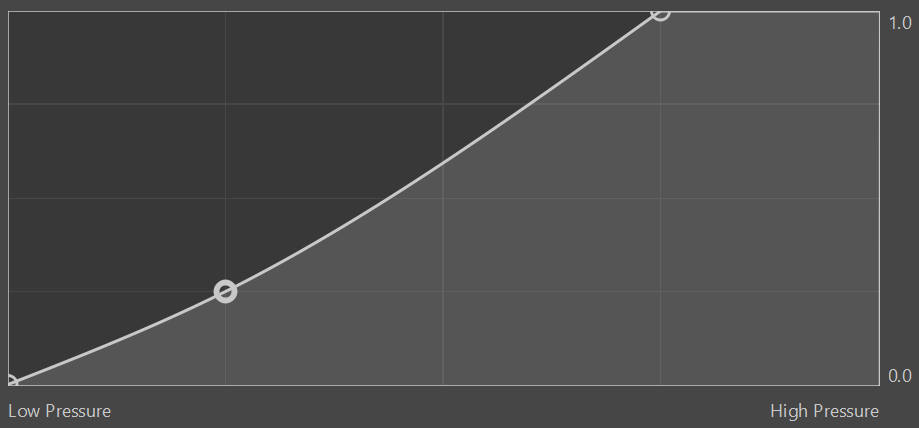
If your pen has 16k levels, it will likely feel very hard/firm. You will not be able to get high pressure, unless you press very hard, which will wear down your nib and tablet surface. You can offset it with a curve like this:
Lastly, what you describe sounds like an inversion of pressure. This should not really be possible, unless your curve somehow goes from high-left to low-right.
For testing pressure response, you can use a very simple brush like b) Basic-5 Size, which should make it easier to understand if it performs as you wish.
Thank you, I have done the 1st part, fixing drivers and firmware (using latest as I reinstalled them 1st one did get corrupted, 2nd one is in it, removed older driver) , my pen has 8k levels. so, what I want is a pencil like feeling, low pressure = low press, high pressure = high press and something like a regular pencil would.
Can you help me see what a pencil like curve will feel like?
That should be the default straight pressure curve, going from left to right and low to high. Which brush are you testing it with? As long as it’s one of the default Krita brushes, it will be working normally.
Each brush has multiple curves associated with parameters like opacity. If something behaves weird, then it could be the problem with the brush preset (if you have a nonstandard or modified one).