It is sane for a plugin to capture Krita internal signal?

Hello everyone, hope all is well

Since my proposal for a plugin to handle slots for brushes I was thinking what would take (if possible) to make this plugin. I followed the available tutorials and manual entries about Plugin Development, as well reading the libkis Krita API Documentation.
So here is what I stumble into:

Details about my endeavor

From what I understood a Krita plugin only has a function called (either directly or by capturing a Signal), if ‘triggered’:

  • Trough a menu entry (Tools/Scripts)
  • Trough a shortcut
  • Via a docker interaction (e.g.: a button)

Then I learned of the Signals from the class Notifier. This let me to pursue the idea of connecting to Krita’s “native” signals.


One of my ideas was for the plugin to check the current brush preset. However this would only be possible when the user ‘activated’ the plugin with a shorcut.
For a constant check I imagined two possibilities:

  1. Setting a timer and updating the current brush every timeout.
  2. Trying to get a signal for when a brush was selected, if possible.

About the item 1: I don’t know how bad (performance-wise) running a timer and checking the brush every timeout could it be. However, it seemed kind of a crude or ‘hacking’ way of doing it.

Then I tried item 2. Thanks to the awesome Python Plugin Developer Tools by @KnowZero I discovered how to interacting directly with the window dockers.

The docker Brushes Preset with its ResourceChooser QWidget caught my attention, especially the public signals: resourceClicked and resourceSelected.
While connecting to resourceClicked resulted in nothing (maybe it’s not being emitted?), connecting to resourceSelected gave a Python Script Error.
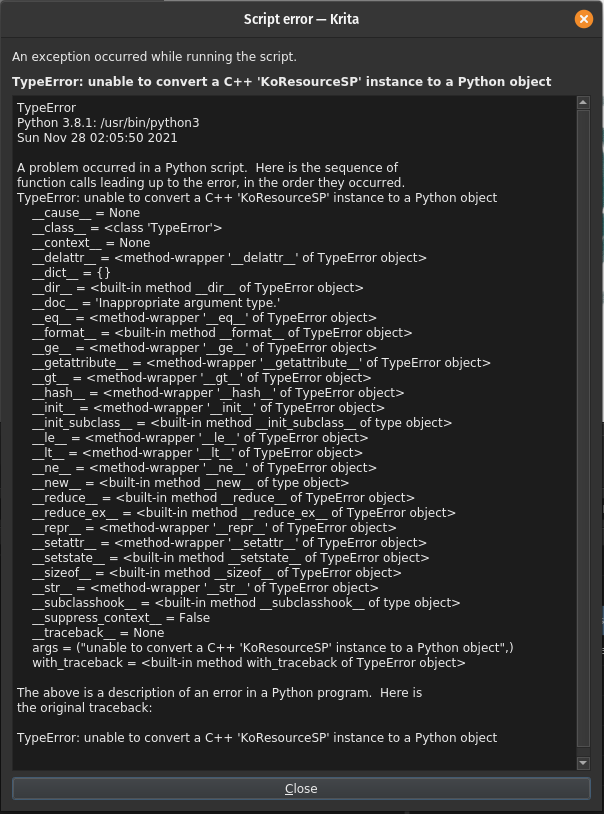
Python Error

TL;DR:

Can a plugin connect to Krita’s ‘Internal’ Signals?
Just copy and paste the code bellow in the Scripter, then click in any brush in the Brush Docker.

from krita import *

def hello():
    print('hello')

qwin = Krita.instance().activeWindow().qwindow()
obj = qwin.findChild(QWidget, 'ResourceChooser')
obj.resourceSelected.connect(hello)

#Disconnect the 'resourceSelected' Signal
#obj.resourceSelected.disconnect()

  • Am I wrong to try something like this? Are plugins meant to interact this way with Krita?
    If so, would be valid to request the Python API to include a KoResource C++ type?
  • Is using a timer the proper way to constantly check the current brush, and would be too costing?

Cheers.

Hi

Using things “outside” what is provided by API is a tweak.
According to what you’re doing, it’s not “insane” to do it, but you have no guarantee for something that is currently working will continue to work on next Krita’s version…

Not really.
Here emitted signal provide a type that is not available for Python so you can’t use it…

It’s already done through Resource class, that is exposing internal Krita’s type to Python API.

What’s needed here is more a new Signal defined on View (or Window, or Notifier, not sure which one is the best for that) like currentResourceChanged(newResource, oldResource)

I’m asking myself the same question…
I don’t really like the polling solution but if there’s no other solution I’ll probably have to use it too for my plugin.
I have other ideas to tests, but they’re all based on some tweak… if I found something better than polling I’ll inform you here :wink:

Grum999

Someone™ really should connect KisCanvasResourceProvider to Python :pleading_face:

What you did above just finds some preset chooser, it may or may not follow the current brush preset.

It is being emitted just fine, and the reason for the error is because KoResourceSP isn’t mapped to Resource when being sent as a signal.

If just making your own docker with PresetChooser isn’t good enough for your needs. You can do an installEventFilter, then on click check for preset changes.

Well pigmento and tela use the QTimer solution and they get by because there are no emitted signals for them so you need to check… I know is bad, but you need to do it with some care if you really want it. But I don’t full heartedly recommend it.

If you do that I recommend:

  • an on/off switch.
  • Turn the timer off when it is not present.
  • a way to adjust the verification ping.
  • keeping things vector
  • no stylesheets if they are not static.
  • a gate to verify with previous values, because you can’t be updating constantly if there is not gonna be any change with your calculations.

Pigmento update rate is 30ms and Tela update rate is 0.1s up to 10s. So they update pretty fast but have different limitations and performance options.

Just asking Krita numbers and strings is not heavy. Honestly sometimes I am surprised with how much it can handle as I expand my requests to make new features. I am a big abuser in this regard :flushed:

I do this because if you depend on UI elements to check the info. If people go tab your thing stops and interactivity goes bye bye. So I always prefer using the API.

I just looked at it in more detail, and ResourceChooser is a complex object which has child objects. Which means something like this becomes possible:

from krita import *

def hello():
    view = Krita.instance().activeWindow().activeView()
    print('hello', view.currentBrushPreset() )

qwin = Krita.instance().activeWindow().qwindow()
obj1 = qwin.findChild(QWidget, 'ResourceChooser')
obj2 = obj1.findChild(QListView,'ResourceItemview')

obj2.currentResourceChanged.connect(hello)

This would be effectively same thing as your code.

Works properly, many thanks! :star_struck:

Still a tweak for which PresetChooser need to not be heavily modified to not broke everything, but better solution for me than polling, I’ll use it :slight_smile:

I already started to take a look with event filters but I wasn’t able to get any interesting results…

Grum999

Thanks everyone, all of your insights were very enlightening,

Sincerely didn’t except to get much response, in the sense of, ‘You’re onto something, maybe we should pry further’. But only get told weren’t much else to do.

@Grum999 Thanks for all the explanation about the sanity of integrating a plugin with things ‘outside’ the Python API. Good to know so not to rely too much on it.

@Lynx3d Expanding the number and variety of ‘default’ signals the Python API could have would be really good. I remember some people requesting a signal for when the canvas were interact with it. Don’t remember the details.

@EyeOdin Thanks for the response. Glad to know thinking about using a Timer isn’t outer of this world, and requesting string isn’t too costing. About not relaying in dockers it is also a good thing to keep in mind.
In this case I already know of some cases a change in preset wouldn’t trigger the update. Like using the default shortcuts / , . to change brush, or another plugin shortcut (like the Ten Brushes) but alas.

@KnowZero Many thanks for taking a time not only explaining things, but testing them too.

When trying the QWidget ‘ResourceChooser’ connecting to the signal resourceSelected gave the error because it send the argument ‘KoResourceSP’. However, the signal resourceClicked didn’t gave any error even thou it also send the argument ‘KoResourceSP’.
This is why I speculated the signal resourceClicked it wasn’t being emitted by Krita.

I also saw the child ResourceItemview previously. Then I tried the using the Get Code Path from your plugin to get this child. It didn’t result in any success, so I thought it was because the signal currentResourceChanged wasn’t being emitted. (Similar to my previous hypothesis of no resourceClicked emitted from “ResourceChooser”).
I didn’t know you should get the direct child of qwindow(), and then get the child of this child. It is always like this?


Now a really newbie and offtopic question. When I tried @KnowZero code where do I see the print of the hello() function? It doesn’t appear in the Scripter window or in the Log Viewer Docker. So I’m kinda lost on how to debug a successful or silent failing code :rofl:
For now, a good compromisse I’m using is using the code Krita.instance().action('mirror_canvas').trigger() :man_facepalming: so I can clearly see when the function run properly.

Again, thanks all of you. It was awesome.

Cheers

On Linux, executing Krita from command line in a terminal, print output is made in terminal :slight_smile:
On Windows, …

You can replace print('hello') method with qDebug('hello') and then you should have printed statement in Krita’s log viewer :wink:
(can’t test it for now, but it should work)

Grum999

this is my cheat sheet to print. sometimes it depends on the situation for me. Log viewer is nice if you want to see the history but sometimes I just need to see the current value and placing it on a label is practical considering how I build my UIs. the pop up message is nice for when Krita is starting up.

    # Label Message
    self.layout.label.setText("message")

    # Pop Up Message
    QMessageBox.information(QWidget(), i18n("Warnning"), i18n("message"))

    # Log Viewer Message
    QtCore.qDebug("message")
    QtCore.qWarning("message")
    QtCore.qCritical("message")

Probably because the events need to be checked in the viewport, so the events need to be checked there. But the method above is better than the event filter solution. Generally I like to keep the filter as last resort.

I doubt PresetChooser would change away from using a QListView internally as it is pretty much the fastest way. You can also make your own PresetChooser and hide it, then see if it’s signals is sent, or take the parent wdgPresetChooser and sip.cast it as PresetChooser or target the label on the statusbar. (note: I have not tested these methods, just throwing out alternative options)

As Lynx3d said, you are targeting a random ‘ResourceChooser’, or more accurately the 1st one. The clicked event happens only when a mouse clicks on that specific one. While the selected event happens regardless of which one is pressed. This is why it is important to build paths from parent to child if you want to be positive you are targeting the right one. The current Python Developer Tools mostly just give you a basic thing to get started. But I do plan to add some algorithms for common paths like going through dockers, mdi and etc so people are less likely to make mistakes. Probably also include warnings when multiple exist.

Others have already answered how to do it. But to explain, stdout gets intercepted by scripter, then released. So in cases of slots or timers, they don’t get included. I was thinking of adding to the Console portion the ability to have 24/7 stdout. So people can monitor event changes directly there.


Edit: I updated the plugin dev tools to take more efficient route to dockers. I also added a warning if there are multiple instances with same name.