Hey guys! I tried installing it and I got this error code. I clicked “okay” and it just doesn’t work at all after! Anyone have something similar? How do I fix it!? I’m curious to give this a try!

It would be better to copy the complete content of this error-dialog and paste it into a reply here. Please try to paste it into a code-box, therefore you need three backticks (```) in an empty line before the beginning and also after the end of the error-text.
Additionally, we have to ping @Halcyoen in this “special case”, because he patched @Kapyia’s plugin, and if you had downloaded the version I linked to, then you have installed this patched version.
Also, it looks like @Kapyia seems to no longer respond to replies here, his last visit here was in November 2020.
Michelist
 Hello @Halcyoen
this is a bug in kapiyas official version of this plugin that shows up when the plugin tries to hide some buttons in the brush preset chooser based on their location in the ui. i guess the layout of the widget changed at some point on the way to krita 5 so the script can’t find those buttons anymore.
i have made a patched version that you can download here:
youll probably have to delete the files of the original kanvasbuddy from your krita resource folder before installing my patched version though.
in my version i also fixed some issues with icons that changed in krita 5 and added keyboard shortcuts for switching to the different dockers (default is shift+1 through 9).
Oh wow! Thank you. Sorry, I’m not used to this forum and how it works yet. And I’ve never downloaded my own plugins for Krita before so it’s a new process for me. How do I delete Kapiyas version of Kanvas Buddy from my Krita resource folder? I’m searching through my settings menu but I’m not sure how to delete it.
in krita you can click settings > manage resources > open resource folder and it should open the correct folder in your file browser. from there open the folder called “pykrita” and delete the “kanvasbuddy” folder and the “kanvasbuddy.desktop” file inside there.
Oh. So I downloaded and imported your version and it overwrote the original and now it’s working!! Also, thank you for taking time to fix the original program. This is phenomenal. I really appreciate being able to access my layers and some of these other tools/dockers from a small quick menu like this is canvas only mode. You did a great job. And thank you for taking time out to help me as well. I really appreciate your kindness! 
You can find it in Kritas resource folder in the subdirectory “pykrita”, there you have to delete the folder “kanvasbuddy” and the file “kanvasbuddy.desktop”, then go back to the resource folder and there to the folder “actions” to delete the file “kanvasbuddy.action”.
Michelist
Addendum: Haha, you two write so fast, I can not keep up, first prescribe, then translate, then determine it is obsolete!

Thank you so much for taking time out of your day to help me today! I really appreciate it a lot! I am new to digital painting still and very new to a forum like this! I appreciate your for showing my the Kanvas Buddy program and for contacting Halcyoen to help me fix it when it wasn’t working! Big, big thanks! This will help me significantly! Thank you for your time!
Yeah but I rarely use it! I only started coming here every now and then to ask for help! I think I made this account a few years ago but I’ve only used it like… twice to ask a question! 
Hi i just installed the KB plugin and in settings>configure krita>python manager>kanvas buddy is enabled but i dont see the Kanvas Buddy docker anywhere in the full screen mode of krita . Please guide
You need to go into Settings, Keyboard Shortcuts … set a shortcut key (I set ‘K’, which is easy to remember). 
I dont get it. I tried to find Kanvas Buddy in shortcuts but there is nothing there
Hello @khyali_musavver, and welcome back to the forum!
I was just wondering if you are still using Krita 4.x or already using a Krita 5.x version?
However, if you are still using Krita 4 and have not also downloaded and installed @Kapyia’s “kanvasbuddy.action” file, then @anon87509114’s hint will come to nothing, because @Kapyia did not bundle the file with the plugin, and without a *.action file you cannot assign a shortcut.
And if you are already using Krita 5.x, the plugin from @Kapyia, which is linked in @Kapyia’s first post, will not work.
Instead you should use the version of Kanvas Buddy patched by @Halcyoen and presented here, it works with Krita 5.x and has the possibility to call it with a shortcut already integrated:
This is the direct download link, and here you can find the corresponding GitHub page from @Halcyoen:
In this “KanvasBuddy-master.zip” you’ve just downloaded from @Halcyoen you will find the file “kb-0-5-unofficial.zip” where the patched plugin is located, you have to unpack it first in order to install it, it may feel a bit circuitous, but works like a charm.
And as a bonus, if you install this via “Tools” >> “Scripts” >> “Import Python Plugin from File…”, then the shortcut will be installed with it right away.
Michelist
Hi everyone!
I was so intrigued with this plugin! I downloaded it and after reading all the comments and trying to adjust the config.ini file with different options, I figured out that when I change the Tool Options from 0 to 1 I get an error message and then I have to delete and reinstall KB and change the Tool Options back to 0 for it to work.
Does anyone else have this problem?
I downloaded the KB-0-5-unofficial.zip folder and Im on WIn10 on Krita 5.1.3
hello!
im using this on w10 and krita 5.1.3 as well. the plugin works by “borrowing” dockers from kritas ui and if the dockers aren’t where the plugin expects them to be it will fail.
do you use any other plugins that affect the tool options docker? do you have the tool options set to be in the toolbar normally? could you post the error message you get maybe?
you shouldnt have to reinstall the plugin every time it fails. setting the tool options docker back to 0 in config.ini and restarting krita should clear out any issues like that.
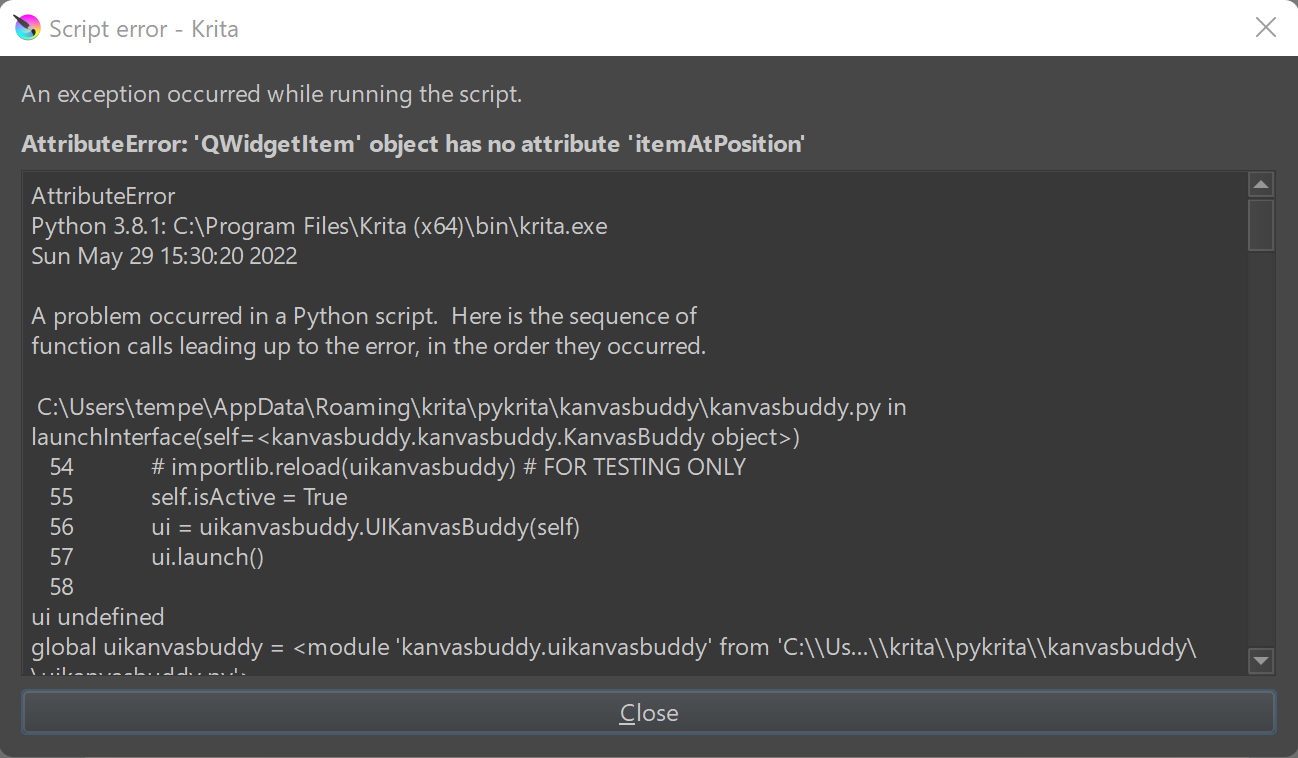
Here is the error message that pops up. I set the Tool Options to 1 again to make the error msg pop up so I could show you…and my setup with the KB so maybe you can check if something is wrong with my setup?
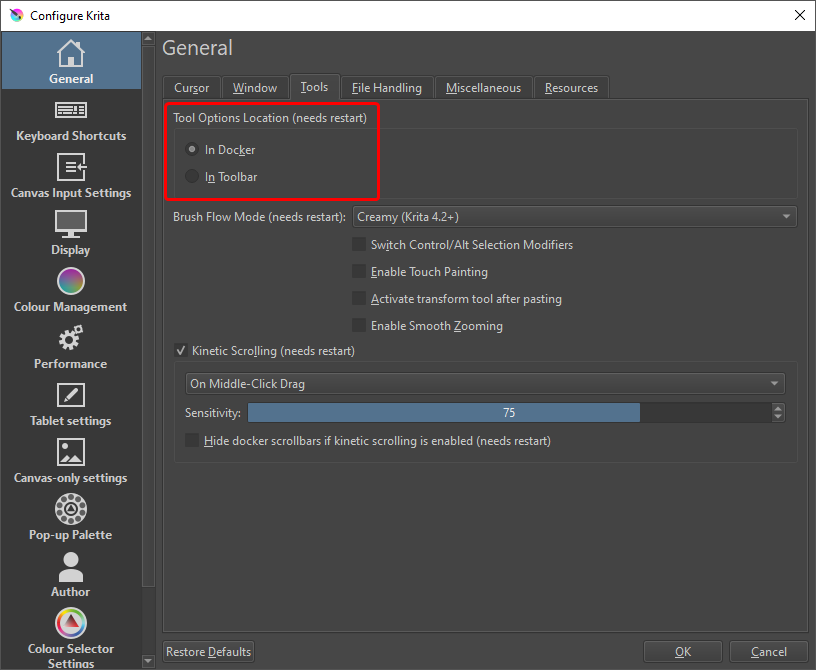
it looks like you have the tool options set to be in the toolbar. go to settings > configure krita and make sure that the tool options are set to be “in docker”.
restart krita and try the plugin again.
Woohoo!! that worked!! You are awesomesauce!! Thank you!
Is it possible to increase the font size and icon sizes of KB so its a bit bigger , as it’s a bit too tiny for me.
at the bottom of the config.ini file should be all the button sizes (in pixels). try setting them to larger numbers.