Kinetic scrolling?
under Settings - General - Extras, you can under the menu item → Sensitivity and you can activate kinetic scrolling…hmmm what’s that good for?
Warm greetings
DAB
Kinetic scrolling?
under Settings - General - Extras, you can under the menu item → Sensitivity and you can activate kinetic scrolling…hmmm what’s that good for?
Warm greetings
DAB
It is one of my favourite features!
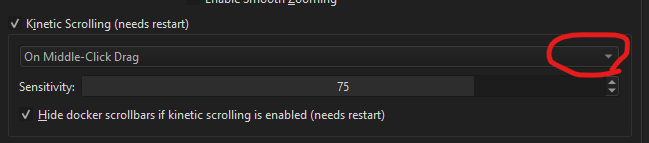
It makes it so you can scroll in the windows of Krita (for instance layers or brush presets) by clicking and holding down. Kinda like you can scroll on your phone with your fingers. There are settings that decide what you hold down, my favourite is the middle mouse, as then I can just hold that button on my pen, and slide it up and down to browse, no need to even put the pen to the tablet. There is also a setting that hides the scrollbars, making for a cleaner Krita if you like to use your pen or finger to navigate 
Ok that’s cool, and where do I set which key is used for this? =)
And the sensitivity? Is for how fast is scrolling?
After turning it on there will be a box with options, a dropdown menu where you can decide key!
I haven’t used the sensitivity I think, but I think the sensitivity is how it glides, or how much you need to flick the pen/finger for it to move or something like that
In Krita 5.0.6, under “Settings”, I see no “General” item.
Is it “Preferences”? There I can open a “General” tab. But there I can’t see any “Extras”.
Are you guys talking about a newer version? I can’t see any version reference in this thread.
Thanks.
Oops I forget that I am using 5.1 beta - I do think things are a bit different there than in 5.0!
It is in ‘‘Settings’’ >> ‘‘Configure Krita’’ >> ‘‘General’’ in the Tab ‘‘Tools’’, if I remember correctly it was it is Extras in the German translation or an earlier version.
Michelist
Edited 
ah ok I have 5.06 Ver.
i have found, thanks
This topic was automatically closed 15 days after the last reply. New replies are no longer allowed.