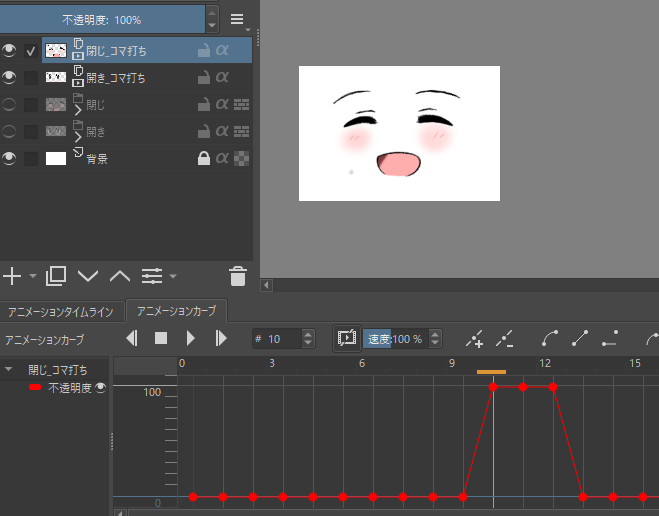
This plugin allows you to control the visibility of cloned layers in Krita using a CSV file.
Each line in the CSV indicates which “cell” or clone is displayed in each frame, making it easy to animate expressions, poses, or states without doing it manually frame by frame.
Well, I came across this while browsing the web and thought it would be interesting to share it here.
From what I understand, this is for cloned layers, since they cannot be animated? I’m not really sure because I haven’t verified this, but according to the person who made the plugin, they put everything in folders and cloned those folders to make them layers, but they couldn’t be animated or something like that. As I said, I haven’t verified it, nor have I tested the plugin, but I found it interesting. Maybe someone was looking for something like this, so I shared it. I apologize if I can’t provide enough information.
This is brilliant! Animation curves in Krita are a mess, really a bad decision since the same graphing area is shared across all variables, even though some use decimal ranges while others go into the thousands. Now all that’s needed is a table view embedded in Krita to manipulate this directly.
Thanks for posting it!
You can actually apply a simple interpolation formula instead of dealing with a Bézier-like curve. This feature is common in other animation software, such as OpenToonz.
I read the blog article,this plugin could Limited animation way.
(for example, animate per parts such as eye and mouth )
It makes swich show and hide of clonelayers due to opacity 0% and 100%
And,which layers decide wheter show or hide the set by csv file
but a bit manual lack of information.
Also,It seems that the developer has a couple of frustrations to Krita.
Krita can’t load movie file as reference
(In currently krita import it as ton of image files )
and that what can’t add Key to layer expect Paint Layer
I hope if he came this forum and add and vote the feature request.