I want to change the “10 brushes” shortcuts as follow: change Ctrl+Alt+1 to 1, change Ctrl+Alt+2 to 2, change Ctrl+Alt+3 to 3, change Ctrl+Alt+4 to 4. The 1,2,3 and 4 keys would then be clicked from either the top line keyboard 1 to 0 keys or the numeric pad. I tried to do it with Settings-Krita-Shortcuts as I successfully did for other shortcut changes but it does not seem to work for those specific keys as clicking 1,2,3 or 4 keeps bringing me back to the original Krita shortcuts . Are the Ctrl+Alt+1to4 preset shortcuts customizable like all the others or are they system-reserved and not customizable? If they are then what am I doing wrong? This is my first post. I searched the community posts but strangely did not find anything on that! Thanks
Hello @JaMo and welcome to the forum 
The 1,2,3,4 keys are used in the Canvas Input Settings which are settings that are independent from the Keyboard Shortcuts.
There must be no clash between the Canvas Input Settings and the Keyboard Shortcuts settings.
There is no automatic warning of this and you must check them yourself for clashes:
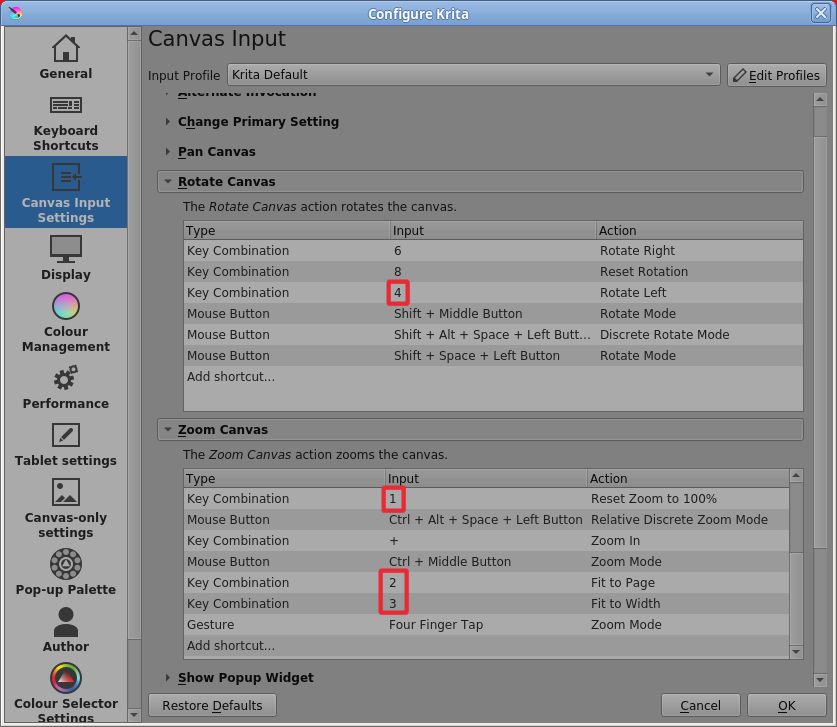
To remove/delete a particular Canvas Input Setting, you right-click on it then press the resulting Delete Shortcut option.
If you double-click on the Type, Input or Action entry then you can change it to something else (but make sure it then doesn’t clash with a Keyboard Shortcut).
Thanks Ahab. Wow! That was a short response time, I could easily get spoiled with that . Yes, it fixed the issue… but I have a new one. I am using the Canadian Multi-language Keyboard layout which includes a number of French characters not currently used by Krita for shortcuts. They make easy additional one-key shortcuts! Except for the few ones that are obtained through the Alt-Gr key, because they are automatically converted to Ctrl+Alt in Krita… and are currently active Krita standard shortcuts. If Alt-Gr were instead converted to Ctrl+Alt+Shift it would work better for me. Is the Alt-Gr conversion to Ctrl+Alt hardcoded or is it user customizable to Ctrl+Alt+Shift or is there another workaround?
ALT-Gr is a keyboard-internal shortcut for ALT + CTRL, that is unchangeable for what I know. It is hardwired, if I’m not mistaken.
Some software is able to detect if the left or right CTRL is pressed, but I don’t know of any OS or software that is able to detect ALT + CTRL as a different key.
Michelist
I don’t know any details of this so it may be better to create a specific topic for it in the
Develop: Developer Questions category.
Testing with the Linux 5.1.5 appimage and my UK keyboard shows this for Alt-Gr+D:
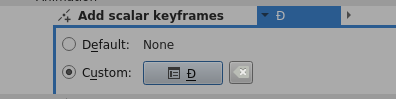
It seems to be recognised as a special character and it’s different from Alt+Ctrl+D.
As a matter of potential interest, a keyboard shortcut can be a two (or more) key sequence, provided that the first key you press is not already in use as a keyboard shortcut.
The potential problem is that if you press the first key of the sequence then krita waits for you to press the second key. That would be a problem if you accidentally pressed the first key without realising it.
Ahab and Michelist, thanks to both of you for your help. I was hoping for a simple solution. As there are only a few cases involved, I will just forget about them and implement all the other new shortcuts. Regards