hi! krita stopped working for me a few months back and i deleted and redownloaded the app today but it still doesn’t open. task manager says the application is running but i don’t even see the splash screen popping up. i’ve tried restarting my laptop and running the application as an admin but it doesn’t work. any help is appreciated!
note: ive tried downloading other art programs such as medibang, firealpaca etc. and they all don’t open as well. i’ve been forced to use ms paint this entire time haha
Hello, it’s not relative to Krita if other programs meet the same problem. Did you use an alternative monitor (or tablet monitor) to work with your laptop ?
That’s what I thought too, could the window be open on a monitor that is turned off? However, if the monitor is completely disconnected, then window should get moved automatically, so I’m not sure if this is it .
To fix an off screen window, you can right click on it’s icon on the toolbar, select move, hit an arrow key, and then you should be able to reposition the window with the mouse (drag it until you see it).
Please try the following:
Open Explorer and enter %APPDATA%\krita\ in the address bar of Explorer and confirm this entry with Enter. This will take you to Kritas resource folder (if you have not changed its location in the past). At the end of the resource folder, you will find the file resourcecache.sqlite rename this file to resourcecache.sqlite.old.
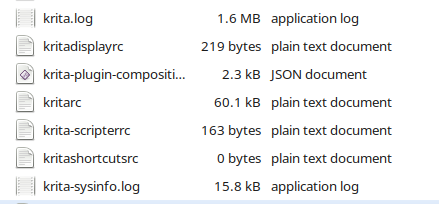
Next, enter %LOCALAPPDATA% in the address bar of the explorer and confirm this entry with Enter. This will take you to your user folder Local, at the end of this folder Krita stores its settings files. Please rename all files that have krita in their name, such as Krita’s settings file kritarc to kritarc.old (the other files accordingly) or move these files to another folder.
Open your Taskmanager and search if you can find a running Krita there and in case you find a running Krita terminate it, if it are more than one Krita, terminate all.
Once you have done this, start Krita.
hi! thanks so much for the detailed explanation, but i can’t seem to find the “kritarc” file. there is a krita folder, a krita.txt, kritacrash.txt and krita-sysinfo.txt file, though. should i just rename those to “____.old”?
The size of the files is variable depending on what’s been happening. and you may not have some of the files depending on what you have or have not been doing, normally.
If krita has ever run then there must be a kritarc file in -AppData/Local
Is there any possibility that you deleted it some time ago?
If there is no kritarc then carry on and rename kritadisplayrc to kritadisplayrc.old. etc.
The purpose of renaming them to -.old is so they can be restored at a later time if needed.
 Hello
Hello