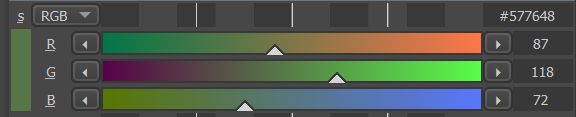
So I started working on a little color picker for myself because I kinda suck with colors.
Either way regardless of that I have 2 questions currently:
I made a UI and some code and it reacting for the most part inside PyQt5 but I still needs to make the changes to affect Krita itself.
I was looking around and if you want the change Krita’s color you need to use the “ManagedColor Class”? Is this right? I found like 5 classes that use colors but this one seemed the most promising for that.
Inside of it I only found a little piece of code example on how to actually use the class but it seems a bit…off to be usable from the get go.
The example:
import krita
import PyQt5

colorYellow = ManagedColor("RGBA", "U8", "")
QVector<float> yellowComponents = colorYellow.components()
yellowComponents[0] = 1.0
yellowComponents[1] = 1.0
yellowComponents[2] = 0
yellowComponents[3] = 1.0
colorYellow.setComponents(yellowComponents)
QColor yellow = colorYellow.colorForCanvas(canvas)
I Opened krita and the scripter and just pasted this in however it gives a error message and each time i try to edit I only make it cry even bigger errors so I stopped that 
Is this a good example to start off on to change the active color? and what is it needed to actually work?
My Second question is about making a QSlider more responsive. I have searched style sheets for it and made them all pretty and stuff but the slider handle moves a bit clunky.
If you click on the handle and move it works fine but if you click on a empty spot on the slider you need to maintain the click for it to move to that point and it will not follow the mouse press after. While a color slider from “specific color selector” or “mixer color slider”(plugin) their sliders have a little white triangle and if you click on a empty area of the slider it instantly goes to that point and you can drag the handle around as if you had clicked it and dragged it.
I have read the mixer color slider python files and I can’t locate what is doing this effect happen.
I don’t want to make a triangle by obligation but if to have that click behavior you need it I would totally do it instead of the look I placed for the time being.


mine is looking a bit more like this now:

the HSL color square is wrong because I still have not implemented HSL only a RGB input into it yet.
Thank you for any help in advanced.