Hi,
I am trying to export .kra files from the commandline using “–export” but I ran into problems. It seems to randomly fail, or rather it randomly works 1 out of 10 times. The TaskManager shows krita.exe working but it seems to just crash/shut down without a result. Sometimes though it creates the .png file just fine, very strange.
This is the command I use: "krita test.kra --export --export-filename test.png"
or more precisely "C:\Program Files\Krita (x64)\bin\krita" test.kra --export --export-filename test.png
I have recorded the behaviour in a short video:
In the video I execute the command two times. The first time it works, the second time it does not (keeps failing afterwards).
Krita Version as reported by “-v” is 4.4.3.
I am on a Windows 10 System.
Is there some sort of “verbose” flag which I can use to dig into this?
Or maybe some direction towards the relevant source code would help too.
To get output to terminal, you have to execute command line from cygwin or git bash for example (cmd or powershell terminal doesn’t output Krita’s warnings&error)
I did noticed that even when using git bash, the output of Krita on Windows is just simply not put into stderr (since I know it works on Windows just fine, because I was developing on Windows before) but something else. So to see Krita’s extended output, you need to download a program called DebugView and enable it before trying Krita. There is also some info in Krita log - the easiest way to access it is to run Krita in GUI and check Help → Show Krita log for bug reports, but you can just open relevant files. See Getting Krita logs — Krita Manual 4.4.0 documentation
Update2: Just to confirm @tiar s observation. I am using the Linux subsystem for Windows (usually for ssh, rsync etc.). It does not seem to return any error logs. Can try cygwin or gitbash too but I don’t think it will yield any different results. Will try the Krita logs as described in the manual next.
Here is another video using the bash:
Updates 3: Got the Krita Logs for a success case and an error case (though the error case seems to just do nothing). %LOCALAPPDATA%\kritacrash.log has no content (file does not exists). I assume there was no error log written.
Success Log:
SESSION: 03 May 2021 16:48:36 +0200. Executing C:\Program Files\Krita (x64)\bin\krita.exe

Krita Version: 4.4.3, Qt version compiled: 5.12.9, loaded: 5.12.9. Process ID: 9800
-- -- -- -- -- -- -- --
03 May 2021 16:48:36 +0200: Style: fusion. Available styles: windowsvista, Windows, Fusion

SESSION: 03 May 2021 16:49:55 +0200. Executing krita.exe test.kra --export --export-filename test.png

Krita Version: 4.4.3, Qt version compiled: 5.12.9, loaded: 5.12.9. Process ID: 15348
-- -- -- -- -- -- -- --
03 May 2021 16:49:55 +0200: Style: fusion. Available styles: windowsvista, Windows, Fusion
03 May 2021 16:50:01 +0200: Importing application/x-krita to application/x-krita. Location: C:/dev/KritaForUnity/Krita/Textures/test.kra. Real location: C:/dev/KritaForUnity/Krita/Textures/test.kra. Batchmode: 1
03 May 2021 16:50:01 +0200: Loaded image from application/x-krita. Size: 1024 * 1024 pixels, 1.38889 dpi. Color model: 8-bit integer/channel RGB/Alpha (sRGB-elle-V2-srgbtrc.icc). Layers: 4
03 May 2021 16:50:01 +0200: Converting from application/x-krita to image/png. Location: test.png. Real location: test.png. Batchmode: 1. Configuration: <!DOCTYPE params>
<params>
 <param name="ColorDepthID" type="string"><![CDATA[U8]]></param>
 <param name="ColorModelID" type="string"><![CDATA[RGBA]]></param>
 <param name="ImageContainsTransparency" type="internal">false</param>
 <param name="alpha" type="string"><![CDATA[true]]></param>
 <param name="compression" type="string"><![CDATA[3]]></param>
 <param name="forceSRGB" type="string"><![CDATA[true]]></param>
 <param name="indexed" type="string"><![CDATA[false]]></param>
 <param name="interlaced" type="string"><![CDATA[false]]></param>
 <param name="sRGB" type="internal">true</param>
 <param name="saveAsHDR" type="string"><![CDATA[false]]></param>
 <param name="saveSRGBProfile" type="string"><![CDATA[false]]></param>
 <param name="storeAuthor" type="string"><![CDATA[false]]></param>
 <param name="storeMetaData" type="string"><![CDATA[false]]></param>
 <param name="transparencyFillcolor" type="string"><![CDATA[<!DOCTYPE color>
<color>
 <RGB g="1" r="1" b="1" space="sRGB-elle-V2-g10.icc"/>
</color>
]]></param>
</params>

03 May 2021 16:50:02 +0200: CLOSING SESSION
“Error” Log:
SESSION: 03 May 2021 17:03:11 +0200. Executing krita.exe test.kra --export --export-filename test.png

Krita Version: 4.4.3, Qt version compiled: 5.12.9, loaded: 5.12.9. Process ID: 3332
-- -- -- -- -- -- -- --
03 May 2021 17:03:11 +0200: Style: fusion. Available styles: windowsvista, Windows, Fusion
03 May 2021 17:03:16 +0200: Importing application/x-krita to application/x-krita. Location: C:/dev/KritaForUnity/Krita/Textures/test.kra. Real location: C:/dev/KritaForUnity/Krita/Textures/test.kra. Batchmode: 1
03 May 2021 17:03:17 +0200: Loaded image from application/x-krita. Size: 1024 * 1024 pixels, 1.38889 dpi. Color model: 8-bit integer/channel RGB/Alpha (sRGB-elle-V2-srgbtrc.icc). Layers: 4
03 May 2021 17:03:17 +0200: CLOSING SESSION
It seems to just stop after loading the image (not export).
Hi, good question to ask (let’s get the obvious out of the way).
Yes, it works if I do it manually (open in krita and export).
Also it sometimes works with the commandline, that’s what I find really odd, because intially I though I had the command line parameters wrong but that does not seem to be the issue.
I will try with some other files but it really is just a very simple krita file:
kamgam dot com/krita/test.kra (the forum does not allow me to post this link?)
I will try some other files, just to be sure.
Update: Just tried with a very simple file (4 strokes with a brush) and it also fails.
That’s because you’re a new user, it’s an anti-spam defense. It’s annoying for help requests but quite good for preventing spam, actually.
I guess it would be good for someone to try to replicate it even on Linux, it looks as if Krita was closing before managing to finish the export… but without a crash. So it might be a bug.
Should I create a bug report somewhere with a repro description?
Also, can you point me to the source code involved in this?
Maybe I can build it myself and fiddle around a little (not sure if I can find the time).
Here is some context on what I acutally need this for (maybe there is a different approach). I am trying to automate importing .kra files into the Unity3D game engine. It natively supports importing .psd files and I want to kinda have that for krita too. My approach is to have a dedicated folder with all the .kra files in it. That folder is observerd with a file watcher which detects if a file has changed and then automatically creates a .png from it and copies it over to Unity’s textures folder. Alas, it fails just when I need Krita to do the batch processing :-/
Anyhow, thank you for your help. I really appreciate it and did not expect to get such nice detailed answers so quickly.
Oh, thanks @Grum999 for giving it a try. I am currently knee deep in installing Linux Mint for testing, but I think I can skip that now :D. So it’s a windows only issue?
What I noticed is that the command returns immediately within cmd.exe but not in bash. So maybe it really is somehow stopping processing prematurely? Though, using bash on windows does not make it succeed any more often I think. Hm …
Using bash in windows doesn’t change anything
I used here a powershell command to do check because I’m used to with this scripting language but how you execute command line doesn’t really matter
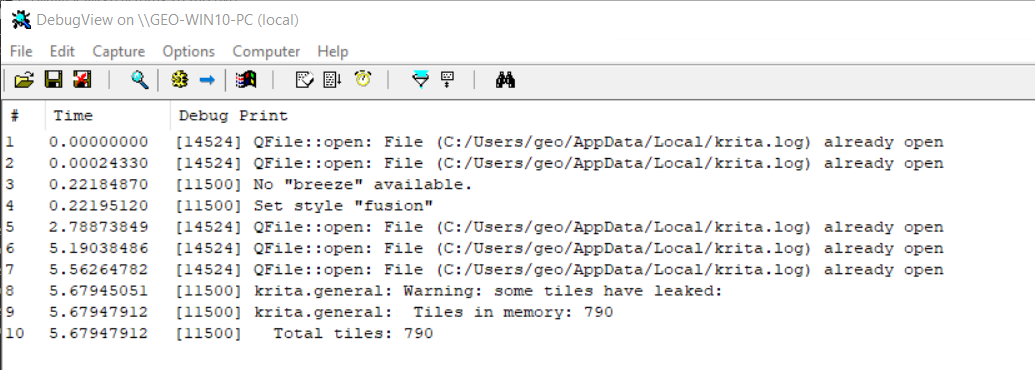
I have now tried it on Linux Mint/Debian too and can also confirm that it works just fine there. Though it prints some funny logs:
oem@geo-mint:~/Downloads$ ./krita443.appimage test.kra --export --export-filename text.png
NOT COOL: Duplicated action name from xml data:  "object_order_raise"
NOT COOL: Duplicated action name from xml data:  "object_align_horizontal_right"
NOT COOL: Duplicated action name from xml data:  "object_ungroup"
NOT COOL: Duplicated action name from xml data:  "object_order_back"
NOT COOL: Duplicated action name from xml data:  "object_order_front"
NOT COOL: Duplicated action name from xml data:  "object_align_vertical_center"
NOT COOL: Duplicated action name from xml data:  "object_group"
NOT COOL: Duplicated action name from xml data:  "object_align_horizontal_left"
NOT COOL: Duplicated action name from xml data:  "object_align_vertical_top"
NOT COOL: Duplicated action name from xml data:  "object_align_horizontal_center"
NOT COOL: Duplicated action name from xml data:  "object_order_lower"
... I shortened them because it's a long list ...
NOT COOL: Duplicated action name from xml data:  "execute_script_8"
NOT COOL: Duplicated action name from xml data:  "execute_script_9"
NOT COOL: Duplicated action name from xml data:  "execute_script_10"
NOT COOL: Duplicated action name from xml data:  "krita_filter_threshold"
krita.general: Warning: some tiles have leaked:
krita.general: 	Tiles in memory: 790
 	Total tiles: 790
Doing it with the commandline results in this log: (Updated version with my logs)
KRITA DID NOT CLOSE CORRECTLY

SESSION: 11 May 2021 18:44:32 +0200. Executing c:\krita\dev\i\bin\krita.exe test.kra --export --export-filename test.png

Krita Version: 5.0.0-prealpha (git e455453), Qt version compiled: 5.12.9, loaded: 5.12.9. Process ID: 11032
-- -- -- -- -- -- -- --
11 May 2021 18:44:32 +0200: Style: fusion. Available styles: windowsvista, Windows, Fusion
11 May 2021 18:44:40 +0200: Database is up to date. Version: 0.0.9, created by Krita 5.0.0-prealpha, at Mo. Mai 10 15:20:39 2021
11 May 2021 18:44:40 +0200: Could not retrieve md5 for resourcepaintoppresets/Special_dyna_dots.kpp
11 May 2021 18:44:40 +0200: KisApplication  exportAs
11 May 2021 18:44:40 +0200: KisApplication  mimeType okay
11 May 2021 18:44:40 +0200: KisApplication  createDoc okay
11 May 2021 18:44:40 +0200: KisImportExportManager:: convert
11 May 2021 18:44:40 +0200: Importing application/x-krita to application/x-krita. Location: C:/krita/dev/test.kra. Real location: C:/krita/dev/test.kra. Batchmode: 1
11 May 2021 18:44:40 +0200: KisImportExportManager:: doImport with batchMode ON
11 May 2021 18:44:40 +0200: KisImportExportManager:: doImport()
11 May 2021 18:44:40 +0200: KisImportExportManager::doImport - fileExists
11 May 2021 18:44:40 +0200: KisImportExportManager::doImport - fileOpened
11 May 2021 18:44:40 +0200: KisImportExportManager::doImport - status: okay
11 May 2021 18:44:40 +0200: Loaded image from application/x-krita. Size: 1024 * 1024 pixels, 1.38889 dpi. Color model: 8-bit integer/channel RGB/Alpha (sRGB-elle-V2-srgbtrc.icc). Layers: 4
11 May 2021 18:44:40 +0200: KisApplication openPath okay
11 May 2021 18:44:40 +0200: KisApplication exportFileName okay
11 May 2021 18:44:40 +0200: KisApplication process Events
11 May 2021 18:44:41 +0200: CLOSING SESSION
-
I have been using KisUsageLogger::log("my logs"); to get some custom logs. Is there a slot or something I can use to get a message directly to console output?
Btw. my compliments to this project building at first try, I was surprised
Try using fprintf(stderr, "Message");, while it’s an ugly c-like structure, it does know where stderr is (which is the console) so I think it should work. I think it would work around Qt’s desire to adhere to Windows standard to use debug stream instead.
Thanks. I did stick with KisUsageLogger for now. I have tracked the error down to some file locking in KisDocument.cpp
Here are my custom logs which show that the lock on the document->image fails.
I guess I should attach a debugger to dig some more but I fear I am not familiar enough with the codebase to provide a fix.
    KRITA DID NOT CLOSE CORRECTLY

SESSION: 11 May 2021 19:18:35 +0200. Executing c:\krita\dev\i\bin\krita.exe test.kra --export --export-filename test.png

Krita Version: 5.0.0-prealpha (git e455453), Qt version compiled: 5.12.9, loaded: 5.12.9. Process ID: 12672
-- -- -- -- -- -- -- --
11 May 2021 19:18:35 +0200: Style: fusion. Available styles: windowsvista, Windows, Fusion
11 May 2021 19:18:42 +0200: Database is up to date. Version: 0.0.9, created by Krita 5.0.0-prealpha, at Mo. Mai 10 15:20:39 2021
11 May 2021 19:18:43 +0200: Could not retrieve md5 for resourcepaintoppresets/Special_dyna_dots.kpp
11 May 2021 19:18:43 +0200: KisApplication  exportAs
11 May 2021 19:18:43 +0200: KisApplication  mimeType okay
11 May 2021 19:18:43 +0200: KisApplication  createDoc okay
11 May 2021 19:18:43 +0200: KisImportExportManager:: convert
11 May 2021 19:18:43 +0200: Importing application/x-krita to application/x-krita. Location: C:/krita/dev/test.kra. Real location: C:/krita/dev/test.kra. Batchmode: 1
11 May 2021 19:18:43 +0200: KisImportExportManager:: doImport with batchMode ON
11 May 2021 19:18:43 +0200: KisImportExportManager:: doImport()
11 May 2021 19:18:43 +0200: KisImportExportManager::doImport - fileExists
11 May 2021 19:18:43 +0200: KisImportExportManager::doImport - fileOpened
11 May 2021 19:18:43 +0200: KisImportExportManager::doImport - status: okay
11 May 2021 19:18:43 +0200: Loaded image from application/x-krita. Size: 1024 * 1024 pixels, 1.38889 dpi. Color model: 8-bit integer/channel RGB/Alpha (sRGB-elle-V2-srgbtrc.icc). Layers: 4
11 May 2021 19:18:43 +0200: KisApplication openPath okay
11 May 2021 19:18:43 +0200: KisApplication exportFileName okay
11 May 2021 19:18:43 +0200: KisApplication process Events
11 May 2021 19:18:43 +0200: KisDocument::exportDocumentSync()
11 May 2021 19:18:43 +0200: KisDocument::exportDocumentSync() - locker did NOT lock successfully!
11 May 2021 19:18:43 +0200: Could not export
11 May 2021 19:18:43 +0200:
11 May 2021 19:18:43 +0200: CLOSING SESSION
Here is the relevant code I used to produce the log:
KisDocument.cpp, Line 1030ish:
bool KisDocument::exportDocumentSync(const QString &path, const QByteArray &mimeType, KisPropertiesConfigurationSP exportConfiguration)
{
    KisUsageLogger::log("KisDocument::exportDocumentSync()");

    {

        /**
         * The caller guarantees that no one else uses the document (usually,
         * it is a temporary document created specifically for exporting), so
         * we don't need to copy or lock the document. Instead we should just
         * ensure the barrier lock is synced and then released.
         */
        Private::StrippedSafeSavingLocker locker(&d->savingMutex, d->image);
        if (!locker.successfullyLocked()) {
            KisUsageLogger::log("KisDocument::exportDocumentSync() - locker did NOT lock successfully!");
            return false;
        }
        else
        {
            KisUsageLogger::log("KisDocument::exportDocumentSync() - locker did lock successfully!");
        }
    }
	...
I used a tool called “LockHunter” to check if the test.kra file is being locked by some other application. It is not. So I guess something internally fails to retrieve a lock on the not yet existing tmp image (I speculate).
Well I have a “fix” (though I would not call it such). I simply brute force the lock (sometimes it takes 5 tries, sometimes 400).
class KisDocument::Private::StrippedSafeSavingLocker {
public:
    StrippedSafeSavingLocker(QMutex *savingMutex, KisImageSP image)
        : m_locked(false)
        , m_image(image)
        , m_savingLock(savingMutex)
        , m_imageLock(image, true)

    {
        /**
         * Initial try to lock both objects. Locking the image guards
         * us from any image composition threads running in the
         * background, while savingMutex guards us from entering the
         * saving code twice by autosave and main threads.
         *
         * Since we are trying to lock multiple objects, so we should
         * do it in a safe manner.
         */
        m_locked = std::try_lock(m_imageLock, m_savingLock) < 0;

        if (!m_locked) {
            m_image->requestStrokeEnd();
            QApplication::processEvents(QEventLoop::ExcludeUserInputEvents);

            // "one" more try...
            int i = 0;
            while(!m_locked && i++ < 10000)   //  <-- this is ridiculous
            {
                m_locked = std::try_lock(m_imageLock, m_savingLock) < 0;
            }
            KisUsageLogger::log("KisDocument::Private::StrippedSafeSavingLocker - lock succeeded after tries: ");
            KisUsageLogger::log(QString::number(i));
        }
    }
Updated version with some sleep. Though I have no idea what side effects this may have:
    class KisDocument::Private::StrippedSafeSavingLocker {
public:
    StrippedSafeSavingLocker(QMutex *savingMutex, KisImageSP image)
        : m_locked(false)
        , m_image(image)
        , m_savingLock(savingMutex)
        , m_imageLock(image, true)

    {
        /**
         * Initial try to lock both objects. Locking the image guards
         * us from any image composition threads running in the
         * background, while savingMutex guards us from entering the
         * saving code twice by autosave and main threads.
         *
         * Since we are trying to lock multiple objects, so we should
         * do it in a safe manner.
         */
        m_locked = std::try_lock(m_imageLock, m_savingLock) < 0;

        if (!m_locked) {
            m_image->requestStrokeEnd();
            QApplication::processEvents(QEventLoop::ExcludeUserInputEvents);

            // one more try...
            int i = 0;
            while(!m_locked && i++ < 10)
            {
                QThread::msleep(2);
                m_locked = std::try_lock(m_imageLock, m_savingLock) < 0;
            }
            KisUsageLogger::log("KisDocument::Private::StrippedSafeSavingLocker - lock succeeded after tries: ");
            KisUsageLogger::log(QString::number(i));
        }
    }
In my tests the sleep() version never exceeded 2 tries.