I draw a circle on a new paint layer with the help of circle tool and I’m trying to color the circle only.
But whenever I try to color it the whole background is coloured including the circle, and I can’t change the background color.
Can you tell me why it’s happening?
I’m new in krita.
Did you Draw a circle using the elipse tool? Or did you Trace a circle using the Eliptical selection tool?
If you could post a screenshot or more info it may be easier to track the problem.
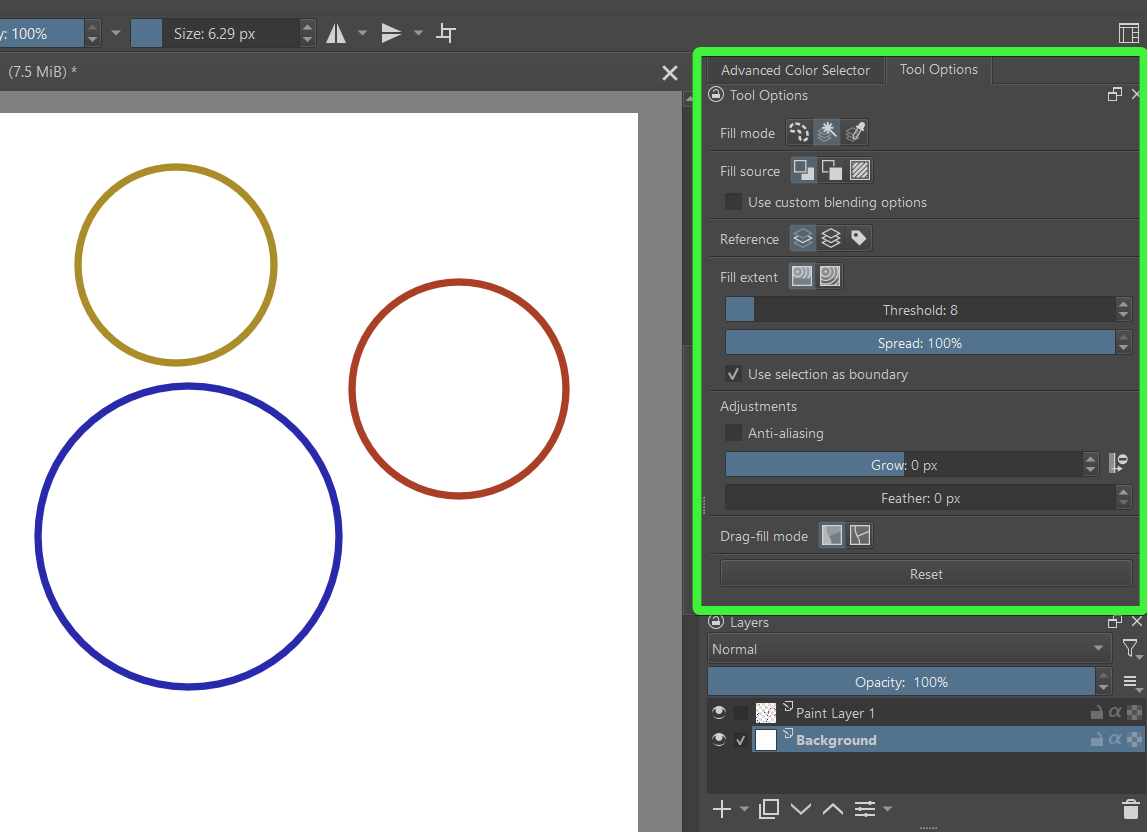
For filling with the paint bucket, you first have to select in the Tool Options Docker what has to be filled with what.
You find that docker under the Advanced Color Selector in the upper right.
I thought so, because new users often do not recognize the importance of that docker. And when you go through the tools in Krita’s Toolbox on the left, select the Freehand Brush Tool or any other tool, it will offer you the settings for that tool, so the Tool Options Docker is probably one of the most important dockers, if not the most important.
So, I’m happy you found what you were missing. Happy painting!
 Hello
Hello