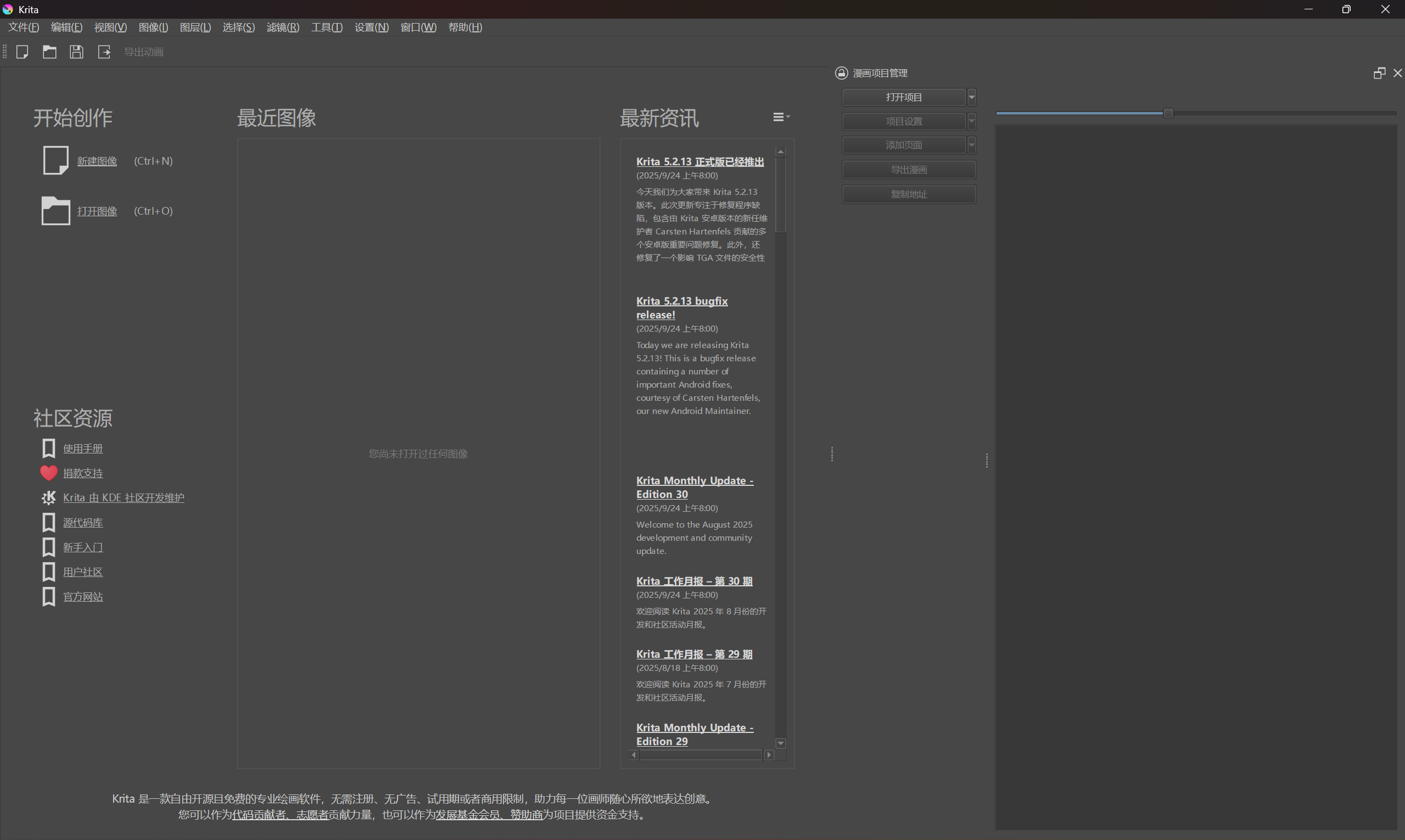
I’ve recently started using Krita’s Comics Project Management Tools (Comics Project Management Tools) for my university graduation project. First off, thank you for this incredibly useful plugin! I’m assuming it’s maintained by the core Krita team since it’s bundled with Krita itself—please correct me if I’m wrong and point me in the right direction!
Here are the key points I encountered:
A “Clean Up” feature for physical files. I noticed that removing a page from the project list doesn’t delete the actual .kra file from my disk. These files can be very large, so a built-in way to find and remove these “orphaned” files would be incredibly helpful for project hygiene.
In-plugin notes field for pages. Currently, adding notes requires a trip to File → Document Properties. Having a quick and dedicated field for page-specific comments right inside the CPMT docker would feel much more integrated.
Decouple the internal Page ID from a user-editable name. Currently, the automatically generated “page name” acts as a unique internal ID. It would be great if this technical ID could be hidden from the main UI (and perhaps restricted to ASCII for compatibility). Then, we could have a separate, freely editable field for a “Page Name” or “Display Name” that is shown to the user in the list. This would make organizing and identifying pages much more intuitive.
More direct export formats (PNG, JPG, WEBP, PSD). While the current export targets comic formats, directly exporting to common image formats and, crucially, PSD (a requirement for my school submission) would be a huge workflow booster.
Persistent UI State and Settings.
Currently, there are a couple of issues with the plugin’s UI state not being remembered:
The docker panel is unusually wide when Krita starts up without any documents open.
The slider that controls the thumbnail size in the docker is reset every time Krita restarts.
It would greatly improve the user experience if the plugin could remember its interface state, including the docker width and the thumbnail preview size, across sessions.
“Open Project” should remember the last directory. It would save a few clicks if the “Open Project” dialog could start in the last folder I used, instead of resetting each time.
Option to export a structured .kra file sequence. It would be incredibly useful to have an export option that can process and output the .kra files themselves. This would generate a clean, sequentially numbered set of .kra files in the export directory, reflecting the logical page order defined in the project.
This is different from just copying files because it could leverage the plugin’s knowledge of the project structure. For example, it could:
Rename files to a consistent pattern (e.g., ProjectName_001.kra, ProjectName_002.kra).
This feature would be a lifesaver for creating clean archives, preparing files for submission, or simply having a well-organized backup of the final page sequence. It bridges the gap between the plugin’s logical view and the physical file system in a very practical way.
Thank you for your time and for building such a powerful tool! These are just my thoughts as a new user diving into comic creation with Krita. I hope this feedback is helpful!
Just as a side note: PSD support in Krita is very spotty and I can not recommend exporting to it ever if you can avoid it. There’s no guarantee that Krita features are compatible to PSD. There won’t ever be 100% compatibility to photoshop.
I know, but this is a mandatory requirement from my school. I’m only using features that I’ve confirmed Krita can correctly export to PSD for this assignment. To be honest, I really don’t understand why the school has this requirement. Managing comic projects in Photoshop (without plugins) is extremely primitive, and aside from PS, other applications have poor support for PSD files. The school’s requirement essentially forces us into a dilemma. I just checked the documentation and found that Krita can export files from the command line. I’ve decided to manage this project manually for now and use a batch script to export the PNG and PSD files I need.
It looks like this feature request has been buried. I think these features are quite necessary. If I have to, maybe I could try to implement them myself, but I’m not very confident in my programming skills.
How should I get started? To modify just this plugin, do I need to clone the entire Krita repository?
Comic Manager is a python plugin so you can just write some modifications in python without needing to build Krita from source! On windows, pre-installed plug-ins can be found in Krita > share > krita > pykrita.
Managing comic projects in Photoshop (without plugins) is extremely primitive, and aside from PS, other applications have poor support for PSD files. The school’s requirement essentially forces us into a dilemma.
That sounds like the subject of a treatise to write and share as an accidental activist, in regards to requirements for any project at universities. The treatise could be titled “Creating Comics with Krita versus Photoshop” or something else along that line.
I’m planning to start with the simplest parts. After reading the plugin source code, I already have some ideas.
Currently, I’m planning to make the following changes:
Right now, when we remove a page, nothing changes in the Pages folder in the file system. I’ve decided to change this: the removed .kra file will be moved to a subdirectory named _deleted.
Currently, when adding an existing page, the .kra file is moved to the Pages folder. I’ve decided to change this: if the file is added from _deleted, it will be moved; if it’s added from the project’s Pages folder, no action will be taken; if it’s added from any other folder, it will be copied.
Currently, after reordering pages via drag and drop, the files in the Pages directory don’t change. I’ve decided to change this: after each reordering, all files not in the _deleted directory will have their filenames normalized (project name + page number).
Add a button in the UI to quickly remove the _deleted directory.
Since my time and ability are limited, these changes might take a while. If you think my design is not good enough, feel free to discuss.
I plan to submit a PR after making these changes. What should I pay attention to?
These are great ideas! Although for (2), I feel like it makes more sense to have files always be moved instead of copied. The plugin is supposed to help you move scattered page files into one place, after all. It’s also inconsistent behavior depending on the location. What’s the rationale of having copies?
For your original request (6), I wrote a small update to make it remember the last opened directory! Feel free to use that if it works on your machine set up. But if you plan to make larger changes to the plugin with more complex config, I don’t know if it’s better to keep saving it to kritarc or write a separate config json file to the plugin directory or something (that’s what I do for my speech bubble plugin).
I do hope there’s a way to make exports be faster on the plugin (each page takes 3-4 seconds even with no cropping and small final image size). It might just be the limitation of having to open, flatten, and save the file on a python API… To the seasoned coders here, are there ways I could try to optimize the plugin speed? Or am I kinda stuck here with python?
I was just thinking about that too. I think it would be best to let users set whether the default behavior is copy or move. I also thought about adding a recent projects panel, but that might be a bit tricky to implement (since I’m not very familiar with PyQt and Krita’s API yet—I’m studying them in my spare time, so even the small changes I just mentioned might take me a long time to implement). Besides that, I also feel that a cross-page feature is needed.
There’s actually a quick way to export, though it’s a bit dirty: we can unzip the .kra file (a .kra file is essentially a zip), and inside there is a PNG that contains all the layers merged together.
We can collect that image and then convert it to the desired format.
If needed, I think we could write a separate script instead of a Krita plugin, because implementing this as a plugin would indeed be too dirty.
It might be better to just set default as move, and add an option to the right click menu for copying pages/projects! That’s one less setting config users have to setup and plugin has to remember.
Interesting, but yeah that sounds like a bash level script not python. That would also remove the ability to crop and remove labeled layers (though I don’t really use this much for webcomics).
Then I think the default behavior should be “move”, with an option in settings to also enable “copy” (since some pages might be reused, like an author page or certain title pages). That way there’s a sensible default, and artists can customize it to their needs.
As for the export script, bash could work, but on Windows you’d probably need PowerShell. For cross-platform compatibility, Python is probably the most convenient, and it can be paired with wxPython or tkinter to create a simple GUI for ease of use.
The crop‑by‑guide feature could actually be preserved as well — you would parse the XML inside the .kra file to get the guide information. But I don’t know the internal structure of .kra files, and since I draw traditional page‑based manga, I don’t use the cropping or labeled‑layer removal functions either. Maybe those aren’t very common.
Ah, I see what you mean. So it’ll be like “Add Existing Pages” (move) vs “Import Pages” (copy)? I still think it’s better to just have them as separate UI buttons; any one artist would regularly use both of them. Since it’s already in the dropdown menu adding one more entry will be trivial.
That reminds me, would it make sense for pages dialog to update automatically based on what’s present in that directory? I can’t imagine why someone would put other non-page files in that folder. Combined with the batch rename function, this would make mass movement of pages across projects way easier. I did notice that the comic manager’s visible page names are actually Krita document Title and not the file name though.
Yeah I meant any command line tool, like bash and powershell. Also interesting, didn’t know kra files could be opened up like that! I see the XML tag for guides too. The image will still have to be extracted from .kra, loaded to memory and processed for crops, dpi change, etc. but we’d bypass having to open Krita which may help with the speed. Maybe I can write is as “Fast Export” option or something.
Well, I think directly writing Add Page (Copy) and Add Page (Cut) is more self-descriptive and consistent, and compared to Import Page and Add Existing Page, it makes the difference between copying and moving much clearer.
Automatically updating based on the page folder might be more difficult to implement, because we can’t determine which page number the user just added (if they haven’t changed the document name). Also, this might require a background process that continuously scans, which could become laggy if there are many pages. We can test what scanning frequency would be appropriate when the time comes.
I also think we could add a “quick export” checkbox when exporting, and explain how it works.
Yeah that sounds good too! It’s less about the names and more that I think both options should be available as an UI option, rather than it being a toggle setting.
Good point, we could set a timer so the update scan runs every n seconds, or if that is also slow, make it only run when user clicks “update directory” or something like that. For file names, I was thinking just populate pages alphabetically, and then an option for user to batch rename page files based on page order.
Yeah either like that or a separate button under the current Export button, both makes sense imo.
Btw are you working on this on a public repo I can pull from? Although I can’t make promises (with limited free time) it’d be nice if I can make sure whatever features I write are compatible with yours. No offense if you’d rather work on your own though.
I haven’t started yet because I’m finishing up my internship tasks. I plan to fork one of Krita’s source repositories and use Git’s sparse checkout to clone only this plugin separately for modification. I’ll paste the repository link here when it’s ready. For now, I only have time on weekends, and I’m taking some time to read the Scripting School website.