Like, today my Win11 laptop always wholly freezes after running Krita. I have to hard reset (holding power button), not even Ctrl+Alt+Del or Ctrl+Shift+Win+B help.
You can try deleting your resource database so that Krita can recreate it the next time you start it up. Sometimes a corrupted database can cause Krita to freeze.
To find that file, you need to open Explorer and enter %APPDATA%\krita\ in its address bar and then hit Enter, now scroll down to the end of the opening folder and delete the file resourcecache.sqlite. With a little luck, your Krita will then start up again.
Depending on the amount of additionally installed resources, so bundles, brushes and the like, it may take a longer time than usually to start up the first time, and it maybe will be stuck recreating the database. If that should happen, you should be able to start your task manager, then you can terminate Krita via the task manager and restart it again to continue updating the new database, especially for a resourcecache.sqlite that has more than 7 GB in size that can happen. A good indicator to decide if Krita is stuck, is to observe the file size of the resourcecache.sqlite while it is being recreated, as long as it is adding more resources to it its file size will be updated every few seconds or alternatively when you refresh your Explorer Window via F5 for instance.
But if you can no longer interact with your PC when it is stuck starting Krita, like it happens right now, then we may need the help of a developer here.
But it is interesting that your log states that you are using Windows 10 Version 2009.
Are you aware that your laptop, which once must have been a potent machine, performs little better than an average pocket calculator of today? The age and version of your graphics card is not quite as problematic, since Krita uses it for little more than displaying images on the monitor, but your CPU is an ancient relict.
Running such a demanding OS on such hardware sucks away the performance that you need with the user software that you want to run on that machine. What helps a little is that it has 16 GB of RAM, if it were a 4 or 8 GB machine that were usually that time, you hardly could use it for Krita, Discord and a browser together with W11 as OS, which seems a standard for many these days.
I’m surprised this is happening when you have 16GB of RAM.
While you’re using krita, it would be a good idea to regularly use the Task Manager to note the amount of RAM that it says krita is using to see if it is creeping up as well as the total amount of RAM in use.
In Settings → Configure Krita → Performance → General tab, make sure that you have left Windows enough RAM to work in.
Windows 10 seems to need 2 to 4 GB to perform (depending which of its background facilities are enabled) while Windows 11 can grab 5GB or more.
In this situation, it’s also important to make sure that you’re not running other applications which might be using up RAM or CPU power.
Your CPU is not very powerful but it’s a little more powerful than mine and I also have 16GB of RAM but I don’t have freezing or crashing problems with Windows 10.
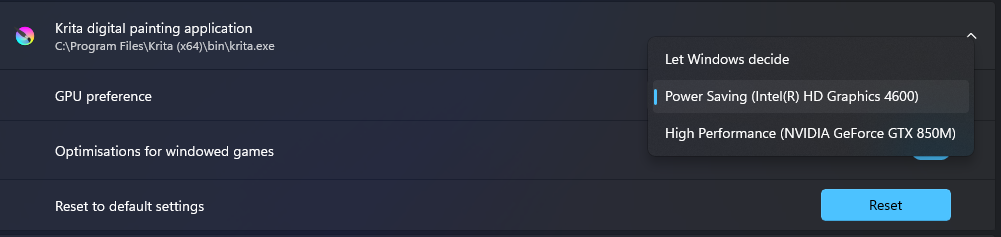
The Windows 11 lappy stops freezing (shortly after starting Krita) if I set Krita’s GPU Preference to Intel HD Graphics 4600. The other options (Let Windows decide and Nvidia GeForce GTX 850M) make Krita freeze the whole PC shortly after being launched.
By the way, deleting resourcecache.sqlite does not seem to help, and Configure Display -> Display -> Canvas Acceleration settting does not seem to affect the freeze.
Thank you for getting back and saying what has happened.
Ah, graphics cards and their drivers …
The choice between the two is interesting:
HD 4600: G3D mark score - 631, G2D mark score - 312
GTX 850M: G3D mark score - 2539, G2D mark score - 228
(Source: https://www.videocardbenchmark.net/ )
Both are about twelve years old.
The HD4600 has a better 2D mark score (not by much) which would be better for krita.
The GTX 850M has a better 3D mark score (by a lot) which may be good for Blender etc.
As I understand things, Nvidia is not good at updating the drivers for old graphics cards so there may not be much chance of updating that driver to a newer/better version.
I don’t know if the HD 4600 driver could be updated or if you’d want to. Maybe leave it alone.