Krita erased one of my drawings, it still apears but i can´t open the archive :c
Hi @Cocodrilo_Fresita - Krita isn’t capable of erasing a drawing. Do you mean it no longer appears in the start screen?
Also, you put a crash tag on your post. Did your device crash and you lost a document that had never been named or saved?
I’m also curious to know what “archive” you mean.
It appears in krita, in the recents images, but when I try to open it Krita crashes.
Now that i look it isnt the only draw that I cant open
By archive i mean the draw itself
If you see “archive” in this kind of context, it’s usually just supposed to mean “file”. South American flavors of Spanish and Portuguese call it archivo/arquivo instead of fichero/ficheiro.
Thanks for clarifying. I updated the title of your post to better reflect the issue.
- Did you install any plugins?
- Which operating system are you on? Windows? macOS? Something else?
No, i didn´t and i´m in Windows.
And sorry for the misunderstanding, there are words that i don´t know how to translate
Don’t worry about the words, this is an international forum so we know sometimes we need to clarify definitions.
I’m wondering if your files are too big or complex (like taking too much RAM).
Are you able to create a fresh Krita file that is not very large, for example you could make it 1,000 pixels by 1,000 pixels.
Also are you up to date with the newest version? To find your version number, tap help, about krita, and tell us the version number you have as well as the results of attempting to create a new krita file.
Yes, i updated krita trying to fix the problem, and yes, the file was big but i always draw in big files but its the first time that this happen
Is there a way to recover the drawing and keep it in a new smaller file?
I’m not sure yet.
-
Have you attempted to make a new Krita file by selecting ‘new image’ on the welcome screen?
-
The files that you were attempting to open, the ones that cause the crash, are they .kra files or something else?
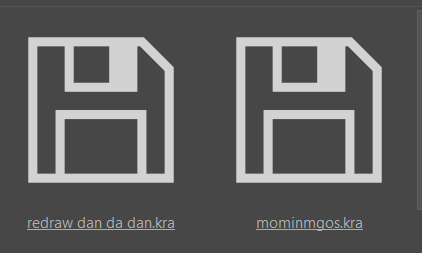
In your screenshot above, those icons mean that those files have no visible content.
That would be very unusual for a properly working .kra file that opened with no problem.
The files that open with no problem are new, those are the files that i can´t open
Can you make one or both of those ‘bad’ .kra files available using links to a file sharing service?
how can i do that?
A ‘file sharing service’ is something like Google Drive or Microsoft One Drive or Dropbox.
Those need you to be registered with them by having an account with the service..
A free service with no need for an account would be ufile.io
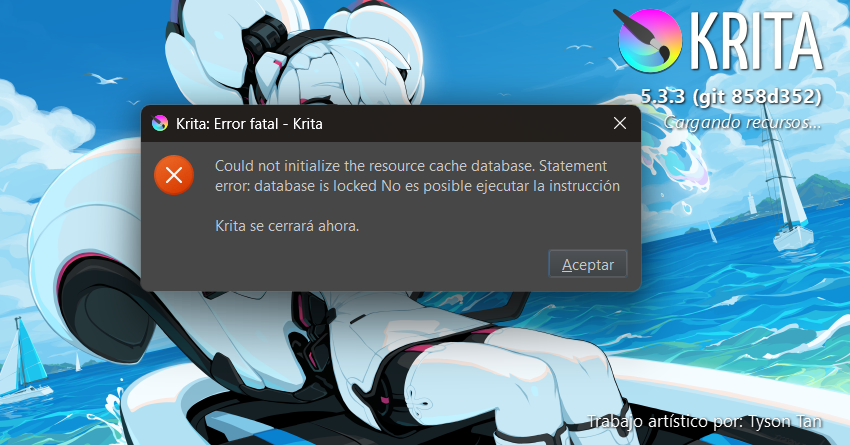
People use those file sharing services all the time to share .kra files and other types of file so I’ve no idea why they said “error” to you.
Your attempt to use a file sharing service to share .kra files would not have affected the krita application in any way.
Something else has happened that has affected your resources database. I’ve no idea what that could be.
The fact that the error message claims your database is locked points to an open and running Krita somewhere in your computers memory, because the DB is locked when Krita loads it.
Therefore, it is very possible that there is a “second Krita” in your memory, which can happen after an incomplete/partial crash. Please, can you open the Windows Taskmanager from the folder “Windows-System” in your Start menu to see if there is another Krita open and running and if so select and then close it using the button in the lower right corner that says something like “terminate task” or perhaps “kill task”? If you don’t find it or don’t know how to do that, you can also reboot Windows to end such remains from the PC memory.
After you closed all running Krita tasks, you should be able to start Krita normally.
Michelist