I’m having a problem where krita will open fine and even let me open a file to work on, but as soon as I try to do anything with that file (zoom in, draw, pan,) it will freeze for a minute and then crash my entire computer.
Background: I did download a whole bunch of brushes a couple of weeks ago, which slowed down the initial startup/loading of the program, but I thought things were generally fine. It only started crashing my computer about a week after I downloaded the brushes. The crashing started out slower, only crashing after I’d been using the program for awhile while streaming via obs. However it slowly got worse to the point where I can’t do anything anymore.
I have deleted all of the brushes I downloaded and also tried uninstalling and reinstalling krita. Neither have helped.
I’m on windows 11 home and using the latest version of krita (5.2.3)
Any advice is appreciated. I’m just trying to be able to work on my projects.
That sounds strange, because I’ve never heard something like that before.
How big are your pictures, for instance A4, A3, A2, in 300 or even in 600 PPI? Or even larger?
Can you tell us the name of the CPU of your PC, and how much RAM you have installed?
Additionally, do you see that Krita’s memory warning turns yellow or red while you are working on your pictures and before these crashes happen? You find it in the status bar left of the rotation widget.
Do you have this issue also if you only run Krita, so close every other Program you may have running in the background or hidden in your systray?
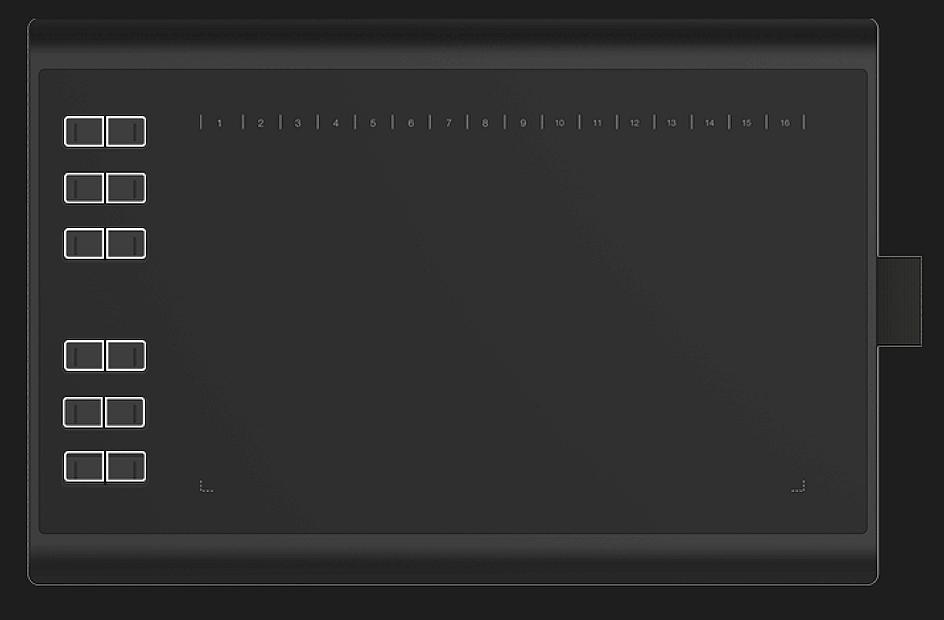
It sounds like you are using a relabeled Huion H1060P or a license replica of the Huion H1060P. If so, you can try to see if your tablet works better with the original Huion driver, you wouldn’t be the first user to have this work.
If yours looks similar, you have good chances it will work:
The tablet should be very similar to this one, with 12 hardware switches on the left and another 16 software switches at the top, only if this applies to your tablet can you use the Huion driver.
This is the page of the Huion H1060P and here you can get the driver.
Too bad, it would have been nice if it had been the driver. Unfortunately, I can’t tell you if it’s a problem with the tablet, but if you have a friend with a different tablet, please ask them to test it with their tablet.
Unfortunately, your problem is the kind of problem that you (I) would rather try to solve on the spot, because I don’t like to give you advice that jeopardizes your entire system without being able to help you remotely.
I have tried closing all other applications. And krita still crashes, both with and without the tablet. It just takes longer without.
I try to do a full shutdown of my computer every night. And when it crashes I assume it completely shuts down.
Task manager says krita is using 330MB to 350MB of memory when the main screen is open. It jumped to about 777MB when I opened a canvas and then stabilized to somewhere in the 500s about 30 secs before it crashed. In total about 48% of my memory is being used on the main screen. I was unable to get a percent for once i opened a canvas. This is all after I have closed every other application.
I am currently trying to find out what situations are causing crashes. It appears so far that crashing only happens after a canvas is opened, but im still experimenting.
I used the task manager to make a note of what the cpu and memory usage was like at different points. I made a table. (Please forgive me if formatting is weird, I’m on mobile)
when
cpu total
cpu krita
memory total
memory krita
Computer resting (nothing open)
4%
N/A
33%
N/A
Krita opening
57%
33%
Krita resting main screen
4%
0%
34%
348MB
Canvas opening
43%
37%
Krita resting canvas open
60%
0%
36%
609.9MB
Crashed soon after canvas is open
I’m also trying to see if it will crash if I just leave the main screen open. So far it has not.
Windows 11 using 33% of 16GB when ‘doing nothing’ is not unusual.
The RAM usage of krita seems not at all bad.
In the C:\Users\{username}\AppData\Local folder you should find a file called kritacrash.log and a file called krita.log.
They will contain large amount of data at the moment after many sessions and many crashes so are not suitable for posting on the forum.
Please make them available using a link to a file download service or website.
Note that your PC account username will be visible in those files.
There will also be a file called krita-sysinfo.log.
Please copy-paste the content of that file to a reply here.
Note that it will also contain your PC account username.
Thanks everyone for the advice! I was not able to figure out the exact issue, but I went into my settings and changed the graphics card I had Krita running on. That fixed everything.
I don’t really understand why the graphics card was the problem, since I had it on the better quality card according to my settings, but putting it on the power saving option has seemed to fix it.
It could be a bad driver or an issue with the card itself.
I once had to RMA a brand new GPU not because it crashed under load, it never did, but it crashed when idle. It just really didn’t like switching PCIe speeds which happens a lot idling, and the trigger made no sense at first.
Keep an eye on how yours behaves with other graphically demanding programs in case something is wrong with it and your device is still under warranty.
 Hello
Hello