xp pen 15.6 pro graphics tablet
MacBook Air m3 2024
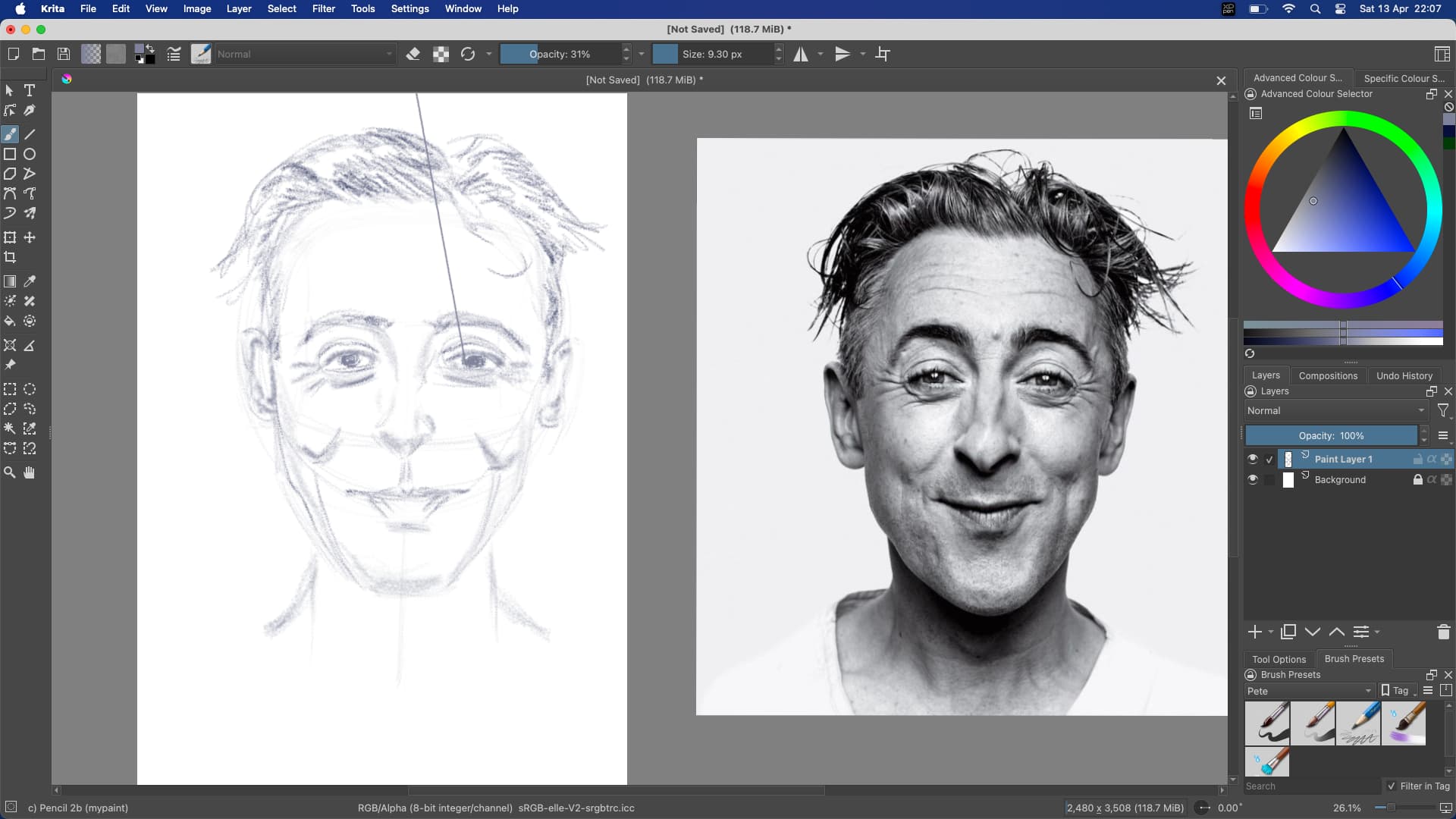
When either drawing or laying in colour Krita will draw a perfectly straight line off the canvas by itself. In the screen shot I was laying in the black of the pupil in the eye when Krita just drew a line of the top of the canvas
I just want to say that I’ve been having exactly the same problem except I’m on pc without a touchscreen tablet (Huion Inspiroy H1161) and it’s been happening throughout many versions of Krita. If someone has any other ideas, I’ll be grateful
Fortunately, most times it’s not that big of a problem which is why I always forget to ask about it.
Thanks for the suggestion Meowfix, but my tablet is not a touchscreen. I agree Welume, it’s not a major problem. If spotted early enough you can always hit undo. Most of the time it doesn’t bother me but just occasionally it can be infuriating. It would be nice if it could be fixed.
Also I have tried other art programs with the same hardware setup and I can’t recreate the fault, so I believe it is specific to Krita. However I will not let this spoil an otherwise excellent program.
Let me clarify that last remark Meowfix. The xp pen 15.6 pro is indeed classed as a touch screen. I was distinguishing between a screen that uses the stylus only, as in xp pen, or a tablet that also supports hand gestures. The xp pen should only recognise stylus input. However as per your suggestion I will try wearing a glove and report back my findings
I also do not have a screen tablet, however, many screenless tablets support touch input. I disabled it for my Wacom tablets to avoid accidental inputs. Even if your tablet is screenless, you should go to the driver menu and disable touch, if the feature exists.
I’ve also had similar issues by accidentally touching my laptop’s touchpad while drawing with the stylus, or when bumping into the mouse.
You’re right, mine does have a small touch bar on the side but I gave it “no function” long time ago (as I kept accidentally touching it when moving the tablet around).
It’s in a place I don’t even get close to when the problem happens though and it’s only in Krita that I noticed this issue.
I will disable the touch input in general, since I don’t use it anyway, in case it is some sort of bug connected to it though
I had a similar issue once with my Wacom tablet it was a broken driver. Basically the tablet disconnect for a fraction of a second, which made Krita (or any application) think the cursor moved to somewhere else in an instant when it reconnected or something and it drew a line to that position.
I too had that with a Wacom tablet some years ago, it had to do with faulty drivers (tablet connection would disconnect intermittently). Cleaning up drivers and installing fresh fixed it. If that doesn’t help then you could try using Windows Ink instead of WinTab, set it in both display drivers and Krita settings and see if that works better.
The reason why I think it has something to do with Krita is because it only happens in Krita.
I was using PS for a very long time as well as some other programs here and there like Gimp or Medibang, and never had it happen.
Maybe it’s just more sensitive to those small disconnections compared to others, I don’t know how art programs work
I will try the other solutions, if I notice it still doing it, but it’s such a small issue I might just forget about it like I always do haha
Well I have tried everything. I’ve got the latest driver for my tablet (released 5 days ago), the latest operating version for my MacBook Air, and the latest version of Krita. I have tried reinstalling my tablet drivers and Krita. I have tried wearing a glove. I am at a loss what to do next. Like Welume said it is a minor annoyance most of the time. However just occasionally I will print out my work and see these fine lines that I missed when I was drawing or painting, and I have to go back in and either try to erase the lines or try to blend them in. Then it becomes really annoying.
Same here.
I’m not sure if it matters really but I just spent some time sketching in Gimp with a simple brush that would show any inconsistences and there were no lines, no skipping, nothing that would indicate tablet disconnecting even for a split second.
This happens intermittently for me as well, Cintiq 24 pro on Kubuntu. Wasn’t an issue before and then suddenly became an issue about 8 months ago. It’s rare enough that I ignore it (about once per hour of drawing).
It only ever seems to happen when I pick the pen up to end a brush stroke. Then the ending shoots off in a random direction for a seemingly random distance.
well, this is happening with me many many times after update to 5.2.x and i’m use mouse… right after the update 5.2.x drop i saw some people with same problem and i never had this problem with the previous version.
Bonjour, Par moment, le stylet me projette une ligne large involontaire (couleur, effacement, etc… suivant l’outil sélectionné). De quoi cela peut - il provenir ?
Merci de me répondre
English translation by a moderator:
Hello, At times, the stylus projects an unintentional wide line (color, erasure, etc. depending on the tool selected). What could this come from?
Thank you for answering me
@lianel Please provide an English translation after any posts in a different language.
The website https://translate.google.com/ can help you with this.
Veuillez fournir une traduction en anglais après tout message dans une autre langue.
Le site Web https://translate.google.com/ peut vous aider.
yeah, i’m 100% sure is a thing from the 5.2.x. I did two 2d animations with the 5.1.x (5.1.5 to be precise, i still have the installer here), one animation has 250 frames and the other 180, during those i had literally 0 issues like that. The 180 frames one took me way more time to finish and was about a month.During this period i saw the 5.2.x release with a cool feature of the multiple layers scale that actually help a lot but i decide wait until i finish my animation, we never know… after i finish the animation i update the version in the very next day and as soon i start do something just to “test the ground” that weird lines pop from nowhere and still happens since then quite often sadly.
I did the update on 02/02 and i though my mouse was dying but after i search here a bit i saw some people with same problem. The lines looks like when you hold shift and “click” on Photoshop and it do a straight line from point A to B where you click, a bit annoying if you ask me… i’m about the back to 5.1.5
Someone post here back in the day a short video reporting that but i tried to find it and i think is gone, i think was in the dev post about the 5.2.x “patch notes” or something, i dunno.