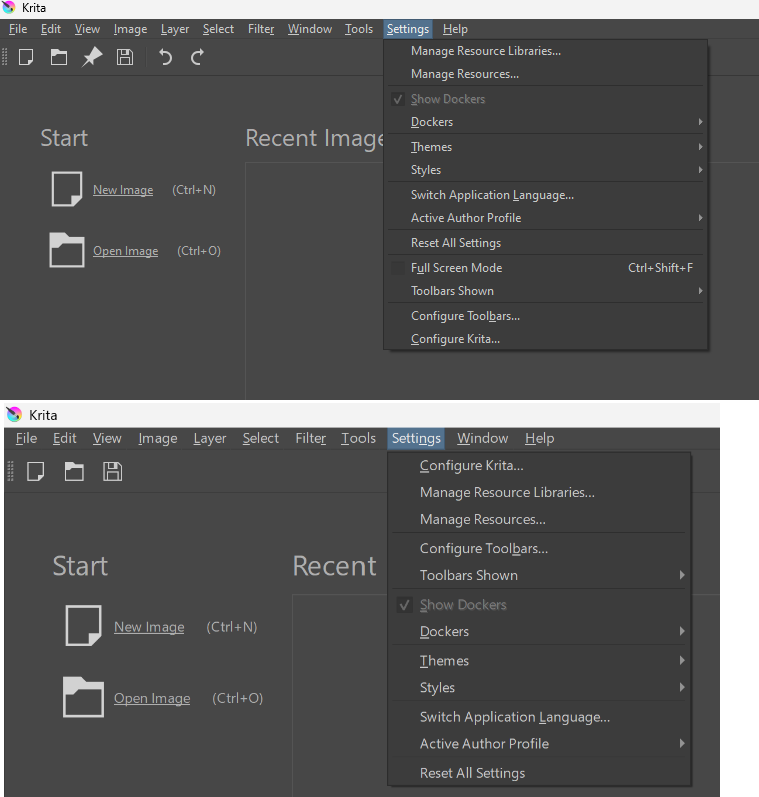
Hi, brand new to Krita. I installed 2.5.6 and worked my way through a few options and settings. Then, all of a sudden, the order of the menus changed, and the order of items in the Settings menu changed.
I re-installed Krita, but it did not revert to the original. So I installed it on a second computer and there I see the original/familiar menu order.
Screenshot attached. At the top is the new, changed menu order, at the bottom the out of the box menu order. What have I done to create that change? How can I revert back to the original menu order, with, for e.g. “Configure Krita” at the top of the Settings menu?
The same thing happened to me on Windows, I think it was 5.2.2 at the time. I’m on a new device now with a fresh install of Krita and the menu is in the right order.
You might want to add which OS you’re on in your question.
I dug through my Windows profile and deleted the Krita folder in C:\Users\myName\AppData\Roaming\krita
After that, I did a total uninstall, then installed back from the installer.
Now everything is back to normal.
I think what may have happened is it was caused by me clicking Settings > Reset all settings. Either that, or me clicking Settings > Configure Krita > Restore Defaults.
One of these.
But I would expect a reset or a revert back to default to arrive at the out of the box state instead of totally re-ordered menus.
Anyway, no further action require. Thanks for reading.