All other views don’t result in blur, but the most important on 66,7%, blurr displayed animation. What is the solution?
Hello @Beniamin1230 and welcome to the forum 
Your topic title has the ‘crash’ tag. Did you mean to put that there? Is it crashing?
Which version of krita are you using and where did you get it from?
Which operating system are you using?
I have a 3,400 x 5,200 animation that I’ve played and tried changing between 66.7% zoom and 100% zoom and I see no loss of detail or any blurring.
Can you take a screenshot of an area of the canvas where you see this happening and provide two screenshots, one at 66.7% and one that does not show blurring?
Bear in mind that changing the size of the image on the monitor can easily result in artifacts due to the Display settings mode and filtering used and also could depend on your graphics card.
No, i really ment to find “bug” report but only thing i found was “crash”.
I using Windows 10 and my Krita is 5.2.2
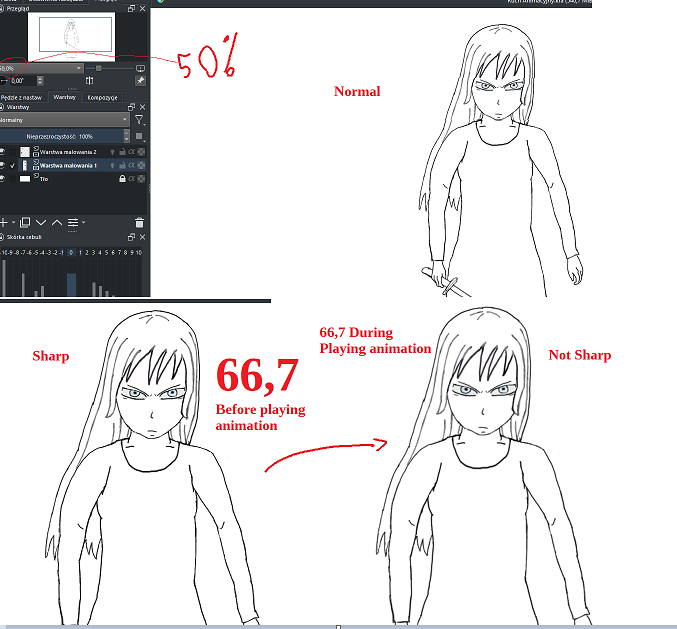
Wanted to upload film but new people can’t do it.
I’ve removed the ‘crash’ tag.
Your lineart is at a very low resolution so that the individual pixels are visible.
It’s not surprising that changing the zoom level causes noticeable changes.
For an animation, the important question is: When the frames are exported out to an intermediate .png sequence, in preparation for rendering into a video file, do the image sequence .png files look as they should?
You can test that easily.
Yes they do like they should, even when i will stop displaying of animation even on the 66,7 view, and just click random frame (without playing the whole thing) - it’s maintaing sharpness, as i said, it’s all sharp on every view, but ONLY loosing sharpness when displayes on just 66,7%.
It’s important becasue i recording animation on display, and then from recording i montaning it in Camtasia Studio (recording program).
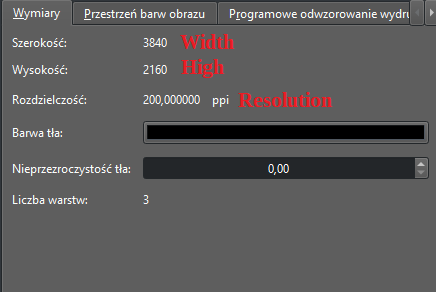
So you’re not making a video using krita, you’re making a video by screen capture of the krita application being used in order to make a video for illustration or demonstration purposes?
All I can suggest is that you go to Settings → Configure Krita → Display
then change the Scaling Mode to see if that improves the situation.
I’d also suggest that you make artwork that uses a thicker line.
With an image size of 3840 x 2160 that should be easy to do.
The problem, had appear to be the size of the settings.
I read somewhere today on this forum that best size for youtube are 1080 x 1200 or something like that. After creating new project with proportions like that, there is no more problem with sharpness of the 66 view, it’s all fine.
The reason why i capturing the screen on display, is that Krita renders film to MKV format that is not read-able by my program, so i either capturing the screen from display and then modyfing it in the program, or converting MKV file from Krita into MP4 first.
Thank you for the attention, good to join this community here.
1 Like
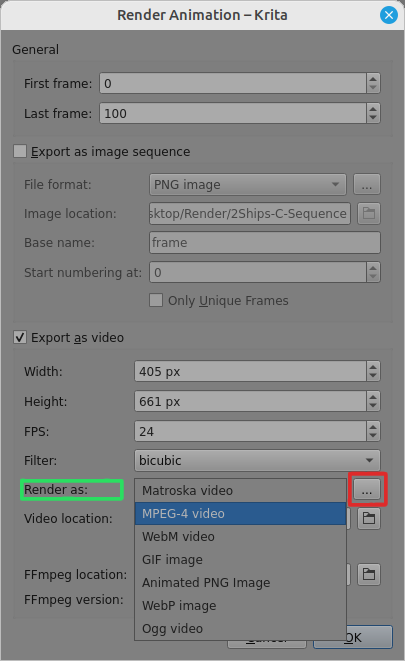
You can render video to a variety of formats using the drop down list Render as:
The red outlined button will give you the options for the selected file format:
2 Likes
This topic was automatically closed 4 days after the last reply. New replies are no longer allowed.