Ive try everything changing space color, video format but it always comes black, can someone please help me…
Hello @Pesk and welcome to the forum 
Please make a simple short animation then make sure that the animation plays properly in krita.
Make sure that the animation plays properly in krita then upload a full screen screenshot in a reply here.
Make sure that the Layers docker and the Animation Timeline docker and the status bar (at the bottom of the application window) are fully visible in the screenshot.
Then do File → Render Animation to get the Render Animation window.
Enable ‘Export as image sequence’ and click the small pencil icon at the end of the File Format: item and make sure it has these options:
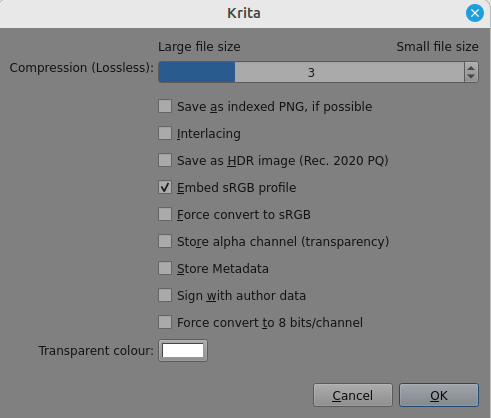
Enable ‘Export as video’ then choose a suitable folder for the image sequence output and the video output.
Choose Render as as: MPEG-4 video then click the small pencil icon at the end of that line and make sure the render options are as shown:
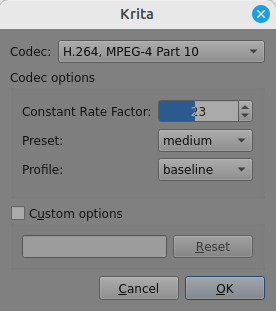
Then click ‘OK’ on the Render Animation window and see if that works.