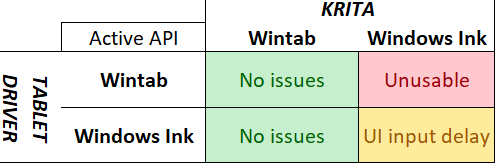
Type of device : Pen Display
Brand and version of the device: XP-Pen
System : Windows 11
Description of the issue:
With the XPPen device I have across different driver and Krita versions, when Windows Ink is enabled in Krita, using the pen to select UI elements won’t register right away unless then pen moves while being held down or upon pen lift. I beIeve a lmb input is intended to be sent immediatey on pen down. The canvas has no issues with Windows Ink at all, only the UI elements.
Here’s the video demonstration. Every cursor pause is me already having my pen down on my tablet’s surface, and every time it selects/perform a left click input is when me lifting my pen, which does a quick ripple effect on the cursor.
Moving the cursor while the pen is held down/dragging input will register a left click input immediately. Video demo below, a ripple effect upon left click input is when me not moving a the pen until pen lift, while a left click input without the ripple effect is me immediately dragging my pen
I have whatever “press and hold” setting disabled in both the Windows Settings and Control Panel. I noticed it since about a year ago. The workaround that works for me is setting the tablet setings within Krita in WinTab mode despite the driver being in Windows Ink. I have it set on WinTab on Krita while Windows Ink on the driver years before I even noticed the issue.
I’m pretty satisfied with the workaround that’s been working for me, but I beIeve this is an unintended behavior and should at least be reported. I’d like to know if anyone else is experiencing the same thing with Windows Ink using a different hardware.
I’ve asked a friend who has a Huion Frego M to do the same thing I did in the demos using the same settings and the input conditions are the exact same for the UI.
That is absolutely right!
Usually, but not always, Krita works best when you disable Windows Ink in the driver application and enable WinTab in Krita (then both are using the same API).
Also, very important, the first thing one should do when setting up a tablet and the programs you want to use with it, is to create a profile for each program you want to use with it. Then you have the advantage that each program can use what it is best for it. So Krita can use WinTab and you can disable Windows Ink in the profile for Krita. And if you are lucky, your issue will be gone.
@Michelist You don’t even have to disable Windows Ink on your tablet’s driver. Just setting Krita on Wintab gets rid of the issue. Someone explained to me that in tablet drivers, turning on Windows Ink doesn’t mean disabling Wintab. It means both API are available and it depends on the software which API it will use.
It’s just that if you’re using something like OpenTabletDriver, which specifically mentions that it doesn’t support the Wintab API, you’d be forced to use Krita in Windows Ink mode and it’s not the best experience. Also, I think Krita should have just a bit better Windows Ink support since it’s the newer API.
I believe Krita can not, that is because the driver interface is provided as an API by Qt. For an exact answer we will probably need a developer, so the following can be (partially?) wrong.
Only because something is newer does not necessarily mean it has to be better. That is why it wasn’t (happily) adapted by most other operating systems.
Someone once told me once Windows Ink was invented to support the lesser equipped Hardware that was initially brought into the markets by MS. And now it is offered by a broader base of manufacturers who only want to maximize their income by minimizing what they offer to the customers. But I believe that in between the driver for Windows Ink supports all functions of WinTab, that was different in the beginning of that driver only known in the Windows world. In the end, most adapted at least in part to that API, because of the reach and marketing power.
We had it often enough in support that users had to explicitly decide which API to use. So I suspect that by far not every tablet or manufacturer let their tablets use both APIs simultaneously.