Hello folks,
you know the program PureRef? cool prog.
if you use it for the badge, for example, i think it’s great, but if you need the colors from the image, you have to load the image into Krita, is it possible to technically connect the program so that the eyedropper works there too?.. me white ^^ blatant question
I am biased of course but I would recommend you the imagine board plugin.
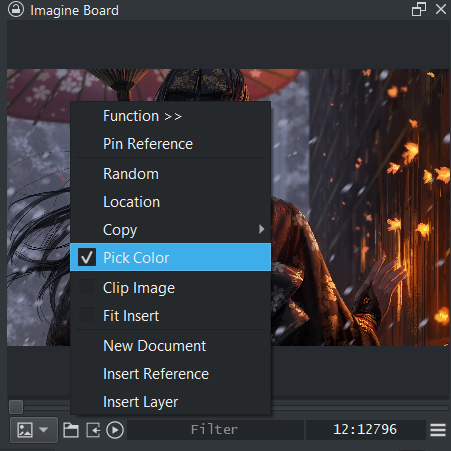
It replaces most of the PureRef needs and it is integrated within krita making colour picking quite an easy process. And also saving the paths of your ref board onto your krita save file.
Automatic image packers are still not implemented though but it’s strength leys in system file sorting and organazation by using tags.
The easiest way to install plugins in Krita is to go to “Tools” >> “Scripts” >> “Import Python Plugin from File…”, then in the dialog that opens, specify the path to the plugin (the ZIP files you just downloaded) and confirm it, confirm the next dialog box as well, then restart Krita and then, depending on the plugin, set up the plugin to your liking.
And @Grum999 described how to use the eyedropper outside Krita to get color values by calling the Foreground/Background-Color-Selector. But it only works via the Foreground/Background-Color-Selector, other ways to call the eyedropper don’t work, as far as I know.
This is how the PureRef team described to me how to use with Krita:
“There’s also a trick in for example Krita, that if you open the “Select a color”-window by clicking the little color square, and select the color picker tool from there, you can color pick from anywhere on your screen! We think that’s really neat!”
(They’re referring to the tool I circled in yellow.)
yes, tick is set
Imagine Board is not under DOCKERS
and what foreground/background color selector, that’s inside KRITA, outside it doesn’t work
I first need the Imagine Board and activate it in it, that’s how I understood it
ah ok now watched the video again yes that’s how it works but not 100%
because if I click outside, he picks up the color, but there is no cross as in his video so I can’t do it like he does, if I click on the logo with the pinpete he opens the page for me, but the he takes color
give a shurtcut for this ?
YES, 2 restarts
ah very nice^^ hmm I don’t want to overwhelm you =) very cool everything done, for one who uses the tablet touch it’s annoying to always reach for the mouse laughing =)
if you could operate the part with touch, =) wow ^ ^ is something difficult?
is this in the planning? @EyeOdin