I’ve been using Krita for about a year now and I logged on recently to find that the program would not open when I click it. I don’t believe I’ve changed anything.
Here are things I’ve done to try and mitigate this issue:
Start / Restart
Uninstall / Reinstall
Try to run as Admin (even this will not open)
Tried running the program through Steam, but the same issue occurs
Updated the graphics driver
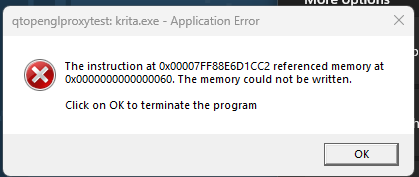
I also got this error message the last time I tried to redownload:
Firstly, I have to tell you that I’m not really familiar with this kind of error, and I hope that users from the developer side will comment on this as well. From what I think I understand from the error message, it seems that access to a required memory area is no longer possible. I don’t know why.
Now a few questions, mostly standard questions, but we need to know this, please try to answer them as good as you can!
Please tell us what Windows you are using, what version of Krita you were using before trying Steam. How old is your computer and how much memory (RAM) does it have? Are you running any other programs at the same time? Which ones?
Is your computer a portable computer, laptop, notebook?
Now, one of the things I would try if I were you is to first download the portable version of Krita, unzip it to a directory of my choice, and then try to run it from one of the shortcuts present in the root directory of the unzipped archive “krita-x64-5.1.5.zip”.
You can find this version on the Krita homepage on the following page:
There, you have to click on “All Download Versions” and select the version “Windows Portable 64-bit”. After the download you have to open the file “krita-x64-5.1.5.zip” in the explorer with a double click and drag the directory “krita-x64-5.1.5” to your desktop (or any other place you have access to and prefer).
If you then go into the folder, you will find three shortcuts, one of which you need to double-click to launch. If it works, then congratulations!
But if this should not work, then I would go one level deeper into the folder “bin” and try there to start the file “krita.com” by double click.
Now I am at the end with what I can recommend in good conscience.
What comes now should not try any inexperienced user, without knowledge of the matter!!!
Everything else is based only on a vague guess, and would be what I would do, but if you do not know what you do there, then you can damage your PC, so better leave it alone!
If you have software that can check your RAM, then please make a full run over your whole computer’s memory, I’m talking about “MemTest86”, “QuickMemoryTestOK”, something like this. Please read the manual thoroughly and act accordingly!
On my own PC, I would check the RAM devices for proper seating, first visually, by eye looking to see if perhaps a device is not plugged in properly. Then I would check carefully if one of the blocks should loosen by middle pull. If this should happen, then the component is no longer correctly inserted and must be firmly snapped back into place.
Since the error title is qtopenglproxytest I assume it something with the OpenGL graphics driver and some compatibility with Krita. Unfortunately I’m not sure how to change Krita to use Angle instead (an alternate to OpenGL) without being able to start it. This error could also indicate a failing Memory, however it would also affect other applications then.
To answer your questions, I’m using Windows 11. I have 2 GB RAM available and my computer is probably about 3 years old.
I can keep trying to download as you have outlined, but I do think there is something preventing the program from opening. I’m hoping my computer specs help narrow it down.
Sorry, but I wanted to know the complete amount of RAM that is built in into your computer, probably I didn’t said this clearly enough.
2 GB RAM? I suspect that much is still available, and if so, it’s pretty darn low for Krita. For a computer that is only ~3 years old, I would hope to find at least 4 GB of RAM, more if possible.
Well, anyway, the minimum requirements to run Krita safely are 4 GB of RAM. Accordingly, before you try to run Krita, I can only recommend that you close any other open software. There are so-called rules of thumb, and they say that Windows alone needs at least 2 GB, often it is more, if now Krita is added, which also wants to occupy 4 GB of RAM, then “it gets tight”, and there I consider, as a non-programmer, software crashes for nothing unusual, and that despite paging memory to the hard disk.
As recommended before, you should close all non-essential software before starting Krita.
Yes, I suspect that there is not enough free memory available.
Didn’t you use as many programs last year as you do today?
I don’t think its an issue with the available memory, because this would give an error along the lines of “out of memory” instead of what you get what is an access violation. There are some reasons for why that can happen, like an application calling an OpenGL function that doesn’t exist for some reason, maybe because of an API version mismatch.
Try the following:
locate the file kritadisplayrc it should be in C:/Users/{your username}/AppData/Local maybe in a subfolder named Krita (replace {your username} with your windows username).
open kritadisplayrc with notepad
find a line that begins with OpenGLRenderer= (take note of what was behind the equal sign and tell us about it)
change it so that it reads OpenGLRenderer=none
save the file and then close notepad
start Krita
This will disable Canvas Graphics Acceleration and may already prevent the error from appearing so Krita will at least start. Later you can reenable it in Krita itself, but chose something different than what was in the config before.
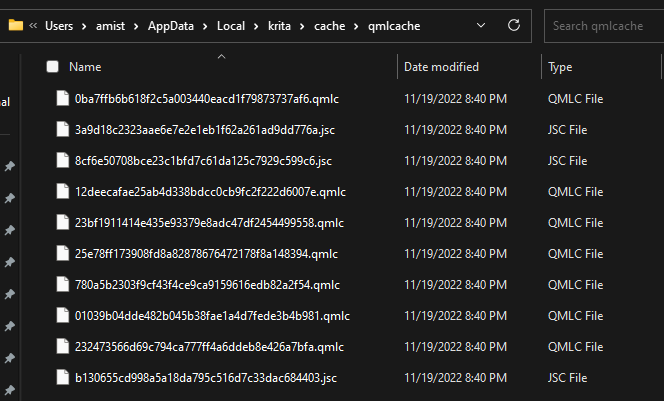
Yeah, because you went too far in, it should either be directly in local or krita. I have no windows to check right now but perhaps the search bar can help find it. It’s definitely not in cache.
That’s unfortunate. You could try deleting the file entirely together with kritarc this will essentially reset Krita’s configurations to default. This way we could at least rule out a configuration issue.
 Hello
Hello