I know this is a relatively known issue among devs, but I’d like to bring it to people’s attention and show just what it means for those of us who do work in higher bit depths (or would like to), as well as how it’s affected those of us who don’t.
What is bit depth and why does it matter to me as an artist?
For those artists who don’t know what bit depth is, let me do a quick summary so this will make sense. If you already know, you can skip this.
You can think of bit depth as the amount of information a pixel can hold per channel (red, green, blue, alpha). Standard 8 bit pixels have 256 unique values that these channels can be. (2 to the 8th power for those math-inclined)
This means if you make a gradient from pure black to pure red from the left side of your image to the right side, there will only be 256 unique colors between the sides. If your image is 256 pixels wide or smaller, great! If it’s bigger, well then we have a problem. There aren’t enough colors to smoothly transition from black to red, and the gradient has to reuse colors over multiple pixels to account for it.
This gets much, much worse if you use colors closer together. For example, a gradient from [black] (0,0,0) to [dark red] (25,0,0) only has 25 colors to transition between the left and right side of your image.

(This particular example has been mitigated recently with the addition of dithered gradients, but it’s only a small step forward in truly eradicating the problem of color banding in Krita)
That isn’t good. Luckily there’s a solution.
Higher bit depth and what it can do for you
8 bit isn’t the only way to handle color, in fact, it’s one of the oldest still-widely-used methods of handling colors. Overall, it allows over 16 million unique colors, which is great, but in images that are very dark or very bright, you still manage to find limits to the amount of colors you need.
The solution? Add more bits. The more bits, the more information. 8 bit colors have 2^8 or 256 unique values of each color, 16 bit colors have 65,536 unique values, and if you’re so inclined and have a few dozen GB of ram to spare, 32 bit channels have 4,294,967,296 unique values of each color.
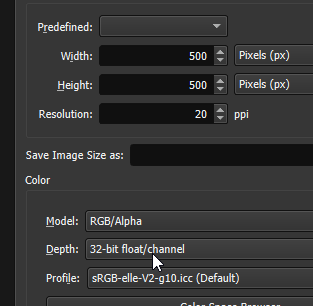
Great, so you switch your canvas to 16 or 32 bit so you don’t have to worry about a lack of colors while drawing. That’s it right? No more banding? Wrong.
A lot of functions in Krita don’t use the bit depth of the document
I’m not entirely sure of the extent of which features do and don’t use higher bit depths, but a couple are obvious. As an example for just how badly Krita handles higher bit depths with some of it’s functions, I’ll use an example that’s reproducible in other programs while also being somewhat understandable to the average artist.
Let’s set up the file. It’s a 200x500 pixel file with 32bit depth per channel. Each file has a non-dithered gradient going from left to right. On the left is a very, very dark blue. in standard 8 bit this would be (0,0,1). On the right, is pure black. (0,0,0).
Using the basic 8 bit depth, there would be 0 colors between the start and end. That means the left side of the image will be 0,0,1 and the right side will be 0,0,0.
Because this is in 32 bit color space, there are nearly 16 million colors between the left and right side.
Of course, because they’re both very dark, it’s hard to see the difference right now. Some with properly calibrated monitors may notice a difference, but take a look at the base file:


Great. Now let’s say that, as an artist, we want to non-destructively brighten this gradient to reveal the blue. After all, it’s hard to tell. Maybe some brighter colors will help. And considering both of these are native 32 bit images with tens of millions of colors in these images, it should be no problem trying to brighten them.
So I add an absolutely extreme curves modifier layer to the image.
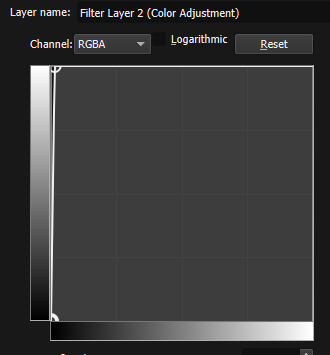
and we get-
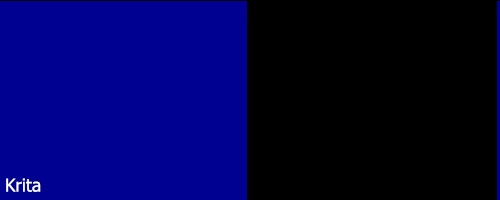

Oh. That’s not good. What happened? Where did our colors go? We have millions of colors to work with in our gradient, why is Krita acting like it’s 8 bit with 0 colors between the two? Why not treat the curves operation like the other program does, using all that precious pixel data we have?
This is one example of a function in Krita which ‘compresses’ your 32 bits down to 8. And anyone who paints in grayscale and uses things like curves to fix their values are going to notice this very easily if they haven’t already.
How does this affect me if I only work in 8 bit
This one is a bit harder to show, but I’ll try.
Because things like effect layers compress to 8 bit per layer operation and not at the end of the render process you can stack different layer filters on top of each other and still lose your precious color information.
The starting gradient:

Then, we want the gradient to be darker at some point during the drawing, so we add a ‘non-destructive’ filter layer:
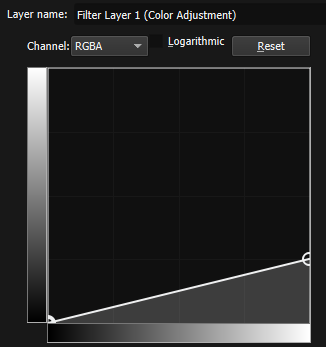

And lastly, we want to do some post-processing and lighten the entire image, using a curves modifier in the opposite direction:
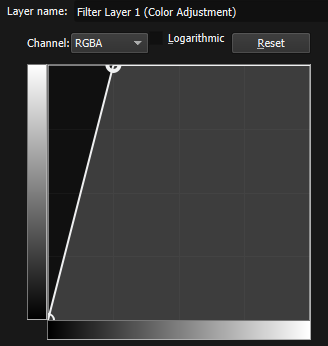

Woah, that’s a big difference considering we did the same operation in opposite directions. If the filter layers worked (or could work) in a higher bit depth while processing, They should have canceled out. Instead, we can now see vertical lines between each shade of grey. Compare them side by side:
So what’s the solution?
I’m not sure. I guess consider it a feature request. Whenever I finish an image, I usually have to import it into an external application just to fix the terrible banding that pops up purely because of these filter layers interacting with each other and losing information every step.
In the meantime, adding some randomness to your brushes so that they add static to your image while drawing can help mitigate it, but doesn’t solve the filter layer issue.

Similarly, once you’re done with your 16/32 bit image, a default-off option to export to 8 bit using a dithering method to more accurately capture colors and prevent banding would be nice as well.