Hi everyone!
I’ve been using Krita for a couple of months on Windows 11 (on a mid-to-high-range PC) and felt comfortable with it right away. Out of curiosity, I recently tried it on a Linux machine and immediately noticed a difference: on Windows, the brush cursor lags behind the mouse (or stylus) much more than it does on Linux.
I’m aware that brush strokes require processing and can introduce some latency, but that’s not what I’m referring to here. As soon as I start moving the pen—even when I’m just hovering over the canvas and not drawing—the brush cursor, which is initially aligned with the mouse/stylus, begins to trail behind it, following the same trajectory with a noticeable delay. When I stop moving, the brush cursor then catches up to the stylus position.
If that isn’t clear, I can provide screenshots or a short video. Does anyone know whether this behavior can be improved on Windows?
This sounds like input delay from hardware acceleration. If that’s the cause, the reason Windows and Linux are different may just because the Linux driver does a better job at the kinds of things Krita throws at it.
You can try to mess around with the settings in that regard under Settings → Configure Krita, in the Display category in the Canvas Acceleration tab. Disabling canvas acceleration or changing the renderer may improve the situation. Ideally restart Krita after changing any of those settings, even if they don’t say they need it, graphics drivers can be unpredictable.
Wow, it worked! I tried every available renderer with no improvement whatsoever. Then I disabled canvas acceleration entirely, and that fixed it—thanks a lot! Now I’m curious, though: wasn’t that feature important? I thought GPU rendering was supposed to improve the experience. What do I lose when rendering is turned off?
You probably don’t lose anything that matters.
Technically hardware acceleration is faster, any graphics card can crunch through rendering a 2D canvas really quickly.. Obviously that’s moot in the face of input delay though. On a fast enough computer, the software renderer is probably fine though.
There may also be some HDR features that aren’t available without hardware acceleration, but I’m not really familiar with that stuff or how it works on Windows. If you don’t know what HDR is and don’t have a special screen that supports it, it probably doesn’t affect you anyway.
Panning and rotating the canvas gets slower without acceleration.
Out of curiosity: Have you installed a driver for your graphics card?
Even if you have a cpu with an integrated graphics unit you still need to install a fitting driver.
The default Windows driver might not support the acceleration properly.
Yes, actually. I have an RTX 5070, and I keep my drivers up to date via the NVIDIA App. I’ve always assumed that was sufficient, since I’ve never encountered issues with any other software—except for this delay in Krita. However, if there’s a specific way to configure the GPU to work with Krita, I’m not aware of it.
Guessing mode on:
A
To my experience the Nvidia RTX 10x, 20x, 30x and 40x worked fine with Krita - no special settings needed.
Does your cpu have an internal graphics unit?
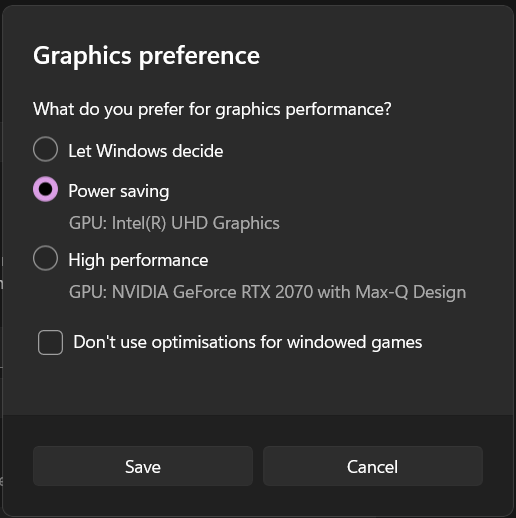
If yes, what happens if you explicitly assing it to be used with Krita?
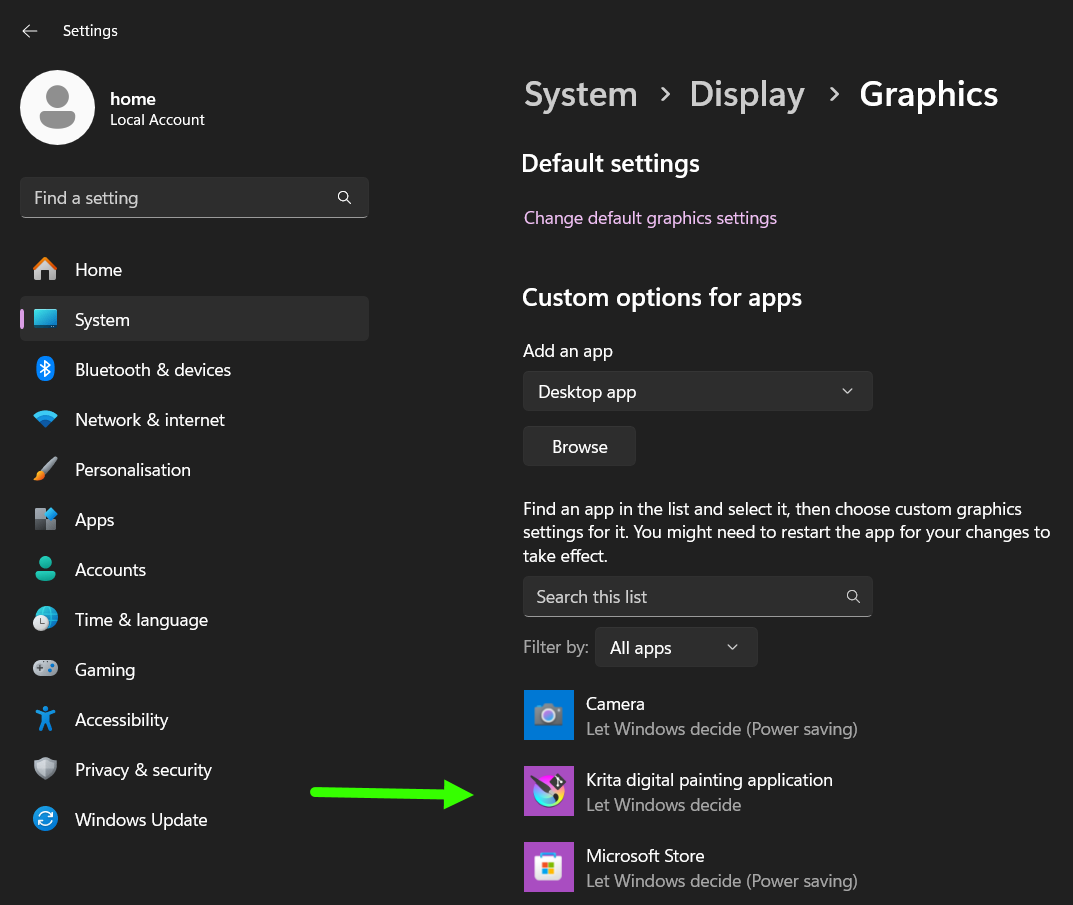
Settings are not in the Nvidia panel anymore in latest Windows 11 / Nvidia driver combo - they are now in Windows settings:
Click on Krita to get the options:
If Krita is not in the list, browse for it first.
B
Is your display running at a high refresh rate (like 144 Hz)?
What happens if you set it to 60 Hz?
Guessing mode off.
Edit
I just made a recording of the brush performance on my notebook:
CPU: intel i7 11th gen (about 4 years old)
GPU: Krita set to use internal CPU unit
Tablet: Huion Inspiroy H580X (super cheap tablet I got for 39 €)
Extra challenge: Video capture was running in the background - set to capture 60 frames / sec.
Krita document: 2400 x 1800, 8 bit integer, sRGB
Brush: Memileo Impasto at 114 pix size
Krita version: 5.3 prealpha from today (2026.01.07)
Hardware acceleration = on (set to openGL)
Even on this old notebook, with the video capture running and using the notoriously demanding memileo brush there is nearly no lag. Your system should at least perform the same.
The link below will open a new browser tab to play the video:
First of all, thank you very much for taking the time to help me!
I have to admit I wasn’t aware that it was possible to manually select which GPU Krita uses—this is definitely very useful to know. That said, switching between the two GPUs doesn’t seem to change the behavior. In the following video, I tried to capture what happens when canvas acceleration is enabled. As mentioned, using either the RTX 5070 or the integrated GPU makes no difference; the recording below was taken with the RTX 5070. As you can see, simply hovering the mouse over the canvas causes the brush cursor to lag significantly behind the mouse/stylus cursor.
By contrast, when canvas acceleration is disabled, the mouse/stylus cursor and the brush cursor are almost always overlapping, with the latter following the former very closely.
Unfortunately, the actual brush stroke is directly affected by this lag…
PS: The videos aren’t great quality, but pausing them at any moment makes the lag I was referring to quite evident.