The multiply function of the layer has a bug. When two layers both use multiply and are merged, only the multiply effect of one layer is displayed, not the multiply effect of both layers.

Hello @daxiang and welcome to the forum 
I’ve changed the category of your topic to Develop: Artists Feedback & Testing, which is the appropriate category for it. I’ve also changed the title to give more detailed information.
It seems that when there are two layers adjacent, both with Multiply layer blending mode, then they are Merged together, the layer contents are merged with Normal blending mode and then the resulting layer is set to Multiply blending mode. (I may have misunderstood that.)
This may be a deliberate decision by the developers for some reason.
Before reporting it using a formal bug report, it would be good to wait for more opinion and feedback in this topic.
With which version of krita have you noticed this?
From your tests and observations, is this behaviour different from previous versions of krita?
1 Like
The behavior is correct, merging a layer with a non-Normal blend mode will change the way your picture looks in many cases. In this case, multiplying twice gives a different result than multiplying once.
This may be a deliberate decision by the developers for some reason.
There isn’t really a way to implement this differently. A layer has pixels and a blend mode. If you merge two layers together, it merges only the pixels. You can’t merge a blend mode in a sensible way. Well, you could technically, by remembering the pixels and blend modes separately… but that would mean not merging the layers, which is what you’re trying to do in the first place.
2 Likes
As a workaround you can set the lower layer’s blend mode to normal before merging, then set the merged layer back to multiply.
1 Like
Hello Ahabgreybeard, thank you for your reply and welcome to my post. I found this bug in the KRITA 5.3 version, and it also existed in previous versions such as 5.2.15. Currently, I try to avoid using this feature in the software while drawing so that I can draw better. My computer doesn’t have enough memory to download several previous versions, so I only used these two versions to test this bug. Therefore, I don’t know if this bug also exists in versions prior to 5.2.15.
Thanks for your reply and welcome to my post.I want the effect of two layers set to Multiply. Right now, I can only achieve the effect of two Multiply layers by not merging the layers. Or I can draw the shadow effect I want directly without using this feature.
As I said, this is not a bug, your expectation is wrong. Multiplying twice gives a different result than multiplying once. This is not unique to Krita.
Here’s an example of the workaround I mentioned:
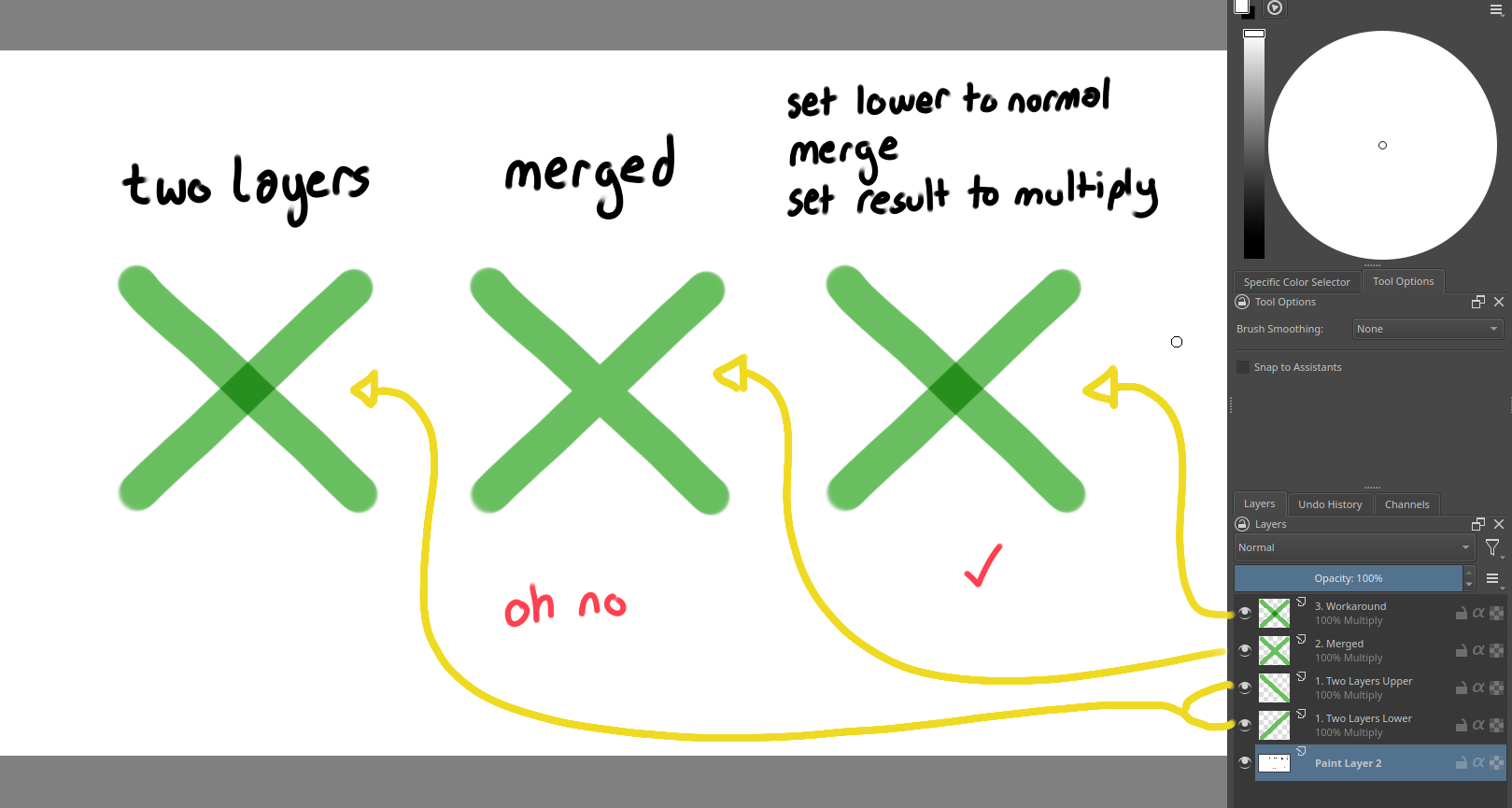
If you merge them when they’re both multiply layers, then they get merged with normal blending and you lose the double multiply. But if you set the lower of the two to normal before merging, then the upper (still set to multiply) will multiply with it when merging, and you can set the result to multiply to get an effective (A * B) * C
I believe the “blending mode inheritance” behavior when merging layers with the same blending mode in Krita is indeed problematic.
Through my testing, I’ve observed that when two layers share the same blending mode, Krita triggers a special inheritance mechanism: it appears to temporarily strip the blending mode from both layers, directly merge the pixels as if they were in “Normal” mode, and then reapply that same blending mode to the resulting merged layer.
This workflow only saves you one step—manually selecting a blending mode—but the final visual result completely deviates from what you would expect. It is convenient in procedure, yet terrible in substance. This is unique to Krita. In Photoshop, for instance, there is no such “inherit blending mode on merge” function. When merging, Photoshop always correctly calculates the blending of the two layers and bakes the result into a layer with a “Normal” blending mode.
I tested several workarounds and found that all of them essentially bypass this “inheritance mechanism”:
-
Changing the bottom layer’s blending mode to “Normal” before merging.
-
Placing the layers in a group first, then merging the group.
-
Using “New From Visible”.
-
Merging layers that have different blending modes.
All of these produce the expected result. The reason is straightforward: the objects being merged are not two layers with identical blending modes, so the problematic special inheritance mechanism is simply never triggered. I feel that removing this superfluous feature and simplifying the merging logic would go a long way in reducing confusion around layer merging.
No, the behavior is not unique to Krita, the result of merging non-Normal layers is generally inconsistent between various programs. It’s just various flavors of throwing their hands up and doing something.
The solution of making it look the same, but totally changing the blend mode is the worst of all of them because it tricks you into thinking that merging those layers actually worked fine.You later change stuff below the layer or try to modify its contents and only then realize that the program baked your layer and switched the blend mode. This is silent data loss and can ruin hours of work.
All of the other options you mention, like sticking stuff in a group or switching modes, change the composited result in a different way. You may have found examples where it gave you what you want, but the same is true for the current behavior, it’s just a different set of situations. There is no general way to merge arbitrary layers that doesn’t lose data somewhere.
1 Like
Thank you for the detailed explanation; I now have a better understanding of your considerations. That said, I think you might have some misunderstandings about the solutions I proposed.
I have never asked for a “general way to merge arbitrary layers that doesn’t lose data somewhere.” On this point I fully agree with you—merging inevitably involves data loss, which is self-evident common sense. Both the current “inheritance merge” and the workarounds we have explored do involve losing data, but neither entails “silent data loss.” The “silent data loss” scenario you described only occurs when you need to merge a lower layer with a blending-mode layer above it, whereas this discussion is about merging only multiple blending-mode layers, excluding the base layer below them. Please bear with me and let me illustrate with an example.
Take merging two Multiply layers as an example again. With the current “inheritance merge,” after merging, the blending mode is indeed inherited and preserved, but the computed result of the two Multiply layers’ stacking effect is lost. As a result, even though the blending mode is retained, the actual visual appearance changes. With the workaround, such as placing them in a group and merging the group, the Multiply blending mode “information” is indeed lost, and the new layer becomes a Normal layer. However, there are two key points. First, after such a merge, the image does not “look the same”—quite the opposite, you must manually reassign the original blending mode to the new layer for the image to look the same as before merging. Second, once you perform this active reapplication of the blending mode, not only is the visual appearance restored to what it was before merging, but the situation you described also never occurs:
“You later change stuff below the layer or try to modify its contents and only then realize that the program baked your layer and switched the blend mode.”
Throughout the entire process, the loss of information and the change of blending mode are immediately visible and are initiated by the user; there is no hidden or delayed trap.
My earlier mention of several workarounds may have caused a misunderstanding. I am not actually trying to discuss all cases of “merging non-Normal layers”; this discussion is specifically about merging only layers that share exactly the same blending mode—the only situation where Krita uses the “blending mode inheritance” behavior. And this behavior is indeed unique to Krita.
I do understand what you’re saying. My point is that there is no correct way to do it anyway and Krita just chooses to behave like this. It isn’t actually just “same blend mode”, it’s about retaining blend modes, opacity, channel flags, layer styles and color spaces as much as possible. Changing the behavior would break existing workflows, make some others work a bit better and still not solve the unsolvable problem in general.