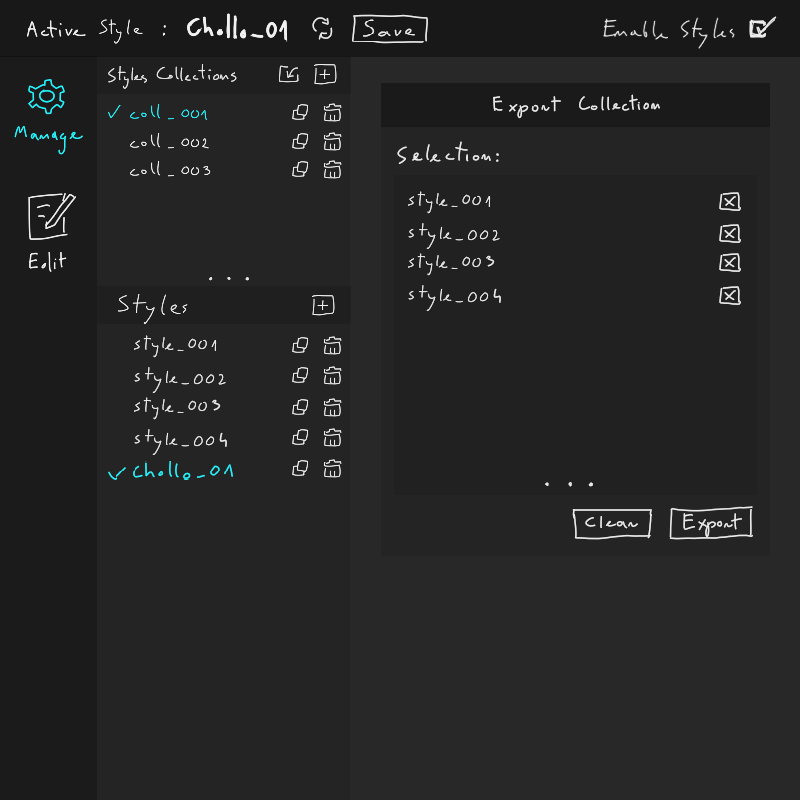
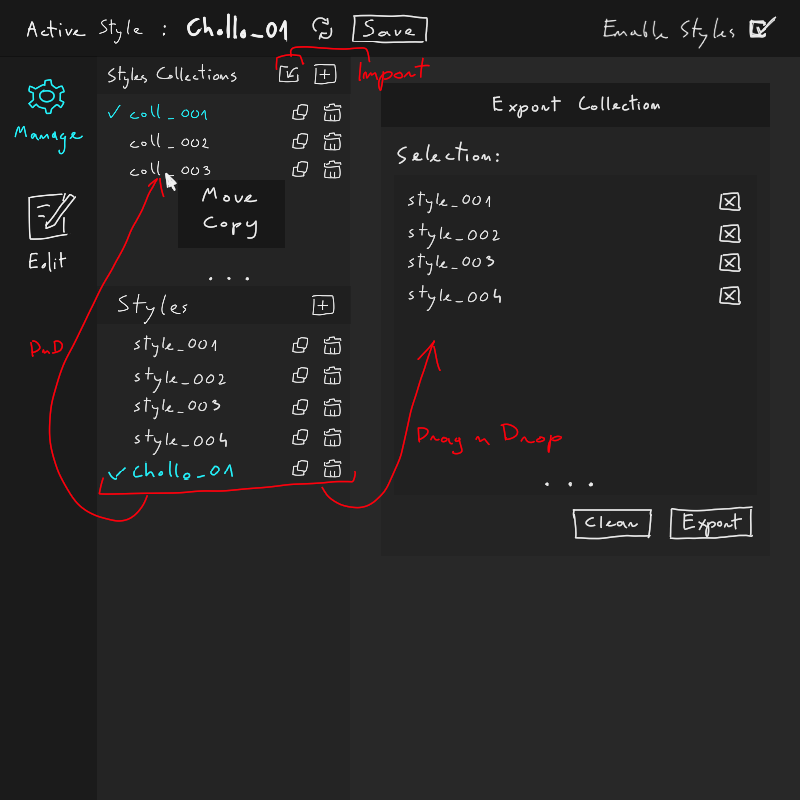
less confusion what does what (at least I hope it’s more obvious)
allows you to save into various collections (before, all layer styles were saved into CustomStyles.asl)
allows you to save a layer style into a new collection (that isn’t CustomStyles.asl) - see that [+] button next to collections combobox in Save Style to Collection section
allows you to export multiple layer styles in one collection (before, export would export only one layer style per one file, which was later difficult to manage in the layer styles docker, because it would be one style per combobox item…)
import style collection is just like it was before (just in a different place).
Disadvantages:
someone will have to implement that
no New, Import and Export buttons on the left when being in other tabs (I don’t see it personally as a problem but maybe someone has a workflow that depends on it?)
It looks pretty ugly for now, but that’s because I was focusing more on general idea, this is the first layer styles manager mockup. I will gladly take both UI and UX suggestions, although UX is highly preferred.
The most important thing I wanted to achieve was:
make it less confusing/more clear
add missing functionality
So if someone has a better idea how to achieve both of those, or want to improve upon my design, please do comment. Images appreciated!
Thoughts?
Ping as FYI to @deevad@thimblefolio and @novames00 since it looks like you’re all interested in copying and pasting layer styles.
No, it’s just a part of resource system rewrite, not layers styles rewrite. I’m not even sure if we manage to implement it before 5.0.0 since we still have Resource Manager and all the bugs to fix.
That’s a good suggestion. Do you have some advice where it would be best located? I guess in the Current Style section, maybe if you right-click on the style?
(I think all resources will be rename-able in the Resource Manager, too).
Sure Tiar , we have a way around to do that kind of action anyway so Hope main work on the resource system going well and we are close to the Krita 5 beta at least
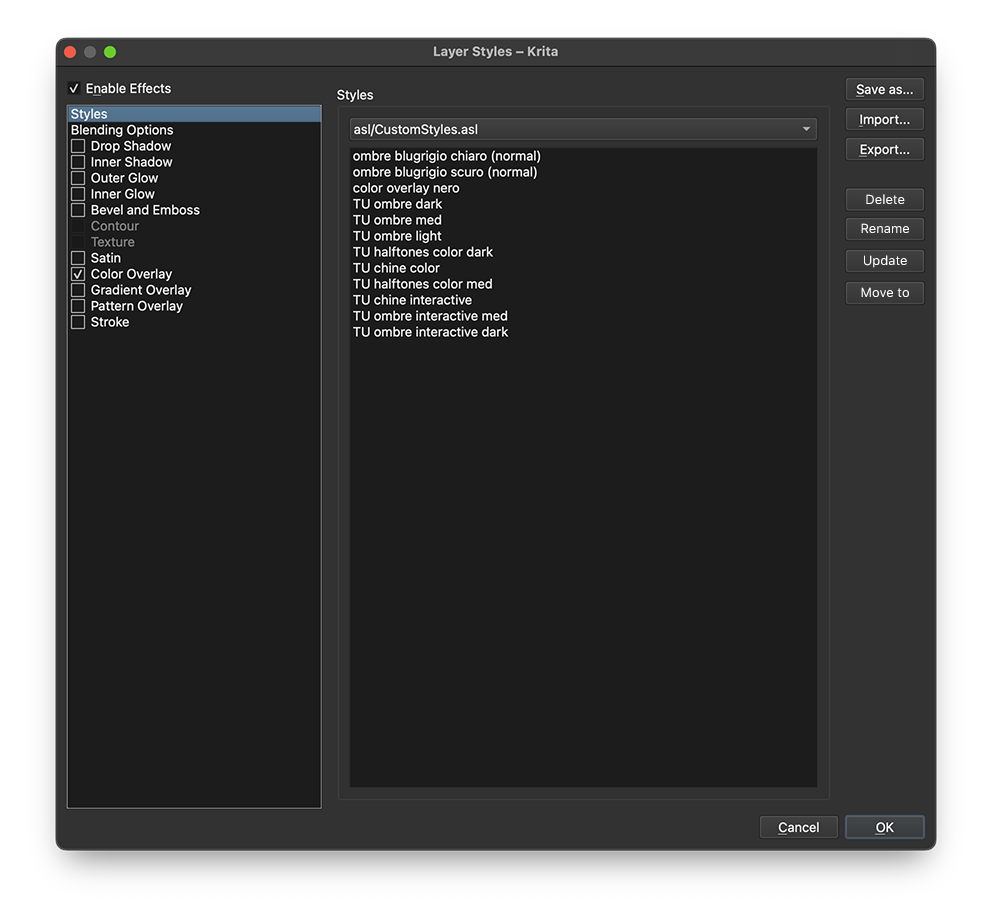
I noticed that Layer Styles does not have a button to delete an individual custom style that has been saved.
This is annoying because as the number of custom styles grows, they need to be organized. It would be nice if there was a delete button under the “Export” button in the current UI.
It would also be nice to be able to rename the custom styles quickly. I think it would be more consistent as a UI if you could double-click on the name to change it, just like when editing a filter preset.
If the delete button is to be placed in the new UI image at the top of this topic, I thought it would be better to have the delete button below the “Load from clipboard” button.
Do not forget about stackable effects, mainly for the following :
stroke
inner shadow
color overlay
gradient overlay
drop shadow
For each of these, adding the same effect multiple times is encouraged.
I take it from the original Photoshop capabilities. As for how useful it’d be, well, it would
allow the user to add multiple versions of the same effect without having to use two layer styles.
Now, I say that, maybe what you did here allows multiple layer style effects to be active on the same layer, with priority following the order in the list. I don’t know. It’s just a use case really.
What do you think ?
Don’t forget the most important thing, a preview of each one in the form of an “icon” in the style list like Photoshop does, the name is not as important as the preview.
Bumping this thread because I’m currently working with lots of saved layer styles and it’s a major pain point right now.
I think it would only take a few smaller additions (they might not be small from a coding point of view of course):
right now you can’t delete a saved layer style preset. Or better, you can delete, but they will persist in the resource file, and can’t be deleted for good. No idea why that is so. Deleting also has to be done via the resource management window, which is not ideal. Management in the layer style window would be much better.
Styles can’t be moved to a different collection nor updated or renamed
When working on larger projects like comics, where you have recurring styles that need to be applied consistently across documents, saving layer styles is super handy and saves a lot of work! Of course over time, as you work on things, there might be changes to these styles. For example, let’s say I use a colour overlay to make all the inks dark blue and add a texture to it, I can save this style and then quickly apply it to all new documents.
But then halfway through the comic, I want it to be a dark red. Now I have to delete the old style, hunt it down in the resource manager, then create a new one.
In a perfect world I would just change the colour and then hit an “update style” button
To recap, what I would love to see added.
these buttons, directly in the layer styles window


 Hope main work on the resource system going well and we are close to the Krita 5 beta at least