Is this a bug? I noticed that I couldn’t draw, move or hide on any of my layers and after I opened up my other documents, all of my layers were missing. I’ve been a Krita use for a while now and this has never happened before. Im using windows 10, krita 5.2.3.
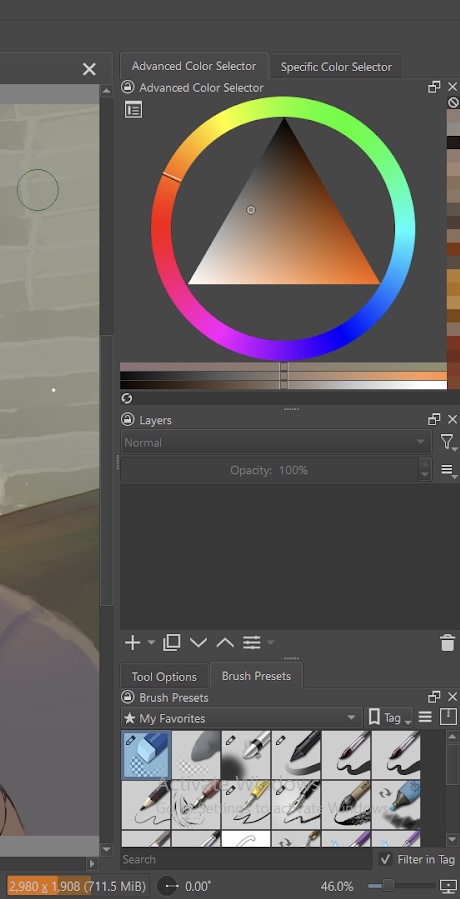
The RAM meter is showing orange even though the document is only using 711 Mb.
Do you have other documents open at the same time?
How much total RAM does your computer have?
Do you have other applications running at the same time?
What happens if you press the ‘+’ (Add Paint Layer) button at the bottom of the Layers docker?
Krita usually lets me know if I don’t have enough storage, but my system says I have 4.00 GB. As for the add layer, it doesn’t do anything. I would like to add that when I did try to add layers on my other document, it would show the number of layers but not the layers themselves. And I had one other document open but this has never happened to me before.
Update: The problem fixed itself, after closing the document again, it went back to normal
1 Like
Sounds the same as this topic: Cant create new layer no matter what I do
It seems it’s a bug that happens rarely under unknown circumstances.
2 Likes
4 GB of total RAM is on the low side because Windows 10 will use 2 GB or possibly more then the krita application will use nearly 1 GB leaving about 1 GB or maybe less for any documents you’re working on in krita.
The RAM meter orange indication at 711 MB seems to confirm that.
1 Like
This topic was automatically closed 30 days after the last reply. New replies are no longer allowed.