Hallo, when i work on animation timeline, the layers on timeline randomly appear and disappear. I think there should be a way that all the layers and groups should stay permanently on timeline so that you dont have to move to the LAYERS window back and forth. And also group should be visible with all its grouped layers inside the timeline. And one more thing, the layer label colors are so faded there must be a way to make it more brighter. Regards……
Please make sure you create your topic in the appropriate category next time.
1 Like
Sure 
In the layers docker, on a layer, do right-click → Pin to Timeline (a check box).
I’m sure that has been asked for in a Feature Request topic but I don’t know where.
People have asked for the ability to define custom layer colours and the ability to have more layer colours.
There are very many things that have been asked for over the years and very few developers to work on them. They have a very long list of wishes 
1 Like
Or….. maybe an action could be added in miscellaneous section as.. “ Add all layers (active + inactive) automatically to the timeline” ……… That will be great ….
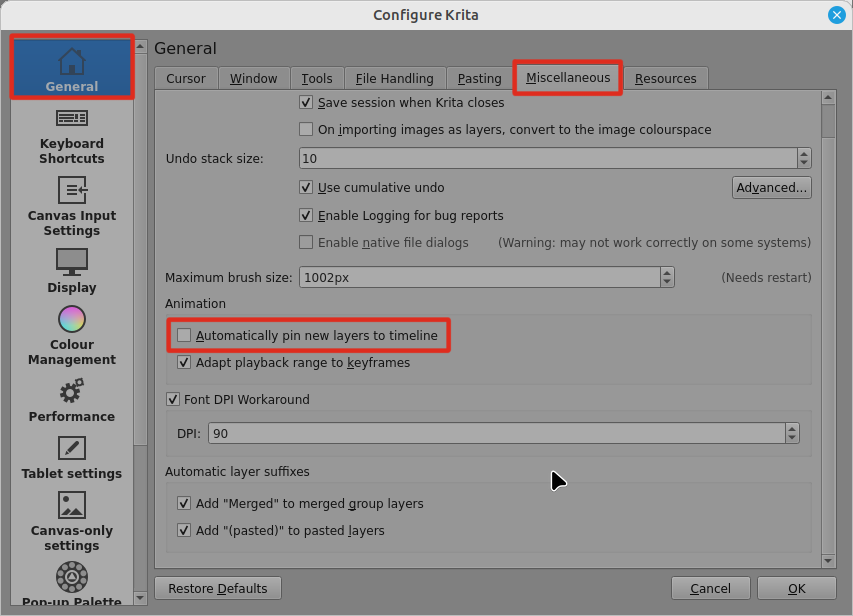
That was very helpful…..
Thank you for the quick response guys….. Thank you #AhabGreybeard
1 Like
This topic was automatically closed 30 days after the last reply. New replies are no longer allowed.