Layers management sometimes hang on

Hi

Not sure being in the right forum to explain my problem.

I have a problem with layers management.
I often use many layers to draw: paint layers, groups, filters layers, transform layers, file layers…
Can sometime have more than fifty layers in a krita file.

The problem is, when I want to remove a layer, move a layer, or group layers, krita sometimes hang on, and can take 30-60minutes just to it.

For example, here I was trying to Quick group 5 layers: in layers tree, group was immediately visible, but quick group operation took approximately 45minutes… (first time, krita had crashed after 30-40min)

I’m working on Linux Debian 10 (kernel 4.19.0-8-amd64) on 8 vCpu workstation with 32GB RAM, using Krita 4.2.8 appimage (tested with 4.2.9beta and got same problem)

Krita file contains 97 layers (of many types), geometry is 6201x8770 px
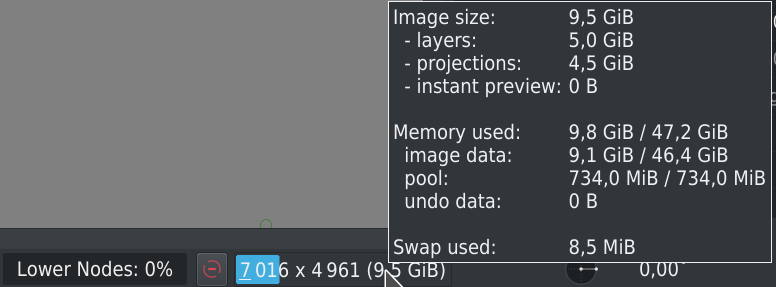
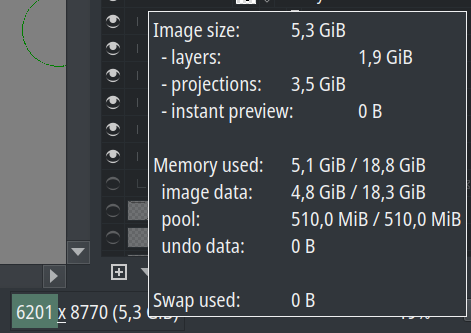
Here some additional memory information

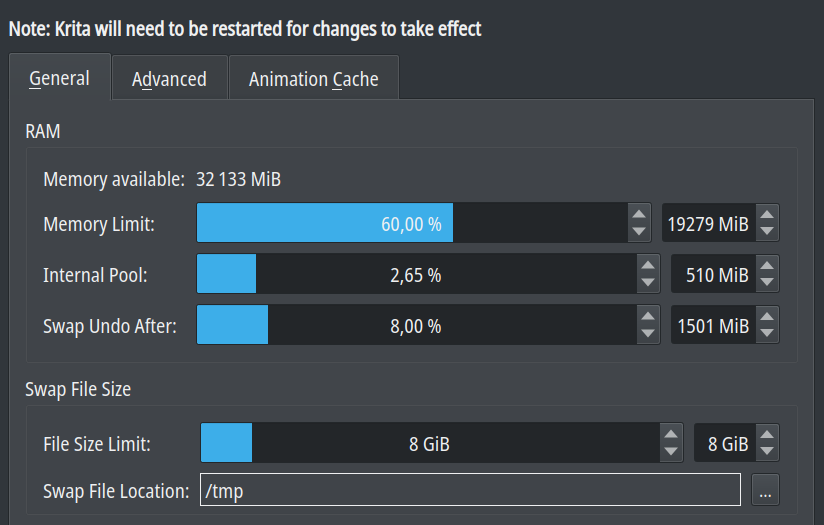
And performance configuration
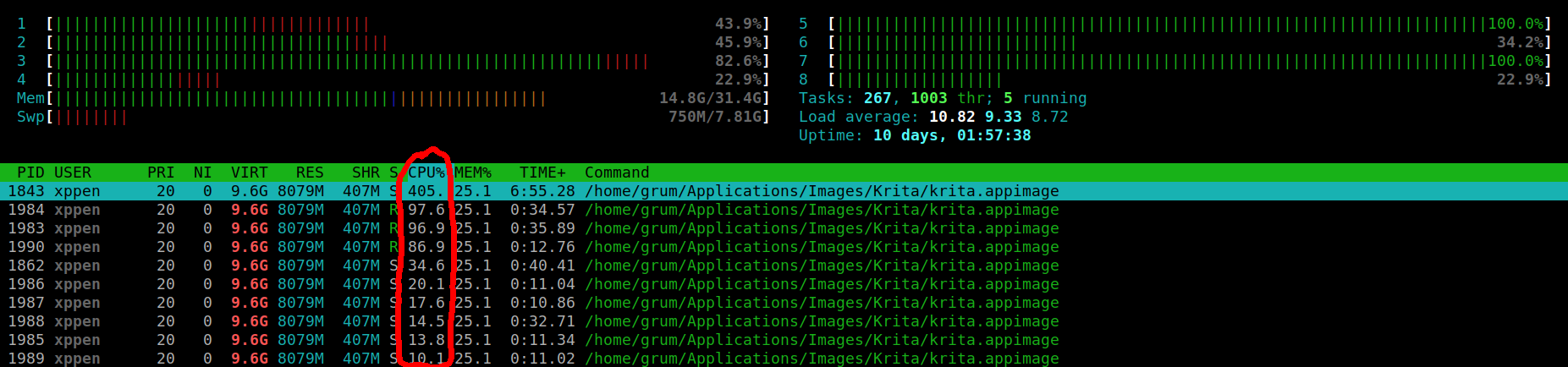
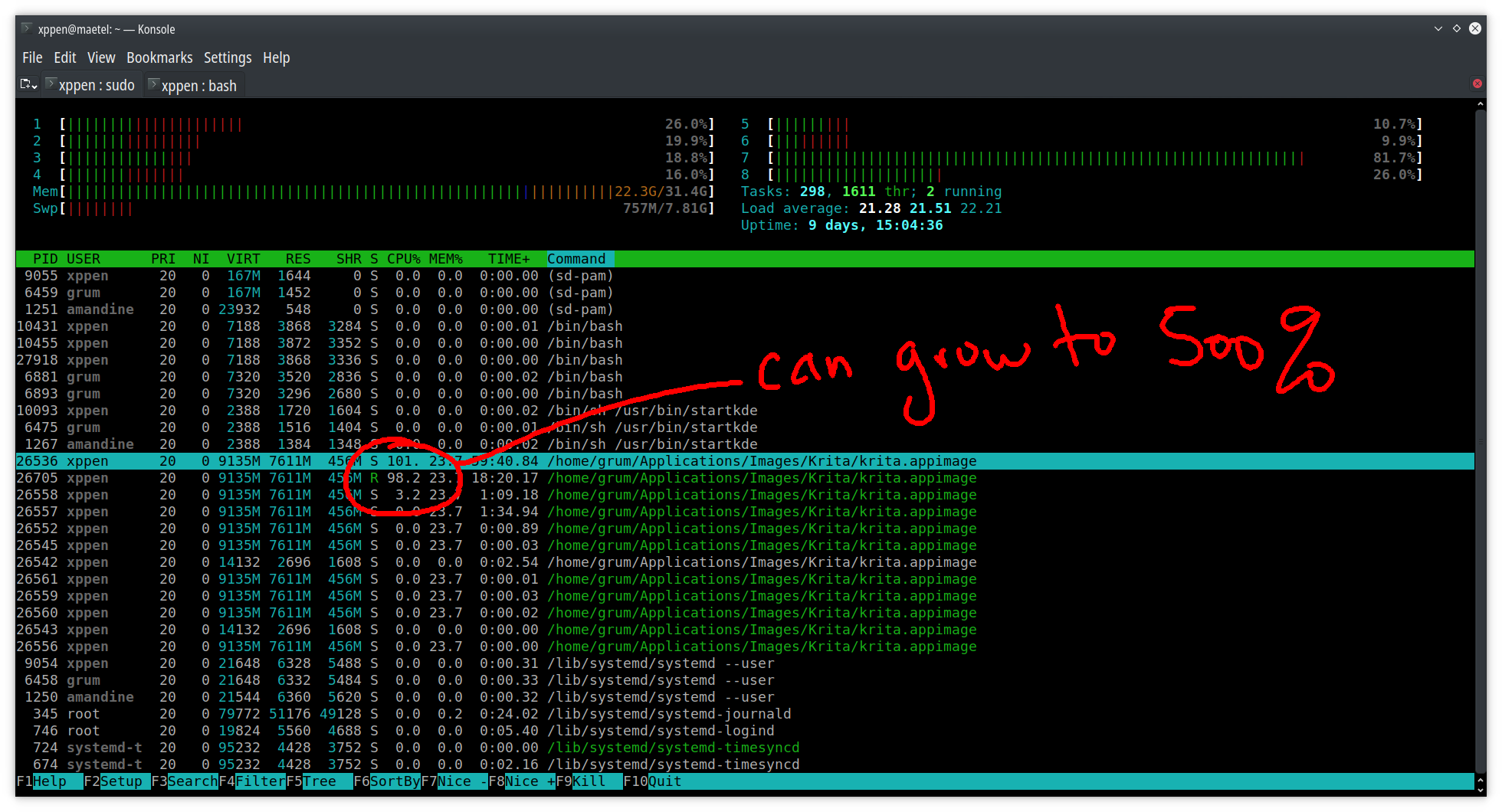
During the long grouping process, Krita process is very high, and peak at 500% cpu (I understand that over 100%, more than 1 cpu is used for process…?)
The problem doesn’t occurs systematically.
For example with this Krita file, I’m able to move/delete/group some layers without any problem, but for some others, it could take a long time…
Restarting Krita doesn’t change anything.

I understand that so many layers can be hard to manage, but finally no: Krita works pretty well, drawing is fluid and only some nodes operations in layer tree generate problems

My question are:

  • Does anyone have an idea about this problem or already had this kind of problem?
  • Is it possible to activate some logs to determinate what really happen? how?

It seems that internal is full… Can this be the origin of my problem? If yes, which recommended value can I set to this setting?

Thanks.
Grum999

Can you get this problem in a systematic way, as in, for example every time you try this specific operation on this file on this specific set of layers, it appears? That would be really helpful.

Hi tiar

Thanks for reply.

File has been saved after group operation has finished…
I’m currently doing an undo to get back to previous layer configuration, but I’m afraid it will be a very long operation too…

When undo will finish, I’ll save a copy, and try to check if it can be reproduced systematically.
It may take some times, will try to post results tomorrow (it’s late in France, and it’s time to sleep now for me :sleeping:)

Grum999

Thank you so much!

Hi

You’re welcome, thanks for your work and to take time about this problem :slightly_smiling_face:

I’ve made new tests, I’m able to reproduce it systematically:

  • Krita 4.2.8
  • Krita 4.2.9beta

As you can see at the beginning of layers grouping process, Krita is consuming a high CPU during 5-10minutes


And after, it’s “only” 2 processes running at ~100% for 30-35minutes before grouping process is completed.

Here a simplified layers tree representation (not all of 97 layers are represented here):

Test 1

- main [group]
  - body [group]
    - dress [group]
      - drawings [group]
        - phoenix [ext. file]
        - models [group]
        - neck - collar
        - right side flowers    -->moving node down=very slow
        - left side flowers     
        - inner borders
        - flowers [ext. file]
        - motif bottom 

Test 2

- main [group]
  - body [group]
    - dress [group]
      - drawings [group]
        - phoenix [ext. file]
        - models [group]
        - neck - collar
        - right side flowers    \
        - left side flowers     |--> quick group very slow
        - inner borders         |
        - flowers [ext. file]   |
        - motif bottom          /

Test 3

- main [group]
  - body [group]
    - dress [group]
      - main [group]
        - top                   
        - middle               
        - bottom               
        - breast               -->moving node (inside group) immediately applied
        - copy of layer 69
        - copy of layer 68        
      - drawings [group]

Test 4

- main [group]
  - body [group]
    - dress [group]
      - main [group]
        - top                   \-->quick group immediately applied
        - middle                /
        - bottom               \-->quick group immediately applied
        - breast               /
        - copy of layer 69
        - copy of layer 68        
      - drawings [group]

I can send you if you want the file (4 files in fact, as there’s 3 external .kra files dependencies: zip file is about 22MB)

Grum999

1 Like

Yes, that would be good if you send me the file :slight_smile:

I sent you a private message with download link :slightly_smiling_face:

Grum999

1 Like

Hi

I’m resurrecting this old topic…

I’m currently working on a (another) document on which I’m facing the same issue.
Moving a node or grouping nodes could take 15 to 30 minutes :dizzy_face:

It’s been a while that I didn’t faced this kind of problem but there’s might be something, somewhere, that have a problem (fortunately I’m not facing this problem on all my document :sweat_smile:)

Current configuration on which I’m facing the problem is 24core/64GB RAM:

Krita

 Version: 4.4.3
 Languages: en_GB, en, fr, fr_FR, fr
 Hidpi: false

Qt

  Version (compiled): 5.12.9
  Version (loaded): 5.12.9

OS Information

  Build ABI: x86_64-little_endian-lp64
  Build CPU: x86_64
  CPU: x86_64
  Kernel Type: linux
  Kernel Version: 4.19.0-16-amd64
  Pretty Productname: Debian GNU/Linux 10 (buster)
  Product Type: debian
  Product Version: 10
  Desktop: KDE

OpenGL Info
 
  Vendor:  "NVIDIA Corporation" 
  Renderer:  "GeForce GTX 1060 3GB/PCIe/SSE2" 
  Version:  "4.6.0 NVIDIA 418.181.07" 
  Shading language:  "4.60 NVIDIA" 
  Requested format:  QSurfaceFormat(version 3.0, options QFlags<QSurfaceFormat::FormatOption>(DeprecatedFunctions), depthBufferSize 24, redBufferSize 8, greenBufferSize 8, blueBufferSize 8, alphaBufferSize 8, stencilBufferSize 8, samples -1, swapBehavior QSurfaceFormat::DoubleBuffer, swapInterval 0, colorSpace QSurfaceFormat::DefaultColorSpace, profile  QSurfaceFormat::CompatibilityProfile) 
  Current format:    QSurfaceFormat(version 4.6, options QFlags<QSurfaceFormat::FormatOption>(DeprecatedFunctions), depthBufferSize 24, redBufferSize 8, greenBufferSize 8, blueBufferSize 8, alphaBufferSize 8, stencilBufferSize 8, samples -1, swapBehavior QSurfaceFormat::DoubleBuffer, swapInterval 0, colorSpace QSurfaceFormat::DefaultColorSpace, profile  QSurfaceFormat::CompatibilityProfile) 
     Version: 4.6
     Supports deprecated functions true 
     is OpenGL ES: false 

QPA OpenGL Detection Info 
  supportsDesktopGL: true 
  supportsOpenGLES: true 
  isQtPreferOpenGLES: false 

Hardware Information

  GPU Acceleration: auto
  Memory: 64390 Mb
  Number of Cores: 24
  Swap Location: /tmp

Current Settings

  Current Swap Location: /tmp
  Current Swap Location writable: true
  Undo Enabled: true
  Undo Stack Limit: 350
  Use OpenGL: true
  Use OpenGL Texture Buffer: true
  Use AMD Vectorization Workaround: false
  Canvas State: OPENGL_SUCCESS
  Autosave Interval: 60
  Use Backup Files: true
  Number of Backups Kept: 2
  Backup File Suffix: ~
  Backup Location: Same Folder as the File
  Backup Location writable: false
  Use Win8 Pointer Input: false
  Use RightMiddleTabletButton Workaround: false
  Levels of Detail Enabled: false
  Use Zip64: true


Display Information
Number of screens: 2
	Screen: 0
		Name: DP-4
		Depth: 24
		Scale: 1
		Resolution in pixels: 3840x2160
		Manufacturer: ViewSonic Corporation
		Model: VP2780 SERIES
		Refresh Rate: 59
	Screen: 1
		Name: HDMI-0
		Depth: 24
		Scale: 1
		Resolution in pixels: 1920x1080
		Manufacturer: Iiyama North America
		Model: PL2410HD-
		Refresh Rate: 60

Any idea about why this could occurs for some documents?

Grum999

Looks like your image is really big – maybe there’s lots of stuff outside the borders? I could take a look at the file if you can share it with me and see whether I can figure out something.

Hi @halla

I sent you a private message with link to download document

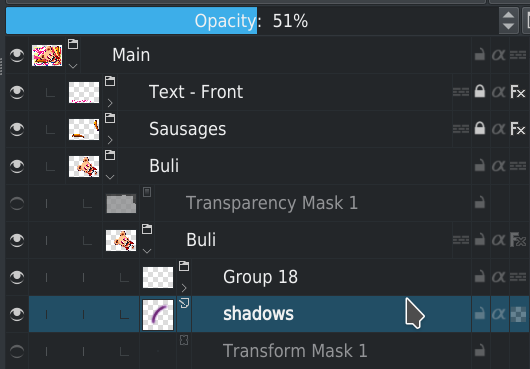
For testing, you can for example move layer shadows into group layer Group 18

File is large yes.
But I’m used to work with A4@600dpi files without this kind of problem.
I may have some layer for which there’s data outside canvas projection…

Grum999

I don’t know if this information can help

  • I started to delete some layers, trying to enlight document
    Especially, hidden layers in Main > Buli > Buli group

  • Deleting the hidden layers also takes a loooooooong time

I’m a little bit surprised because as they’re hidden, I was thinking their impact about projection and/or other rendering calculation should be null… :man_shrugging:

Grum999

I guess that wasn’t the problem – an optimized build from git master is taking an hour now to render the image. I’ll re-check with 4.4.3.

Okay, 4.4.3 loads it a bit faster. It’s still not good enough, though. The problem is the layer styles, it seems.

I’m not sure.

I’ve deactivated all layer styles, problem is still here.
I’ve removed all layer styles, problem is still here.

I’m trying do to additional tests, but it takes time…

Grum999

@halla, I found something I think.

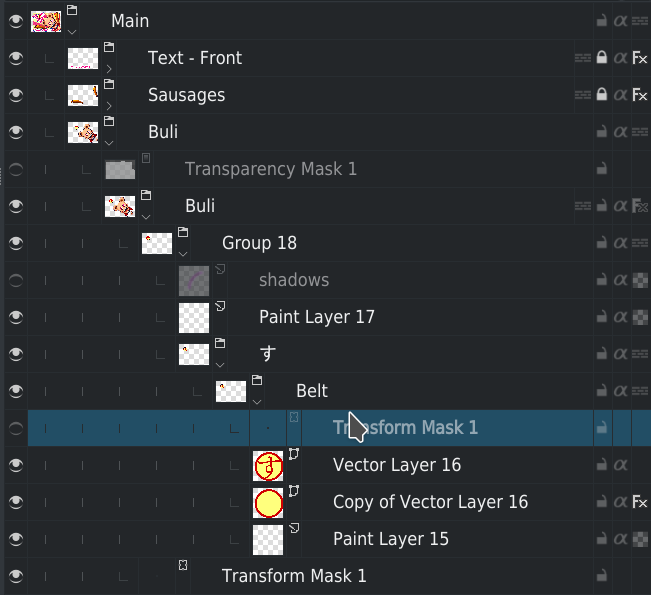
If deactivate transform layer Main > Buli > Buli > Group 18 > す > Belt > Transform mask 1, moving layer Shadows out of Group 18 is immediate.
Moving it in group again took less than a minute: it’s still long just to move a node but it’s fast according to consumed time when transform layer is active…


=> Is it the same on your side?

The strange thing is, if I activate or deactivate the transform layer, result is rendered in few seconds 10-20s max to re-render entire drawing (so according to document size & complexity I think it’s fast?)

Anyway on my side, I’ll review this part as Group 18 was initially created to test some idea (so as I validated my idea I’ll just “implement” it in target layers and finally delete Group 18).

But I think this could be useful for everyone to understand origin of problem: there might be underlying things behind this case.
Once origin is found, maybe it could be fixed and probably could improve general performances? :slight_smile:

If you can tell me where to look in code (where “delete” or “move” node actions are located for example, I think it’s a good starting point, I can try to take a look.
Not sure I’ll be able to understand/found anything (especially if there’s multithreading behind this) but maybe…

Grum999