Lazy Text Tool Plugin and japanese vertical text

I ran the script with the scale at 100%.

==== Warning: Script not saved! ====
7.328125 PyQt5.QtCore.QRectF(0.0, -14.953125, 7.1875, 18.65625) PyQt5.QtCore.QRectF(0.0, -14.953125, 8.953125, 18.65625)

I’m also using a 19201080 sub display with the scale set to 100%…
The main Krita screen is a 2560
1440 screen, so I don’t think that has anything to do with it. Only the scripter is on a sub, though.
I didn’t think I’d find out in this thread that I wasn’t using the recommended scale.

1 Like

It’s not that. It is simply that QT bases its sizes on screen sizes. Not to mention there are variations between platforms as well.

So what I need to do if I plan to do calculations for this is normalize the numbers so they match regardless of platform.

To give you an example, on my pc an ‘x’ is 8.0 width, 19.0 height while yours is 7.1875 width, 18.65625 height.

Not to mention the average size of your char is 7.328125 while mine is 12.84375

1 Like

Thanks for the explanation.
If there are any problems with the way the data is presented, I’ll redo it, just let me know.

1 Like

Can you try running this:

from PyQt5.QtGui import *
from PyQt5.QtWidgets import *
from PyQt5.QtCore import *
from PyQt5.QtPrintSupport import *


font = QFont('Source Han Serif Vertical', 10)
metrics = QFontMetricsF(font)
    
print ( QRawFont.fromFont(font).averageCharWidth() , metrics.boundingRect('x'), metrics.boundingRect('X') )


printer=QPrinter(QPrinter.HighResolution)
printer.setOutputFormat(QPrinter.PdfFormat)
printer.setResolution(96)
print(printer.resolution())
painter = QPainter()
painter.begin(printer)
painter.setFont(font)
mt = painter.fontMetrics()

print ( mt.averageCharWidth(), mt.boundingRect('x'), mt.boundingRect('X') )

painter2 = QPainter()
device = QOpenGLPaintDevice()
font = QFont('Source Han Serif Vertical', 10)
painter2.begin(device)
painter2.setFont(font)
mt2 = painter2.fontMetrics()
print ( mt2.averageCharWidth(), mt2.boundingRect('x'), mt2.boundingRect('X') )
1 Like

Scaling 100%.
Krita’s main window and scripters are both on a 2560*1440 display (do you need this note?)

==== Warning: Script not saved! ====
7.328125 PyQt5.QtCore.QRectF(0.0, -14.953125, 7.1875, 18.65625) PyQt5.QtCore.QRectF(0.0, -14.953125, 8.953125, 18.65625)
96
7 PyQt5.QtCore.QRect(0, -15, 7, 17) PyQt5.QtCore.QRect(0, -15, 9, 17)
13 PyQt5.QtCore.QRect(0, -15, 7, 19) PyQt5.QtCore.QRect(0, -15, 9, 19)
1 Like

Finally, matching values! I probably should be able to work with this maybe… need to do some tests

Okay, maybe I’m trying to overengineer some stuff, but guessing half-width chars probably isn’t going to work programatically. I think the solution here is to simply create maps of which chars are half-width. It shouldn’t be a problem as chars tend to be grouped in ranges.

Also, to confirm, the small japanese characters are half-width right? or are they also full width?

I’m also probably gonna call it for today and work on the maps tommorrow.

Edit: Also, how does CSP respond to wide english chars like WW?

1 Like

I’ll only write what I can answer right away.
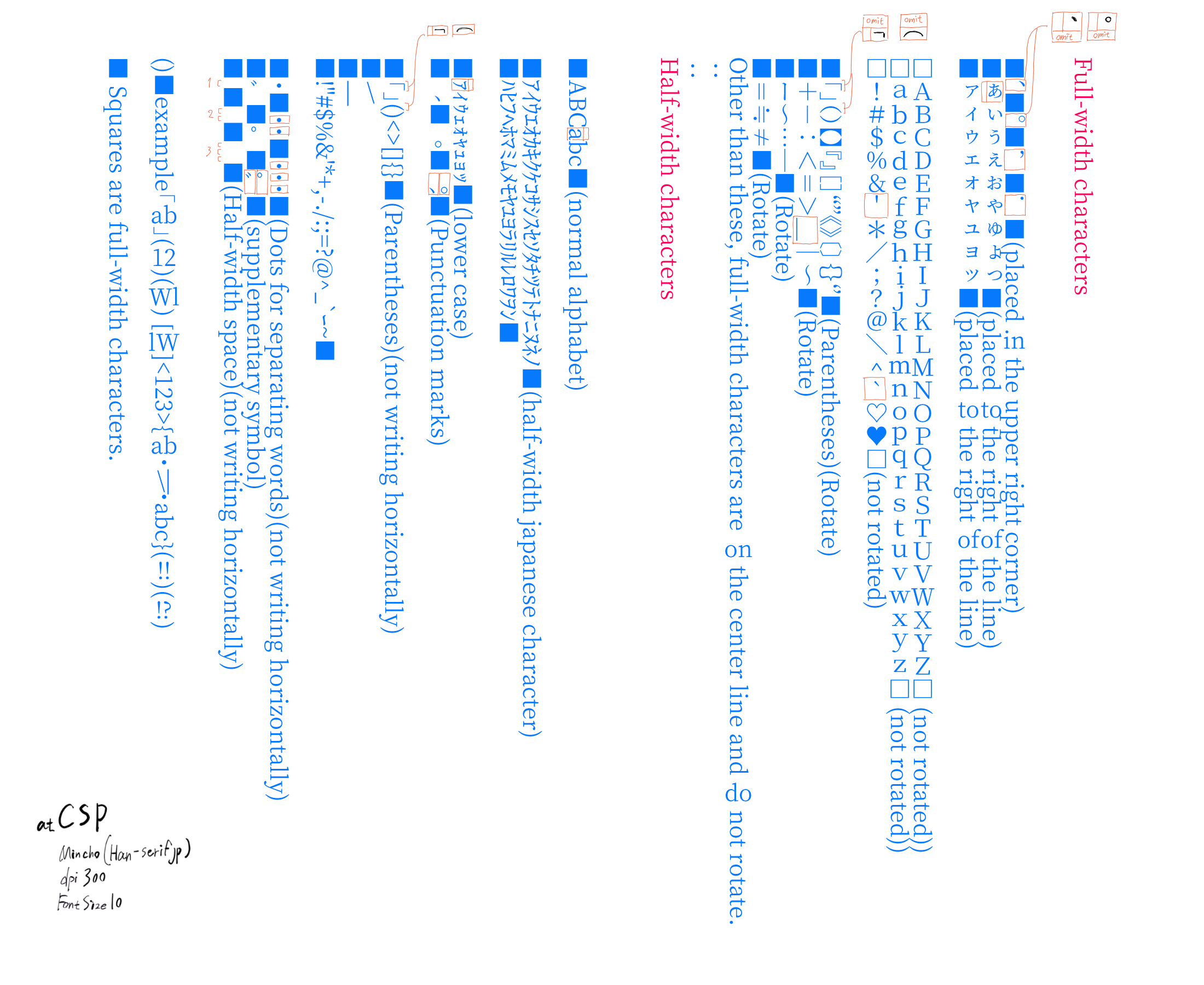
All of the slightly smaller Japanese characters that have appeared so far are full-width characters. Half-width Japanese characters also exist, but I’ll make a list of those by tomorrow.
The CSP is lined up horizontally and aligned to the center line as much as possible.


(Fixed a mistake in the image.)

1 Like

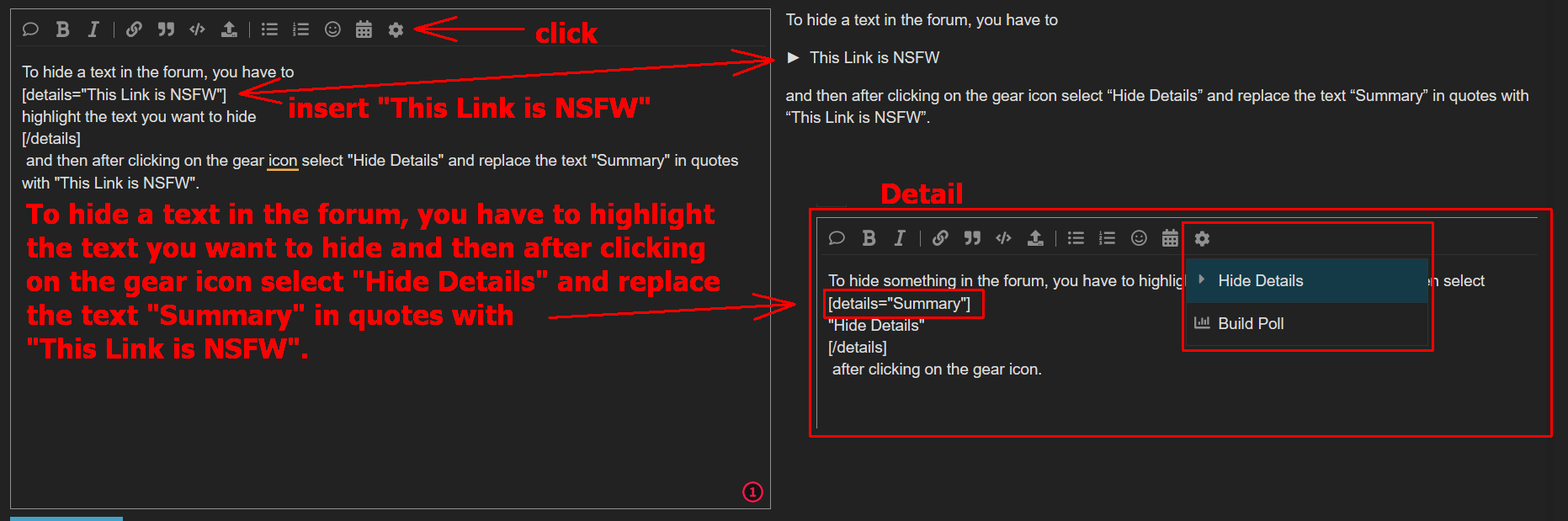
Since you’ve already asked twice regarding the link to age restricted content, I think it’s okay to hide it using the “Hide Details” feature, and tag the text to be clicked with a NSFW tag, I guess it can then be posted.
To be completely sure, you could ask @raghukamath if such a link is tolerated.

In the TOS under “Conditions for Use of the Forum” the minimum age to use the forum is stated as thirteen, so this is “close”.
Provided the forum’s own “Content Standards” points 6 & 7 from the Terms of Service (mainly 7 I think) are not violated on the linked page (though as I understand it, these points apply to works published on the forum, but a link obviously gives access to them).

If you don’t know or haven’t used the “Hide Details” feature yet, here’s a short description:
To hide a text in the forum, you have to select the text you want to hide and then, after clicking on the gear icon, select “Hide Details” and replace the quoted text “Summary” with “This Link is NSFW” or another description.

Michelist

2 Likes

Yes if it is extremely necessary and the website in question is not a porn website and links to malware etc, it is okay to post with with “Hide Details” as @Michelist said. If it is problematic someone will flag it and it will then be moderated. If it is in context then it will be left alone.

2 Likes

Thanks for the explanation.

This is a novel posting site for Japanese. Many of the stories are rated R-15+, so please refrain from reading if you are younger than that.

This Link is NSFW

List of works
https://pdfnovels.net/novel/all/?order=hyoka

Examples of individual works
タテ書き小説ネット - 転生したらスライムだった件
If you click on the blue text at the bottom of the page that says “縦書きPDFで小説を読む,” you can view novels in vertical format. (I think it will probably show up that way even if you’re viewing it from outside of Japan…)

Unlike the CSP, there is no specification to change half-width characters into horizontal characters, nor does it omit spaces, but you can see as many raw Japanese samples as you like, so I think you can get the feeling.
Of course, this is not a novel written by me, so the text is protected by copyright.

1 Like

Okay, I made a map and here is the map: (save it to where krita has permissions to access it)

{
    "version":1,
    "default":{ "charwidth":2, "charmode":2  },
    "single_regex":{
        "[\\u0020]": { "charwidth":2, "name":"Space" },
        "[\\u30FB]":{ "charwidth":2, "fw_height":"[height]/1.33", "name":"middle dot" },
        "[\\u300C\\u300E\\uFF08\\u2014\\uFF5B\\uFF5F\\u3008\\u300A\\u3010\\u3016\\u3018\\u301A]":{ "charwidth":2, "fw_height":"[height]/2", "name":"open parantheses" },
        "[\\u0000-\\u007F]": { "charwidth":1, "name":"Latin" },
        "[\\u3041-\\u3096]": { "charwidth":2, "name":"Hiragana" },
        "[\\u30A0-\\u30FF]": { "charwidth":2, "name":"Katakana" },
        "[\\u3400-\\u4DB5\\u4E00-\\u9FCB\\uF900-\\uFA6A]": { "charwidth":2, "name":"Kanji" },
        "[\\u2E80-\\u2FD5]": { "charwidth":2, "name":"Kanji Radicals" },
        "[\\uFF5F-\\uFF9F]": { "halfwidth":2, "name":"Katakana HalfWidth" },
        "[\\u31F0-\\u31FF\\u3220-\\u3243\\u3280-\\u337F]": { "halfwidth":0, "name":"Symbols" },
        "[\\uFF01-\\uFF5E]":{ "charwidth":2, "name":"FullWidth Alphanumeric" },
        "[\\u3000-\\u303F]":{ "charwidth":2, "name":"punctuation" }
        
    },
    "pair_regex":{
        "[\\u30FB]\\S":{ "charwidth":2, "fw_height":"[height]/1.33", "name":"middle dot" },
        "[\\u3001\\u3002]\\S":{ "charwidth":2, "fw_height":"[height]/2", "name":"end sentence punctuation marks" },
        "[\\u300D\\u300F\\uFF09\\u2015\\uFF5C\\uFF60\\u3009\\u300B\\u3011\u3017\\u3019\\u301B]\\S":{ "charwidth":2, "fw_height":"[height]/2", "name":"close parantheses" }
    }
}

and here is the code: (replace c:/path/to/jpn.json with the map file)

from PyQt5.QtGui import *
from PyQt5.QtWidgets import *
from PyQt5.QtCore import *
import re
import time
import json


def openWindow():
    defaultFont = 'Source Han Serif Vertical'
    defaultFontSize = 10.0
    defaultLineWidth = 100
    defaultLineHeight = 100
    defaultAlign = 'center'
    defaultTransform = ''
    defaultCharMode = 1
    fontRules = 'c:/path/to/jpn.json'
    
    rules = None
    
    with open(fontRules) as f:
        rules = json.load(f)
    
    w = QDialog()
    layout = QVBoxLayout(w)
    
    fontCmb = QFontComboBox()
    layout.addWidget(fontCmb)
   
    hlayout = QHBoxLayout()
    
    fontSize = QDoubleSpinBox()
    hlayout.addWidget(QLabel("Font Size:"))
    hlayout.addWidget(fontSize)

    widthSize = QDoubleSpinBox()
    widthSize.setMaximum(200)

    hlayout.addWidget(QLabel("Line Width:"))
    hlayout.addWidget(widthSize) 

    heightSize = QDoubleSpinBox()
    heightSize.setMaximum(200)

    hlayout.addWidget(QLabel("Line Height:"))
    hlayout.addWidget(heightSize)
    
    layout.addLayout(hlayout)

    textBox = QPlainTextEdit()
    layout.addWidget(textBox)

    hlayout2 = QHBoxLayout()

    button1 = QPushButton("Add Text")
    button1.clicked.connect(w.accept)
    hlayout2.addWidget(button1)

    editContent = readSvgContent()
    print ("cont", editContent)
    if editContent is not None:

        match = re.compile('^.*?\<text.*?id="(vf_.*?)".*$', re.DOTALL).search(editContent)
        
        if match:
            matchData = match.group(1).split('_')
            defaultLineWidth = float(matchData[1])
            defaultLineHeight = float(matchData[2])
            matchTransform = re.compile('^.*?\<text.*?transform="(.*?)".*$', re.DOTALL).search(editContent)
            if matchTransform: defaultTransform = matchTransform.group(1)
            matchFont = re.compile('^.*?\<text.*?font-family="(.*?)".*$', re.DOTALL).search(editContent)
            if matchFont: defaultFont = matchFont.group(1)    
            matchFontSize = re.compile('^.*?\<text.*?font-size="(\d+)".*$', re.DOTALL).search(editContent)
            if matchFontSize: defaultFontSize = float(matchFontSize.group(1))
    
            editContent = re.sub('\<tspan[^\>]+?y="0">\s*<\/tspan>','<p>&nbsp;</p>',editContent)
            editContent = editContent.replace('<tspan>','\n<p>')
            
            print ("sethtml",editContent)
            textBox.document().setHtml(editContent)
            print ( textBox.document().toHtml() )
            button1.setText("Edit Text")
        else:
            editContent = None


    button2 = QPushButton("Cancel")
    button2.clicked.connect(w.reject)
    hlayout2.addWidget(button2)
    
    layout.addLayout(hlayout2) 
    
    def changeFont():
        font = textBox.document().defaultFont()
        font.setFamily(fontCmb.currentFont().family())
        textBox.document().setDefaultFont(font)
        textBox.setPlainText(textBox.toPlainText())

    fontCmb.currentFontChanged.connect(changeFont)

    def changeFontSize():
        font = textBox.document().defaultFont()
        font.setPointSizeF(fontSize.value())
        textBox.document().setDefaultFont(font)
        textBox.setPlainText(textBox.toPlainText())

    #fontSize.valueChanged.connect(changeFontSize)

    fontCmb.setCurrentFont(QFont(defaultFont))
    changeFont()
    fontSize.setValue(defaultFontSize)
    #changeFontSize()
    widthSize.setValue(defaultLineWidth)
    heightSize.setValue(defaultLineHeight)

    w.show()
    if w.exec_() == 0: return
    
    def align(fw,gw,loc=defaultAlign):
        if loc == 'center':
            return (fw-gw/2)
        elif loc == 'right':
            return (fw-gw/2)
        elif loc == 'left':
            return fw    
            
   
    lines = textBox.toPlainText().split("\n")
    fontWidth = 0
    hPos = 0
    pretty = "\n"

    blockCount = textBox.document().blockCount()
    iblock = textBox.document().begin()
    
    outFontSize = fontSize.value() 
    
    font = QFont(fontCmb.currentFont().family(), outFontSize)
    metrics = QFontMetricsF(font)
    hcutWidth = metrics.boundingRect('W')
    
    #p = QPainter()
    #device = QOpenGLPaintDevice()
    #p.begin(device)
    #p.setFont(QFont(fontCmb.currentFont().family(), (outFontSize/96)*Krita.instance().activeDocument().resolution()  ))
    #pMetrics = p.fontMetrics()


    #fontWidth = metrics.averageCharWidth()
    fontWidth = outFontSize * 1.008
    hPos = (blockCount * fontWidth * widthSize.value()) / 100
    
    hX = heightSize.value()
    wX = widthSize.value()
    
    fontName=font.family()
    altFontName=None
    altFont = None
    altMetrics = None
    if fontName.find(' Vertical'):
        altFontName=fontName.replace(' Vertical',' Rotated')
        altFont = QFont(altFontName, outFontSize)
        altMetrics = QFontMetricsF(font)

    print ( "Font Metrics", font.family(), fontWidth, metrics.maxWidth(), metrics.horizontalAdvance('W'), metrics.lineWidth(), metrics.leftBearing('x'), metrics.minLeftBearing(), metrics.minRightBearing(), "ascent", metrics.ascent(), metrics.capHeight(), metrics.height(), "xheight", metrics.xHeight(), metrics.leading(), metrics.lineSpacing(), metrics.descent() )
    print ( metrics.tightBoundingRect('.'), metrics.tightBoundingRect('a'), metrics.averageCharWidth()  )
    #return
    
    def checkRules(char):
        mrl = rules['default'].copy()
        for key in rules['single_regex']:
            if re.search(key, str(char)):
                mrl = { **mrl ,**rules['single_regex'][key] }
                break
        return mrl
        
    def checkPairRules(chars,mrl):
        for key in rules['pair_regex']:
            if re.search(key, str(chars)):
                mrl = { **mrl ,**rules['pair_regex'][key] }
                return mrl
        return mrl
         
    
    def solver(expr):
        if re.search('[^0-9\(\)\.\+\-\/ \*]', expr):
            print ("Invalid equation!")
            return 0
        return eval(expr)    
    
    output = '<text '
    output += 'id="vf_'+ str(widthSize.value()) +'_'+ str(heightSize.value()) +'_'+str(time.time())+'" '
    output += 'transform = "'+defaultTransform+'" '
    output += 'font-family="'+fontName+'" '
    output += 'font-size="'+str(outFontSize)+'">' + pretty    
    while iblock != textBox.document().end():
        blockText = list(iblock.text())
        blockLineCount = iblock.layout().lineCount()
        fontHeight = outFontSize * 1.008
        output += '<tspan y="0">' + pretty
        for i in range(blockLineCount):
            line = iblock.layout().lineAt(i)
            
            chars = []
            hwCount = [0]
            hwGroup = 1

            for i2 in range(line.textLength()):
                glyph = line.glyphRuns(line.textStart()+i2, 1)[0]
                r = glyph.boundingRect()
                r = QRectF( 0,0, r.width()*(outFontSize/10), r.height()*(outFontSize/10) )
                
                rl = checkRules(blockText[i2])
                print ("RL", blockText[i2], hex(ord(blockText[i2])),  rl)
                #print ("G", glyph.rawFont().maxCharWidth(), glyph.rawFont().averageCharWidth(), glyph.boundingRect().width(), glyph.boundingRect().height(), blockText[i2], glyph.glyphIndexes(), glyph.rawFont().glyphIndexesForString(blockText[i2]) )
                #return
                #print ( glyph.rawFont().descent(), blockText[i2], r, metrics.tightBoundingRect(blockText[i2]), metrics.averageCharWidth() )
                
                halfWidth = None
                onCount = 0
                print ( blockText[i2],  glyph.rawFont().pixelSize(), r.width() ,'>', metrics.averageCharWidth()/1.38 )
                #print ("x", blockText[i2], pMetrics.boundingRect(blockText[i2]).width(), '>', pMetrics.averageCharWidth()/1.25)
                #if pMetrics.boundingRect(blockText[i2]).width() > pMetrics.averageCharWidth()/1.25 or blockText[i2] == ' ':
                if rl['charwidth'] == 2:
                    halfWidth = 0
                    if i2 > 0 and chars[i2-1]['hw'] > 0:
                        hwGroup+=1
                else:
                    halfWidth = hwGroup
                    if hwGroup == len(hwCount)-1:
                        hwCount[hwGroup]+=1
                    else:
                        hwCount.append(1)
                    print ( blockText[i2], halfWidth, hwCount[hwGroup] )
                    onCount=hwCount[hwGroup]

                #fontHeight = r.height()
                
                chars.append({ 'glyph': glyph, 'rect': r, 'char':blockText[i2], 'hw': halfWidth, 'hwCount': onCount, 'height': fontHeight, 'skip':False, 'rule': rl  })


            for i2 in range(line.textLength()):
                c = chars[i2]
                
                if c['skip'] is True:
                    continue

                print ('hw', c['char'], c['hw'], hwCount[c['hw']] )
                if defaultCharMode == 0 or c['hw'] == 0 or hwCount[c['hw']] <= 1:
                    print("HO", c['char'], (metrics.ascent()* hX)/100, altMetrics.tightBoundingRect(c['char']), c['rect'] )
                    oHeight = 0 if i2 == 0 else ((chars[i2-1]['height']*hX)/100)
                    oWidth = ( align(fontWidth,c['rect'].width()) * wX)/100

                    if i2 > 0: c['rule']=checkPairRules(chars[i2-1]['char']+c['char'], c['rule']) 
                    
                    if 'fw_height' in c['rule']:
                        print ("SOLVE",c['char'], oHeight, c['rule']['fw_height'].replace('[height]',str(oHeight)))
                        oHeight=solver(c['rule']['fw_height'].replace('[height]',str(oHeight)))
                    
   
                    '''
                    if c['char'] == '「' :
                        oHeight=oHeight / 2
                    elif c['char'] == '(' :
                        oHeight=oHeight / 2
                    elif c['char'] == '・' :
                        oHeight=oHeight / 1.33
                    elif i2 >0 and chars[i2-1]['char'] == '」':
                        oHeight=oHeight / 2
                    elif i2 >0 and chars[i2-1]['char'] == ')':
                        oHeight=oHeight / 2
                    elif i2 >0 and chars[i2-1]['char'] == '、':
                        oHeight=oHeight / 2
                    elif i2 >0 and chars[i2-1]['char'] == '・':
                        oHeight=oHeight / 1.33
                    '''
                        
                    #if i2 > 0 and altMetrics.tightBoundingRect(chars[i2-1]['char']).height() < (metrics.ascent()* hX)/100:
                    #    oHeight = (( altMetrics.tightBoundingRect(chars[i2-1]['char']).height()) )/100              
                    
                    output += ('<tspan '
                    #'font-family="'+fontName+'" '
                    'dy="'+str( oHeight )+'" '
                    'x="'+str(hPos + oWidth  )+'">'
                    +c['char']+
                    '</tspan>' + pretty)
                elif hwCount[c['hw']] == 2:
                    oHeight = 0 if i2 == 0 else ((chars[i2-1]['height']*hX)/100)
                    oWidth = ( align(fontWidth, c['rect'].width()+chars[i2+1]['rect'].width() ) * wX)/100
                    output += ('<tspan '
                    #'font-family="'+fontName+'" '
                    #'dy="'+str( (fontHeight*heightSize.value())/100 )+'" '
                    'dy="'+str( oHeight )+'" '
                    'x="'+str(hPos + oWidth  )+'">'
                    +c['char']+chars[i2+1]['char']+
                    '</tspan>' + pretty)
                    chars[i2+1]['skip']=True
                else:
                    oWidth=(align( c['rect'].height()/2,c['height'])*wX)/100
                    oHeight = 0 if i2 == 0 else (( chars[i2-1]['rect'].width()/2 * hX)/100)
                    if c['hwCount']==1:
                        oHeight=oHeight / 1.07
                    else:
                        oHeight=oHeight * 1.6
                    oWidth-=altMetrics.tightBoundingRect(c['char']).x()
                    c['height']= c['height']
                    print ("M", c['char'], metrics.size(0,'123'), altMetrics.tightBoundingRect(c['char']), 'height', oHeight, metrics.horizontalAdvance(c['char']), metrics.leftBearing(c['char']), metrics.rightBearing(c['char']) )

                    #oWidth-=((metrics.ascent()* hX)/100)-altMetrics.tightBoundingRect(c['char']).width()
                    #oWidth+=((metrics.ascent()* hX)/100)-c['rect'].width()   
                    #oWidth-=((metrics.ascent()* hX)/100)-altMetrics.tightBoundingRect(c['char']).width()
                    #print("HO", c['char'], (metrics.ascent()* hX)/100, altMetrics.tightBoundingRect(c['char']), c['rect'] )    
                    output += ('<tspan '
                    'dy="'+str( oHeight )+'" '
                    'x="'+str(hPos + oWidth)+'" '
                    #'style="font-family: \''+altFontName+'\'">'
                    'font-family="'+altFontName+'">'
                    #'font-family="Roboto Thin">'
                    +c['char']+
                    '</tspan>' + pretty)

                
                #if metrics.tightBoundingRect(blockText[i2]).height() < 40:
                #    fontHeight = r.height() /2 
                #fontHeight = metrics.tightBoundingRect(blockText[i2]).height() - rawFont.descent()
       
        iblock = iblock.next()
        hPos -= (fontWidth * widthSize.value()) / 100
        output += '</tspan>' + pretty
    output += '</text>' + pretty    


    doc = Krita.instance().activeDocument()    

    svgWidth = str( (doc.width()/72)*doc.resolution() )
    svgHeight = str( (doc.height()/72)*doc.resolution() )
 

    svgContent = '''<?xml version="1.0" standalone="no"?>
<!DOCTYPE svg PUBLIC "-//W3C//DTD SVG 20010904//EN" "http://www.w3.org/TR/2001/REC-SVG-20010904/DTD/svg10.dtd">
<!-- Created using Krita: https://krita.org -->
<svg xmlns="http://www.w3.org/2000/svg" 
    xmlns:xlink="http://www.w3.org/1999/xlink"
    xmlns:krita="http://krita.org/namespaces/svg/krita"
    xmlns:sodipodi="http://sodipodi.sourceforge.net/DTD/sodipodi-0.dtd"
    width="''' + svgWidth + '''pt"
    height="''' + svgHeight + '''pt"
    viewBox="0 0 ''' + svgWidth + ' ' + svgHeight + '''">
<defs/>''' + output + "</svg>"    
    print( svgContent )
    writeSvgContent(svgContent, doc.activeNode(), (editContent is not None) )
    

def writeSvgContent(svgContent, layer, editMode):
                mimeOldContent=QGuiApplication.clipboard().mimeData();
                mimeStoreContent=QMimeData() 
                for mimeType in mimeOldContent.formats(): 
                    mimeStoreContent.setData(mimeType,QByteArray(mimeOldContent.data(mimeType))) 
                if editMode: Krita.instance().action('edit_cut').trigger()
                mimeNewContent=QMimeData()
                mimeNewContent.setData('image/svg', svgContent.encode())
                QGuiApplication.clipboard().setMimeData(mimeNewContent)
                Krita.instance().action('edit_paste').trigger()
                QGuiApplication.clipboard().setMimeData(mimeStoreContent)
                return None


def readSvgContent():
    returnContent = None
    node = Krita.instance().activeDocument().activeNode()
    if node.type() != 'vectorlayer': return None
    mimeOldContent=QGuiApplication.clipboard().mimeData();
    mimeStoreContent=QMimeData() 
    for mimeType in mimeOldContent.formats(): 
        mimeStoreContent.setData(mimeType,QByteArray(mimeOldContent.data(mimeType))) 
                    
    Krita.instance().action('edit_copy').trigger()
    mimeContent=QGuiApplication.clipboard().mimeData();

    for mimeType in mimeContent.formats(): 
        if mimeType.startswith('image/svg'):
            returnContent = str( QByteArray(mimeContent.data(mimeType)) , 'utf-8')
            break
    
    QGuiApplication.clipboard().setMimeData(mimeStoreContent)    
    return returnContent


openWindow()

So from my understanding, how novels handle things and how manga handle things is different. So probably the novel version is the correct one, and the CSP one is a condensed one. Does novel also put 2 characters together like that?

Overall, supporting both proper and manga version wouldn’t be a problem, just have the ability to swap map files.

1 Like

I’ll post this for now.

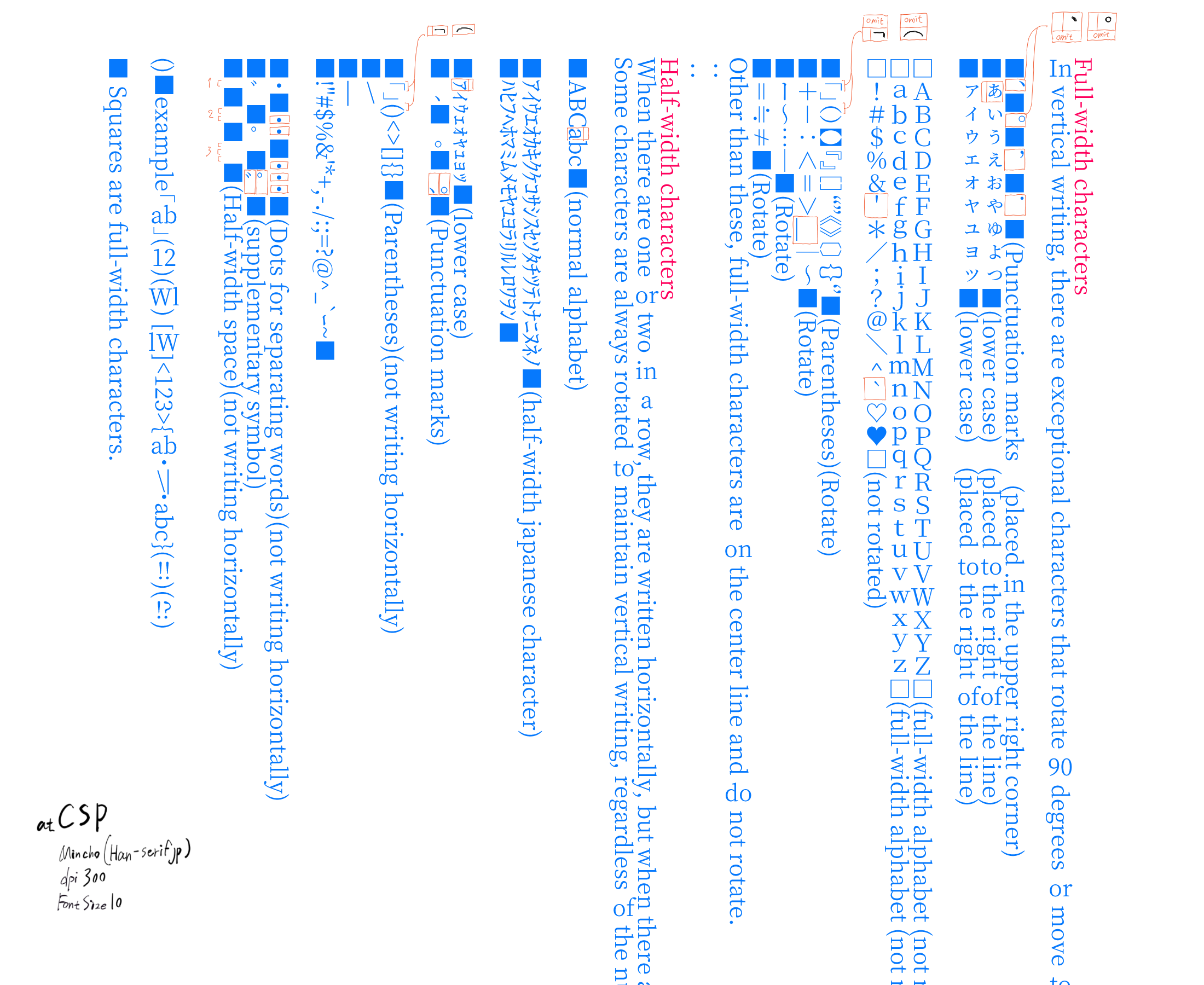
Clip Studio’s Japanese vertical writing function
Handling of full-width and half-width characters

Full-width characters 
In vertical writing, there are exceptional characters that rotate 90 degrees or move to a special position.

■、■。■,■.■(Punctuation marks (placed in the upper right corner)
■ぁぃぅぇぉゃゅょっ■(lower case) (placed to the right of the line)
■ァィゥェォャュョッ■(lower case) (placed to the right of the line)

□ABCDEFGHIJKLMNOPQRSTUVWXYZ□(full-width alphabet (not rotated))
□abcdefghijklmnopqrstuvwxyz□(full-width alphabet (not rotated))
□!#$%&'*/;?@\^`♡♥□(not rotated)

■「」()【】『』[]“”《》〔〕{}‘’■(Parentheses)(Rotate)
■+-:<=>_|~■(Rotate)
■ー~…―■(Rotate)
■=≒≠■(Rotate)
Other than these, full-width characters are on the center line and do not rotate.
:
:
Half-width characters
When there are one or two in a row, they are written horizontally, but when there are three or more in a row, they are rotated 90 degrees and written vertically.
Some characters are always rotated to maintain vertical writing, regardless of the number of characters.

■ABCabc■(normal alphabet)

■アイウエオカキクケコサシスセソタチツテトナニヌネノ■(half-width japanese character)
■ハヒフヘホマミムメモヤユヨラリルレロワヲン■

■ァィゥェォャュョッ■(lower case)
■、■。■、。■(Punctuation marks)

■「」()<>[]{}■(Parentheses)(not writing horizontally)
■\
■|
■!"#$%&'*+,-./:;=?@^_`ー~■

■・■・・■・・・■(Dots for separating words)(not writing horizontally)
■゙■゚■゙゚■(supplementary symbol)
■ ■  ■   ■(Half-width space)(not writing horizontally)


()■example「ab」(12)(Wl) [lW]<123>{ab・\|・abc}(!!)(!?)

■ Squares are full-width characters.

There are so many that there may be mistakes, but this is how they are handled.
Numbers, alphabets, and !,? , () are often used, while other half-width characters are rarely used in vertical writing.

Postscript
I used up all my energy making the list, so I’ll reply a while later. I don’t even know how to save a map.

1 Like

Copy it into notepad and save. Then put the path in the script.

I’ll look over your example and will try to recreate it, though part of the image got cut off?

1 Like

The only thing that’s cut out is the description, so you can ignore it.
https://github.com/dk8479/test-text/releases/tag/text
I’ll put the shortened raw text file here. I rarely use github, so I hope I’ve put it up correctly.

I saved the map file as text in the pyKrita folder, rewrote the path part of the script passed to me, and ran it. I got the following error

AttributeError
Python 3.8.1: C:\Program Files\Krita (x64)\bin\krita.exe
Fri Aug 13 15:15:46 2021

A problem occurred in a Python script.  Here is the sequence of
function calls leading up to the error, in the order they occurred.

 C:\Program Files\Krita (x64)\share\krita\pykrita\scripter\ui_scripter\actions\runaction\runaction.py in run(self=<scripter.ui_scripter.actions.runaction.runaction.RunAction object>)
   95             type_, value_, traceback_ = sys.exc_info()
   96             if type_ == SyntaxError:
   97                 errorMessage = "%s\n%s" % (value_.text.rstrip(), " " * (value_.offset - 1) + "^")
   98                 # rstrip to remove trailing \n, output needs to be fixed width font for the ^ to align correctly
   99                 errorText = "Syntax Error on line %s" % value_.lineno
errorMessage undefined
value_ = SyntaxError("(unicode error) 'unicodeescape' cod... \\UXXXXXXXX escape", ('<string>', 17, 17, None))
value_.text = None
value_.text.rstrip undefined
value_.offset = 17
AttributeError: 'NoneType' object has no attribute 'rstrip'
    __cause__ = None
    __class__ = <class 'AttributeError'>
    __context__ = SyntaxError("(unicode error) 'unicodeescape' cod... \\UXXXXXXXX escape", ('<string>', 17, 17, None))
    __delattr__ = <method-wrapper '__delattr__' of AttributeError object>
    __dict__ = {}
    __dir__ = <built-in method __dir__ of AttributeError object>
    __doc__ = 'Attribute not found.'
    __eq__ = <method-wrapper '__eq__' of AttributeError object>
    __format__ = <built-in method __format__ of AttributeError object>
    __ge__ = <method-wrapper '__ge__' of AttributeError object>
    __getattribute__ = <method-wrapper '__getattribute__' of AttributeError object>
    __gt__ = <method-wrapper '__gt__' of AttributeError object>
    __hash__ = <method-wrapper '__hash__' of AttributeError object>
    __init__ = <method-wrapper '__init__' of AttributeError object>
    __init_subclass__ = <built-in method __init_subclass__ of type object>
    __le__ = <method-wrapper '__le__' of AttributeError object>
    __lt__ = <method-wrapper '__lt__' of AttributeError object>
    __ne__ = <method-wrapper '__ne__' of AttributeError object>
    __new__ = <built-in method __new__ of type object>
    __reduce__ = <built-in method __reduce__ of AttributeError object>
    __reduce_ex__ = <built-in method __reduce_ex__ of AttributeError object>
    __repr__ = <method-wrapper '__repr__' of AttributeError object>
    __setattr__ = <method-wrapper '__setattr__' of AttributeError object>
    __setstate__ = <built-in method __setstate__ of AttributeError object>
    __sizeof__ = <built-in method __sizeof__ of AttributeError object>
    __str__ = <method-wrapper '__str__' of AttributeError object>
    __subclasshook__ = <built-in method __subclasshook__ of type object>
    __suppress_context__ = False
    __traceback__ = <traceback object>
    args = ("'NoneType' object has no attribute 'rstrip'",)
    with_traceback = <built-in method with_traceback of AttributeError object>

The above is a description of an error in a Python program.  Here is
the original traceback:

Traceback (most recent call last):
  File "C:\Program Files\Krita (x64)\share\krita\pykrita\scripter\ui_scripter\actions\runaction\runaction.py", line 82, in run
    code = compile(script, '<string>', 'exec')
  File "<string>", line 17
SyntaxError: (unicode error) 'unicodeescape' codec can't decode bytes in position 2-3: truncated \UXXXXXXXX escape

During handling of the above exception, another exception occurred:

Traceback (most recent call last):
  File "C:\Program Files\Krita (x64)\share\krita\pykrita\scripter\ui_scripter\actions\runaction\runaction.py", line 97, in run
    errorMessage = "%s\n%s" % (value_.text.rstrip(), " " * (value_.offset - 1) + "^")
AttributeError: 'NoneType' object has no attribute 'rstrip'


So from my understanding, how novels handle things and how manga handle things is different. So probably the novel version is the correct one, and the CSP one is a condensed one. Does novel also put 2 characters together like that?

It depends on the software. Primitive software doesn’t combine the characters, it just displays them one by one, and novels tend to use that method. So if you combine two characters in a novel and insert them in a vertical line, you are not writing incorrectly. It’s not that there is a right way to write, it’s just that there are two styles: the primitive style and the condensed style which is useful when you want to cram in more characters.

1 Like

okay, it gets included as part of the copy and paste.

It is fine, but for things like a single text file, gists are better. Less hassle for you too.

Are you using slashes like "", that is an escape char and in that case you gotta do \ so c:\ turns into c:\

Okay, I think I got the general idea on how to make it work, just need to test a few things first.

1 Like

I don’t have much time today, so I’ll just post a shortened version of the image for now, if the description affects the text line.

1 Like

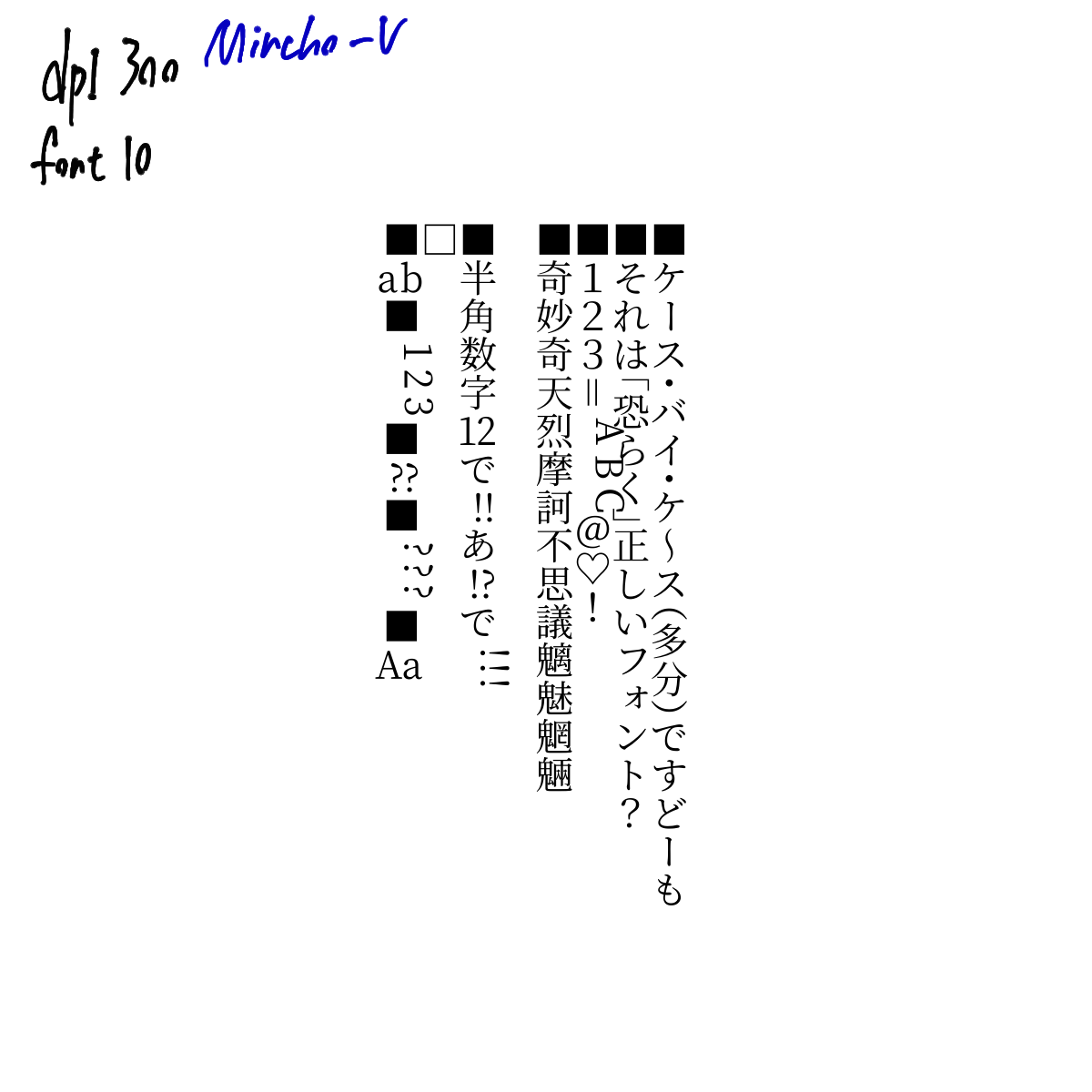
I finally got it running.

■あっとまーく、はんにゃしんぎょう。
■ケース・バイ・ケ~ス(多分)ですどーも
■それは「恐らく」正しいフォント?
■123=ABC@♡!
■奇妙奇天烈摩訶不思議魑魅魍魎

■半角数字12で!!あ!?で!!!
□
■ab■123■??■???■Aa

And output.

==== Warning: Script not saved! ====
cont None
<string>:140: DeprecationWarning: an integer is required (got type float).  Implicit conversion to integers using __int__ is deprecated, and may be removed in a future version of Python.
<string>:164: DeprecationWarning: an integer is required (got type float).  Implicit conversion to integers using __int__ is deprecated, and may be removed in a future version of Python.
Font Metrics 源ノ明朝 Vertical 10.08 32.109375 13.609375 0.640625 0.125 -12.960999999999999 -0.8969999999999999 ascent 14.953125 9.46875 18.65625 xheight 6.671875 0.0 18.65625 3.703125
PyQt5.QtCore.QRectF(1.25, -1.578125, 1.734375, 1.75) PyQt5.QtCore.QRectF(0.671875, -6.875, 6.359375, 7.0625) 7.328125
RL ■ 0x25a0 {'charwidth': 2, 'charmode': 2}
■ 17.0 17.0 > 5.310235507246377
RL ケ 0x30b1 {'charwidth': 2, 'charmode': 2, 'name': 'Katakana'}
ケ 17.0 17.0 > 5.310235507246377
RL ー 0x30fc {'charwidth': 2, 'charmode': 2, 'name': 'Katakana'}
ー 17.0 16.0 > 5.310235507246377
RL ス 0x30b9 {'charwidth': 2, 'charmode': 2, 'name': 'Katakana'}
ス 17.0 17.0 > 5.310235507246377
RL ・ 0x30fb {'charwidth': 2, 'charmode': 2, 'fw_height': '[height]/1.33', 'name': 'middle dot'}
・ 17.0 17.0 > 5.310235507246377
RL バ 0x30d0 {'charwidth': 2, 'charmode': 2, 'name': 'Katakana'}
バ 17.0 17.0 > 5.310235507246377
RL イ 0x30a4 {'charwidth': 2, 'charmode': 2, 'name': 'Katakana'}
イ 17.0 17.0 > 5.310235507246377
RL ・ 0x30fb {'charwidth': 2, 'charmode': 2, 'fw_height': '[height]/1.33', 'name': 'middle dot'}
・ 17.0 17.0 > 5.310235507246377
RL ケ 0x30b1 {'charwidth': 2, 'charmode': 2, 'name': 'Katakana'}
ケ 17.0 17.0 > 5.310235507246377
RL ~ 0xff5e {'charwidth': 2, 'charmode': 2, 'name': 'FullWidth Alphanumeric'}
~ 17.0 17.0 > 5.310235507246377
RL ス 0x30b9 {'charwidth': 2, 'charmode': 2, 'name': 'Katakana'}
ス 17.0 17.0 > 5.310235507246377
RL ( 0xff08 {'charwidth': 2, 'charmode': 2, 'fw_height': '[height]/2', 'name': 'open parantheses'}
( 17.0 17.0 > 5.310235507246377
RL 多 0x591a {'charwidth': 2, 'charmode': 2, 'name': 'Kanji'}
多 17.0 17.0 > 5.310235507246377
RL 分 0x5206 {'charwidth': 2, 'charmode': 2, 'name': 'Kanji'}
分 17.0 17.0 > 5.310235507246377
RL ) 0xff09 {'charwidth': 2, 'charmode': 2, 'name': 'FullWidth Alphanumeric'}
) 17.0 17.0 > 5.310235507246377
RL で 0x3067 {'charwidth': 2, 'charmode': 2, 'name': 'Hiragana'}
で 17.0 17.0 > 5.310235507246377
RL す 0x3059 {'charwidth': 2, 'charmode': 2, 'name': 'Hiragana'}
す 17.0 17.0 > 5.310235507246377
RL ど 0x3069 {'charwidth': 2, 'charmode': 2, 'name': 'Hiragana'}
ど 17.0 17.0 > 5.310235507246377
RL ー 0x30fc {'charwidth': 2, 'charmode': 2, 'name': 'Katakana'}
ー 17.0 17.0 > 5.310235507246377
RL も 0x3082 {'charwidth': 2, 'charmode': 2, 'name': 'Hiragana'}
も 17.0 17.0 > 5.310235507246377
hw ■ 0 0
HO ■ 14.953125 PyQt5.QtCore.QRectF(1.296875, -10.140625, 10.40625, 10.40625) PyQt5.QtCore.QRectF(0.0, 0.0, 17.0, 25.0)
hw ケ 0 0
HO ケ 14.953125 PyQt5.QtCore.QRectF(1.4375, -10.0, 10.078125, 10.34375) PyQt5.QtCore.QRectF(0.0, 0.0, 17.0, 25.0)
hw ー 0 0
HO ー 14.953125 PyQt5.QtCore.QRectF(5.0625, -9.734375, 2.25, 9.875) PyQt5.QtCore.QRectF(0.0, 0.0, 16.0, 25.0)
hw ス 0 0
HO ス 14.953125 PyQt5.QtCore.QRectF(1.203125, -8.84375, 10.09375, 8.84375) PyQt5.QtCore.QRectF(0.0, 0.0, 17.0, 25.0)
hw ・ 0 0
HO ・ 14.953125 PyQt5.QtCore.QRectF(5.296875, -6.140625, 2.40625, 6.140625) PyQt5.QtCore.QRectF(0.0, 0.0, 17.0, 25.0)
SOLVE ・ 10.08 10.08/1.33
hw バ 0 0
HO バ 14.953125 PyQt5.QtCore.QRectF(0.609375, -9.28125, 11.3125, 9.28125) PyQt5.QtCore.QRectF(0.0, 0.0, 17.0, 25.0)
SOLVE バ 10.08 10.08/1.33
hw イ 0 0
HO イ 14.953125 PyQt5.QtCore.QRectF(1.671875, -9.859375, 7.921875, 10.3125) PyQt5.QtCore.QRectF(0.0, 0.0, 17.0, 25.0)
hw ・ 0 0
HO ・ 14.953125 PyQt5.QtCore.QRectF(5.296875, -6.140625, 2.40625, 6.140625) PyQt5.QtCore.QRectF(0.0, 0.0, 17.0, 25.0)
SOLVE ・ 10.08 10.08/1.33
hw ケ 0 0
HO ケ 14.953125 PyQt5.QtCore.QRectF(1.4375, -10.0, 10.078125, 10.34375) PyQt5.QtCore.QRectF(0.0, 0.0, 17.0, 25.0)
SOLVE ケ 10.08 10.08/1.33
hw ~ 0 0
HO ~ 14.953125 PyQt5.QtCore.QRectF(5.234375, -10.796875, 2.546875, 11.71875) PyQt5.QtCore.QRectF(0.0, 0.0, 17.0, 25.0)
hw ス 0 0
HO ス 14.953125 PyQt5.QtCore.QRectF(1.203125, -8.84375, 10.09375, 8.84375) PyQt5.QtCore.QRectF(0.0, 0.0, 17.0, 25.0)
hw ( 0 0
HO ( 14.953125 PyQt5.QtCore.QRectF(0.40625, -3.0, 12.1875, 3.734375) PyQt5.QtCore.QRectF(0.0, 0.0, 17.0, 25.0)
SOLVE ( 10.08 10.08/2
hw 多 0 0
HO 多 14.953125 PyQt5.QtCore.QRectF(0.6875, -10.96875, 11.75, 11.96875) PyQt5.QtCore.QRectF(0.0, 0.0, 17.0, 25.0)
hw 分 0 0
HO 分 14.953125 PyQt5.QtCore.QRectF(0.515625, -10.921875, 12.15625, 11.9375) PyQt5.QtCore.QRectF(0.0, 0.0, 17.0, 25.0)
hw ) 0 0
HO ) 14.953125 PyQt5.QtCore.QRectF(0.40625, -10.625, 12.1875, 10.625) PyQt5.QtCore.QRectF(0.0, 0.0, 17.0, 25.0)
hw で 0 0
HO で 14.953125 PyQt5.QtCore.QRectF(0.84375, -9.125, 11.109375, 9.125) PyQt5.QtCore.QRectF(0.0, 0.0, 17.0, 25.0)
SOLVE で 10.08 10.08/2
hw す 0 0
HO す 14.953125 PyQt5.QtCore.QRectF(1.234375, -10.015625, 10.84375, 10.765625) PyQt5.QtCore.QRectF(0.0, 0.0, 17.0, 25.0)
hw ど 0 0
HO ど 14.953125 PyQt5.QtCore.QRectF(2.6875, -10.171875, 9.5625, 10.578125) PyQt5.QtCore.QRectF(0.0, 0.0, 17.0, 25.0)
hw ー 0 0
HO ー 14.953125 PyQt5.QtCore.QRectF(5.0625, -9.734375, 2.25, 9.875) PyQt5.QtCore.QRectF(0.0, 0.0, 17.0, 25.0)
hw も 0 0
HO も 14.953125 PyQt5.QtCore.QRectF(2.625, -10.078125, 7.828125, 10.609375) PyQt5.QtCore.QRectF(0.0, 0.0, 17.0, 25.0)
RL ■ 0x25a0 {'charwidth': 2, 'charmode': 2}
■ 17.0 17.0 > 5.310235507246377
RL そ 0x305d {'charwidth': 2, 'charmode': 2, 'name': 'Hiragana'}
そ 17.0 17.0 > 5.310235507246377
RL れ 0x308c {'charwidth': 2, 'charmode': 2, 'name': 'Hiragana'}
れ 17.0 17.0 > 5.310235507246377
RL は 0x306f {'charwidth': 2, 'charmode': 2, 'name': 'Hiragana'}
は 17.0 17.0 > 5.310235507246377
RL 「 0x300c {'charwidth': 2, 'charmode': 2, 'fw_height': '[height]/2', 'name': 'open parantheses'}
「 17.0 17.0 > 5.310235507246377
RL 恐 0x6050 {'charwidth': 2, 'charmode': 2, 'name': 'Kanji'}
恐 17.0 17.0 > 5.310235507246377
RL ら 0x3089 {'charwidth': 2, 'charmode': 2, 'name': 'Hiragana'}
ら 17.0 17.0 > 5.310235507246377
RL く 0x304f {'charwidth': 2, 'charmode': 2, 'name': 'Hiragana'}
く 17.0 17.0 > 5.310235507246377
RL 」 0x300d {'charwidth': 2, 'charmode': 2, 'name': 'punctuation'}
」 17.0 17.0 > 5.310235507246377
RL 正 0x6b63 {'charwidth': 2, 'charmode': 2, 'name': 'Kanji'}
正 17.0 17.0 > 5.310235507246377
RL し 0x3057 {'charwidth': 2, 'charmode': 2, 'name': 'Hiragana'}
し 17.0 17.0 > 5.310235507246377
RL い 0x3044 {'charwidth': 2, 'charmode': 2, 'name': 'Hiragana'}
い 17.0 17.0 > 5.310235507246377
RL フ 0x30d5 {'charwidth': 2, 'charmode': 2, 'name': 'Katakana'}
フ 17.0 16.0 > 5.310235507246377
RL ォ 0x30a9 {'charwidth': 2, 'charmode': 2, 'name': 'Katakana'}
ォ 17.0 17.0 > 5.310235507246377
RL ン 0x30f3 {'charwidth': 2, 'charmode': 2, 'name': 'Katakana'}
ン 17.0 17.0 > 5.310235507246377
RL ト 0x30c8 {'charwidth': 2, 'charmode': 2, 'name': 'Katakana'}
ト 17.0 17.0 > 5.310235507246377
RL ? 0xff1f {'charwidth': 2, 'charmode': 2, 'name': 'FullWidth Alphanumeric'}
? 17.0 17.0 > 5.310235507246377
hw ■ 0 0
HO ■ 14.953125 PyQt5.QtCore.QRectF(1.296875, -10.140625, 10.40625, 10.40625) PyQt5.QtCore.QRectF(0.0, 0.0, 17.0, 25.0)
hw そ 0 0
HO そ 14.953125 PyQt5.QtCore.QRectF(1.578125, -9.859375, 9.734375, 10.390625) PyQt5.QtCore.QRectF(0.0, 0.0, 17.0, 25.0)
hw れ 0 0
HO れ 14.953125 PyQt5.QtCore.QRectF(0.859375, -10.140625, 11.890625, 10.703125) PyQt5.QtCore.QRectF(0.0, 0.0, 17.0, 25.0)
hw は 0 0
HO は 14.953125 PyQt5.QtCore.QRectF(1.59375, -9.703125, 10.4375, 10.09375) PyQt5.QtCore.QRectF(0.0, 0.0, 17.0, 25.0)
hw 「 0 0
HO 「 14.953125 PyQt5.QtCore.QRectF(3.390625, -2.90625, 9.296875, 4.0) PyQt5.QtCore.QRectF(0.0, 0.0, 17.0, 25.0)
SOLVE 「 10.08 10.08/2
hw 恐 0 0
HO 恐 14.953125 PyQt5.QtCore.QRectF(0.515625, -10.625, 11.953125, 11.375) PyQt5.QtCore.QRectF(0.0, 0.0, 17.0, 25.0)
hw ら 0 0
HO ら 14.953125 PyQt5.QtCore.QRectF(2.8125, -9.96875, 8.125, 10.46875) PyQt5.QtCore.QRectF(0.0, 0.0, 17.0, 25.0)
hw く 0 0
HO く 14.953125 PyQt5.QtCore.QRectF(3.578125, -10.265625, 5.140625, 10.984375) PyQt5.QtCore.QRectF(0.0, 0.0, 17.0, 25.0)
hw 」 0 0
HO 」 14.953125 PyQt5.QtCore.QRectF(0.3125, -10.90625, 9.296875, 10.90625) PyQt5.QtCore.QRectF(0.0, 0.0, 17.0, 25.0)
hw 正 0 0
HO 正 14.953125 PyQt5.QtCore.QRectF(0.546875, -10.546875, 11.953125, 10.9375) PyQt5.QtCore.QRectF(0.0, 0.0, 17.0, 25.0)
SOLVE 正 10.08 10.08/2
hw し 0 0
HO し 14.953125 PyQt5.QtCore.QRectF(2.859375, -9.6875, 8.53125, 10.109375) PyQt5.QtCore.QRectF(0.0, 0.0, 17.0, 25.0)
hw い 0 0
HO い 14.953125 PyQt5.QtCore.QRectF(1.1875, -8.78125, 10.578125, 8.78125) PyQt5.QtCore.QRectF(0.0, 0.0, 17.0, 25.0)
hw フ 0 0
HO フ 14.953125 PyQt5.QtCore.QRectF(2.46875, -8.8125, 8.578125, 8.96875) PyQt5.QtCore.QRectF(0.0, 0.0, 16.0, 25.0)
hw ォ 0 0
HO ォ 14.953125 PyQt5.QtCore.QRectF(4.484375, -8.984375, 7.765625, 8.984375) PyQt5.QtCore.QRectF(0.0, 0.0, 17.0, 25.0)
hw ン 0 0
HO ン 14.953125 PyQt5.QtCore.QRectF(2.46875, -8.796875, 9.203125, 8.796875) PyQt5.QtCore.QRectF(0.0, 0.0, 17.0, 25.0)
hw ト 0 0
HO ト 14.953125 PyQt5.QtCore.QRectF(4.265625, -9.765625, 5.75, 10.171875) PyQt5.QtCore.QRectF(0.0, 0.0, 17.0, 25.0)
hw ? 0 0
HO ? 14.953125 PyQt5.QtCore.QRectF(3.203125, -9.953125, 6.09375, 10.125) PyQt5.QtCore.QRectF(0.0, 0.0, 17.0, 25.0)
RL ■ 0x25a0 {'charwidth': 2, 'charmode': 2}
■ 17.0 17.0 > 5.310235507246377
RL 1 0xff11 {'charwidth': 2, 'charmode': 2, 'name': 'FullWidth Alphanumeric'}
1 17.0 17.0 > 5.310235507246377
RL 2 0xff12 {'charwidth': 2, 'charmode': 2, 'name': 'FullWidth Alphanumeric'}
2 17.0 17.0 > 5.310235507246377
RL 3 0xff13 {'charwidth': 2, 'charmode': 2, 'name': 'FullWidth Alphanumeric'}
3 17.0 17.0 > 5.310235507246377
RL = 0xff1d {'charwidth': 2, 'charmode': 2, 'name': 'FullWidth Alphanumeric'}
= 17.0 17.0 > 5.310235507246377
RL A 0x41 {'charwidth': 1, 'charmode': 2, 'name': 'Latin'}
A 17.0 12.0 > 5.310235507246377
A 1 1
RL B 0x42 {'charwidth': 1, 'charmode': 2, 'name': 'Latin'}
B 17.0 11.0 > 5.310235507246377
B 1 2
RL C 0x43 {'charwidth': 1, 'charmode': 2, 'name': 'Latin'}
C 17.0 12.0 > 5.310235507246377
C 1 3
RL @ 0xff20 {'charwidth': 2, 'charmode': 2, 'name': 'FullWidth Alphanumeric'}
@ 17.0 17.0 > 5.310235507246377
RL ♡ 0x2661 {'charwidth': 2, 'charmode': 2}
♡ 17.0 17.0 > 5.310235507246377
RL ! 0xff01 {'charwidth': 2, 'charmode': 2, 'name': 'FullWidth Alphanumeric'}
! 17.0 17.0 > 5.310235507246377
hw ■ 0 0
HO ■ 14.953125 PyQt5.QtCore.QRectF(1.296875, -10.140625, 10.40625, 10.40625) PyQt5.QtCore.QRectF(0.0, 0.0, 17.0, 25.0)
hw 1 0 0
HO 1 14.953125 PyQt5.QtCore.QRectF(3.703125, -9.890625, 5.765625, 9.90625) PyQt5.QtCore.QRectF(0.0, 0.0, 17.0, 25.0)
hw 2 0 0
HO 2 14.953125 PyQt5.QtCore.QRectF(3.28125, -9.953125, 6.5625, 9.96875) PyQt5.QtCore.QRectF(0.0, 0.0, 17.0, 25.0)
hw 3 0 0
HO 3 14.953125 PyQt5.QtCore.QRectF(3.328125, -9.953125, 6.375, 10.203125) PyQt5.QtCore.QRectF(0.0, 0.0, 17.0, 25.0)
hw = 0 0
HO = 14.953125 PyQt5.QtCore.QRectF(4.71875, -9.5, 3.25, 9.5) PyQt5.QtCore.QRectF(0.0, 0.0, 17.0, 25.0)
hw A 1 3
M A PyQt5.QtCore.QSizeF(21.0, 18.65625) PyQt5.QtCore.QRectF(0.09375, -9.578125, 9.140625, 9.59375) height 7.943925233644859 9.34375 0.09375 0.109375
hw B 1 3
M B PyQt5.QtCore.QSizeF(21.0, 18.65625) PyQt5.QtCore.QRectF(0.671875, -9.484375, 7.453125, 9.5) height 9.600000000000001 8.765625 0.671875 0.640625
hw C 1 3
M C PyQt5.QtCore.QSizeF(21.0, 18.65625) PyQt5.QtCore.QRectF(0.703125, -9.703125, 7.640625, 9.921875) height 8.8 8.96875 0.703125 0.625
hw @ 0 0
HO @ 14.953125 PyQt5.QtCore.QRectF(1.15625, -9.953125, 10.921875, 11.09375) PyQt5.QtCore.QRectF(0.0, 0.0, 17.0, 25.0)
hw ♡ 0 0
HO ♡ 14.953125 PyQt5.QtCore.QRectF(1.0, -10.375, 11.015625, 10.9375) PyQt5.QtCore.QRectF(0.0, 0.0, 17.0, 25.0)
hw ! 0 0
HO ! 14.953125 PyQt5.QtCore.QRectF(5.671875, -9.953125, 1.65625, 10.125) PyQt5.QtCore.QRectF(0.0, 0.0, 17.0, 25.0)
RL ■ 0x25a0 {'charwidth': 2, 'charmode': 2}
■ 17.0 17.0 > 5.310235507246377
RL 奇 0x5947 {'charwidth': 2, 'charmode': 2, 'name': 'Kanji'}
奇 17.0 17.0 > 5.310235507246377
RL 妙 0x5999 {'charwidth': 2, 'charmode': 2, 'name': 'Kanji'}
妙 17.0 17.0 > 5.310235507246377
RL 奇 0x5947 {'charwidth': 2, 'charmode': 2, 'name': 'Kanji'}
奇 17.0 17.0 > 5.310235507246377
RL 天 0x5929 {'charwidth': 2, 'charmode': 2, 'name': 'Kanji'}
天 17.0 17.0 > 5.310235507246377
RL 烈 0x70c8 {'charwidth': 2, 'charmode': 2, 'name': 'Kanji'}
烈 17.0 17.0 > 5.310235507246377
RL 摩 0x6469 {'charwidth': 2, 'charmode': 2, 'name': 'Kanji'}
摩 17.0 17.0 > 5.310235507246377
RL 訶 0x8a36 {'charwidth': 2, 'charmode': 2, 'name': 'Kanji'}
訶 17.0 17.0 > 5.310235507246377
RL 不 0x4e0d {'charwidth': 2, 'charmode': 2, 'name': 'Kanji'}
不 17.0 17.0 > 5.310235507246377
RL 思 0x601d {'charwidth': 2, 'charmode': 2, 'name': 'Kanji'}
思 17.0 17.0 > 5.310235507246377
RL 議 0x8b70 {'charwidth': 2, 'charmode': 2, 'name': 'Kanji'}
議 17.0 17.0 > 5.310235507246377
RL 魑 0x9b51 {'charwidth': 2, 'charmode': 2, 'name': 'Kanji'}
魑 17.0 17.0 > 5.310235507246377
RL 魅 0x9b45 {'charwidth': 2, 'charmode': 2, 'name': 'Kanji'}
魅 17.0 17.0 > 5.310235507246377
RL 魍 0x9b4d {'charwidth': 2, 'charmode': 2, 'name': 'Kanji'}
魍 17.0 17.0 > 5.310235507246377
RL 魎 0x9b4e {'charwidth': 2, 'charmode': 2, 'name': 'Kanji'}
魎 17.0 17.0 > 5.310235507246377
hw ■ 0 0
HO ■ 14.953125 PyQt5.QtCore.QRectF(1.296875, -10.140625, 10.40625, 10.40625) PyQt5.QtCore.QRectF(0.0, 0.0, 17.0, 25.0)
hw 奇 0 0
HO 奇 14.953125 PyQt5.QtCore.QRectF(0.546875, -10.90625, 11.921875, 11.921875) PyQt5.QtCore.QRectF(0.0, 0.0, 17.0, 25.0)
hw 妙 0 0
HO 妙 14.953125 PyQt5.QtCore.QRectF(0.46875, -10.859375, 12.109375, 11.890625) PyQt5.QtCore.QRectF(0.0, 0.0, 17.0, 25.0)
hw 奇 0 0
HO 奇 14.953125 PyQt5.QtCore.QRectF(0.546875, -10.90625, 11.921875, 11.921875) PyQt5.QtCore.QRectF(0.0, 0.0, 17.0, 25.0)
hw 天 0 0
HO 天 14.953125 PyQt5.QtCore.QRectF(0.515625, -10.4375, 12.03125, 11.484375) PyQt5.QtCore.QRectF(0.0, 0.0, 17.0, 25.0)
hw 烈 0 0
HO 烈 14.953125 PyQt5.QtCore.QRectF(0.53125, -10.734375, 11.796875, 11.84375) PyQt5.QtCore.QRectF(0.0, 0.0, 17.0, 25.0)
hw 摩 0 0
HO 摩 14.953125 PyQt5.QtCore.QRectF(0.40625, -10.90625, 12.140625, 11.9375) PyQt5.QtCore.QRectF(0.0, 0.0, 17.0, 25.0)
hw 訶 0 0
HO 訶 14.953125 PyQt5.QtCore.QRectF(0.453125, -10.75, 12.1875, 11.734375) PyQt5.QtCore.QRectF(0.0, 0.0, 17.0, 25.0)
hw 不 0 0
HO 不 14.953125 PyQt5.QtCore.QRectF(0.453125, -10.65625, 11.890625, 11.640625) PyQt5.QtCore.QRectF(0.0, 0.0, 17.0, 25.0)
hw 思 0 0
HO 思 14.953125 PyQt5.QtCore.QRectF(0.578125, -10.640625, 11.96875, 11.4375) PyQt5.QtCore.QRectF(0.0, 0.0, 17.0, 25.0)
hw 議 0 0
HO 議 14.953125 PyQt5.QtCore.QRectF(0.46875, -10.96875, 12.046875, 12.0) PyQt5.QtCore.QRectF(0.0, 0.0, 17.0, 25.0)
hw 魑 0 0
HO 魑 14.953125 PyQt5.QtCore.QRectF(0.375, -10.9375, 12.09375, 11.96875) PyQt5.QtCore.QRectF(0.0, 0.0, 17.0, 25.0)
hw 魅 0 0
HO 魅 14.953125 PyQt5.QtCore.QRectF(0.421875, -10.921875, 12.171875, 11.953125) PyQt5.QtCore.QRectF(0.0, 0.0, 17.0, 25.0)
hw 魍 0 0
HO 魍 14.953125 PyQt5.QtCore.QRectF(0.375, -10.9375, 12.09375, 11.96875) PyQt5.QtCore.QRectF(0.0, 0.0, 17.0, 25.0)
hw 魎 0 0
HO 魎 14.953125 PyQt5.QtCore.QRectF(0.375, -10.9375, 12.09375, 11.96875) PyQt5.QtCore.QRectF(0.0, 0.0, 17.0, 25.0)
RL ■ 0x25a0 {'charwidth': 2, 'charmode': 2}
■ 17.0 17.0 > 5.310235507246377
RL 半 0x534a {'charwidth': 2, 'charmode': 2, 'name': 'Kanji'}
半 17.0 17.0 > 5.310235507246377
RL 角 0x89d2 {'charwidth': 2, 'charmode': 2, 'name': 'Kanji'}
角 17.0 17.0 > 5.310235507246377
RL 数 0x6570 {'charwidth': 2, 'charmode': 2, 'name': 'Kanji'}
数 17.0 17.0 > 5.310235507246377
RL 字 0x5b57 {'charwidth': 2, 'charmode': 2, 'name': 'Kanji'}
字 17.0 17.0 > 5.310235507246377
RL 1 0x31 {'charwidth': 1, 'charmode': 2, 'name': 'Latin'}
1 17.0 9.0 > 5.310235507246377
1 1 1
RL 2 0x32 {'charwidth': 1, 'charmode': 2, 'name': 'Latin'}
2 17.0 9.0 > 5.310235507246377
2 1 2
RL で 0x3067 {'charwidth': 2, 'charmode': 2, 'name': 'Hiragana'}
で 17.0 17.0 > 5.310235507246377
RL ! 0x21 {'charwidth': 1, 'charmode': 2, 'name': 'Latin'}
! 17.0 5.0 > 5.310235507246377
! 2 1
RL ! 0x21 {'charwidth': 1, 'charmode': 2, 'name': 'Latin'}
! 17.0 5.0 > 5.310235507246377
! 2 2
RL あ 0x3042 {'charwidth': 2, 'charmode': 2, 'name': 'Hiragana'}
あ 17.0 17.0 > 5.310235507246377
RL ! 0x21 {'charwidth': 1, 'charmode': 2, 'name': 'Latin'}
! 17.0 5.0 > 5.310235507246377
! 3 1
RL ? 0x3f {'charwidth': 1, 'charmode': 2, 'name': 'Latin'}
? 17.0 7.0 > 5.310235507246377
? 3 2
RL で 0x3067 {'charwidth': 2, 'charmode': 2, 'name': 'Hiragana'}
で 17.0 17.0 > 5.310235507246377
RL ! 0x21 {'charwidth': 1, 'charmode': 2, 'name': 'Latin'}
! 17.0 5.0 > 5.310235507246377
! 4 1
RL ! 0x21 {'charwidth': 1, 'charmode': 2, 'name': 'Latin'}
! 17.0 5.0 > 5.310235507246377
! 4 2
RL ! 0x21 {'charwidth': 1, 'charmode': 2, 'name': 'Latin'}
! 17.0 5.0 > 5.310235507246377
! 4 3
hw ■ 0 0
HO ■ 14.953125 PyQt5.QtCore.QRectF(1.296875, -10.140625, 10.40625, 10.40625) PyQt5.QtCore.QRectF(0.0, 0.0, 17.0, 25.0)
hw 半 0 0
HO 半 14.953125 PyQt5.QtCore.QRectF(0.53125, -10.90625, 11.984375, 11.9375) PyQt5.QtCore.QRectF(0.0, 0.0, 17.0, 25.0)
hw 角 0 0
HO 角 14.953125 PyQt5.QtCore.QRectF(0.5, -10.921875, 10.953125, 11.921875) PyQt5.QtCore.QRectF(0.0, 0.0, 17.0, 25.0)
hw 数 0 0
HO 数 14.953125 PyQt5.QtCore.QRectF(0.4375, -10.90625, 12.234375, 11.953125) PyQt5.QtCore.QRectF(0.0, 0.0, 17.0, 25.0)
hw 字 0 0
HO 字 14.953125 PyQt5.QtCore.QRectF(0.609375, -10.9375, 11.859375, 11.96875) PyQt5.QtCore.QRectF(0.0, 0.0, 17.0, 25.0)
hw 1 1 2
hw で 0 0
HO で 14.953125 PyQt5.QtCore.QRectF(0.84375, -9.125, 11.109375, 9.125) PyQt5.QtCore.QRectF(0.0, 0.0, 17.0, 25.0)
hw ! 2 2
hw あ 0 0
HO あ 14.953125 PyQt5.QtCore.QRectF(1.734375, -10.125, 9.796875, 10.59375) PyQt5.QtCore.QRectF(0.0, 0.0, 17.0, 25.0)
hw ! 3 2
hw で 0 0
HO で 14.953125 PyQt5.QtCore.QRectF(0.84375, -9.125, 11.109375, 9.125) PyQt5.QtCore.QRectF(0.0, 0.0, 17.0, 25.0)
hw ! 4 3
M ! PyQt5.QtCore.QSizeF(21.0, 18.65625) PyQt5.QtCore.QRectF(1.15625, -9.71875, 1.625, 9.890625) height 7.943925233644859 3.9375 1.15625 1.15625
hw ! 4 3
M ! PyQt5.QtCore.QSizeF(21.0, 18.65625) PyQt5.QtCore.QRectF(1.15625, -9.71875, 1.625, 9.890625) height 4.0 3.9375 1.15625 1.15625
hw ! 4 3
M ! PyQt5.QtCore.QSizeF(21.0, 18.65625) PyQt5.QtCore.QRectF(1.15625, -9.71875, 1.625, 9.890625) height 4.0 3.9375 1.15625 1.15625
RL □ 0x25a1 {'charwidth': 2, 'charmode': 2}
□ 17.0 17.0 > 5.310235507246377
hw □ 0 0
HO □ 14.953125 PyQt5.QtCore.QRectF(1.296875, -10.140625, 10.40625, 10.40625) PyQt5.QtCore.QRectF(0.0, 0.0, 17.0, 25.0)
RL ■ 0x25a0 {'charwidth': 2, 'charmode': 2}
■ 17.0 17.0 > 5.310235507246377
RL a 0x61 {'charwidth': 1, 'charmode': 2, 'name': 'Latin'}
a 17.0 9.0 > 5.310235507246377
a 1 1
RL b 0x62 {'charwidth': 1, 'charmode': 2, 'name': 'Latin'}
b 17.0 11.0 > 5.310235507246377
b 1 2
RL ■ 0x25a0 {'charwidth': 2, 'charmode': 2}
■ 17.0 17.0 > 5.310235507246377
RL 1 0x31 {'charwidth': 1, 'charmode': 2, 'name': 'Latin'}
1 17.0 9.0 > 5.310235507246377
1 2 1
RL 2 0x32 {'charwidth': 1, 'charmode': 2, 'name': 'Latin'}
2 17.0 9.0 > 5.310235507246377
2 2 2
RL 3 0x33 {'charwidth': 1, 'charmode': 2, 'name': 'Latin'}
3 17.0 9.0 > 5.310235507246377
3 2 3
RL ■ 0x25a0 {'charwidth': 2, 'charmode': 2}
■ 17.0 17.0 > 5.310235507246377
RL ? 0x3f {'charwidth': 1, 'charmode': 2, 'name': 'Latin'}
? 17.0 7.0 > 5.310235507246377
? 3 1
RL ? 0x3f {'charwidth': 1, 'charmode': 2, 'name': 'Latin'}
? 17.0 7.0 > 5.310235507246377
? 3 2
RL ■ 0x25a0 {'charwidth': 2, 'charmode': 2}
■ 17.0 17.0 > 5.310235507246377
RL ? 0x3f {'charwidth': 1, 'charmode': 2, 'name': 'Latin'}
? 17.0 7.0 > 5.310235507246377
? 4 1
RL ? 0x3f {'charwidth': 1, 'charmode': 2, 'name': 'Latin'}
? 17.0 7.0 > 5.310235507246377
? 4 2
RL ? 0x3f {'charwidth': 1, 'charmode': 2, 'name': 'Latin'}
? 17.0 7.0 > 5.310235507246377
? 4 3
RL ■ 0x25a0 {'charwidth': 2, 'charmode': 2}
■ 17.0 17.0 > 5.310235507246377
RL A 0x41 {'charwidth': 1, 'charmode': 2, 'name': 'Latin'}
A 17.0 12.0 > 5.310235507246377
A 5 1
RL a 0x61 {'charwidth': 1, 'charmode': 2, 'name': 'Latin'}
a 17.0 9.0 > 5.310235507246377
a 5 2
hw ■ 0 0
HO ■ 14.953125 PyQt5.QtCore.QRectF(1.296875, -10.140625, 10.40625, 10.40625) PyQt5.QtCore.QRectF(0.0, 0.0, 17.0, 25.0)
hw a 1 2
hw ■ 0 0
HO ■ 14.953125 PyQt5.QtCore.QRectF(1.296875, -10.140625, 10.40625, 10.40625) PyQt5.QtCore.QRectF(0.0, 0.0, 17.0, 25.0)
hw 1 2 3
M 1 PyQt5.QtCore.QSizeF(21.0, 18.65625) PyQt5.QtCore.QRectF(1.078125, -9.609375, 5.140625, 9.625) height 7.943925233644859 7.0 1.078125 0.78125
hw 2 2 3
M 2 PyQt5.QtCore.QSizeF(21.0, 18.65625) PyQt5.QtCore.QRectF(0.625, -9.671875, 5.796875, 9.6875) height 7.2 7.0 0.625 0.578125
hw 3 2 3
M 3 PyQt5.QtCore.QSizeF(21.0, 18.65625) PyQt5.QtCore.QRectF(0.609375, -9.671875, 5.765625, 9.859375) height 7.2 7.0 0.609375 0.625
hw ■ 0 0
HO ■ 14.953125 PyQt5.QtCore.QRectF(1.296875, -10.140625, 10.40625, 10.40625) PyQt5.QtCore.QRectF(0.0, 0.0, 17.0, 25.0)
hw ? 3 2
hw ■ 0 0
HO ■ 14.953125 PyQt5.QtCore.QRectF(1.296875, -10.140625, 10.40625, 10.40625) PyQt5.QtCore.QRectF(0.0, 0.0, 17.0, 25.0)
hw ? 4 3
M ? PyQt5.QtCore.QSizeF(21.0, 18.65625) PyQt5.QtCore.QRectF(0.984375, -9.734375, 3.84375, 9.90625) height 7.943925233644859 5.6875 0.984375 0.859375
hw ? 4 3
M ? PyQt5.QtCore.QSizeF(21.0, 18.65625) PyQt5.QtCore.QRectF(0.984375, -9.734375, 3.84375, 9.90625) height 5.6000000000000005 5.6875 0.984375 0.859375
hw ? 4 3
M ? PyQt5.QtCore.QSizeF(21.0, 18.65625) PyQt5.QtCore.QRectF(0.984375, -9.734375, 3.84375, 9.90625) height 5.6000000000000005 5.6875 0.984375 0.859375
hw ■ 0 0
HO ■ 14.953125 PyQt5.QtCore.QRectF(1.296875, -10.140625, 10.40625, 10.40625) PyQt5.QtCore.QRectF(0.0, 0.0, 17.0, 25.0)
hw A 5 2
<?xml version="1.0" standalone="no"?>
<!DOCTYPE svg PUBLIC "-//W3C//DTD SVG 20010904//EN" "http://www.w3.org/TR/2001/REC-SVG-20010904/DTD/svg10.dtd">
<!-- Created using Krita: https://krita.org -->
<svg xmlns="http://www.w3.org/2000/svg" 
    xmlns:xlink="http://www.w3.org/1999/xlink"
    xmlns:krita="http://krita.org/namespaces/svg/krita"
    xmlns:sodipodi="http://sodipodi.sourceforge.net/DTD/sodipodi-0.dtd"
    width="5000.0pt"
    height="5000.0pt"
    viewBox="0 0 5000.0 5000.0">
<defs/><text id="vf_100.0_100.0_1628846628.9936872" transform = "" font-family="源ノ明朝 Vertical" font-size="10.0">
<tspan y="0">
</tspan>
<tspan y="0">
<tspan dy="0" x="82.22">■</tspan>
<tspan dy="10.08" x="82.22">ケ</tspan>
<tspan dy="10.08" x="82.72">ー</tspan>
<tspan dy="10.08" x="82.22">ス</tspan>
<tspan dy="7.578947368421052" x="82.22">・</tspan>
<tspan dy="7.578947368421052" x="82.22">バ</tspan>
<tspan dy="10.08" x="82.22">イ</tspan>
<tspan dy="7.578947368421052" x="82.22">・</tspan>
<tspan dy="7.578947368421052" x="82.22">ケ</tspan>
<tspan dy="10.08" x="82.22">~</tspan>
<tspan dy="10.08" x="82.22">ス</tspan>
<tspan dy="5.04" x="82.22">(</tspan>
<tspan dy="10.08" x="82.22">多</tspan>
<tspan dy="10.08" x="82.22">分</tspan>
<tspan dy="10.08" x="82.22">)</tspan>
<tspan dy="5.04" x="82.22">で</tspan>
<tspan dy="10.08" x="82.22">す</tspan>
<tspan dy="10.08" x="82.22">ど</tspan>
<tspan dy="10.08" x="82.22">ー</tspan>
<tspan dy="10.08" x="82.22">も</tspan>
</tspan>
<tspan y="0">
<tspan dy="0" x="72.14">■</tspan>
<tspan dy="10.08" x="72.14">そ</tspan>
<tspan dy="10.08" x="72.14">れ</tspan>
<tspan dy="10.08" x="72.14">は</tspan>
<tspan dy="5.04" x="72.14">「</tspan>
<tspan dy="10.08" x="72.14">恐</tspan>
<tspan dy="10.08" x="72.14">ら</tspan>
<tspan dy="10.08" x="72.14">く</tspan>
<tspan dy="10.08" x="72.14">」</tspan>
<tspan dy="5.04" x="72.14">正</tspan>
<tspan dy="10.08" x="72.14">し</tspan>
<tspan dy="10.08" x="72.14">い</tspan>
<tspan dy="10.08" x="72.64">フ</tspan>
<tspan dy="10.08" x="72.14">ォ</tspan>
<tspan dy="10.08" x="72.14">ン</tspan>
<tspan dy="10.08" x="72.14">ト</tspan>
<tspan dy="10.08" x="72.14">?</tspan>
</tspan>
<tspan y="0">
<tspan dy="0" x="62.06">■</tspan>
<tspan dy="10.08" x="62.06">1</tspan>
<tspan dy="10.08" x="62.06">2</tspan>
<tspan dy="10.08" x="62.06">3</tspan>
<tspan dy="10.08" x="62.06">=</tspan>
<tspan dy="7.943925233644859" x="67.84625" font-family="源ノ明朝 Rotated">A</tspan>
<tspan dy="9.600000000000001" x="67.268125" font-family="源ノ明朝 Rotated">B</tspan>
<tspan dy="8.8" x="67.236875" font-family="源ノ明朝 Rotated">C</tspan>
<tspan dy="10.08" x="62.06">@</tspan>
<tspan dy="10.08" x="62.06">♡</tspan>
<tspan dy="10.08" x="62.06">!</tspan>
</tspan>
<tspan y="0">
<tspan dy="0" x="51.980000000000004">■</tspan>
<tspan dy="10.08" x="51.980000000000004">奇</tspan>
<tspan dy="10.08" x="51.980000000000004">妙</tspan>
<tspan dy="10.08" x="51.980000000000004">奇</tspan>
<tspan dy="10.08" x="51.980000000000004">天</tspan>
<tspan dy="10.08" x="51.980000000000004">烈</tspan>
<tspan dy="10.08" x="51.980000000000004">摩</tspan>
<tspan dy="10.08" x="51.980000000000004">訶</tspan>
<tspan dy="10.08" x="51.980000000000004">不</tspan>
<tspan dy="10.08" x="51.980000000000004">思</tspan>
<tspan dy="10.08" x="51.980000000000004">議</tspan>
<tspan dy="10.08" x="51.980000000000004">魑</tspan>
<tspan dy="10.08" x="51.980000000000004">魅</tspan>
<tspan dy="10.08" x="51.980000000000004">魍</tspan>
<tspan dy="10.08" x="51.980000000000004">魎</tspan>
</tspan>
<tspan y="0">
</tspan>
<tspan y="0">
<tspan dy="0" x="31.820000000000007">■</tspan>
<tspan dy="10.08" x="31.820000000000007">半</tspan>
<tspan dy="10.08" x="31.820000000000007">角</tspan>
<tspan dy="10.08" x="31.820000000000007">数</tspan>
<tspan dy="10.08" x="31.820000000000007">字</tspan>
<tspan dy="10.08" x="31.320000000000007">12</tspan>
<tspan dy="10.08" x="31.820000000000007">で</tspan>
<tspan dy="10.08" x="35.32000000000001">!!</tspan>
<tspan dy="10.08" x="31.820000000000007">あ</tspan>
<tspan dy="10.08" x="34.32000000000001">!?</tspan>
<tspan dy="10.08" x="31.820000000000007">で</tspan>
<tspan dy="7.943925233644859" x="36.54375000000001" font-family="源ノ明朝 Rotated">!</tspan>
<tspan dy="4.0" x="36.54375000000001" font-family="源ノ明朝 Rotated">!</tspan>
</tspan>
<tspan y="0">
<tspan dy="0" x="21.74000000000001">□</tspan>
</tspan>
<tspan y="0">
<tspan dy="0" x="11.66000000000001">■</tspan>
<tspan dy="10.08" x="10.16000000000001">ab</tspan>
<tspan dy="10.08" x="11.66000000000001">■</tspan>
<tspan dy="7.943925233644859" x="16.46187500000001" font-family="源ノ明朝 Rotated">1</tspan>
<tspan dy="7.2" x="16.91500000000001" font-family="源ノ明朝 Rotated">2</tspan>
<tspan dy="7.2" x="16.93062500000001" font-family="源ノ明朝 Rotated">3</tspan>
<tspan dy="10.08" x="11.66000000000001">■</tspan>
<tspan dy="10.08" x="13.16000000000001">??</tspan>
<tspan dy="10.08" x="11.66000000000001">■</tspan>
<tspan dy="7.943925233644859" x="16.55562500000001" font-family="源ノ明朝 Rotated">?</tspan>
<tspan dy="5.6000000000000005" x="16.55562500000001" font-family="源ノ明朝 Rotated">?</tspan>
<tspan dy="10.08" x="11.66000000000001">■</tspan>
<tspan dy="10.08" x="9.66000000000001">Aa</tspan>
</tspan>
</text>
</svg>

1 Like

Is it fully functioning?

1 Like

Almost, patience is a virtue…

I already created a proper baselined rotated font (the previous was just blind rotation to test the logic)

So now I am focusing on the minor detail positioning so that it is proper in all cases the dk8 has given.

1 Like

Dont worry, no rush, but your progress is remarkable. Good luck!

1 Like