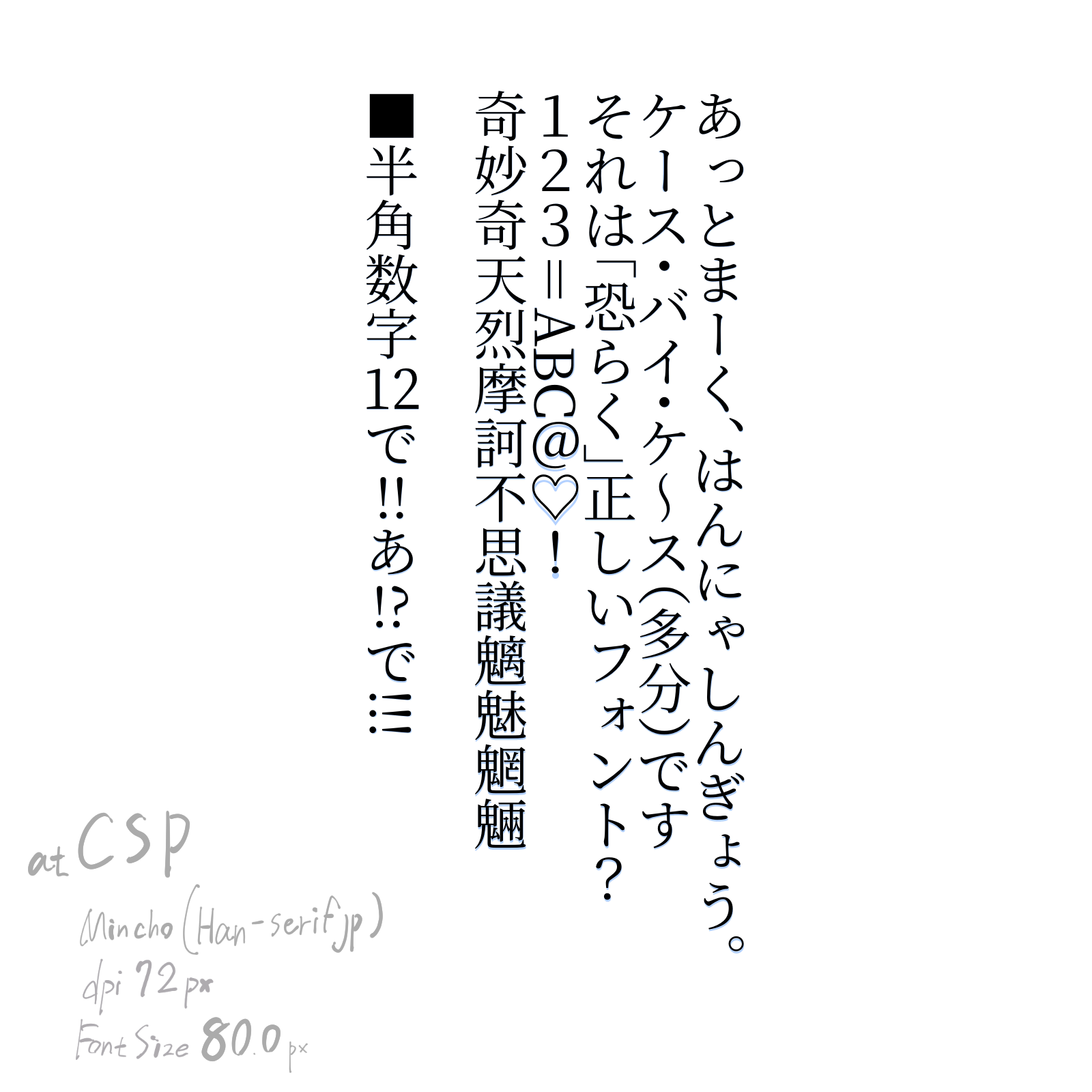
Some software does not omit the spaces that punctuation and parentheses have. Comics tend to shrink whitespace to make sentences more compact. In novels, for example, they are often not omitted.
So even if you don’t omit the punctuation spaces as in the image, it is still correct as Japanese text.
For your reference, I’d like to post a link to a novel posting site for Japanese readers, but there are many sites that include works with a rating of R15+.
Is it okay to post links to sites that contain age-restricted content here?
Uhm, okay… so would that be dependent on the font?
Cause I was doing some mapping of the punctuation to see if I could find a pattern. Cause I found it weird that some punctuation is pretty much full sized in the font data. Of course there are a few places I think that data may be, but I wanted to confirm if they would be under the same rules or not.
My results was this:
Here is the code, and the rotated font is in the github. Do note that the font probably needs to be fixed up to be on baseline and I am kind of going around that in the script for the time being.
from PyQt5.QtGui import *
from PyQt5.QtWidgets import *
from PyQt5.QtCore import *
import re
import time
def openWindow():
defaultFont = 'Source Han Serif Vertical'
defaultFontSize = 10.0
defaultLineWidth = 100
defaultLineHeight = 100
defaultAlign = 'center'
defaultTransform = ''
defaultCharMode = 1
w = QDialog()
layout = QVBoxLayout(w)
fontCmb = QFontComboBox()
layout.addWidget(fontCmb)
hlayout = QHBoxLayout()
fontSize = QDoubleSpinBox()
hlayout.addWidget(QLabel("Font Size:"))
hlayout.addWidget(fontSize)
widthSize = QDoubleSpinBox()
widthSize.setMaximum(200)
hlayout.addWidget(QLabel("Line Width:"))
hlayout.addWidget(widthSize)
heightSize = QDoubleSpinBox()
heightSize.setMaximum(200)
hlayout.addWidget(QLabel("Line Height:"))
hlayout.addWidget(heightSize)
layout.addLayout(hlayout)
textBox = QPlainTextEdit()
layout.addWidget(textBox)
hlayout2 = QHBoxLayout()
button1 = QPushButton("Add Text")
button1.clicked.connect(w.accept)
hlayout2.addWidget(button1)
editContent = readSvgContent()
print ("cont", editContent)
if editContent is not None:
match = re.compile('^.*?\<text.*?id="(vf_.*?)".*$', re.DOTALL).search(editContent)
if match:
matchData = match.group(1).split('_')
defaultLineWidth = float(matchData[1])
defaultLineHeight = float(matchData[2])
matchTransform = re.compile('^.*?\<text.*?transform="(.*?)".*$', re.DOTALL).search(editContent)
if matchTransform: defaultTransform = matchTransform.group(1)
matchFont = re.compile('^.*?\<text.*?font-family="(.*?)".*$', re.DOTALL).search(editContent)
if matchFont: defaultFont = matchFont.group(1)
matchFontSize = re.compile('^.*?\<text.*?font-size="(\d+)".*$', re.DOTALL).search(editContent)
if matchFontSize: defaultFontSize = float(matchFontSize.group(1))
editContent = re.sub('\<tspan[^\>]+?y="0">\s*<\/tspan>','<p> </p>',editContent)
editContent = editContent.replace('<tspan>','\n<p>')
print ("sethtml",editContent)
textBox.document().setHtml(editContent)
print ( textBox.document().toHtml() )
button1.setText("Edit Text")
else:
editContent = None
button2 = QPushButton("Cancel")
button2.clicked.connect(w.reject)
hlayout2.addWidget(button2)
layout.addLayout(hlayout2)
def changeFont():
font = textBox.document().defaultFont()
font.setFamily(fontCmb.currentFont().family())
textBox.document().setDefaultFont(font)
textBox.setPlainText(textBox.toPlainText())
fontCmb.currentFontChanged.connect(changeFont)
def changeFontSize():
font = textBox.document().defaultFont()
font.setPointSizeF(fontSize.value())
textBox.document().setDefaultFont(font)
textBox.setPlainText(textBox.toPlainText())
#fontSize.valueChanged.connect(changeFontSize)
fontCmb.setCurrentFont(QFont(defaultFont))
changeFont()
fontSize.setValue(defaultFontSize)
#changeFontSize()
widthSize.setValue(defaultLineWidth)
heightSize.setValue(defaultLineHeight)
w.show()
if w.exec_() == 0: return
def align(fw,gw,loc=defaultAlign):
if loc == 'center':
return (fw-gw/2)
elif loc == 'right':
return (fw-gw/2)
elif loc == 'left':
return fw
lines = textBox.toPlainText().split("\n")
fontWidth = 0
hPos = 0
pretty = "\n"
blockCount = textBox.document().blockCount()
iblock = textBox.document().begin()
outFontSize = fontSize.value()
font = QFont(fontCmb.currentFont().family(), outFontSize)
metrics = QFontMetricsF(font)
fontWidth = metrics.averageCharWidth()
hPos = (blockCount * fontWidth * widthSize.value()) / 100
hX = heightSize.value()
wX = widthSize.value()
fontName=font.family()
altFontName=None
altFont = None
altMetrics = None
if fontName.find(' Vertical'):
altFontName=fontName.replace(' Vertical',' Rotated')
altFont = QFont(altFontName, outFontSize)
altMetrics = QFontMetricsF(font)
print ( "Font Metrics", font.family(), metrics.minLeftBearing(), metrics.minRightBearing(), metrics.ascent(), metrics.capHeight() )
print ( metrics.tightBoundingRect('.'), metrics.tightBoundingRect('a'), metrics.averageCharWidth() )
#return
output = '<text '
output += 'id="vf_'+ str(widthSize.value()) +'_'+ str(heightSize.value()) +'_'+str(time.time())+'" '
output += 'transform = "'+defaultTransform+'" '
output += 'font-family="'+fontName+'" '
output += 'font-size="'+str(outFontSize)+'">' + pretty
while iblock != textBox.document().end():
blockText = list(iblock.text())
blockLineCount = iblock.layout().lineCount()
fontHeight = 0
output += '<tspan y="0">' + pretty
for i in range(blockLineCount):
line = iblock.layout().lineAt(i)
chars = []
hwCount = [0]
hwGroup = 1
for i2 in range(line.textLength()):
glyph = line.glyphRuns(line.textStart()+i2, 1)[0]
r = glyph.boundingRect()
r = QRectF( 0,0, r.width()*(outFontSize/10), r.height()*(outFontSize/10) )
#print ("G", glyph.rawFont().maxCharWidth(), glyph.rawFont().averageCharWidth(), glyph.boundingRect().width(), glyph.boundingRect().height(), blockText[i2], glyph.glyphIndexes(), glyph.rawFont().glyphIndexesForString(blockText[i2]) )
#return
#print ( glyph.rawFont().descent(), blockText[i2], r, metrics.tightBoundingRect(blockText[i2]), metrics.averageCharWidth() )
halfWidth = None
onCount = 0
print ( blockText[i2], r.width() ,'>', metrics.averageCharWidth()/1.39 )
if r.width() > metrics.averageCharWidth()/1.39:
halfWidth = 0
if i2 > 0 and chars[i2-1]['hw'] > 0:
hwGroup+=1
else:
halfWidth = hwGroup
if hwGroup == len(hwCount)-1:
hwCount[hwGroup]+=1
else:
hwCount.append(1)
print ( blockText[i2], halfWidth, hwCount[hwGroup] )
onCount=hwCount[hwGroup]
fontHeight = r.height()
chars.append({ 'glyph': glyph, 'rect': r, 'char':blockText[i2], 'hw': halfWidth, 'hwCount': onCount, 'height': fontHeight, 'skip':False })
for i2 in range(line.textLength()):
c = chars[i2]
if c['skip'] is True:
continue
print ('hw', c['char'], c['hw'], hwCount[c['hw']] )
if defaultCharMode == 0 or c['hw'] == 0 or hwCount[c['hw']] <= 1:
print("HO", c['char'], (metrics.ascent()* hX)/100, altMetrics.tightBoundingRect(c['char']), c['rect'] )
oHeight = 0 if i2 == 0 else ((chars[i2-1]['height']*hX)/100)
oWidth = ( align(fontWidth,c['rect'].width()) * wX)/100
if c['char'] == '「' :
oHeight=oHeight / 2
elif c['char'] == '(' :
oHeight=oHeight / 2
elif c['char'] == '・' :
oHeight=oHeight / 1.33
elif i2 >0 and chars[i2-1]['char'] == '」':
oHeight=oHeight / 2
elif i2 >0 and chars[i2-1]['char'] == ')':
oHeight=oHeight / 2
elif i2 >0 and chars[i2-1]['char'] == '、':
oHeight=oHeight / 2
elif i2 >0 and chars[i2-1]['char'] == '・':
oHeight=oHeight / 1.33
#if i2 > 0 and altMetrics.tightBoundingRect(chars[i2-1]['char']).height() < (metrics.ascent()* hX)/100:
# oHeight = (( altMetrics.tightBoundingRect(chars[i2-1]['char']).height()) )/100
output += ('<tspan '
#'font-family="'+fontName+'" '
'dy="'+str( oHeight )+'" '
'x="'+str(hPos + oWidth )+'">'
+c['char']+
'</tspan>' + pretty)
elif hwCount[c['hw']] == 2:
oHeight = 0 if i2 == 0 else ((chars[i2-1]['height']*hX)/100)
oWidth = ( align(fontWidth, c['rect'].width()+chars[i2+1]['rect'].width() ) * wX)/100
output += ('<tspan '
#'font-family="'+fontName+'" '
#'dy="'+str( (fontHeight*heightSize.value())/100 )+'" '
'dy="'+str( oHeight )+'" '
'x="'+str(hPos + oWidth )+'">'
+c['char']+chars[i2+1]['char']+
'</tspan>' + pretty)
chars[i2+1]['skip']=True
else:
oWidth=(align( c['rect'].height()/1.07,c['height'])*wX)/100
oHeight = 0 if i2 == 0 else (( chars[i2-1]['rect'].width() * hX)/100)
if c['hwCount']==1:
oHeight=oHeight / 1.07
else:
oHeight=oHeight * 1.45
oWidth-=altMetrics.tightBoundingRect(c['char']).x()
#oWidth-=((metrics.ascent()* hX)/100)-altMetrics.tightBoundingRect(c['char']).width()
#oWidth+=((metrics.ascent()* hX)/100)-c['rect'].width()
#oWidth-=((metrics.ascent()* hX)/100)-altMetrics.tightBoundingRect(c['char']).width()
#print("HO", c['char'], (metrics.ascent()* hX)/100, altMetrics.tightBoundingRect(c['char']), c['rect'] )
output += ('<tspan '
'dy="'+str( oHeight )+'" '
'x="'+str(hPos + oWidth)+'" '
#'style="font-family: \''+altFontName+'\'">'
'font-family="'+altFontName+'">'
#'font-family="Roboto Thin">'
+c['char']+
'</tspan>' + pretty)
#if metrics.tightBoundingRect(blockText[i2]).height() < 40:
# fontHeight = r.height() /2
#fontHeight = metrics.tightBoundingRect(blockText[i2]).height() - rawFont.descent()
iblock = iblock.next()
hPos -= (fontWidth * widthSize.value()) / 100
output += '</tspan>' + pretty
output += '</text>' + pretty
doc = Krita.instance().activeDocument()
svgWidth = str( (doc.width()/72)*doc.resolution() )
svgHeight = str( (doc.height()/72)*doc.resolution() )
svgContent = '''<?xml version="1.0" standalone="no"?>
<!DOCTYPE svg PUBLIC "-//W3C//DTD SVG 20010904//EN" "http://www.w3.org/TR/2001/REC-SVG-20010904/DTD/svg10.dtd">
<!-- Created using Krita: https://krita.org -->
<svg xmlns="http://www.w3.org/2000/svg"
xmlns:xlink="http://www.w3.org/1999/xlink"
xmlns:krita="http://krita.org/namespaces/svg/krita"
xmlns:sodipodi="http://sodipodi.sourceforge.net/DTD/sodipodi-0.dtd"
width="''' + svgWidth + '''pt"
height="''' + svgHeight + '''pt"
viewBox="0 0 ''' + svgWidth + ' ' + svgHeight + '''">
<defs/>''' + output + "</svg>"
print( svgContent )
writeSvgContent(svgContent, doc.activeNode(), (editContent is not None) )
def writeSvgContent(svgContent, layer, editMode):
mimeOldContent=QGuiApplication.clipboard().mimeData();
mimeStoreContent=QMimeData()
for mimeType in mimeOldContent.formats():
mimeStoreContent.setData(mimeType,QByteArray(mimeOldContent.data(mimeType)))
if editMode: Krita.instance().action('edit_cut').trigger()
mimeNewContent=QMimeData()
mimeNewContent.setData('image/svg', svgContent.encode())
QGuiApplication.clipboard().setMimeData(mimeNewContent)
Krita.instance().action('edit_paste').trigger()
QGuiApplication.clipboard().setMimeData(mimeStoreContent)
return None
def readSvgContent():
returnContent = None
node = Krita.instance().activeDocument().activeNode()
if node.type() != 'vectorlayer': return None
mimeOldContent=QGuiApplication.clipboard().mimeData();
mimeStoreContent=QMimeData()
for mimeType in mimeOldContent.formats():
mimeStoreContent.setData(mimeType,QByteArray(mimeOldContent.data(mimeType)))
Krita.instance().action('edit_copy').trigger()
mimeContent=QGuiApplication.clipboard().mimeData();
for mimeType in mimeContent.formats():
if mimeType.startswith('image/svg'):
returnContent = str( QByteArray(mimeContent.data(mimeType)) , 'utf-8')
break
QGuiApplication.clipboard().setMimeData(mimeStoreContent)
return returnContent
openWindow()
I can’t read what information is contained in the font, but I think it depends on the software, not the font, whether punctuation spaces are omitted or not.
If you check the Japanese version of the site that distributes the original Mincho font, you will see that it is written horizontally, but there are wide spaces next to commas and periods. Microsoft’s Notepad also does not omit punctuation spaces. (Whether the text is written vertically or horizontally has nothing to do with whether or not spaces are omitted.
:
:
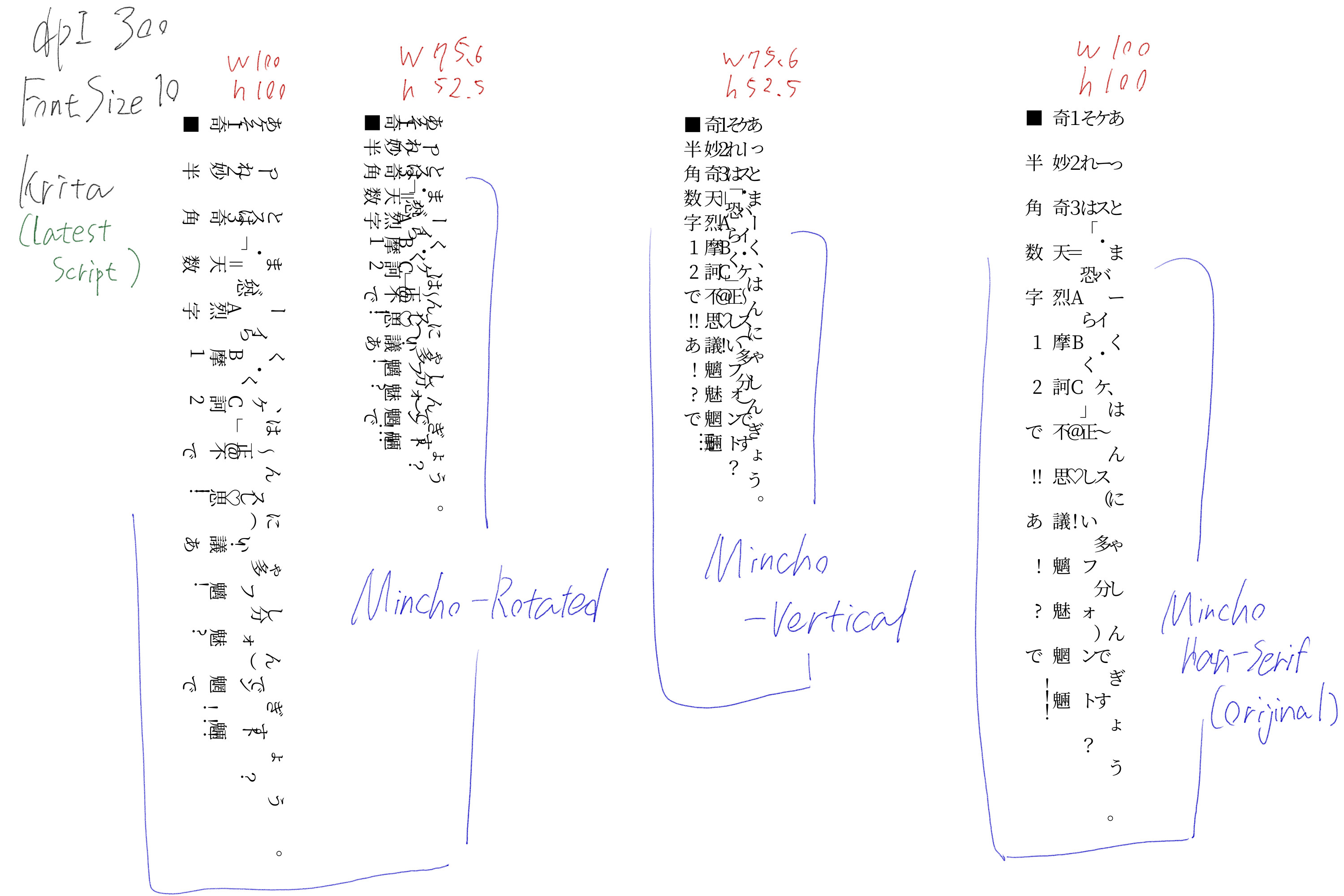
Using the latest script, I compared the rotated Mincho font you just distributed, the previous Mincho font (vertical writing), and the original Mincho font. I simply chose the one I installed and used it, but I’m not sure if this is correct. Something doesn’t seem to be going right.
:
:
Also, the script you created at this time, with the width set to 75.6% and the height set to 52.5%, has the most beautiful text with gaps between the letters.
https://krita-artists.org/t/typing-japanese/27124/47?u=dk8
You only need the rotated font installed, and can use the vertical font. It should automatically use the rotated font if it exists when needed. Does that not happen on your pc?
Also, if you are saying that the spacing isn’t an issue and part of the font. Then I can simply add map files for those people who wish to adjust these things I guess. And only focus on the other stuff.
Edit: Okay, I did a minor edit to change the detection of half fonts. See if it is better.
When you say you edited it, you mean the script you just wrote, right?
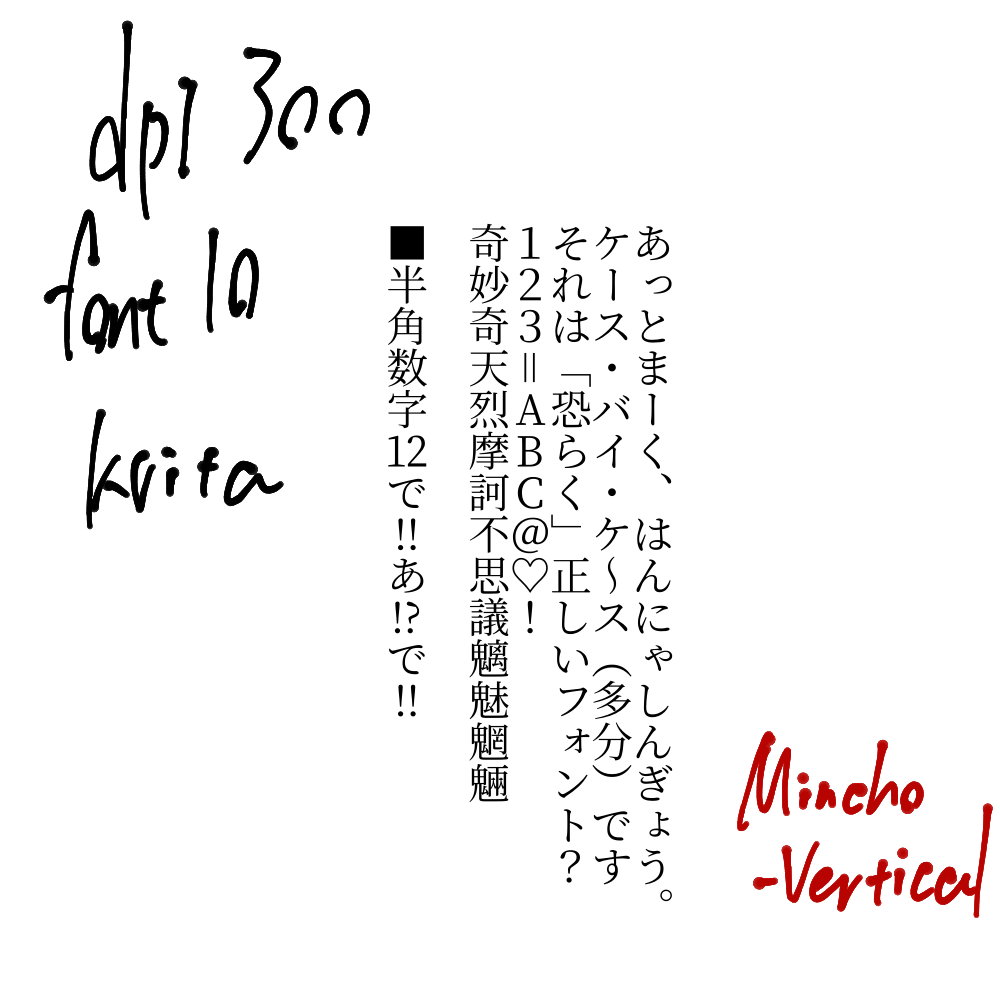
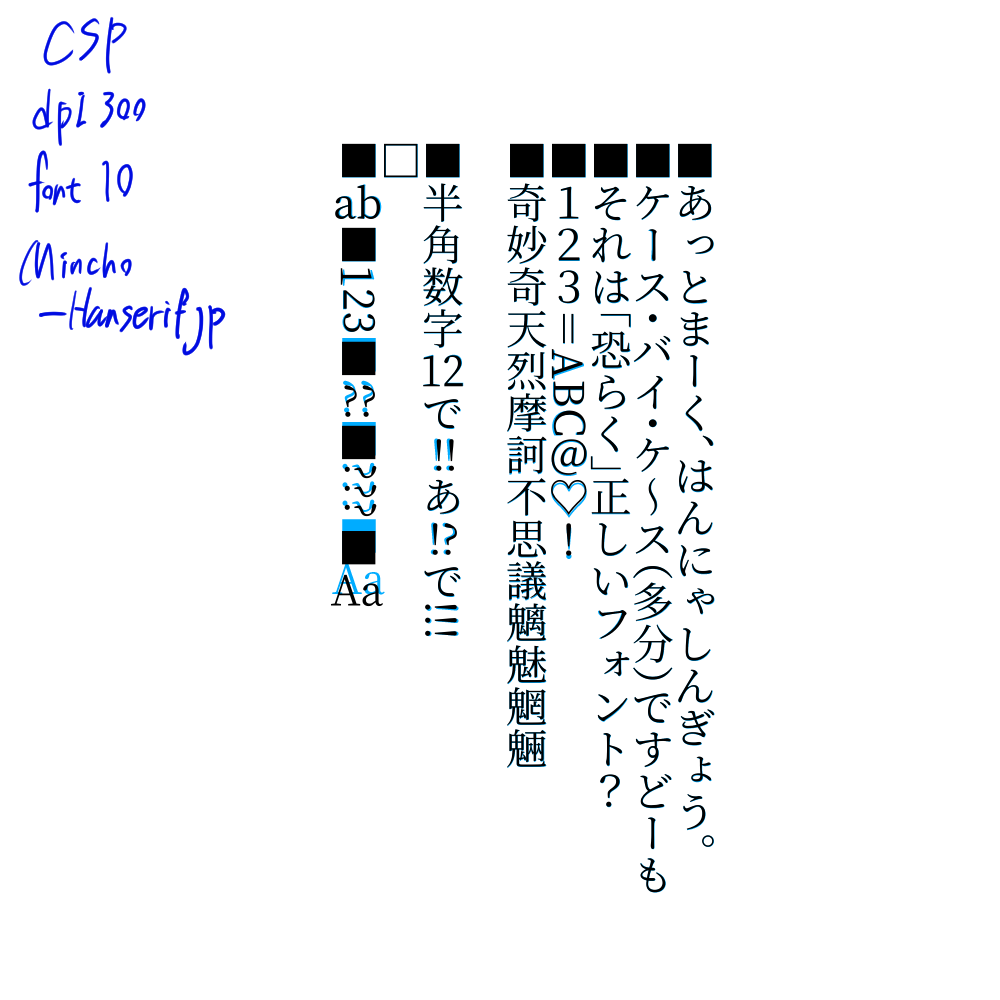
This script has vertical Mincho selected by default, so I created the text in that state, and also created the text with the rotated Mincho selected. It looks like this.
It’s been a long thread, so I’ll just leave the text I used.
あっとまーく、はんにゃしんぎょう。
ケース・バイ・ケ~ス(多分)です
それは「恐らく」正しいフォント?
123=ABC@♡!
奇妙奇天烈摩訶不思議魑魅魍魎

■半角数字12で!!あ!?で!!!
I updated the script changing a number just a short while ago. Overall, you don’t need to use the Rotated script, just have it installed and if you use vertical, it will turn on automatically. Notice how your !!! turned when using vertical?
Now ABC should do that too, try the change I did to the script. If it doesn’t help, can you copy and paste in a code block what shows up in the debug window?
It’s late today but I’ll review it tomorrow and see the issue.
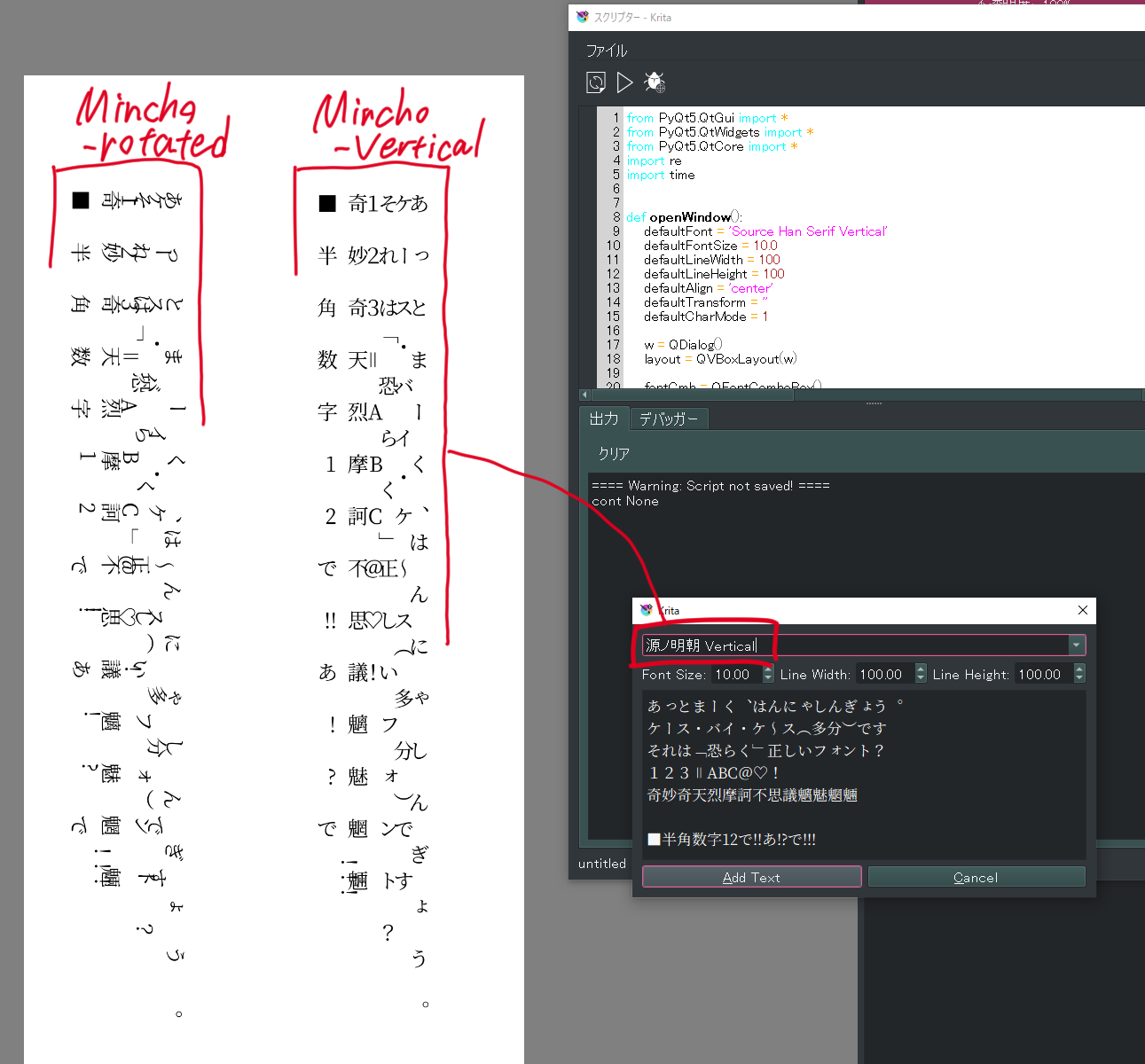
This text was created by selecting the vertical Mincho font in the latest script. I’m trying it with additional text. You’re right, the exclamation mark is rotated.

The text on the left has been changed in width and height to make it easier to read.
When I shrink the height, the punctuation gaps seem to be placed in a nice way.
I see that some characters shift to the right from the center line and some don’t.
↓Here is the same text in CSP using the original Mincho font.
(Updated the image because of a mistake.)
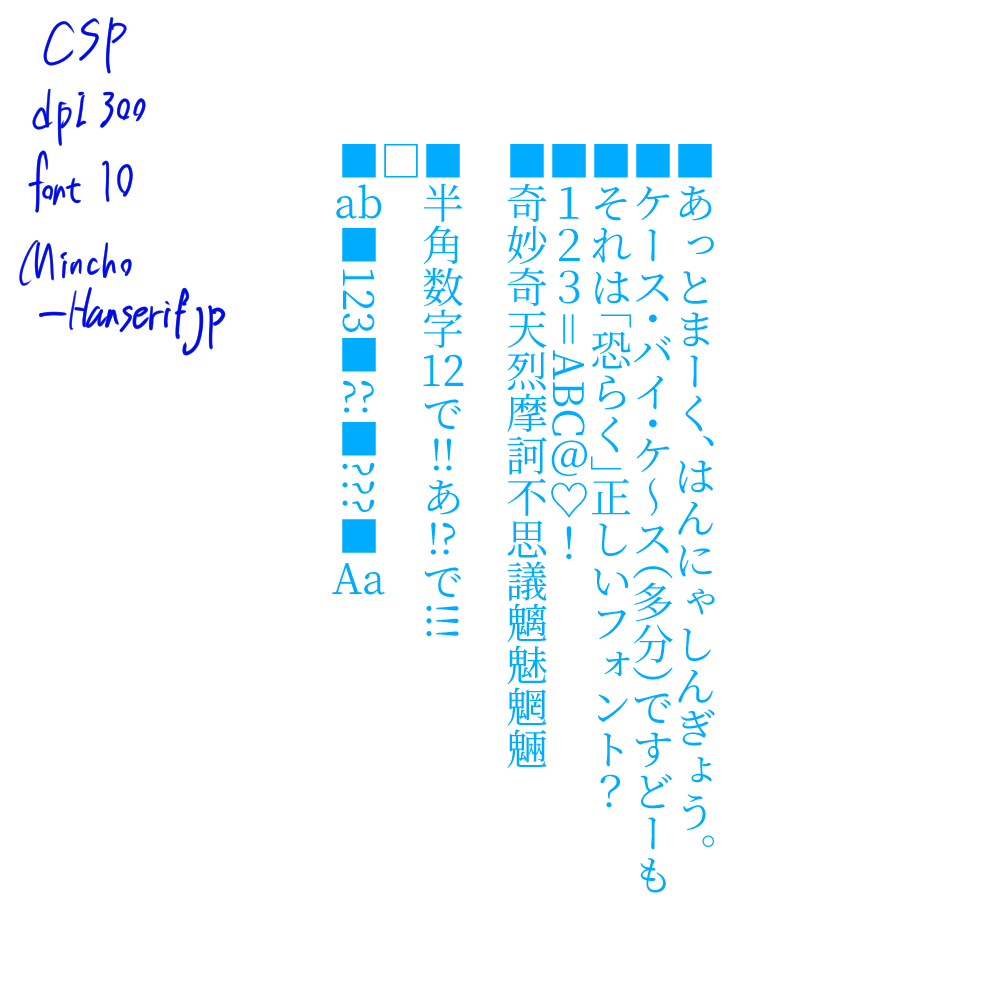
■あっとまーく、はんにゃしんぎょう。
■ケース・バイ・ケ~ス(多分)ですどーも
■それは「恐らく」正しいフォント?
■123=ABC@♡!
■奇妙奇天烈摩訶不思議魑魅魍魎

■半角数字12で!!あ!?で!!!
□
■ab■123■??■???■Aa
:
I wonder if the debug window is the lower part of the scripter? Here is the text that will remain when the script is executed.
==== Warning: Script not saved! ====
cont None
<string>:133: DeprecationWarning: an integer is required (got type float).  Implicit conversion to integers using __int__ is deprecated, and may be removed in a future version of Python.
<string>:148: DeprecationWarning: an integer is required (got type float).  Implicit conversion to integers using __int__ is deprecated, and may be removed in a future version of Python.
Font Metrics 源ノ明朝 Vertical -12.960999999999999 -0.8969999999999999 14.953125 9.46875
PyQt5.QtCore.QRectF(1.25, -1.578125, 1.734375, 1.75) PyQt5.QtCore.QRectF(0.671875, -6.875, 6.359375, 7.0625) 7.328125
■ 17.0 > 5.27203237410072
あ 17.0 > 5.27203237410072
っ 17.0 > 5.27203237410072
と 17.0 > 5.27203237410072
ま 17.0 > 5.27203237410072
ー 17.0 > 5.27203237410072
く 17.0 > 5.27203237410072
、 17.0 > 5.27203237410072
は 17.0 > 5.27203237410072
ん 17.0 > 5.27203237410072
に 17.0 > 5.27203237410072
ゃ 17.0 > 5.27203237410072
し 17.0 > 5.27203237410072
ん 17.0 > 5.27203237410072
ぎ 17.0 > 5.27203237410072
ょ 17.0 > 5.27203237410072
う 17.0 > 5.27203237410072
。 17.0 > 5.27203237410072
hw ■ 0 0
HO ■ 14.953125 PyQt5.QtCore.QRectF(1.296875, -10.140625, 10.40625, 10.40625) PyQt5.QtCore.QRectF(0.0, 0.0, 17.0, 25.0)
hw あ 0 0
HO あ 14.953125 PyQt5.QtCore.QRectF(1.734375, -10.125, 9.796875, 10.59375) PyQt5.QtCore.QRectF(0.0, 0.0, 17.0, 25.0)
hw っ 0 0
HO っ 14.953125 PyQt5.QtCore.QRectF(4.21875, -7.5, 8.09375, 7.5) PyQt5.QtCore.QRectF(0.0, 0.0, 17.0, 25.0)
hw と 0 0
HO と 14.953125 PyQt5.QtCore.QRectF(2.921875, -9.8125, 7.375, 10.0625) PyQt5.QtCore.QRectF(0.0, 0.0, 17.0, 25.0)
hw ま 0 0
HO ま 14.953125 PyQt5.QtCore.QRectF(2.0625, -10.0, 8.78125, 10.484375) PyQt5.QtCore.QRectF(0.0, 0.0, 17.0, 25.0)
hw ー 0 0
HO ー 14.953125 PyQt5.QtCore.QRectF(5.0625, -9.734375, 2.25, 9.875) PyQt5.QtCore.QRectF(0.0, 0.0, 17.0, 25.0)
hw く 0 0
HO く 14.953125 PyQt5.QtCore.QRectF(3.578125, -10.265625, 5.140625, 10.984375) PyQt5.QtCore.QRectF(0.0, 0.0, 17.0, 25.0)
hw 、 0 0
HO 、 14.953125 PyQt5.QtCore.QRectF(8.953125, -10.828125, 3.234375, 10.828125) PyQt5.QtCore.QRectF(0.0, 0.0, 17.0, 25.0)
hw は 0 0
HO は 14.953125 PyQt5.QtCore.QRectF(1.59375, -9.703125, 10.4375, 10.09375) PyQt5.QtCore.QRectF(0.0, 0.0, 17.0, 25.0)
hw ん 0 0
HO ん 14.953125 PyQt5.QtCore.QRectF(1.390625, -9.890625, 10.609375, 10.21875) PyQt5.QtCore.QRectF(0.0, 0.0, 17.0, 25.0)
hw に 0 0
HO に 14.953125 PyQt5.QtCore.QRectF(1.84375, -9.4375, 9.84375, 9.6875) PyQt5.QtCore.QRectF(0.0, 0.0, 17.0, 25.0)
hw ゃ 0 0
HO ゃ 14.953125 PyQt5.QtCore.QRectF(4.09375, -9.046875, 8.40625, 9.046875) PyQt5.QtCore.QRectF(0.0, 0.0, 17.0, 25.0)
hw し 0 0
HO し 14.953125 PyQt5.QtCore.QRectF(2.859375, -9.6875, 8.53125, 10.109375) PyQt5.QtCore.QRectF(0.0, 0.0, 17.0, 25.0)
hw ん 0 0
HO ん 14.953125 PyQt5.QtCore.QRectF(1.390625, -9.890625, 10.609375, 10.21875) PyQt5.QtCore.QRectF(0.0, 0.0, 17.0, 25.0)
hw ぎ 0 0
HO ぎ 14.953125 PyQt5.QtCore.QRectF(2.140625, -10.625, 10.375, 11.203125) PyQt5.QtCore.QRectF(0.0, 0.0, 17.0, 25.0)
hw ょ 0 0
HO ょ 14.953125 PyQt5.QtCore.QRectF(5.40625, -8.96875, 6.203125, 8.96875) PyQt5.QtCore.QRectF(0.0, 0.0, 17.0, 25.0)
hw う 0 0
HO う 14.953125 PyQt5.QtCore.QRectF(2.9375, -10.390625, 6.859375, 11.125) PyQt5.QtCore.QRectF(0.0, 0.0, 17.0, 25.0)
hw 。 0 0
HO 。 14.953125 PyQt5.QtCore.QRectF(8.8125, -10.609375, 3.59375, 10.609375) PyQt5.QtCore.QRectF(0.0, 0.0, 17.0, 25.0)
■ 17.0 > 5.27203237410072
ケ 17.0 > 5.27203237410072
ー 16.0 > 5.27203237410072
ス 17.0 > 5.27203237410072
・ 17.0 > 5.27203237410072
バ 17.0 > 5.27203237410072
イ 17.0 > 5.27203237410072
・ 17.0 > 5.27203237410072
ケ 17.0 > 5.27203237410072
~ 17.0 > 5.27203237410072
ス 17.0 > 5.27203237410072
( 17.0 > 5.27203237410072
多 17.0 > 5.27203237410072
分 17.0 > 5.27203237410072
) 17.0 > 5.27203237410072
で 17.0 > 5.27203237410072
す 17.0 > 5.27203237410072
ど 17.0 > 5.27203237410072
ー 17.0 > 5.27203237410072
も 17.0 > 5.27203237410072
hw ■ 0 0
HO ■ 14.953125 PyQt5.QtCore.QRectF(1.296875, -10.140625, 10.40625, 10.40625) PyQt5.QtCore.QRectF(0.0, 0.0, 17.0, 25.0)
hw ケ 0 0
HO ケ 14.953125 PyQt5.QtCore.QRectF(1.4375, -10.0, 10.078125, 10.34375) PyQt5.QtCore.QRectF(0.0, 0.0, 17.0, 25.0)
hw ー 0 0
HO ー 14.953125 PyQt5.QtCore.QRectF(5.0625, -9.734375, 2.25, 9.875) PyQt5.QtCore.QRectF(0.0, 0.0, 16.0, 25.0)
hw ス 0 0
HO ス 14.953125 PyQt5.QtCore.QRectF(1.203125, -8.84375, 10.09375, 8.84375) PyQt5.QtCore.QRectF(0.0, 0.0, 17.0, 25.0)
hw ・ 0 0
HO ・ 14.953125 PyQt5.QtCore.QRectF(5.296875, -6.140625, 2.40625, 6.140625) PyQt5.QtCore.QRectF(0.0, 0.0, 17.0, 25.0)
hw バ 0 0
HO バ 14.953125 PyQt5.QtCore.QRectF(0.609375, -9.28125, 11.3125, 9.28125) PyQt5.QtCore.QRectF(0.0, 0.0, 17.0, 25.0)
hw イ 0 0
HO イ 14.953125 PyQt5.QtCore.QRectF(1.671875, -9.859375, 7.921875, 10.3125) PyQt5.QtCore.QRectF(0.0, 0.0, 17.0, 25.0)
hw ・ 0 0
HO ・ 14.953125 PyQt5.QtCore.QRectF(5.296875, -6.140625, 2.40625, 6.140625) PyQt5.QtCore.QRectF(0.0, 0.0, 17.0, 25.0)
hw ケ 0 0
HO ケ 14.953125 PyQt5.QtCore.QRectF(1.4375, -10.0, 10.078125, 10.34375) PyQt5.QtCore.QRectF(0.0, 0.0, 17.0, 25.0)
hw ~ 0 0
HO ~ 14.953125 PyQt5.QtCore.QRectF(5.234375, -10.796875, 2.546875, 11.71875) PyQt5.QtCore.QRectF(0.0, 0.0, 17.0, 25.0)
hw ス 0 0
HO ス 14.953125 PyQt5.QtCore.QRectF(1.203125, -8.84375, 10.09375, 8.84375) PyQt5.QtCore.QRectF(0.0, 0.0, 17.0, 25.0)
hw ( 0 0
HO ( 14.953125 PyQt5.QtCore.QRectF(0.40625, -3.0, 12.1875, 3.734375) PyQt5.QtCore.QRectF(0.0, 0.0, 17.0, 25.0)
hw 多 0 0
HO 多 14.953125 PyQt5.QtCore.QRectF(0.6875, -10.96875, 11.75, 11.96875) PyQt5.QtCore.QRectF(0.0, 0.0, 17.0, 25.0)
hw 分 0 0
HO 分 14.953125 PyQt5.QtCore.QRectF(0.515625, -10.921875, 12.15625, 11.9375) PyQt5.QtCore.QRectF(0.0, 0.0, 17.0, 25.0)
hw ) 0 0
HO ) 14.953125 PyQt5.QtCore.QRectF(0.40625, -10.625, 12.1875, 10.625) PyQt5.QtCore.QRectF(0.0, 0.0, 17.0, 25.0)
hw で 0 0
HO で 14.953125 PyQt5.QtCore.QRectF(0.84375, -9.125, 11.109375, 9.125) PyQt5.QtCore.QRectF(0.0, 0.0, 17.0, 25.0)
hw す 0 0
HO す 14.953125 PyQt5.QtCore.QRectF(1.234375, -10.015625, 10.84375, 10.765625) PyQt5.QtCore.QRectF(0.0, 0.0, 17.0, 25.0)
hw ど 0 0
HO ど 14.953125 PyQt5.QtCore.QRectF(2.6875, -10.171875, 9.5625, 10.578125) PyQt5.QtCore.QRectF(0.0, 0.0, 17.0, 25.0)
hw ー 0 0
HO ー 14.953125 PyQt5.QtCore.QRectF(5.0625, -9.734375, 2.25, 9.875) PyQt5.QtCore.QRectF(0.0, 0.0, 17.0, 25.0)
hw も 0 0
HO も 14.953125 PyQt5.QtCore.QRectF(2.625, -10.078125, 7.828125, 10.609375) PyQt5.QtCore.QRectF(0.0, 0.0, 17.0, 25.0)
■ 17.0 > 5.27203237410072
そ 17.0 > 5.27203237410072
れ 17.0 > 5.27203237410072
は 17.0 > 5.27203237410072
「 17.0 > 5.27203237410072
恐 17.0 > 5.27203237410072
ら 17.0 > 5.27203237410072
く 17.0 > 5.27203237410072
」 17.0 > 5.27203237410072
正 17.0 > 5.27203237410072
し 17.0 > 5.27203237410072
い 17.0 > 5.27203237410072
フ 16.0 > 5.27203237410072
ォ 17.0 > 5.27203237410072
ン 17.0 > 5.27203237410072
ト 17.0 > 5.27203237410072
? 17.0 > 5.27203237410072
hw ■ 0 0
HO ■ 14.953125 PyQt5.QtCore.QRectF(1.296875, -10.140625, 10.40625, 10.40625) PyQt5.QtCore.QRectF(0.0, 0.0, 17.0, 25.0)
hw そ 0 0
HO そ 14.953125 PyQt5.QtCore.QRectF(1.578125, -9.859375, 9.734375, 10.390625) PyQt5.QtCore.QRectF(0.0, 0.0, 17.0, 25.0)
hw れ 0 0
HO れ 14.953125 PyQt5.QtCore.QRectF(0.859375, -10.140625, 11.890625, 10.703125) PyQt5.QtCore.QRectF(0.0, 0.0, 17.0, 25.0)
hw は 0 0
HO は 14.953125 PyQt5.QtCore.QRectF(1.59375, -9.703125, 10.4375, 10.09375) PyQt5.QtCore.QRectF(0.0, 0.0, 17.0, 25.0)
hw 「 0 0
HO 「 14.953125 PyQt5.QtCore.QRectF(3.390625, -2.90625, 9.296875, 4.0) PyQt5.QtCore.QRectF(0.0, 0.0, 17.0, 25.0)
hw 恐 0 0
HO 恐 14.953125 PyQt5.QtCore.QRectF(0.515625, -10.625, 11.953125, 11.375) PyQt5.QtCore.QRectF(0.0, 0.0, 17.0, 25.0)
hw ら 0 0
HO ら 14.953125 PyQt5.QtCore.QRectF(2.8125, -9.96875, 8.125, 10.46875) PyQt5.QtCore.QRectF(0.0, 0.0, 17.0, 25.0)
hw く 0 0
HO く 14.953125 PyQt5.QtCore.QRectF(3.578125, -10.265625, 5.140625, 10.984375) PyQt5.QtCore.QRectF(0.0, 0.0, 17.0, 25.0)
hw 」 0 0
HO 」 14.953125 PyQt5.QtCore.QRectF(0.3125, -10.90625, 9.296875, 10.90625) PyQt5.QtCore.QRectF(0.0, 0.0, 17.0, 25.0)
hw 正 0 0
HO 正 14.953125 PyQt5.QtCore.QRectF(0.546875, -10.546875, 11.953125, 10.9375) PyQt5.QtCore.QRectF(0.0, 0.0, 17.0, 25.0)
hw し 0 0
HO し 14.953125 PyQt5.QtCore.QRectF(2.859375, -9.6875, 8.53125, 10.109375) PyQt5.QtCore.QRectF(0.0, 0.0, 17.0, 25.0)
hw い 0 0
HO い 14.953125 PyQt5.QtCore.QRectF(1.1875, -8.78125, 10.578125, 8.78125) PyQt5.QtCore.QRectF(0.0, 0.0, 17.0, 25.0)
hw フ 0 0
HO フ 14.953125 PyQt5.QtCore.QRectF(2.46875, -8.8125, 8.578125, 8.96875) PyQt5.QtCore.QRectF(0.0, 0.0, 16.0, 25.0)
hw ォ 0 0
HO ォ 14.953125 PyQt5.QtCore.QRectF(4.484375, -8.984375, 7.765625, 8.984375) PyQt5.QtCore.QRectF(0.0, 0.0, 17.0, 25.0)
hw ン 0 0
HO ン 14.953125 PyQt5.QtCore.QRectF(2.46875, -8.796875, 9.203125, 8.796875) PyQt5.QtCore.QRectF(0.0, 0.0, 17.0, 25.0)
hw ト 0 0
HO ト 14.953125 PyQt5.QtCore.QRectF(4.265625, -9.765625, 5.75, 10.171875) PyQt5.QtCore.QRectF(0.0, 0.0, 17.0, 25.0)
hw ? 0 0
HO ? 14.953125 PyQt5.QtCore.QRectF(3.203125, -9.953125, 6.09375, 10.125) PyQt5.QtCore.QRectF(0.0, 0.0, 17.0, 25.0)
■ 17.0 > 5.27203237410072
1 17.0 > 5.27203237410072
2 17.0 > 5.27203237410072
3 17.0 > 5.27203237410072
= 17.0 > 5.27203237410072
A 12.0 > 5.27203237410072
B 11.0 > 5.27203237410072
C 12.0 > 5.27203237410072
@ 17.0 > 5.27203237410072
♡ 17.0 > 5.27203237410072
! 17.0 > 5.27203237410072
hw ■ 0 0
HO ■ 14.953125 PyQt5.QtCore.QRectF(1.296875, -10.140625, 10.40625, 10.40625) PyQt5.QtCore.QRectF(0.0, 0.0, 17.0, 25.0)
hw 1 0 0
HO 1 14.953125 PyQt5.QtCore.QRectF(3.703125, -9.890625, 5.765625, 9.90625) PyQt5.QtCore.QRectF(0.0, 0.0, 17.0, 25.0)
hw 2 0 0
HO 2 14.953125 PyQt5.QtCore.QRectF(3.28125, -9.953125, 6.5625, 9.96875) PyQt5.QtCore.QRectF(0.0, 0.0, 17.0, 25.0)
hw 3 0 0
HO 3 14.953125 PyQt5.QtCore.QRectF(3.328125, -9.953125, 6.375, 10.203125) PyQt5.QtCore.QRectF(0.0, 0.0, 17.0, 25.0)
hw = 0 0
HO = 14.953125 PyQt5.QtCore.QRectF(4.71875, -9.5, 3.25, 9.5) PyQt5.QtCore.QRectF(0.0, 0.0, 17.0, 25.0)
hw A 0 0
HO A 14.953125 PyQt5.QtCore.QRectF(0.09375, -9.578125, 9.140625, 9.59375) PyQt5.QtCore.QRectF(0.0, 0.0, 12.0, 25.0)
hw B 0 0
HO B 14.953125 PyQt5.QtCore.QRectF(0.671875, -9.484375, 7.453125, 9.5) PyQt5.QtCore.QRectF(0.0, 0.0, 11.0, 25.0)
hw C 0 0
HO C 14.953125 PyQt5.QtCore.QRectF(0.703125, -9.703125, 7.640625, 9.921875) PyQt5.QtCore.QRectF(0.0, 0.0, 12.0, 25.0)
hw @ 0 0
HO @ 14.953125 PyQt5.QtCore.QRectF(1.15625, -9.953125, 10.921875, 11.09375) PyQt5.QtCore.QRectF(0.0, 0.0, 17.0, 25.0)
hw ♡ 0 0
HO ♡ 14.953125 PyQt5.QtCore.QRectF(1.0, -10.375, 11.015625, 10.9375) PyQt5.QtCore.QRectF(0.0, 0.0, 17.0, 25.0)
hw ! 0 0
HO ! 14.953125 PyQt5.QtCore.QRectF(5.671875, -9.953125, 1.65625, 10.125) PyQt5.QtCore.QRectF(0.0, 0.0, 17.0, 25.0)
■ 17.0 > 5.27203237410072
奇 17.0 > 5.27203237410072
妙 17.0 > 5.27203237410072
奇 17.0 > 5.27203237410072
天 17.0 > 5.27203237410072
烈 17.0 > 5.27203237410072
摩 17.0 > 5.27203237410072
訶 17.0 > 5.27203237410072
不 17.0 > 5.27203237410072
思 17.0 > 5.27203237410072
議 17.0 > 5.27203237410072
魑 17.0 > 5.27203237410072
魅 17.0 > 5.27203237410072
魍 17.0 > 5.27203237410072
魎 17.0 > 5.27203237410072
hw ■ 0 0
HO ■ 14.953125 PyQt5.QtCore.QRectF(1.296875, -10.140625, 10.40625, 10.40625) PyQt5.QtCore.QRectF(0.0, 0.0, 17.0, 25.0)
hw 奇 0 0
HO 奇 14.953125 PyQt5.QtCore.QRectF(0.546875, -10.90625, 11.921875, 11.921875) PyQt5.QtCore.QRectF(0.0, 0.0, 17.0, 25.0)
hw 妙 0 0
HO 妙 14.953125 PyQt5.QtCore.QRectF(0.46875, -10.859375, 12.109375, 11.890625) PyQt5.QtCore.QRectF(0.0, 0.0, 17.0, 25.0)
hw 奇 0 0
HO 奇 14.953125 PyQt5.QtCore.QRectF(0.546875, -10.90625, 11.921875, 11.921875) PyQt5.QtCore.QRectF(0.0, 0.0, 17.0, 25.0)
hw 天 0 0
HO 天 14.953125 PyQt5.QtCore.QRectF(0.515625, -10.4375, 12.03125, 11.484375) PyQt5.QtCore.QRectF(0.0, 0.0, 17.0, 25.0)
hw 烈 0 0
HO 烈 14.953125 PyQt5.QtCore.QRectF(0.53125, -10.734375, 11.796875, 11.84375) PyQt5.QtCore.QRectF(0.0, 0.0, 17.0, 25.0)
hw 摩 0 0
HO 摩 14.953125 PyQt5.QtCore.QRectF(0.40625, -10.90625, 12.140625, 11.9375) PyQt5.QtCore.QRectF(0.0, 0.0, 17.0, 25.0)
hw 訶 0 0
HO 訶 14.953125 PyQt5.QtCore.QRectF(0.453125, -10.75, 12.1875, 11.734375) PyQt5.QtCore.QRectF(0.0, 0.0, 17.0, 25.0)
hw 不 0 0
HO 不 14.953125 PyQt5.QtCore.QRectF(0.453125, -10.65625, 11.890625, 11.640625) PyQt5.QtCore.QRectF(0.0, 0.0, 17.0, 25.0)
hw 思 0 0
HO 思 14.953125 PyQt5.QtCore.QRectF(0.578125, -10.640625, 11.96875, 11.4375) PyQt5.QtCore.QRectF(0.0, 0.0, 17.0, 25.0)
hw 議 0 0
HO 議 14.953125 PyQt5.QtCore.QRectF(0.46875, -10.96875, 12.046875, 12.0) PyQt5.QtCore.QRectF(0.0, 0.0, 17.0, 25.0)
hw 魑 0 0
HO 魑 14.953125 PyQt5.QtCore.QRectF(0.375, -10.9375, 12.09375, 11.96875) PyQt5.QtCore.QRectF(0.0, 0.0, 17.0, 25.0)
hw 魅 0 0
HO 魅 14.953125 PyQt5.QtCore.QRectF(0.421875, -10.921875, 12.171875, 11.953125) PyQt5.QtCore.QRectF(0.0, 0.0, 17.0, 25.0)
hw 魍 0 0
HO 魍 14.953125 PyQt5.QtCore.QRectF(0.375, -10.9375, 12.09375, 11.96875) PyQt5.QtCore.QRectF(0.0, 0.0, 17.0, 25.0)
hw 魎 0 0
HO 魎 14.953125 PyQt5.QtCore.QRectF(0.375, -10.9375, 12.09375, 11.96875) PyQt5.QtCore.QRectF(0.0, 0.0, 17.0, 25.0)
■ 17.0 > 5.27203237410072
半 17.0 > 5.27203237410072
角 17.0 > 5.27203237410072
数 17.0 > 5.27203237410072
字 17.0 > 5.27203237410072
1 9.0 > 5.27203237410072
2 9.0 > 5.27203237410072
で 17.0 > 5.27203237410072
! 5.0 > 5.27203237410072
! 1 1
! 5.0 > 5.27203237410072
! 1 2
あ 17.0 > 5.27203237410072
! 5.0 > 5.27203237410072
! 2 1
? 7.0 > 5.27203237410072
で 17.0 > 5.27203237410072
! 5.0 > 5.27203237410072
! 3 1
! 5.0 > 5.27203237410072
! 3 2
! 5.0 > 5.27203237410072
! 3 3
hw ■ 0 0
HO ■ 14.953125 PyQt5.QtCore.QRectF(1.296875, -10.140625, 10.40625, 10.40625) PyQt5.QtCore.QRectF(0.0, 0.0, 17.0, 25.0)
hw 半 0 0
HO 半 14.953125 PyQt5.QtCore.QRectF(0.53125, -10.90625, 11.984375, 11.9375) PyQt5.QtCore.QRectF(0.0, 0.0, 17.0, 25.0)
hw 角 0 0
HO 角 14.953125 PyQt5.QtCore.QRectF(0.5, -10.921875, 10.953125, 11.921875) PyQt5.QtCore.QRectF(0.0, 0.0, 17.0, 25.0)
hw 数 0 0
HO 数 14.953125 PyQt5.QtCore.QRectF(0.4375, -10.90625, 12.234375, 11.953125) PyQt5.QtCore.QRectF(0.0, 0.0, 17.0, 25.0)
hw 字 0 0
HO 字 14.953125 PyQt5.QtCore.QRectF(0.609375, -10.9375, 11.859375, 11.96875) PyQt5.QtCore.QRectF(0.0, 0.0, 17.0, 25.0)
hw 1 0 0
HO 1 14.953125 PyQt5.QtCore.QRectF(1.078125, -9.609375, 5.140625, 9.625) PyQt5.QtCore.QRectF(0.0, 0.0, 9.0, 25.0)
hw 2 0 0
HO 2 14.953125 PyQt5.QtCore.QRectF(0.625, -9.671875, 5.796875, 9.6875) PyQt5.QtCore.QRectF(0.0, 0.0, 9.0, 25.0)
hw で 0 0
HO で 14.953125 PyQt5.QtCore.QRectF(0.84375, -9.125, 11.109375, 9.125) PyQt5.QtCore.QRectF(0.0, 0.0, 17.0, 25.0)
hw ! 1 2
hw あ 0 0
HO あ 14.953125 PyQt5.QtCore.QRectF(1.734375, -10.125, 9.796875, 10.59375) PyQt5.QtCore.QRectF(0.0, 0.0, 17.0, 25.0)
hw ! 2 1
HO ! 14.953125 PyQt5.QtCore.QRectF(1.15625, -9.71875, 1.625, 9.890625) PyQt5.QtCore.QRectF(0.0, 0.0, 5.0, 25.0)
hw ? 0 0
HO ? 14.953125 PyQt5.QtCore.QRectF(0.984375, -9.734375, 3.84375, 9.90625) PyQt5.QtCore.QRectF(0.0, 0.0, 7.0, 25.0)
hw で 0 0
HO で 14.953125 PyQt5.QtCore.QRectF(0.84375, -9.125, 11.109375, 9.125) PyQt5.QtCore.QRectF(0.0, 0.0, 17.0, 25.0)
hw ! 3 3
hw ! 3 3
hw ! 3 3
□ 17.0 > 5.27203237410072
hw □ 0 0
HO □ 14.953125 PyQt5.QtCore.QRectF(1.296875, -10.140625, 10.40625, 10.40625) PyQt5.QtCore.QRectF(0.0, 0.0, 17.0, 25.0)
■ 17.0 > 5.27203237410072
a 9.0 > 5.27203237410072
b 11.0 > 5.27203237410072
■ 17.0 > 5.27203237410072
1 9.0 > 5.27203237410072
2 9.0 > 5.27203237410072
3 9.0 > 5.27203237410072
■ 17.0 > 5.27203237410072
? 7.0 > 5.27203237410072
? 7.0 > 5.27203237410072
■ 17.0 > 5.27203237410072
? 7.0 > 5.27203237410072
? 7.0 > 5.27203237410072
? 7.0 > 5.27203237410072
■ 17.0 > 5.27203237410072
A 12.0 > 5.27203237410072
a 9.0 > 5.27203237410072
hw ■ 0 0
HO ■ 14.953125 PyQt5.QtCore.QRectF(1.296875, -10.140625, 10.40625, 10.40625) PyQt5.QtCore.QRectF(0.0, 0.0, 17.0, 25.0)
hw a 0 0
HO a 14.953125 PyQt5.QtCore.QRectF(0.671875, -6.875, 6.359375, 7.0625) PyQt5.QtCore.QRectF(0.0, 0.0, 9.0, 25.0)
hw b 0 0
HO b 14.953125 PyQt5.QtCore.QRectF(0.4375, -10.5, 7.046875, 10.6875) PyQt5.QtCore.QRectF(0.0, 0.0, 11.0, 25.0)
hw ■ 0 0
HO ■ 14.953125 PyQt5.QtCore.QRectF(1.296875, -10.140625, 10.40625, 10.40625) PyQt5.QtCore.QRectF(0.0, 0.0, 17.0, 25.0)
hw 1 0 0
HO 1 14.953125 PyQt5.QtCore.QRectF(1.078125, -9.609375, 5.140625, 9.625) PyQt5.QtCore.QRectF(0.0, 0.0, 9.0, 25.0)
hw 2 0 0
HO 2 14.953125 PyQt5.QtCore.QRectF(0.625, -9.671875, 5.796875, 9.6875) PyQt5.QtCore.QRectF(0.0, 0.0, 9.0, 25.0)
hw 3 0 0
HO 3 14.953125 PyQt5.QtCore.QRectF(0.609375, -9.671875, 5.765625, 9.859375) PyQt5.QtCore.QRectF(0.0, 0.0, 9.0, 25.0)
hw ■ 0 0
HO ■ 14.953125 PyQt5.QtCore.QRectF(1.296875, -10.140625, 10.40625, 10.40625) PyQt5.QtCore.QRectF(0.0, 0.0, 17.0, 25.0)
hw ? 0 0
HO ? 14.953125 PyQt5.QtCore.QRectF(0.984375, -9.734375, 3.84375, 9.90625) PyQt5.QtCore.QRectF(0.0, 0.0, 7.0, 25.0)
hw ? 0 0
HO ? 14.953125 PyQt5.QtCore.QRectF(0.984375, -9.734375, 3.84375, 9.90625) PyQt5.QtCore.QRectF(0.0, 0.0, 7.0, 25.0)
hw ■ 0 0
HO ■ 14.953125 PyQt5.QtCore.QRectF(1.296875, -10.140625, 10.40625, 10.40625) PyQt5.QtCore.QRectF(0.0, 0.0, 17.0, 25.0)
hw ? 0 0
HO ? 14.953125 PyQt5.QtCore.QRectF(0.984375, -9.734375, 3.84375, 9.90625) PyQt5.QtCore.QRectF(0.0, 0.0, 7.0, 25.0)
hw ? 0 0
HO ? 14.953125 PyQt5.QtCore.QRectF(0.984375, -9.734375, 3.84375, 9.90625) PyQt5.QtCore.QRectF(0.0, 0.0, 7.0, 25.0)
hw ? 0 0
HO ? 14.953125 PyQt5.QtCore.QRectF(0.984375, -9.734375, 3.84375, 9.90625) PyQt5.QtCore.QRectF(0.0, 0.0, 7.0, 25.0)
hw ■ 0 0
HO ■ 14.953125 PyQt5.QtCore.QRectF(1.296875, -10.140625, 10.40625, 10.40625) PyQt5.QtCore.QRectF(0.0, 0.0, 17.0, 25.0)
hw A 0 0
HO A 14.953125 PyQt5.QtCore.QRectF(0.09375, -9.578125, 9.140625, 9.59375) PyQt5.QtCore.QRectF(0.0, 0.0, 12.0, 25.0)
hw a 0 0
HO a 14.953125 PyQt5.QtCore.QRectF(0.671875, -6.875, 6.359375, 7.0625) PyQt5.QtCore.QRectF(0.0, 0.0, 9.0, 25.0)
<?xml version="1.0" standalone="no"?>
<!DOCTYPE svg PUBLIC "-//W3C//DTD SVG 20010904//EN" "http://www.w3.org/TR/2001/REC-SVG-20010904/DTD/svg10.dtd">
<!-- Created using Krita: https://krita.org -->
<svg xmlns="http://www.w3.org/2000/svg"
    xmlns:xlink="http://www.w3.org/1999/xlink"
    xmlns:krita="http://krita.org/namespaces/svg/krita"
    xmlns:sodipodi="http://sodipodi.sourceforge.net/DTD/sodipodi-0.dtd"
    width="5833.333333333333pt"
    height="9166.666666666668pt"
    viewBox="0 0 5833.333333333333 9166.666666666668">
<defs/><text id="vf_100.0_100.0_1628696027.413588" transform = "" font-family="源ノ明朝 Vertical" font-size="10.0">
<tspan y="0">
<tspan dy="0" x="64.78125">■</tspan>
<tspan dy="25.0" x="64.78125">あ</tspan>
<tspan dy="25.0" x="64.78125">っ</tspan>
<tspan dy="25.0" x="64.78125">と</tspan>
<tspan dy="25.0" x="64.78125">ま</tspan>
<tspan dy="25.0" x="64.78125">ー</tspan>
<tspan dy="25.0" x="64.78125">く</tspan>
<tspan dy="25.0" x="64.78125">、</tspan>
<tspan dy="12.5" x="64.78125">は</tspan>
<tspan dy="25.0" x="64.78125">ん</tspan>
<tspan dy="25.0" x="64.78125">に</tspan>
<tspan dy="25.0" x="64.78125">ゃ</tspan>
<tspan dy="25.0" x="64.78125">し</tspan>
<tspan dy="25.0" x="64.78125">ん</tspan>
<tspan dy="25.0" x="64.78125">ぎ</tspan>
<tspan dy="25.0" x="64.78125">ょ</tspan>
<tspan dy="25.0" x="64.78125">う</tspan>
<tspan dy="25.0" x="64.78125">。</tspan>
</tspan>
<tspan y="0">
<tspan dy="0" x="57.453125">■</tspan>
<tspan dy="25.0" x="57.453125">ケ</tspan>
<tspan dy="25.0" x="57.953125">ー</tspan>
<tspan dy="25.0" x="57.453125">ス</tspan>
<tspan dy="18.796992481203006" x="57.453125">・</tspan>
<tspan dy="18.796992481203006" x="57.453125">バ</tspan>
<tspan dy="25.0" x="57.453125">イ</tspan>
<tspan dy="18.796992481203006" x="57.453125">・</tspan>
<tspan dy="18.796992481203006" x="57.453125">ケ</tspan>
<tspan dy="25.0" x="57.453125">~</tspan>
<tspan dy="25.0" x="57.453125">ス</tspan>
<tspan dy="12.5" x="57.453125">(</tspan>
<tspan dy="25.0" x="57.453125">多</tspan>
<tspan dy="25.0" x="57.453125">分</tspan>
<tspan dy="25.0" x="57.453125">)</tspan>
<tspan dy="12.5" x="57.453125">で</tspan>
<tspan dy="25.0" x="57.453125">す</tspan>
<tspan dy="25.0" x="57.453125">ど</tspan>
<tspan dy="25.0" x="57.453125">ー</tspan>
<tspan dy="25.0" x="57.453125">も</tspan>
</tspan>
<tspan y="0">
<tspan dy="0" x="50.125">■</tspan>
<tspan dy="25.0" x="50.125">そ</tspan>
<tspan dy="25.0" x="50.125">れ</tspan>
<tspan dy="25.0" x="50.125">は</tspan>
<tspan dy="12.5" x="50.125">「</tspan>
<tspan dy="25.0" x="50.125">恐</tspan>
<tspan dy="25.0" x="50.125">ら</tspan>
<tspan dy="25.0" x="50.125">く</tspan>
<tspan dy="25.0" x="50.125">」</tspan>
<tspan dy="12.5" x="50.125">正</tspan>
<tspan dy="25.0" x="50.125">し</tspan>
<tspan dy="25.0" x="50.125">い</tspan>
<tspan dy="25.0" x="50.625">フ</tspan>
<tspan dy="25.0" x="50.125">ォ</tspan>
<tspan dy="25.0" x="50.125">ン</tspan>
<tspan dy="25.0" x="50.125">ト</tspan>
<tspan dy="25.0" x="50.125">?</tspan>
</tspan>
<tspan y="0">
<tspan dy="0" x="42.796875">■</tspan>
<tspan dy="25.0" x="42.796875">1</tspan>
<tspan dy="25.0" x="42.796875">2</tspan>
<tspan dy="25.0" x="42.796875">3</tspan>
<tspan dy="25.0" x="42.796875">=</tspan>
<tspan dy="25.0" x="45.296875">A</tspan>
<tspan dy="25.0" x="45.796875">B</tspan>
<tspan dy="25.0" x="45.296875">C</tspan>
<tspan dy="25.0" x="42.796875">@</tspan>
<tspan dy="25.0" x="42.796875">♡</tspan>
<tspan dy="25.0" x="42.796875">!</tspan>
</tspan>
<tspan y="0">
<tspan dy="0" x="35.46875">■</tspan>
<tspan dy="25.0" x="35.46875">奇</tspan>
<tspan dy="25.0" x="35.46875">妙</tspan>
<tspan dy="25.0" x="35.46875">奇</tspan>
<tspan dy="25.0" x="35.46875">天</tspan>
<tspan dy="25.0" x="35.46875">烈</tspan>
<tspan dy="25.0" x="35.46875">摩</tspan>
<tspan dy="25.0" x="35.46875">訶</tspan>
<tspan dy="25.0" x="35.46875">不</tspan>
<tspan dy="25.0" x="35.46875">思</tspan>
<tspan dy="25.0" x="35.46875">議</tspan>
<tspan dy="25.0" x="35.46875">魑</tspan>
<tspan dy="25.0" x="35.46875">魅</tspan>
<tspan dy="25.0" x="35.46875">魍</tspan>
<tspan dy="25.0" x="35.46875">魎</tspan>
</tspan>
<tspan y="0">
</tspan>
<tspan y="0">
<tspan dy="0" x="20.8125">■</tspan>
<tspan dy="25.0" x="20.8125">半</tspan>
<tspan dy="25.0" x="20.8125">角</tspan>
<tspan dy="25.0" x="20.8125">数</tspan>
<tspan dy="25.0" x="20.8125">字</tspan>
<tspan dy="25.0" x="24.8125">1</tspan>
<tspan dy="25.0" x="24.8125">2</tspan>
<tspan dy="25.0" x="20.8125">で</tspan>
<tspan dy="25.0" x="24.3125">!!</tspan>
<tspan dy="25.0" x="20.8125">あ</tspan>
<tspan dy="25.0" x="26.8125">!</tspan>
<tspan dy="25.0" x="25.8125">?</tspan>
<tspan dy="25.0" x="20.8125">で</tspan>
<tspan dy="15.887850467289718" x="31.692610981308412" font-family="源ノ明朝 Rotated">!</tspan>
<tspan dy="7.25" x="31.692610981308412" font-family="源ノ明朝 Rotated">!</tspan>
<tspan dy="7.25" x="31.692610981308412" font-family="源ノ明朝 Rotated">!</tspan>
</tspan>
<tspan y="0">
<tspan dy="0" x="13.484375">□</tspan>
</tspan>
<tspan y="0">
<tspan dy="0" x="6.15625">■</tspan>
<tspan dy="25.0" x="10.15625">a</tspan>
<tspan dy="25.0" x="9.15625">b</tspan>
<tspan dy="25.0" x="6.15625">■</tspan>
<tspan dy="25.0" x="10.15625">1</tspan>
<tspan dy="25.0" x="10.15625">2</tspan>
<tspan dy="25.0" x="10.15625">3</tspan>
<tspan dy="25.0" x="6.15625">■</tspan>
<tspan dy="25.0" x="11.15625">?</tspan>
<tspan dy="25.0" x="11.15625">?</tspan>
<tspan dy="25.0" x="6.15625">■</tspan>
<tspan dy="25.0" x="11.15625">?</tspan>
<tspan dy="25.0" x="11.15625">?</tspan>
<tspan dy="25.0" x="11.15625">?</tspan>
<tspan dy="25.0" x="6.15625">■</tspan>
<tspan dy="25.0" x="8.65625">A</tspan>
<tspan dy="25.0" x="10.15625">a</tspan>
</tspan>
</text>
</svg>
Okay, here is what I have for now with latest version where I am trying to normalize the stuff, aka everything should be 100% width and height. There is still a bit of things to figure out but getting there.
from PyQt5.QtGui import *
from PyQt5.QtWidgets import *
from PyQt5.QtCore import *
import re
import time
def openWindow():
defaultFont = 'Source Han Serif Vertical'
defaultFontSize = 10.0
defaultLineWidth = 100
defaultLineHeight = 100
defaultAlign = 'center'
defaultTransform = ''
defaultCharMode = 1
w = QDialog()
layout = QVBoxLayout(w)
fontCmb = QFontComboBox()
layout.addWidget(fontCmb)
hlayout = QHBoxLayout()
fontSize = QDoubleSpinBox()
hlayout.addWidget(QLabel("Font Size:"))
hlayout.addWidget(fontSize)
widthSize = QDoubleSpinBox()
widthSize.setMaximum(200)
hlayout.addWidget(QLabel("Line Width:"))
hlayout.addWidget(widthSize)
heightSize = QDoubleSpinBox()
heightSize.setMaximum(200)
hlayout.addWidget(QLabel("Line Height:"))
hlayout.addWidget(heightSize)
layout.addLayout(hlayout)
textBox = QPlainTextEdit()
layout.addWidget(textBox)
hlayout2 = QHBoxLayout()
button1 = QPushButton("Add Text")
button1.clicked.connect(w.accept)
hlayout2.addWidget(button1)
editContent = readSvgContent()
print ("cont", editContent)
if editContent is not None:
match = re.compile('^.*?\<text.*?id="(vf_.*?)".*$', re.DOTALL).search(editContent)
if match:
matchData = match.group(1).split('_')
defaultLineWidth = float(matchData[1])
defaultLineHeight = float(matchData[2])
matchTransform = re.compile('^.*?\<text.*?transform="(.*?)".*$', re.DOTALL).search(editContent)
if matchTransform: defaultTransform = matchTransform.group(1)
matchFont = re.compile('^.*?\<text.*?font-family="(.*?)".*$', re.DOTALL).search(editContent)
if matchFont: defaultFont = matchFont.group(1)
matchFontSize = re.compile('^.*?\<text.*?font-size="(\d+)".*$', re.DOTALL).search(editContent)
if matchFontSize: defaultFontSize = float(matchFontSize.group(1))
editContent = re.sub('\<tspan[^\>]+?y="0">\s*<\/tspan>','<p> </p>',editContent)
editContent = editContent.replace('<tspan>','\n<p>')
print ("sethtml",editContent)
textBox.document().setHtml(editContent)
print ( textBox.document().toHtml() )
button1.setText("Edit Text")
else:
editContent = None
button2 = QPushButton("Cancel")
button2.clicked.connect(w.reject)
hlayout2.addWidget(button2)
layout.addLayout(hlayout2)
def changeFont():
font = textBox.document().defaultFont()
font.setFamily(fontCmb.currentFont().family())
textBox.document().setDefaultFont(font)
textBox.setPlainText(textBox.toPlainText())
fontCmb.currentFontChanged.connect(changeFont)
def changeFontSize():
font = textBox.document().defaultFont()
font.setPointSizeF(fontSize.value())
textBox.document().setDefaultFont(font)
textBox.setPlainText(textBox.toPlainText())
#fontSize.valueChanged.connect(changeFontSize)
fontCmb.setCurrentFont(QFont(defaultFont))
changeFont()
fontSize.setValue(defaultFontSize)
#changeFontSize()
widthSize.setValue(defaultLineWidth)
heightSize.setValue(defaultLineHeight)
w.show()
if w.exec_() == 0: return
def align(fw,gw,loc=defaultAlign):
if loc == 'center':
return (fw-gw/2)
elif loc == 'right':
return (fw-gw/2)
elif loc == 'left':
return fw
lines = textBox.toPlainText().split("\n")
fontWidth = 0
hPos = 0
pretty = "\n"
blockCount = textBox.document().blockCount()
iblock = textBox.document().begin()
outFontSize = fontSize.value()
font = QFont(fontCmb.currentFont().family(), outFontSize)
metrics = QFontMetricsF(font)
#fontWidth = metrics.averageCharWidth()
fontWidth = outFontSize * 1.008
hPos = (blockCount * fontWidth * widthSize.value()) / 100
hX = heightSize.value()
wX = widthSize.value()
fontName=font.family()
altFontName=None
altFont = None
altMetrics = None
if fontName.find(' Vertical'):
altFontName=fontName.replace(' Vertical',' Rotated')
altFont = QFont(altFontName, outFontSize)
altMetrics = QFontMetricsF(font)
print ( "Font Metrics", font.family(), fontWidth, metrics.maxWidth(), metrics.horizontalAdvance('W'), metrics.lineWidth(), metrics.leftBearing('x'), metrics.minLeftBearing(), metrics.minRightBearing(), "ascent", metrics.ascent(), metrics.capHeight(), metrics.height(), "xheight", metrics.xHeight(), metrics.leading(), metrics.lineSpacing(), metrics.descent() )
print ( metrics.tightBoundingRect('.'), metrics.tightBoundingRect('a'), metrics.averageCharWidth() )
#return
output = '<text '
output += 'id="vf_'+ str(widthSize.value()) +'_'+ str(heightSize.value()) +'_'+str(time.time())+'" '
output += 'transform = "'+defaultTransform+'" '
output += 'font-family="'+fontName+'" '
output += 'font-size="'+str(outFontSize)+'">' + pretty
while iblock != textBox.document().end():
blockText = list(iblock.text())
blockLineCount = iblock.layout().lineCount()
fontHeight = outFontSize * 1.008
output += '<tspan y="0">' + pretty
for i in range(blockLineCount):
line = iblock.layout().lineAt(i)
chars = []
hwCount = [0]
hwGroup = 1
for i2 in range(line.textLength()):
glyph = line.glyphRuns(line.textStart()+i2, 1)[0]
r = glyph.boundingRect()
r = QRectF( 0,0, r.width()*(outFontSize/10), r.height()*(outFontSize/10) )
#print ("G", glyph.rawFont().maxCharWidth(), glyph.rawFont().averageCharWidth(), glyph.boundingRect().width(), glyph.boundingRect().height(), blockText[i2], glyph.glyphIndexes(), glyph.rawFont().glyphIndexesForString(blockText[i2]) )
#return
#print ( glyph.rawFont().descent(), blockText[i2], r, metrics.tightBoundingRect(blockText[i2]), metrics.averageCharWidth() )
halfWidth = None
onCount = 0
print ( blockText[i2], r.width() ,'>', metrics.averageCharWidth()/1.38 )
if r.width() > metrics.averageCharWidth()/1.38 or blockText[i2] == ' ':
halfWidth = 0
if i2 > 0 and chars[i2-1]['hw'] > 0:
hwGroup+=1
else:
halfWidth = hwGroup
if hwGroup == len(hwCount)-1:
hwCount[hwGroup]+=1
else:
hwCount.append(1)
print ( blockText[i2], halfWidth, hwCount[hwGroup] )
onCount=hwCount[hwGroup]
#fontHeight = r.height()
chars.append({ 'glyph': glyph, 'rect': r, 'char':blockText[i2], 'hw': halfWidth, 'hwCount': onCount, 'height': fontHeight, 'skip':False })
for i2 in range(line.textLength()):
c = chars[i2]
if c['skip'] is True:
continue
print ('hw', c['char'], c['hw'], hwCount[c['hw']] )
if defaultCharMode == 0 or c['hw'] == 0 or hwCount[c['hw']] <= 1:
print("HO", c['char'], (metrics.ascent()* hX)/100, altMetrics.tightBoundingRect(c['char']), c['rect'] )
oHeight = 0 if i2 == 0 else ((chars[i2-1]['height']*hX)/100)
oWidth = ( align(fontWidth,c['rect'].width()) * wX)/100
if c['char'] == '「' :
oHeight=oHeight / 2
elif c['char'] == '(' :
oHeight=oHeight / 2
elif c['char'] == '・' :
oHeight=oHeight / 1.33
elif i2 >0 and chars[i2-1]['char'] == '」':
oHeight=oHeight / 2
elif i2 >0 and chars[i2-1]['char'] == ')':
oHeight=oHeight / 2
elif i2 >0 and chars[i2-1]['char'] == '、':
oHeight=oHeight / 2
elif i2 >0 and chars[i2-1]['char'] == '・':
oHeight=oHeight / 1.33
#if i2 > 0 and altMetrics.tightBoundingRect(chars[i2-1]['char']).height() < (metrics.ascent()* hX)/100:
# oHeight = (( altMetrics.tightBoundingRect(chars[i2-1]['char']).height()) )/100
output += ('<tspan '
#'font-family="'+fontName+'" '
'dy="'+str( oHeight )+'" '
'x="'+str(hPos + oWidth )+'">'
+c['char']+
'</tspan>' + pretty)
elif hwCount[c['hw']] == 2:
oHeight = 0 if i2 == 0 else ((chars[i2-1]['height']*hX)/100)
oWidth = ( align(fontWidth, c['rect'].width()+chars[i2+1]['rect'].width() ) * wX)/100
output += ('<tspan '
#'font-family="'+fontName+'" '
#'dy="'+str( (fontHeight*heightSize.value())/100 )+'" '
'dy="'+str( oHeight )+'" '
'x="'+str(hPos + oWidth )+'">'
+c['char']+chars[i2+1]['char']+
'</tspan>' + pretty)
chars[i2+1]['skip']=True
else:
oWidth=(align( c['rect'].height()/2,c['height'])*wX)/100
oHeight = 0 if i2 == 0 else (( chars[i2-1]['rect'].width()/2 * hX)/100)
if c['hwCount']==1:
oHeight=oHeight / 1.07
else:
oHeight=oHeight * 1.6
oWidth-=altMetrics.tightBoundingRect(c['char']).x()
c['height']= c['height']
print ("M", c['char'], metrics.size(0,'123'), altMetrics.tightBoundingRect(c['char']), 'height', oHeight, metrics.horizontalAdvance(c['char']), metrics.leftBearing(c['char']), metrics.rightBearing(c['char']) )
#oWidth-=((metrics.ascent()* hX)/100)-altMetrics.tightBoundingRect(c['char']).width()
#oWidth+=((metrics.ascent()* hX)/100)-c['rect'].width()
#oWidth-=((metrics.ascent()* hX)/100)-altMetrics.tightBoundingRect(c['char']).width()
#print("HO", c['char'], (metrics.ascent()* hX)/100, altMetrics.tightBoundingRect(c['char']), c['rect'] )
output += ('<tspan '
'dy="'+str( oHeight )+'" '
'x="'+str(hPos + oWidth)+'" '
#'style="font-family: \''+altFontName+'\'">'
'font-family="'+altFontName+'">'
#'font-family="Roboto Thin">'
+c['char']+
'</tspan>' + pretty)
#if metrics.tightBoundingRect(blockText[i2]).height() < 40:
# fontHeight = r.height() /2
#fontHeight = metrics.tightBoundingRect(blockText[i2]).height() - rawFont.descent()
iblock = iblock.next()
hPos -= (fontWidth * widthSize.value()) / 100
output += '</tspan>' + pretty
output += '</text>' + pretty
doc = Krita.instance().activeDocument()
svgWidth = str( (doc.width()/72)*doc.resolution() )
svgHeight = str( (doc.height()/72)*doc.resolution() )
svgContent = '''<?xml version="1.0" standalone="no"?>
<!DOCTYPE svg PUBLIC "-//W3C//DTD SVG 20010904//EN" "http://www.w3.org/TR/2001/REC-SVG-20010904/DTD/svg10.dtd">
<!-- Created using Krita: https://krita.org -->
<svg xmlns="http://www.w3.org/2000/svg"
xmlns:xlink="http://www.w3.org/1999/xlink"
xmlns:krita="http://krita.org/namespaces/svg/krita"
xmlns:sodipodi="http://sodipodi.sourceforge.net/DTD/sodipodi-0.dtd"
width="''' + svgWidth + '''pt"
height="''' + svgHeight + '''pt"
viewBox="0 0 ''' + svgWidth + ' ' + svgHeight + '''">
<defs/>''' + output + "</svg>"
print( svgContent )
writeSvgContent(svgContent, doc.activeNode(), (editContent is not None) )
def writeSvgContent(svgContent, layer, editMode):
mimeOldContent=QGuiApplication.clipboard().mimeData();
mimeStoreContent=QMimeData()
for mimeType in mimeOldContent.formats():
mimeStoreContent.setData(mimeType,QByteArray(mimeOldContent.data(mimeType)))
if editMode: Krita.instance().action('edit_cut').trigger()
mimeNewContent=QMimeData()
mimeNewContent.setData('image/svg', svgContent.encode())
QGuiApplication.clipboard().setMimeData(mimeNewContent)
Krita.instance().action('edit_paste').trigger()
QGuiApplication.clipboard().setMimeData(mimeStoreContent)
return None
def readSvgContent():
returnContent = None
node = Krita.instance().activeDocument().activeNode()
if node.type() != 'vectorlayer': return None
mimeOldContent=QGuiApplication.clipboard().mimeData();
mimeStoreContent=QMimeData()
for mimeType in mimeOldContent.formats():
mimeStoreContent.setData(mimeType,QByteArray(mimeOldContent.data(mimeType)))
Krita.instance().action('edit_copy').trigger()
mimeContent=QGuiApplication.clipboard().mimeData();
for mimeType in mimeContent.formats():
if mimeType.startswith('image/svg'):
returnContent = str( QByteArray(mimeContent.data(mimeType)) , 'utf-8')
break
QGuiApplication.clipboard().setMimeData(mimeStoreContent)
return returnContent
openWindow()
I created a text with the latest script. Here is what it looks like now.
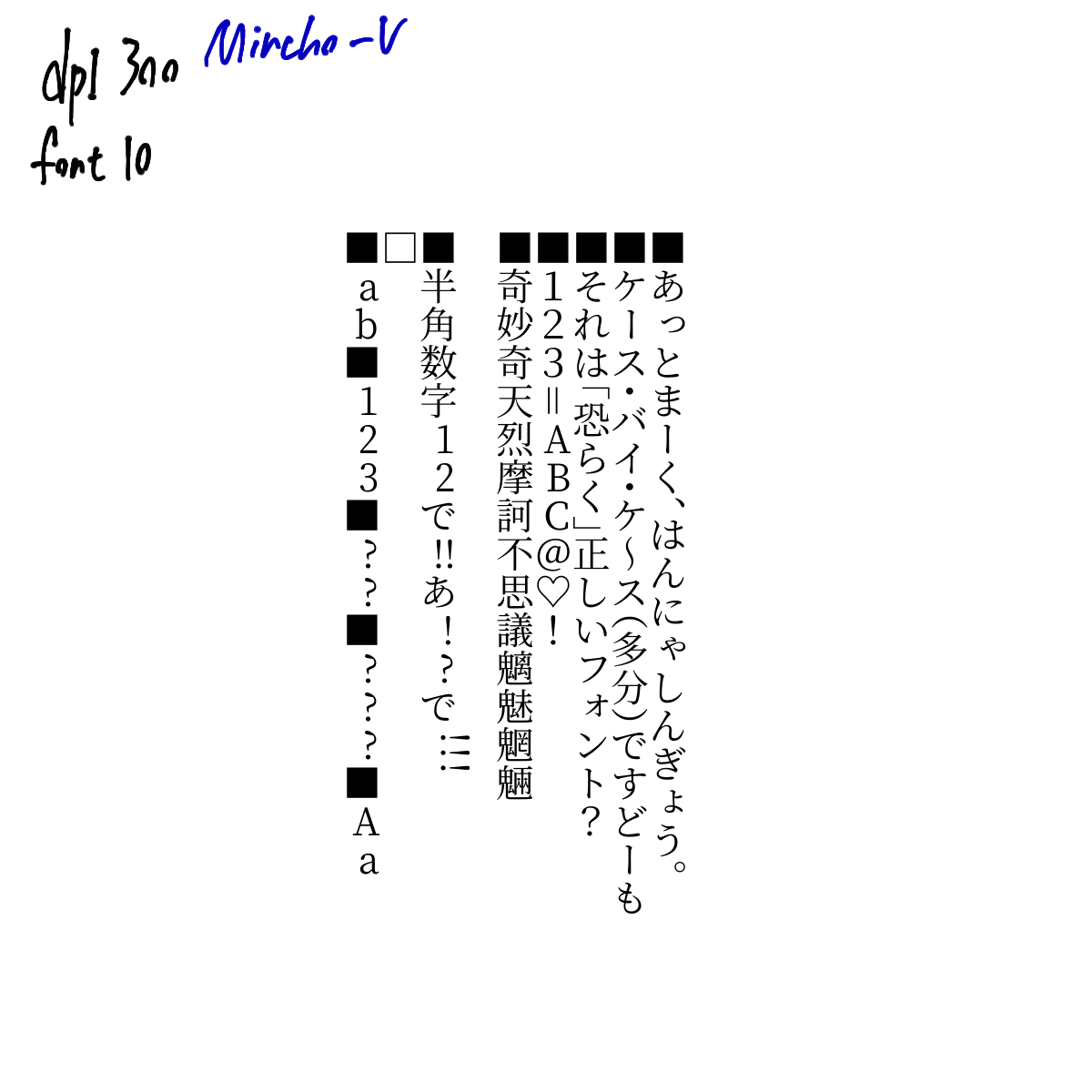
I’ll also post the output text just in case.
==== Warning: Script not saved! ====
cont None
<string>:133: DeprecationWarning: an integer is required (got type float).  Implicit conversion to integers using __int__ is deprecated, and may be removed in a future version of Python.
<string>:149: DeprecationWarning: an integer is required (got type float).  Implicit conversion to integers using __int__ is deprecated, and may be removed in a future version of Python.
Font Metrics 源ノ明朝 Vertical 10.08 32.109375 13.609375 0.640625 0.125 -12.960999999999999 -0.8969999999999999 ascent 14.953125 9.46875 18.65625 xheight 6.671875 0.0 18.65625 3.703125
PyQt5.QtCore.QRectF(1.25, -1.578125, 1.734375, 1.75) PyQt5.QtCore.QRectF(0.671875, -6.875, 6.359375, 7.0625) 7.328125
■ 17.0 > 5.310235507246377
あ 17.0 > 5.310235507246377
っ 17.0 > 5.310235507246377
と 17.0 > 5.310235507246377
ま 17.0 > 5.310235507246377
ー 17.0 > 5.310235507246377
く 17.0 > 5.310235507246377
、 17.0 > 5.310235507246377
は 17.0 > 5.310235507246377
ん 17.0 > 5.310235507246377
に 17.0 > 5.310235507246377
ゃ 17.0 > 5.310235507246377
し 17.0 > 5.310235507246377
ん 17.0 > 5.310235507246377
ぎ 17.0 > 5.310235507246377
ょ 17.0 > 5.310235507246377
う 17.0 > 5.310235507246377
。 17.0 > 5.310235507246377
hw ■ 0 0
HO ■ 14.953125 PyQt5.QtCore.QRectF(1.296875, -10.140625, 10.40625, 10.40625) PyQt5.QtCore.QRectF(0.0, 0.0, 17.0, 25.0)
hw あ 0 0
HO あ 14.953125 PyQt5.QtCore.QRectF(1.734375, -10.125, 9.796875, 10.59375) PyQt5.QtCore.QRectF(0.0, 0.0, 17.0, 25.0)
hw っ 0 0
HO っ 14.953125 PyQt5.QtCore.QRectF(4.21875, -7.5, 8.09375, 7.5) PyQt5.QtCore.QRectF(0.0, 0.0, 17.0, 25.0)
hw と 0 0
HO と 14.953125 PyQt5.QtCore.QRectF(2.921875, -9.8125, 7.375, 10.0625) PyQt5.QtCore.QRectF(0.0, 0.0, 17.0, 25.0)
hw ま 0 0
HO ま 14.953125 PyQt5.QtCore.QRectF(2.0625, -10.0, 8.78125, 10.484375) PyQt5.QtCore.QRectF(0.0, 0.0, 17.0, 25.0)
hw ー 0 0
HO ー 14.953125 PyQt5.QtCore.QRectF(5.0625, -9.734375, 2.25, 9.875) PyQt5.QtCore.QRectF(0.0, 0.0, 17.0, 25.0)
hw く 0 0
HO く 14.953125 PyQt5.QtCore.QRectF(3.578125, -10.265625, 5.140625, 10.984375) PyQt5.QtCore.QRectF(0.0, 0.0, 17.0, 25.0)
hw 、 0 0
HO 、 14.953125 PyQt5.QtCore.QRectF(8.953125, -10.828125, 3.234375, 10.828125) PyQt5.QtCore.QRectF(0.0, 0.0, 17.0, 25.0)
hw は 0 0
HO は 14.953125 PyQt5.QtCore.QRectF(1.59375, -9.703125, 10.4375, 10.09375) PyQt5.QtCore.QRectF(0.0, 0.0, 17.0, 25.0)
hw ん 0 0
HO ん 14.953125 PyQt5.QtCore.QRectF(1.390625, -9.890625, 10.609375, 10.21875) PyQt5.QtCore.QRectF(0.0, 0.0, 17.0, 25.0)
hw に 0 0
HO に 14.953125 PyQt5.QtCore.QRectF(1.84375, -9.4375, 9.84375, 9.6875) PyQt5.QtCore.QRectF(0.0, 0.0, 17.0, 25.0)
hw ゃ 0 0
HO ゃ 14.953125 PyQt5.QtCore.QRectF(4.09375, -9.046875, 8.40625, 9.046875) PyQt5.QtCore.QRectF(0.0, 0.0, 17.0, 25.0)
hw し 0 0
HO し 14.953125 PyQt5.QtCore.QRectF(2.859375, -9.6875, 8.53125, 10.109375) PyQt5.QtCore.QRectF(0.0, 0.0, 17.0, 25.0)
hw ん 0 0
HO ん 14.953125 PyQt5.QtCore.QRectF(1.390625, -9.890625, 10.609375, 10.21875) PyQt5.QtCore.QRectF(0.0, 0.0, 17.0, 25.0)
hw ぎ 0 0
HO ぎ 14.953125 PyQt5.QtCore.QRectF(2.140625, -10.625, 10.375, 11.203125) PyQt5.QtCore.QRectF(0.0, 0.0, 17.0, 25.0)
hw ょ 0 0
HO ょ 14.953125 PyQt5.QtCore.QRectF(5.40625, -8.96875, 6.203125, 8.96875) PyQt5.QtCore.QRectF(0.0, 0.0, 17.0, 25.0)
hw う 0 0
HO う 14.953125 PyQt5.QtCore.QRectF(2.9375, -10.390625, 6.859375, 11.125) PyQt5.QtCore.QRectF(0.0, 0.0, 17.0, 25.0)
hw 。 0 0
HO 。 14.953125 PyQt5.QtCore.QRectF(8.8125, -10.609375, 3.59375, 10.609375) PyQt5.QtCore.QRectF(0.0, 0.0, 17.0, 25.0)
■ 17.0 > 5.310235507246377
ケ 17.0 > 5.310235507246377
ー 16.0 > 5.310235507246377
ス 17.0 > 5.310235507246377
・ 17.0 > 5.310235507246377
バ 17.0 > 5.310235507246377
イ 17.0 > 5.310235507246377
・ 17.0 > 5.310235507246377
ケ 17.0 > 5.310235507246377
~ 17.0 > 5.310235507246377
ス 17.0 > 5.310235507246377
( 17.0 > 5.310235507246377
多 17.0 > 5.310235507246377
分 17.0 > 5.310235507246377
) 17.0 > 5.310235507246377
で 17.0 > 5.310235507246377
す 17.0 > 5.310235507246377
ど 17.0 > 5.310235507246377
ー 17.0 > 5.310235507246377
も 17.0 > 5.310235507246377
hw ■ 0 0
HO ■ 14.953125 PyQt5.QtCore.QRectF(1.296875, -10.140625, 10.40625, 10.40625) PyQt5.QtCore.QRectF(0.0, 0.0, 17.0, 25.0)
hw ケ 0 0
HO ケ 14.953125 PyQt5.QtCore.QRectF(1.4375, -10.0, 10.078125, 10.34375) PyQt5.QtCore.QRectF(0.0, 0.0, 17.0, 25.0)
hw ー 0 0
HO ー 14.953125 PyQt5.QtCore.QRectF(5.0625, -9.734375, 2.25, 9.875) PyQt5.QtCore.QRectF(0.0, 0.0, 16.0, 25.0)
hw ス 0 0
HO ス 14.953125 PyQt5.QtCore.QRectF(1.203125, -8.84375, 10.09375, 8.84375) PyQt5.QtCore.QRectF(0.0, 0.0, 17.0, 25.0)
hw ・ 0 0
HO ・ 14.953125 PyQt5.QtCore.QRectF(5.296875, -6.140625, 2.40625, 6.140625) PyQt5.QtCore.QRectF(0.0, 0.0, 17.0, 25.0)
hw バ 0 0
HO バ 14.953125 PyQt5.QtCore.QRectF(0.609375, -9.28125, 11.3125, 9.28125) PyQt5.QtCore.QRectF(0.0, 0.0, 17.0, 25.0)
hw イ 0 0
HO イ 14.953125 PyQt5.QtCore.QRectF(1.671875, -9.859375, 7.921875, 10.3125) PyQt5.QtCore.QRectF(0.0, 0.0, 17.0, 25.0)
hw ・ 0 0
HO ・ 14.953125 PyQt5.QtCore.QRectF(5.296875, -6.140625, 2.40625, 6.140625) PyQt5.QtCore.QRectF(0.0, 0.0, 17.0, 25.0)
hw ケ 0 0
HO ケ 14.953125 PyQt5.QtCore.QRectF(1.4375, -10.0, 10.078125, 10.34375) PyQt5.QtCore.QRectF(0.0, 0.0, 17.0, 25.0)
hw ~ 0 0
HO ~ 14.953125 PyQt5.QtCore.QRectF(5.234375, -10.796875, 2.546875, 11.71875) PyQt5.QtCore.QRectF(0.0, 0.0, 17.0, 25.0)
hw ス 0 0
HO ス 14.953125 PyQt5.QtCore.QRectF(1.203125, -8.84375, 10.09375, 8.84375) PyQt5.QtCore.QRectF(0.0, 0.0, 17.0, 25.0)
hw ( 0 0
HO ( 14.953125 PyQt5.QtCore.QRectF(0.40625, -3.0, 12.1875, 3.734375) PyQt5.QtCore.QRectF(0.0, 0.0, 17.0, 25.0)
hw 多 0 0
HO 多 14.953125 PyQt5.QtCore.QRectF(0.6875, -10.96875, 11.75, 11.96875) PyQt5.QtCore.QRectF(0.0, 0.0, 17.0, 25.0)
hw 分 0 0
HO 分 14.953125 PyQt5.QtCore.QRectF(0.515625, -10.921875, 12.15625, 11.9375) PyQt5.QtCore.QRectF(0.0, 0.0, 17.0, 25.0)
hw ) 0 0
HO ) 14.953125 PyQt5.QtCore.QRectF(0.40625, -10.625, 12.1875, 10.625) PyQt5.QtCore.QRectF(0.0, 0.0, 17.0, 25.0)
hw で 0 0
HO で 14.953125 PyQt5.QtCore.QRectF(0.84375, -9.125, 11.109375, 9.125) PyQt5.QtCore.QRectF(0.0, 0.0, 17.0, 25.0)
hw す 0 0
HO す 14.953125 PyQt5.QtCore.QRectF(1.234375, -10.015625, 10.84375, 10.765625) PyQt5.QtCore.QRectF(0.0, 0.0, 17.0, 25.0)
hw ど 0 0
HO ど 14.953125 PyQt5.QtCore.QRectF(2.6875, -10.171875, 9.5625, 10.578125) PyQt5.QtCore.QRectF(0.0, 0.0, 17.0, 25.0)
hw ー 0 0
HO ー 14.953125 PyQt5.QtCore.QRectF(5.0625, -9.734375, 2.25, 9.875) PyQt5.QtCore.QRectF(0.0, 0.0, 17.0, 25.0)
hw も 0 0
HO も 14.953125 PyQt5.QtCore.QRectF(2.625, -10.078125, 7.828125, 10.609375) PyQt5.QtCore.QRectF(0.0, 0.0, 17.0, 25.0)
■ 17.0 > 5.310235507246377
そ 17.0 > 5.310235507246377
れ 17.0 > 5.310235507246377
は 17.0 > 5.310235507246377
「 17.0 > 5.310235507246377
恐 17.0 > 5.310235507246377
ら 17.0 > 5.310235507246377
く 17.0 > 5.310235507246377
」 17.0 > 5.310235507246377
正 17.0 > 5.310235507246377
し 17.0 > 5.310235507246377
い 17.0 > 5.310235507246377
フ 16.0 > 5.310235507246377
ォ 17.0 > 5.310235507246377
ン 17.0 > 5.310235507246377
ト 17.0 > 5.310235507246377
? 17.0 > 5.310235507246377
hw ■ 0 0
HO ■ 14.953125 PyQt5.QtCore.QRectF(1.296875, -10.140625, 10.40625, 10.40625) PyQt5.QtCore.QRectF(0.0, 0.0, 17.0, 25.0)
hw そ 0 0
HO そ 14.953125 PyQt5.QtCore.QRectF(1.578125, -9.859375, 9.734375, 10.390625) PyQt5.QtCore.QRectF(0.0, 0.0, 17.0, 25.0)
hw れ 0 0
HO れ 14.953125 PyQt5.QtCore.QRectF(0.859375, -10.140625, 11.890625, 10.703125) PyQt5.QtCore.QRectF(0.0, 0.0, 17.0, 25.0)
hw は 0 0
HO は 14.953125 PyQt5.QtCore.QRectF(1.59375, -9.703125, 10.4375, 10.09375) PyQt5.QtCore.QRectF(0.0, 0.0, 17.0, 25.0)
hw 「 0 0
HO 「 14.953125 PyQt5.QtCore.QRectF(3.390625, -2.90625, 9.296875, 4.0) PyQt5.QtCore.QRectF(0.0, 0.0, 17.0, 25.0)
hw 恐 0 0
HO 恐 14.953125 PyQt5.QtCore.QRectF(0.515625, -10.625, 11.953125, 11.375) PyQt5.QtCore.QRectF(0.0, 0.0, 17.0, 25.0)
hw ら 0 0
HO ら 14.953125 PyQt5.QtCore.QRectF(2.8125, -9.96875, 8.125, 10.46875) PyQt5.QtCore.QRectF(0.0, 0.0, 17.0, 25.0)
hw く 0 0
HO く 14.953125 PyQt5.QtCore.QRectF(3.578125, -10.265625, 5.140625, 10.984375) PyQt5.QtCore.QRectF(0.0, 0.0, 17.0, 25.0)
hw 」 0 0
HO 」 14.953125 PyQt5.QtCore.QRectF(0.3125, -10.90625, 9.296875, 10.90625) PyQt5.QtCore.QRectF(0.0, 0.0, 17.0, 25.0)
hw 正 0 0
HO 正 14.953125 PyQt5.QtCore.QRectF(0.546875, -10.546875, 11.953125, 10.9375) PyQt5.QtCore.QRectF(0.0, 0.0, 17.0, 25.0)
hw し 0 0
HO し 14.953125 PyQt5.QtCore.QRectF(2.859375, -9.6875, 8.53125, 10.109375) PyQt5.QtCore.QRectF(0.0, 0.0, 17.0, 25.0)
hw い 0 0
HO い 14.953125 PyQt5.QtCore.QRectF(1.1875, -8.78125, 10.578125, 8.78125) PyQt5.QtCore.QRectF(0.0, 0.0, 17.0, 25.0)
hw フ 0 0
HO フ 14.953125 PyQt5.QtCore.QRectF(2.46875, -8.8125, 8.578125, 8.96875) PyQt5.QtCore.QRectF(0.0, 0.0, 16.0, 25.0)
hw ォ 0 0
HO ォ 14.953125 PyQt5.QtCore.QRectF(4.484375, -8.984375, 7.765625, 8.984375) PyQt5.QtCore.QRectF(0.0, 0.0, 17.0, 25.0)
hw ン 0 0
HO ン 14.953125 PyQt5.QtCore.QRectF(2.46875, -8.796875, 9.203125, 8.796875) PyQt5.QtCore.QRectF(0.0, 0.0, 17.0, 25.0)
hw ト 0 0
HO ト 14.953125 PyQt5.QtCore.QRectF(4.265625, -9.765625, 5.75, 10.171875) PyQt5.QtCore.QRectF(0.0, 0.0, 17.0, 25.0)
hw ? 0 0
HO ? 14.953125 PyQt5.QtCore.QRectF(3.203125, -9.953125, 6.09375, 10.125) PyQt5.QtCore.QRectF(0.0, 0.0, 17.0, 25.0)
■ 17.0 > 5.310235507246377
1 17.0 > 5.310235507246377
2 17.0 > 5.310235507246377
3 17.0 > 5.310235507246377
= 17.0 > 5.310235507246377
A 12.0 > 5.310235507246377
B 11.0 > 5.310235507246377
C 12.0 > 5.310235507246377
@ 17.0 > 5.310235507246377
♡ 17.0 > 5.310235507246377
! 17.0 > 5.310235507246377
hw ■ 0 0
HO ■ 14.953125 PyQt5.QtCore.QRectF(1.296875, -10.140625, 10.40625, 10.40625) PyQt5.QtCore.QRectF(0.0, 0.0, 17.0, 25.0)
hw 1 0 0
HO 1 14.953125 PyQt5.QtCore.QRectF(3.703125, -9.890625, 5.765625, 9.90625) PyQt5.QtCore.QRectF(0.0, 0.0, 17.0, 25.0)
hw 2 0 0
HO 2 14.953125 PyQt5.QtCore.QRectF(3.28125, -9.953125, 6.5625, 9.96875) PyQt5.QtCore.QRectF(0.0, 0.0, 17.0, 25.0)
hw 3 0 0
HO 3 14.953125 PyQt5.QtCore.QRectF(3.328125, -9.953125, 6.375, 10.203125) PyQt5.QtCore.QRectF(0.0, 0.0, 17.0, 25.0)
hw = 0 0
HO = 14.953125 PyQt5.QtCore.QRectF(4.71875, -9.5, 3.25, 9.5) PyQt5.QtCore.QRectF(0.0, 0.0, 17.0, 25.0)
hw A 0 0
HO A 14.953125 PyQt5.QtCore.QRectF(0.09375, -9.578125, 9.140625, 9.59375) PyQt5.QtCore.QRectF(0.0, 0.0, 12.0, 25.0)
hw B 0 0
HO B 14.953125 PyQt5.QtCore.QRectF(0.671875, -9.484375, 7.453125, 9.5) PyQt5.QtCore.QRectF(0.0, 0.0, 11.0, 25.0)
hw C 0 0
HO C 14.953125 PyQt5.QtCore.QRectF(0.703125, -9.703125, 7.640625, 9.921875) PyQt5.QtCore.QRectF(0.0, 0.0, 12.0, 25.0)
hw @ 0 0
HO @ 14.953125 PyQt5.QtCore.QRectF(1.15625, -9.953125, 10.921875, 11.09375) PyQt5.QtCore.QRectF(0.0, 0.0, 17.0, 25.0)
hw ♡ 0 0
HO ♡ 14.953125 PyQt5.QtCore.QRectF(1.0, -10.375, 11.015625, 10.9375) PyQt5.QtCore.QRectF(0.0, 0.0, 17.0, 25.0)
hw ! 0 0
HO ! 14.953125 PyQt5.QtCore.QRectF(5.671875, -9.953125, 1.65625, 10.125) PyQt5.QtCore.QRectF(0.0, 0.0, 17.0, 25.0)
■ 17.0 > 5.310235507246377
奇 17.0 > 5.310235507246377
妙 17.0 > 5.310235507246377
奇 17.0 > 5.310235507246377
天 17.0 > 5.310235507246377
烈 17.0 > 5.310235507246377
摩 17.0 > 5.310235507246377
訶 17.0 > 5.310235507246377
不 17.0 > 5.310235507246377
思 17.0 > 5.310235507246377
議 17.0 > 5.310235507246377
魑 17.0 > 5.310235507246377
魅 17.0 > 5.310235507246377
魍 17.0 > 5.310235507246377
魎 17.0 > 5.310235507246377
hw ■ 0 0
HO ■ 14.953125 PyQt5.QtCore.QRectF(1.296875, -10.140625, 10.40625, 10.40625) PyQt5.QtCore.QRectF(0.0, 0.0, 17.0, 25.0)
hw 奇 0 0
HO 奇 14.953125 PyQt5.QtCore.QRectF(0.546875, -10.90625, 11.921875, 11.921875) PyQt5.QtCore.QRectF(0.0, 0.0, 17.0, 25.0)
hw 妙 0 0
HO 妙 14.953125 PyQt5.QtCore.QRectF(0.46875, -10.859375, 12.109375, 11.890625) PyQt5.QtCore.QRectF(0.0, 0.0, 17.0, 25.0)
hw 奇 0 0
HO 奇 14.953125 PyQt5.QtCore.QRectF(0.546875, -10.90625, 11.921875, 11.921875) PyQt5.QtCore.QRectF(0.0, 0.0, 17.0, 25.0)
hw 天 0 0
HO 天 14.953125 PyQt5.QtCore.QRectF(0.515625, -10.4375, 12.03125, 11.484375) PyQt5.QtCore.QRectF(0.0, 0.0, 17.0, 25.0)
hw 烈 0 0
HO 烈 14.953125 PyQt5.QtCore.QRectF(0.53125, -10.734375, 11.796875, 11.84375) PyQt5.QtCore.QRectF(0.0, 0.0, 17.0, 25.0)
hw 摩 0 0
HO 摩 14.953125 PyQt5.QtCore.QRectF(0.40625, -10.90625, 12.140625, 11.9375) PyQt5.QtCore.QRectF(0.0, 0.0, 17.0, 25.0)
hw 訶 0 0
HO 訶 14.953125 PyQt5.QtCore.QRectF(0.453125, -10.75, 12.1875, 11.734375) PyQt5.QtCore.QRectF(0.0, 0.0, 17.0, 25.0)
hw 不 0 0
HO 不 14.953125 PyQt5.QtCore.QRectF(0.453125, -10.65625, 11.890625, 11.640625) PyQt5.QtCore.QRectF(0.0, 0.0, 17.0, 25.0)
hw 思 0 0
HO 思 14.953125 PyQt5.QtCore.QRectF(0.578125, -10.640625, 11.96875, 11.4375) PyQt5.QtCore.QRectF(0.0, 0.0, 17.0, 25.0)
hw 議 0 0
HO 議 14.953125 PyQt5.QtCore.QRectF(0.46875, -10.96875, 12.046875, 12.0) PyQt5.QtCore.QRectF(0.0, 0.0, 17.0, 25.0)
hw 魑 0 0
HO 魑 14.953125 PyQt5.QtCore.QRectF(0.375, -10.9375, 12.09375, 11.96875) PyQt5.QtCore.QRectF(0.0, 0.0, 17.0, 25.0)
hw 魅 0 0
HO 魅 14.953125 PyQt5.QtCore.QRectF(0.421875, -10.921875, 12.171875, 11.953125) PyQt5.QtCore.QRectF(0.0, 0.0, 17.0, 25.0)
hw 魍 0 0
HO 魍 14.953125 PyQt5.QtCore.QRectF(0.375, -10.9375, 12.09375, 11.96875) PyQt5.QtCore.QRectF(0.0, 0.0, 17.0, 25.0)
hw 魎 0 0
HO 魎 14.953125 PyQt5.QtCore.QRectF(0.375, -10.9375, 12.09375, 11.96875) PyQt5.QtCore.QRectF(0.0, 0.0, 17.0, 25.0)
■ 17.0 > 5.310235507246377
半 17.0 > 5.310235507246377
角 17.0 > 5.310235507246377
数 17.0 > 5.310235507246377
字 17.0 > 5.310235507246377
1 9.0 > 5.310235507246377
2 9.0 > 5.310235507246377
で 17.0 > 5.310235507246377
! 5.0 > 5.310235507246377
! 1 1
! 5.0 > 5.310235507246377
! 1 2
あ 17.0 > 5.310235507246377
! 5.0 > 5.310235507246377
! 2 1
? 7.0 > 5.310235507246377
で 17.0 > 5.310235507246377
! 5.0 > 5.310235507246377
! 3 1
! 5.0 > 5.310235507246377
! 3 2
! 5.0 > 5.310235507246377
! 3 3
hw ■ 0 0
HO ■ 14.953125 PyQt5.QtCore.QRectF(1.296875, -10.140625, 10.40625, 10.40625) PyQt5.QtCore.QRectF(0.0, 0.0, 17.0, 25.0)
hw 半 0 0
HO 半 14.953125 PyQt5.QtCore.QRectF(0.53125, -10.90625, 11.984375, 11.9375) PyQt5.QtCore.QRectF(0.0, 0.0, 17.0, 25.0)
hw 角 0 0
HO 角 14.953125 PyQt5.QtCore.QRectF(0.5, -10.921875, 10.953125, 11.921875) PyQt5.QtCore.QRectF(0.0, 0.0, 17.0, 25.0)
hw 数 0 0
HO 数 14.953125 PyQt5.QtCore.QRectF(0.4375, -10.90625, 12.234375, 11.953125) PyQt5.QtCore.QRectF(0.0, 0.0, 17.0, 25.0)
hw 字 0 0
HO 字 14.953125 PyQt5.QtCore.QRectF(0.609375, -10.9375, 11.859375, 11.96875) PyQt5.QtCore.QRectF(0.0, 0.0, 17.0, 25.0)
hw 1 0 0
HO 1 14.953125 PyQt5.QtCore.QRectF(1.078125, -9.609375, 5.140625, 9.625) PyQt5.QtCore.QRectF(0.0, 0.0, 9.0, 25.0)
hw 2 0 0
HO 2 14.953125 PyQt5.QtCore.QRectF(0.625, -9.671875, 5.796875, 9.6875) PyQt5.QtCore.QRectF(0.0, 0.0, 9.0, 25.0)
hw で 0 0
HO で 14.953125 PyQt5.QtCore.QRectF(0.84375, -9.125, 11.109375, 9.125) PyQt5.QtCore.QRectF(0.0, 0.0, 17.0, 25.0)
hw ! 1 2
hw あ 0 0
HO あ 14.953125 PyQt5.QtCore.QRectF(1.734375, -10.125, 9.796875, 10.59375) PyQt5.QtCore.QRectF(0.0, 0.0, 17.0, 25.0)
hw ! 2 1
HO ! 14.953125 PyQt5.QtCore.QRectF(1.15625, -9.71875, 1.625, 9.890625) PyQt5.QtCore.QRectF(0.0, 0.0, 5.0, 25.0)
hw ? 0 0
HO ? 14.953125 PyQt5.QtCore.QRectF(0.984375, -9.734375, 3.84375, 9.90625) PyQt5.QtCore.QRectF(0.0, 0.0, 7.0, 25.0)
hw で 0 0
HO で 14.953125 PyQt5.QtCore.QRectF(0.84375, -9.125, 11.109375, 9.125) PyQt5.QtCore.QRectF(0.0, 0.0, 17.0, 25.0)
hw ! 3 3
M ! PyQt5.QtCore.QSizeF(21.0, 18.65625) PyQt5.QtCore.QRectF(1.15625, -9.71875, 1.625, 9.890625) height 7.943925233644859 3.9375 1.15625 1.15625
hw ! 3 3
M ! PyQt5.QtCore.QSizeF(21.0, 18.65625) PyQt5.QtCore.QRectF(1.15625, -9.71875, 1.625, 9.890625) height 4.0 3.9375 1.15625 1.15625
hw ! 3 3
M ! PyQt5.QtCore.QSizeF(21.0, 18.65625) PyQt5.QtCore.QRectF(1.15625, -9.71875, 1.625, 9.890625) height 4.0 3.9375 1.15625 1.15625
□ 17.0 > 5.310235507246377
hw □ 0 0
HO □ 14.953125 PyQt5.QtCore.QRectF(1.296875, -10.140625, 10.40625, 10.40625) PyQt5.QtCore.QRectF(0.0, 0.0, 17.0, 25.0)
■ 17.0 > 5.310235507246377
a 9.0 > 5.310235507246377
b 11.0 > 5.310235507246377
■ 17.0 > 5.310235507246377
1 9.0 > 5.310235507246377
2 9.0 > 5.310235507246377
3 9.0 > 5.310235507246377
■ 17.0 > 5.310235507246377
? 7.0 > 5.310235507246377
? 7.0 > 5.310235507246377
■ 17.0 > 5.310235507246377
? 7.0 > 5.310235507246377
? 7.0 > 5.310235507246377
? 7.0 > 5.310235507246377
■ 17.0 > 5.310235507246377
A 12.0 > 5.310235507246377
a 9.0 > 5.310235507246377
hw ■ 0 0
HO ■ 14.953125 PyQt5.QtCore.QRectF(1.296875, -10.140625, 10.40625, 10.40625) PyQt5.QtCore.QRectF(0.0, 0.0, 17.0, 25.0)
hw a 0 0
HO a 14.953125 PyQt5.QtCore.QRectF(0.671875, -6.875, 6.359375, 7.0625) PyQt5.QtCore.QRectF(0.0, 0.0, 9.0, 25.0)
hw b 0 0
HO b 14.953125 PyQt5.QtCore.QRectF(0.4375, -10.5, 7.046875, 10.6875) PyQt5.QtCore.QRectF(0.0, 0.0, 11.0, 25.0)
hw ■ 0 0
HO ■ 14.953125 PyQt5.QtCore.QRectF(1.296875, -10.140625, 10.40625, 10.40625) PyQt5.QtCore.QRectF(0.0, 0.0, 17.0, 25.0)
hw 1 0 0
HO 1 14.953125 PyQt5.QtCore.QRectF(1.078125, -9.609375, 5.140625, 9.625) PyQt5.QtCore.QRectF(0.0, 0.0, 9.0, 25.0)
hw 2 0 0
HO 2 14.953125 PyQt5.QtCore.QRectF(0.625, -9.671875, 5.796875, 9.6875) PyQt5.QtCore.QRectF(0.0, 0.0, 9.0, 25.0)
hw 3 0 0
HO 3 14.953125 PyQt5.QtCore.QRectF(0.609375, -9.671875, 5.765625, 9.859375) PyQt5.QtCore.QRectF(0.0, 0.0, 9.0, 25.0)
hw ■ 0 0
HO ■ 14.953125 PyQt5.QtCore.QRectF(1.296875, -10.140625, 10.40625, 10.40625) PyQt5.QtCore.QRectF(0.0, 0.0, 17.0, 25.0)
hw ? 0 0
HO ? 14.953125 PyQt5.QtCore.QRectF(0.984375, -9.734375, 3.84375, 9.90625) PyQt5.QtCore.QRectF(0.0, 0.0, 7.0, 25.0)
hw ? 0 0
HO ? 14.953125 PyQt5.QtCore.QRectF(0.984375, -9.734375, 3.84375, 9.90625) PyQt5.QtCore.QRectF(0.0, 0.0, 7.0, 25.0)
hw ■ 0 0
HO ■ 14.953125 PyQt5.QtCore.QRectF(1.296875, -10.140625, 10.40625, 10.40625) PyQt5.QtCore.QRectF(0.0, 0.0, 17.0, 25.0)
hw ? 0 0
HO ? 14.953125 PyQt5.QtCore.QRectF(0.984375, -9.734375, 3.84375, 9.90625) PyQt5.QtCore.QRectF(0.0, 0.0, 7.0, 25.0)
hw ? 0 0
HO ? 14.953125 PyQt5.QtCore.QRectF(0.984375, -9.734375, 3.84375, 9.90625) PyQt5.QtCore.QRectF(0.0, 0.0, 7.0, 25.0)
hw ? 0 0
HO ? 14.953125 PyQt5.QtCore.QRectF(0.984375, -9.734375, 3.84375, 9.90625) PyQt5.QtCore.QRectF(0.0, 0.0, 7.0, 25.0)
hw ■ 0 0
HO ■ 14.953125 PyQt5.QtCore.QRectF(1.296875, -10.140625, 10.40625, 10.40625) PyQt5.QtCore.QRectF(0.0, 0.0, 17.0, 25.0)
hw A 0 0
HO A 14.953125 PyQt5.QtCore.QRectF(0.09375, -9.578125, 9.140625, 9.59375) PyQt5.QtCore.QRectF(0.0, 0.0, 12.0, 25.0)
hw a 0 0
HO a 14.953125 PyQt5.QtCore.QRectF(0.671875, -6.875, 6.359375, 7.0625) PyQt5.QtCore.QRectF(0.0, 0.0, 9.0, 25.0)
<?xml version="1.0" standalone="no"?>
<!DOCTYPE svg PUBLIC "-//W3C//DTD SVG 20010904//EN" "http://www.w3.org/TR/2001/REC-SVG-20010904/DTD/svg10.dtd">
<!-- Created using Krita: https://krita.org -->
<svg xmlns="http://www.w3.org/2000/svg"
    xmlns:xlink="http://www.w3.org/1999/xlink"
    xmlns:krita="http://krita.org/namespaces/svg/krita"
    xmlns:sodipodi="http://sodipodi.sourceforge.net/DTD/sodipodi-0.dtd"
    width="5000.0pt"
    height="5000.0pt"
    viewBox="0 0 5000.0 5000.0">
<defs/><text id="vf_100.0_100.0_1628728953.1465147" transform = "" font-family="源ノ明朝 Vertical" font-size="10.0">
<tspan y="0">
<tspan dy="0" x="92.3">■</tspan>
<tspan dy="10.08" x="92.3">あ</tspan>
<tspan dy="10.08" x="92.3">っ</tspan>
<tspan dy="10.08" x="92.3">と</tspan>
<tspan dy="10.08" x="92.3">ま</tspan>
<tspan dy="10.08" x="92.3">ー</tspan>
<tspan dy="10.08" x="92.3">く</tspan>
<tspan dy="10.08" x="92.3">、</tspan>
<tspan dy="5.04" x="92.3">は</tspan>
<tspan dy="10.08" x="92.3">ん</tspan>
<tspan dy="10.08" x="92.3">に</tspan>
<tspan dy="10.08" x="92.3">ゃ</tspan>
<tspan dy="10.08" x="92.3">し</tspan>
<tspan dy="10.08" x="92.3">ん</tspan>
<tspan dy="10.08" x="92.3">ぎ</tspan>
<tspan dy="10.08" x="92.3">ょ</tspan>
<tspan dy="10.08" x="92.3">う</tspan>
<tspan dy="10.08" x="92.3">。</tspan>
</tspan>
<tspan y="0">
<tspan dy="0" x="82.22">■</tspan>
<tspan dy="10.08" x="82.22">ケ</tspan>
<tspan dy="10.08" x="82.72">ー</tspan>
<tspan dy="10.08" x="82.22">ス</tspan>
<tspan dy="7.578947368421052" x="82.22">・</tspan>
<tspan dy="7.578947368421052" x="82.22">バ</tspan>
<tspan dy="10.08" x="82.22">イ</tspan>
<tspan dy="7.578947368421052" x="82.22">・</tspan>
<tspan dy="7.578947368421052" x="82.22">ケ</tspan>
<tspan dy="10.08" x="82.22">~</tspan>
<tspan dy="10.08" x="82.22">ス</tspan>
<tspan dy="5.04" x="82.22">(</tspan>
<tspan dy="10.08" x="82.22">多</tspan>
<tspan dy="10.08" x="82.22">分</tspan>
<tspan dy="10.08" x="82.22">)</tspan>
<tspan dy="5.04" x="82.22">で</tspan>
<tspan dy="10.08" x="82.22">す</tspan>
<tspan dy="10.08" x="82.22">ど</tspan>
<tspan dy="10.08" x="82.22">ー</tspan>
<tspan dy="10.08" x="82.22">も</tspan>
</tspan>
<tspan y="0">
<tspan dy="0" x="72.14">■</tspan>
<tspan dy="10.08" x="72.14">そ</tspan>
<tspan dy="10.08" x="72.14">れ</tspan>
<tspan dy="10.08" x="72.14">は</tspan>
<tspan dy="5.04" x="72.14">「</tspan>
<tspan dy="10.08" x="72.14">恐</tspan>
<tspan dy="10.08" x="72.14">ら</tspan>
<tspan dy="10.08" x="72.14">く</tspan>
<tspan dy="10.08" x="72.14">」</tspan>
<tspan dy="5.04" x="72.14">正</tspan>
<tspan dy="10.08" x="72.14">し</tspan>
<tspan dy="10.08" x="72.14">い</tspan>
<tspan dy="10.08" x="72.64">フ</tspan>
<tspan dy="10.08" x="72.14">ォ</tspan>
<tspan dy="10.08" x="72.14">ン</tspan>
<tspan dy="10.08" x="72.14">ト</tspan>
<tspan dy="10.08" x="72.14">?</tspan>
</tspan>
<tspan y="0">
<tspan dy="0" x="62.06">■</tspan>
<tspan dy="10.08" x="62.06">1</tspan>
<tspan dy="10.08" x="62.06">2</tspan>
<tspan dy="10.08" x="62.06">3</tspan>
<tspan dy="10.08" x="62.06">=</tspan>
<tspan dy="10.08" x="64.56">A</tspan>
<tspan dy="10.08" x="65.06">B</tspan>
<tspan dy="10.08" x="64.56">C</tspan>
<tspan dy="10.08" x="62.06">@</tspan>
<tspan dy="10.08" x="62.06">♡</tspan>
<tspan dy="10.08" x="62.06">!</tspan>
</tspan>
<tspan y="0">
<tspan dy="0" x="51.980000000000004">■</tspan>
<tspan dy="10.08" x="51.980000000000004">奇</tspan>
<tspan dy="10.08" x="51.980000000000004">妙</tspan>
<tspan dy="10.08" x="51.980000000000004">奇</tspan>
<tspan dy="10.08" x="51.980000000000004">天</tspan>
<tspan dy="10.08" x="51.980000000000004">烈</tspan>
<tspan dy="10.08" x="51.980000000000004">摩</tspan>
<tspan dy="10.08" x="51.980000000000004">訶</tspan>
<tspan dy="10.08" x="51.980000000000004">不</tspan>
<tspan dy="10.08" x="51.980000000000004">思</tspan>
<tspan dy="10.08" x="51.980000000000004">議</tspan>
<tspan dy="10.08" x="51.980000000000004">魑</tspan>
<tspan dy="10.08" x="51.980000000000004">魅</tspan>
<tspan dy="10.08" x="51.980000000000004">魍</tspan>
<tspan dy="10.08" x="51.980000000000004">魎</tspan>
</tspan>
<tspan y="0">
</tspan>
<tspan y="0">
<tspan dy="0" x="31.820000000000007">■</tspan>
<tspan dy="10.08" x="31.820000000000007">半</tspan>
<tspan dy="10.08" x="31.820000000000007">角</tspan>
<tspan dy="10.08" x="31.820000000000007">数</tspan>
<tspan dy="10.08" x="31.820000000000007">字</tspan>
<tspan dy="10.08" x="35.82000000000001">1</tspan>
<tspan dy="10.08" x="35.82000000000001">2</tspan>
<tspan dy="10.08" x="31.820000000000007">で</tspan>
<tspan dy="10.08" x="35.32000000000001">!!</tspan>
<tspan dy="10.08" x="31.820000000000007">あ</tspan>
<tspan dy="10.08" x="37.82000000000001">!</tspan>
<tspan dy="10.08" x="36.82000000000001">?</tspan>
<tspan dy="10.08" x="31.820000000000007">で</tspan>
<tspan dy="7.943925233644859" x="36.54375000000001" font-family="源ノ明朝 Rotated">!</tspan>
<tspan dy="4.0" x="36.54375000000001" font-family="源ノ明朝 Rotated">!</tspan>
<tspan dy="4.0" x="36.54375000000001" font-family="源ノ明朝 Rotated">!</tspan>
</tspan>
<tspan y="0">
<tspan dy="0" x="21.74000000000001">□</tspan>
</tspan>
<tspan y="0">
<tspan dy="0" x="11.66000000000001">■</tspan>
<tspan dy="10.08" x="15.66000000000001">a</tspan>
<tspan dy="10.08" x="14.66000000000001">b</tspan>
<tspan dy="10.08" x="11.66000000000001">■</tspan>
<tspan dy="10.08" x="15.66000000000001">1</tspan>
<tspan dy="10.08" x="15.66000000000001">2</tspan>
<tspan dy="10.08" x="15.66000000000001">3</tspan>
<tspan dy="10.08" x="11.66000000000001">■</tspan>
<tspan dy="10.08" x="16.66000000000001">?</tspan>
<tspan dy="10.08" x="16.66000000000001">?</tspan>
<tspan dy="10.08" x="11.66000000000001">■</tspan>
<tspan dy="10.08" x="16.66000000000001">?</tspan>
<tspan dy="10.08" x="16.66000000000001">?</tspan>
<tspan dy="10.08" x="16.66000000000001">?</tspan>
<tspan dy="10.08" x="11.66000000000001">■</tspan>
<tspan dy="10.08" x="14.16000000000001">A</tspan>
<tspan dy="10.08" x="15.66000000000001">a</tspan>
</tspan>
</text>
</svg>
Well this is weird, our metrics data seems to be different…
Yours: Font Metrics 源ノ明朝 Vertical 10.08 32.109375 13.609375 0.640625 0.125 -12.960999999999999 -0.8969999999999999 ascent 14.953125 9.46875 18.65625 xheight 6.671875 0.0 18.65625 3.703125
Mine: Font Metrics Source Han Serif Vertical 10.08 32.0 13.609375 1.0 0.0 -12.960999999999999 -0.8969999999999999 ascent 15.0 9.484375 19.0 xheight 6.6875 0.0 19.0 4.0
I mean they are close, but these little things are creating discrepancies that are effecting display and the fonts 
Let me see what can be done.
Edit: Just out of curiosity, what is your screen resolution?
My display is 2560*1440.
As a reference for vertical writing, I would like to post a link to a site that publishes novels for Japanese readers, but there are many sites that publish works with a rating of R15+.
Is it okay to post links here to sites that have partially age-restricted content?
Can you run this for me and tell me the output:
from PyQt5.QtGui import *
from PyQt5.QtWidgets import *
from PyQt5.QtCore import *

device = QOpenGLPaintDevice()
font = QFont('Source Han Serif Vertical', 10)
metrics = QFontMetricsF(font)

print (metrics.fontDpi(), metrics.averageCharWidth() ,device, device.logicalDpiX(), device.physicalDpiX())

device = QOpenGLPaintDevice()
font = QFont('Source Han Serif Vertical', 10)
metrics = QFontMetricsF(font, device)

print (metrics.fontDpi(), metrics.averageCharWidth())
I’m going to do this using Krita’s scripter, right?
I’m getting an error…
==== Warning: Script not saved! ====

**********************
AttributeError: 'QFontMetricsF' object has no attribute 'fontDpi'

In file: <string>
In function: <module> at line: 9. Line with error:

**********************
Sigh, I guess you are on an older QT
Then try without it:
from PyQt5.QtGui import *
from PyQt5.QtWidgets import *
from PyQt5.QtCore import *

device = QOpenGLPaintDevice()
font = QFont('Source Han Serif Vertical', 10)
metrics = QFontMetricsF(font)

print ( metrics.averageCharWidth() ,device, device.logicalDpiX(), device.physicalDpiX())

device = QOpenGLPaintDevice()
font = QFont('Source Han Serif Vertical', 10)
metrics = QFontMetricsF(font, device)

print ( metrics.averageCharWidth())
I’m assuming you mean to run that script as-is in my current environment? When I used it, this was the output.
==== Warning: Script not saved! ====
7.328125 <PyQt5.QtGui.QOpenGLPaintDevice object at 0x000000000E60F6D0> 96 96
7.328125
What about this?
from PyQt5.QtGui import *
from PyQt5.QtWidgets import *
from PyQt5.QtCore import *
import os

print ( QGuiApplication.primaryScreen().logicalDotsPerInch(), QGuiApplication.primaryScreen().physicalDotsPerInch() )
Trying to get data to see why we have different numbers. Also, is windows font scaling enabled and are you using hidpi?
I was using the default settings for the display, but when I checked the scaling in Windows, the current setting was 100.
%.
==== Warning: Script not saved! ====
96.0 123.47638340427713
:
However, the recommended setting is shown as 125%, so I scaled it to 125% and ran the script, and this is the output.
==== Warning: Script not saved! ====
120.0 123.47638340427713
Is hidpi the part of Krita’s settings? It is checked.
Okay, one more test:
from PyQt5.QtGui import *
from PyQt5.QtWidgets import *
from PyQt5.QtCore import *


font = QFont('Source Han Serif Vertical', 10)
metrics = QFontMetricsF(font)

print ( QRawFont.fromFont(font).averageCharWidth() , metrics.boundingRect('x'), metrics.boundingRect('X') )