Lazy Text Tool Plugin and japanese vertical text

I was not sure what “ascent” in Japanese characters meant. I’m not an English speaker, so there may be some translation misunderstandings.
I think I can answer the question if I can see it with my own eyes.

Adobe’s open source font “Gennokaku Gothic” (Gothic)

Adobe’s open source fontGenno Mincho" (Mincho)

Gothic and Mincho are the most basic design fonts in Japanese writing.

GenEiAntique", a font for comic books created by modifying the above fonts and others

This is a free font under OFLicense.It is a free font from OFLicense, and I usually use it because it supports many characters.

The “new comic style” is another one that is easy to use in terms of rights.

Japanese manga often use a unique typeface that uses Gothic for kanji and Mincho for other characters. So those are “comic”, “antique”, etc. are used in the name.
I can say that the Japanese font you chose is not a bad one, but there are not many kanji supported and the design is a bit comedic.
:
:

It’s hard to realize the complexity until I am asked the question.

If you are looking for more free Japanese Unicode fonts, you might be interested in this page. There are 32 Japanese Unicode fonts available for download, which they state are free. (But I think that not all of them are Japanese fonts, and you should check if these fonts they offer are REALLY FREE, even if they say so!)
However, since I don’t understand Japanese myself, I can’t say whether these fonts include the vertical characters needed for vertical-right-to-left writing.

Michelist

Okay, I did the fixed v2 and it looks much better. Make sure to remove the old version first just to be sure it replaces properly.

Now to see about the half width stuff.

Also, going forward, I’ll use the Hans Serif which is based on Mincho since that was the original request. So let us use that as a base. I uploaded it as a zip cause of the github filesize 25mb limit.

Edit: Okay, I did a bit of a dirty hack to the script to see if it works in an automated way to handle the half width stuff. The defaultCharMode=1 enables it, and 0 disables it. The script below is with it enabled:

from PyQt5.QtGui import *
from PyQt5.QtWidgets import *
from PyQt5.QtCore import *
import re
import time

def openWindow():
    defaultFont = 'Open Sans Extrabold'
    defaultFontSize = 10.0
    defaultLineWidth = 100
    defaultLineHeight = 100
    defaultAlign = 'center'
    defaultTransform = ''
    defaultCharMode = 1  
    
    w = QDialog()
    layout = QVBoxLayout(w)
    
    fontCmb = QFontComboBox()
    layout.addWidget(fontCmb)
   
    hlayout = QHBoxLayout()
    
    fontSize = QDoubleSpinBox()
    hlayout.addWidget(QLabel("Font Size:"))
    hlayout.addWidget(fontSize)

    widthSize = QDoubleSpinBox()
    widthSize.setMaximum(200)

    hlayout.addWidget(QLabel("Line Width:"))
    hlayout.addWidget(widthSize) 

    heightSize = QDoubleSpinBox()
    heightSize.setMaximum(200)

    hlayout.addWidget(QLabel("Line Height:"))
    hlayout.addWidget(heightSize)
    
    layout.addLayout(hlayout)

    textBox = QPlainTextEdit()
    layout.addWidget(textBox)

    hlayout2 = QHBoxLayout()

    button1 = QPushButton("Add Text")
    button1.clicked.connect(w.accept)
    hlayout2.addWidget(button1)

    editContent = readSvgContent()
    print (editContent)
    if editContent is not None:

        match = re.compile('^.*?\<text.*?id="(vf_.*?)".*$', re.DOTALL).search(editContent)
        
        if match:
            matchData = match.group(1).split('_')
            defaultLineWidth = float(matchData[1])
            defaultLineHeight = float(matchData[2])
            matchTransform = re.compile('^.*?\<text.*?transform="(.*?)".*$', re.DOTALL).search(editContent)
            if matchTransform: defaultTransform = matchTransform.group(1)
            matchFont = re.compile('^.*?\<text.*?font-family="(.*?)".*$', re.DOTALL).search(editContent)
            if matchFont: defaultFont = matchFont.group(1)    
            matchFontSize = re.compile('^.*?\<text.*?font-size="(\d+)".*$', re.DOTALL).search(editContent)
            if matchFontSize: defaultFontSize = float(matchFontSize.group(1))
    
            editContent = editContent.replace('<tspan>','<p>')
            print (editContent)
            textBox.document().setHtml(editContent)
            button1.setText("Edit Text")
        else:
            editContent = None


    button2 = QPushButton("Cancel")
    button2.clicked.connect(w.reject)
    hlayout2.addWidget(button2)
    
    layout.addLayout(hlayout2) 
    
    def changeFont():
        font = textBox.document().defaultFont()
        font.setFamily(fontCmb.currentFont().family())
        textBox.document().setDefaultFont(font)
        textBox.setPlainText(textBox.toPlainText())

    fontCmb.currentFontChanged.connect(changeFont)

    def changeFontSize():
        font = textBox.document().defaultFont()
        font.setPointSizeF(fontSize.value())
        textBox.document().setDefaultFont(font)
        textBox.setPlainText(textBox.toPlainText())

    fontSize.valueChanged.connect(changeFontSize)

    fontCmb.setCurrentFont(QFont(defaultFont))
    changeFont()
    fontSize.setValue(defaultFontSize)
    changeFontSize()
    widthSize.setValue(defaultLineWidth)
    heightSize.setValue(defaultLineHeight)

    w.show()
    if w.exec_() == 0: return
    
    def align(fw,gw):
        if defaultAlign == 'center':
            return (fw-gw/2)
        elif defaultAlign == 'right':
            return (fw-gw/2)
        elif defaultAlign == 'left':
            return fw    
            
   
    lines = textBox.toPlainText().split("\n")
    fontWidth = 0
    hPos = 0
    pretty = "\n"

    blockCount = textBox.document().blockCount()
    iblock = textBox.document().begin()

    
    output = '<text '
    output += 'id="vf_'+ str(widthSize.value()) +'_'+ str(heightSize.value()) +'_'+str(time.time())+'" '
    output += 'transform = "'+defaultTransform+'" '
    output += 'font-family="'+fontCmb.currentFont().family()+'" '
    output += 'font-size="'+str(fontSize.value())+'">' + pretty    
    while iblock != textBox.document().end():
        blockText = list(iblock.text())
        blockLineCount = iblock.layout().lineCount()
        fontHeight = 0
        output += '<tspan y="0">' + pretty
        for i in range(blockLineCount):
            line = iblock.layout().lineAt(i)
            
            storeChar = None

            for i2 in range(line.textLength()):
                glyph = line.glyphRuns(line.textStart()+i2, 1)[0]
                print ("G", glyph.rawFont().maxCharWidth(), glyph.rawFont().averageCharWidth(), glyph.boundingRect().width(), blockText[i2], glyph.glyphIndexes(), glyph.rawFont().glyphIndexesForString(blockText[i2]) )
                rawFont = glyph.rawFont()
                if fontWidth == 0:
                    fontWidth = rawFont.averageCharWidth()
                    hPos = (blockCount * fontWidth * widthSize.value()) / 100
                    
                r = glyph.boundingRect()
                if defaultCharMode == 0 or r.width() > rawFont.averageCharWidth()/1.5:
                    if storeChar is not None:
                        output += '<tspan dy="'+str( (fontHeight*heightSize.value())/100 )+'" x="'+str(hPos + (( align(fontWidth,storeChar[1].width()) * widthSize.value())/100)  )+'">'+storeChar[0]+'</tspan>' + pretty
                    output += '<tspan dy="'+str( (fontHeight*heightSize.value())/100 )+'" x="'+str(hPos + (( align(fontWidth,r.width()) * widthSize.value())/100)  )+'">'+blockText[i2]+'</tspan>' + pretty
                    storeChar = None
                elif storeChar is None:
                    storeChar = [blockText[i2],r]
                else:
                    output += '<tspan dy="'+str( (fontHeight*heightSize.value())/100 )+'" x="'+str(hPos + (( align(fontWidth, r.width()+storeChar[1].width() ) * widthSize.value())/100)  )+'">'+storeChar[0]+blockText[i2]+'</tspan>' + pretty
                    storeChar = None
                    
                fontHeight = r.height() 
       
        iblock = iblock.next()
        hPos -= (fontWidth * widthSize.value()) / 100
        output += '</tspan>' + pretty
    output += '</text>' + pretty    


    doc = Krita.instance().activeDocument()    

    svgWidth = str( (doc.width()/72)*doc.resolution() )
    svgHeight = str( (doc.height()/72)*doc.resolution() )
 

    svgContent = '''<?xml version="1.0" standalone="no"?>
<!DOCTYPE svg PUBLIC "-//W3C//DTD SVG 20010904//EN" "http://www.w3.org/TR/2001/REC-SVG-20010904/DTD/svg10.dtd">
<!-- Created using Krita: https://krita.org -->
<svg xmlns="http://www.w3.org/2000/svg" 
    xmlns:xlink="http://www.w3.org/1999/xlink"
    xmlns:krita="http://krita.org/namespaces/svg/krita"
    xmlns:sodipodi="http://sodipodi.sourceforge.net/DTD/sodipodi-0.dtd"
    width="''' + svgWidth + '''pt"
    height="''' + svgHeight + '''pt"
    viewBox="0 0 ''' + svgWidth + ' ' + svgHeight + '''">
<defs/>''' + output + "</svg>"    
    print( svgContent )
    writeSvgContent(svgContent, doc.activeNode(), (editContent is not None) )

def writeSvgContent(svgContent, layer, editMode):
                mimeOldContent=QGuiApplication.clipboard().mimeData();
                mimeStoreContent=QMimeData() 
                for mimeType in mimeOldContent.formats(): 
                    mimeStoreContent.setData(mimeType,QByteArray(mimeOldContent.data(mimeType))) 
                if editMode: Krita.instance().action('edit_cut').trigger()
                mimeNewContent=QMimeData()
                mimeNewContent.setData('image/svg', svgContent.encode())
                QGuiApplication.clipboard().setMimeData(mimeNewContent)
                Krita.instance().action('edit_paste').trigger()
                QGuiApplication.clipboard().setMimeData(mimeStoreContent)
                return None


def readSvgContent():
    returnContent = None
    node = Krita.instance().activeDocument().activeNode()
    if node.type() != 'vectorlayer': return None
    mimeOldContent=QGuiApplication.clipboard().mimeData();
    mimeStoreContent=QMimeData() 
    for mimeType in mimeOldContent.formats(): 
        mimeStoreContent.setData(mimeType,QByteArray(mimeOldContent.data(mimeType))) 
                    
    Krita.instance().action('edit_copy').trigger()
    mimeContent=QGuiApplication.clipboard().mimeData();

    for mimeType in mimeContent.formats(): 
        if mimeType.startswith('image/svg'):
            returnContent = str( QByteArray(mimeContent.data(mimeType)) , 'utf-8')
            break
    
    QGuiApplication.clipboard().setMimeData(mimeStoreContent)    
    return returnContent


openWindow()
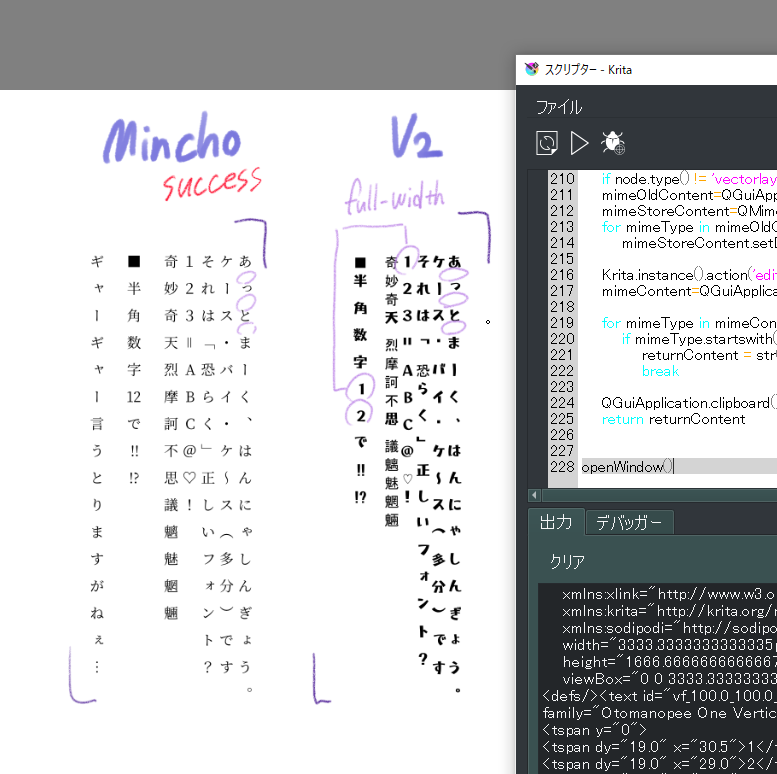
Amazing.I think it’s perfect except for the wide gaps between the letters.

The v2 font also uses full-width numbers for half-width numbers, which may be why horizontal writing doesn’t work.
So it’s a font design that doesn’t have glyphs for half-width numbers.
I’ll just show the results for now and add more later.

Good to see we are having progress. For the spacing between the letters, try setting the line height to 60% to see if it looks better height wise, that is what I am using for now. But that won’t fix the punctuation height enough as seen in my example.

The issue with the v2 font may be simply my dirty hack isn’t versatile enough, but it could also be the font itself. Though I have a few ideas that might fix both issues, just have to see if they work or not.

By the way, can you give me a sample png from CSP with it properly(using Mincho) but in another color and tell me the dpi and font sized used. I want to try overlaying to see how close I can get.


At 60%, Krita is doing well. The punctuation isn’t oddly placed either… though of course there’s my own sensory issues.


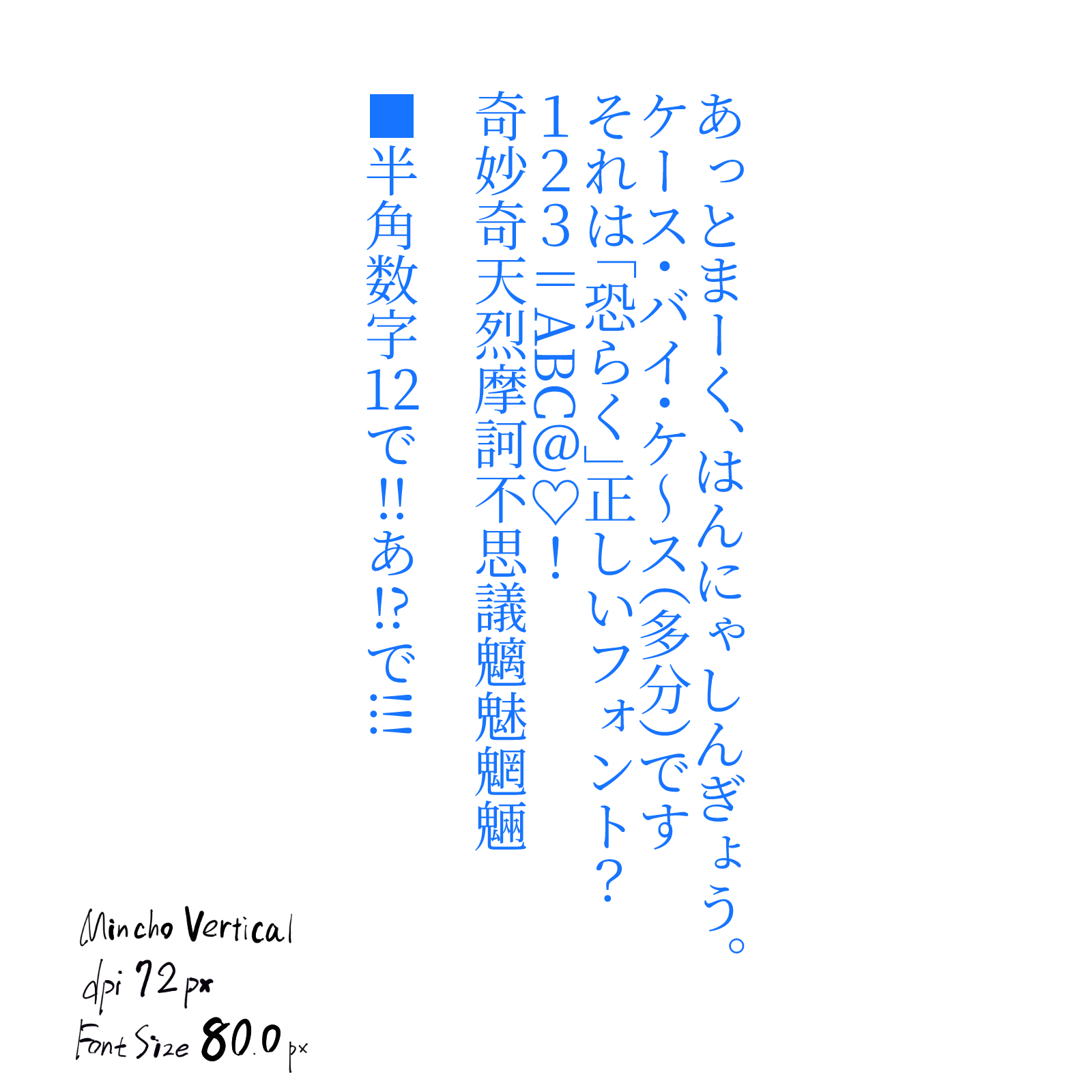
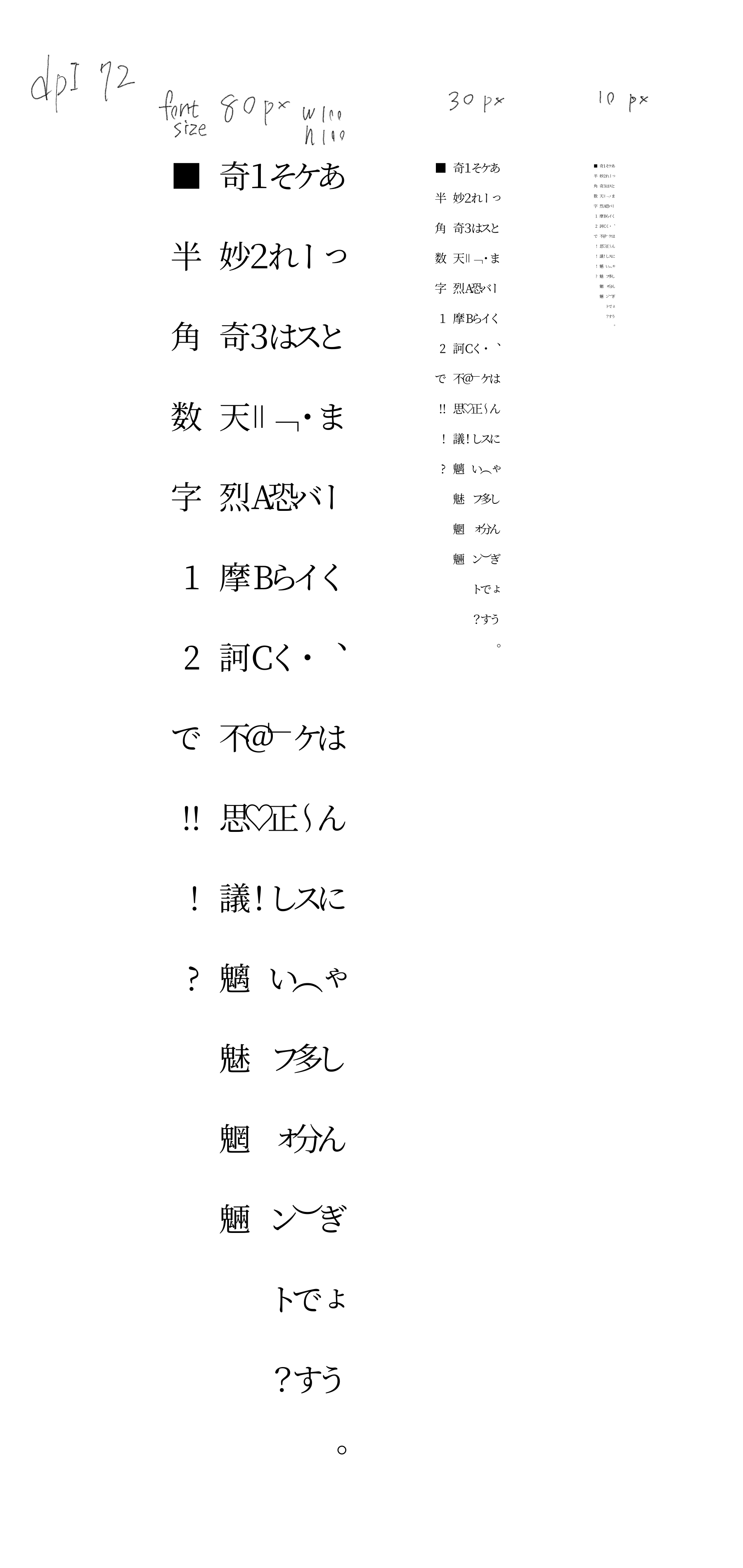
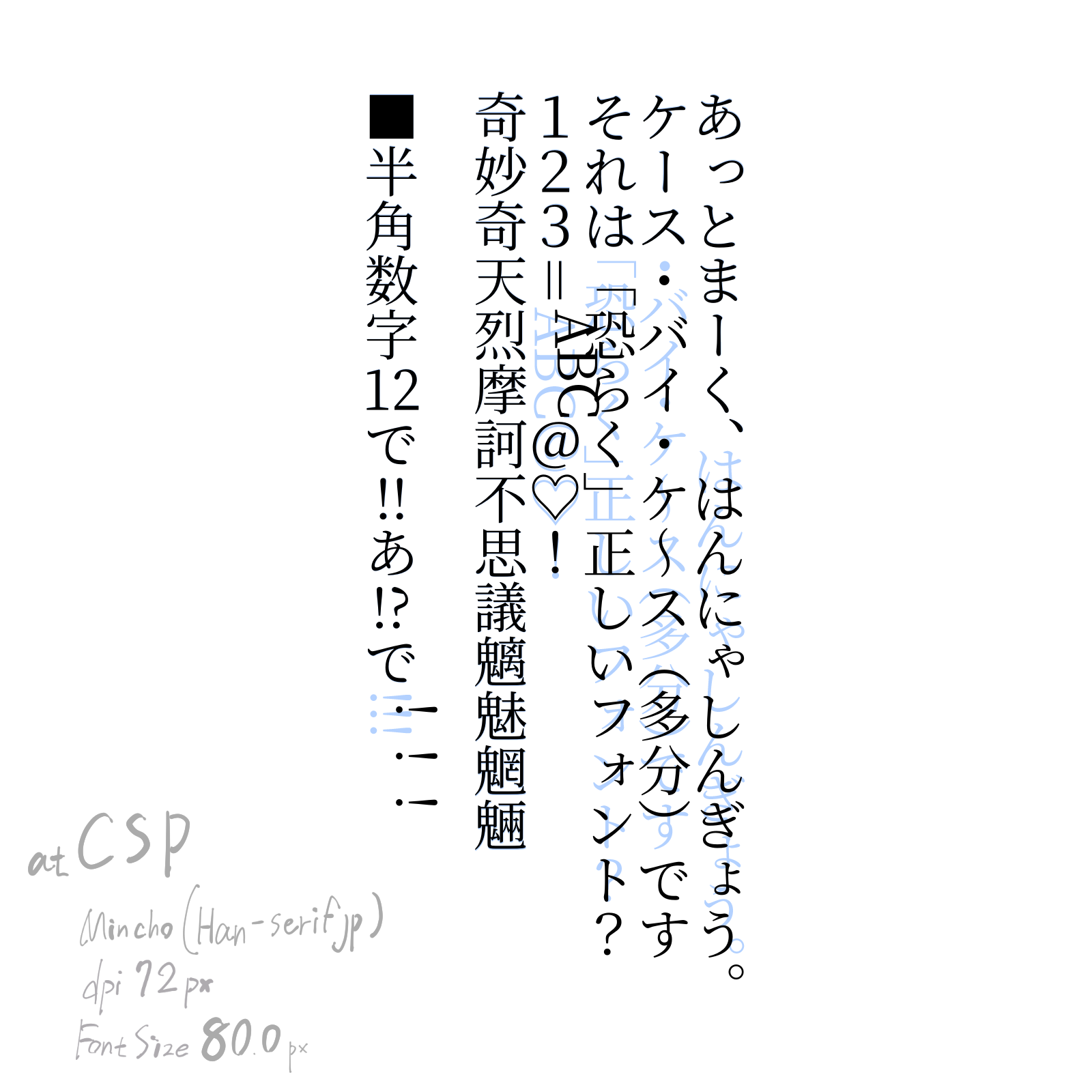
Using the same Mincho V font in CSP
DPI 72px
Font size 80.0px
(I didn’t use enough words, but CSP is designed to write horizontally if there are two consecutive half-width characters, and vertically if there are three or more consecutive characters. So put a full-width character in between!! and !?).
Using this font, the “=” character is rotated.
Is it possible that CSP is confused in dealing with vertical-only fonts? This is something I won’t know until I try different things.

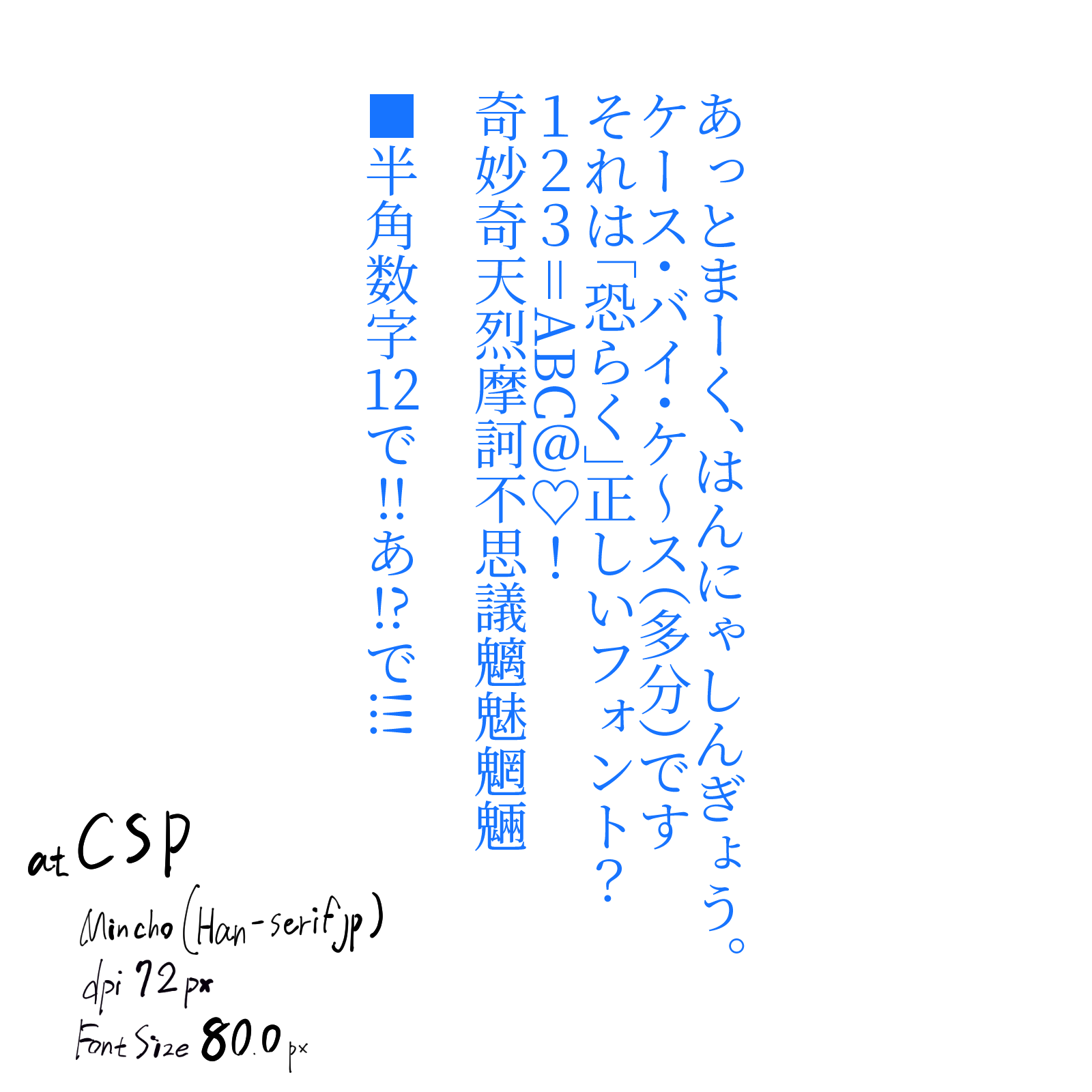
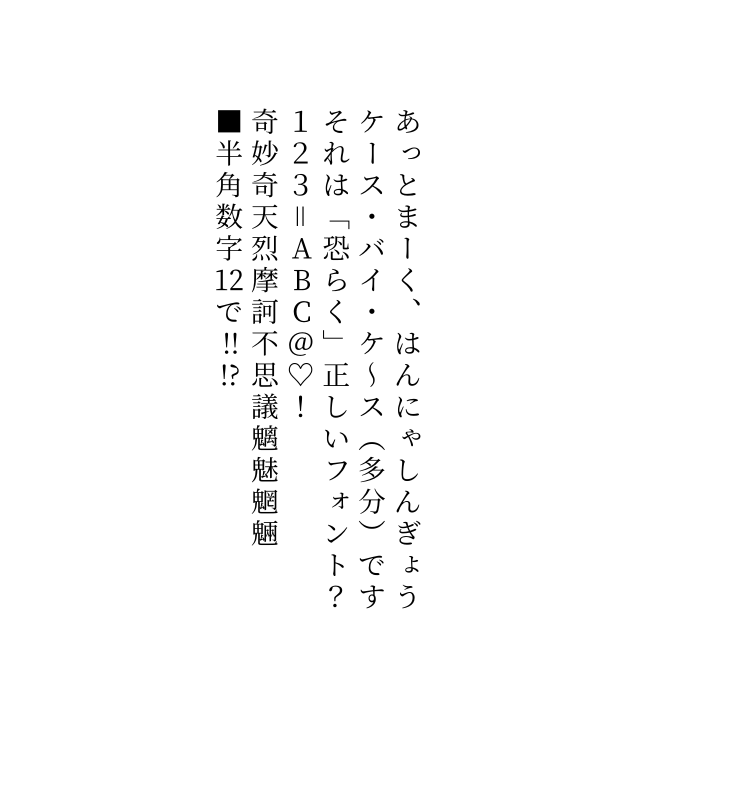
The normal Mincho font should be checked in CSP. Since the goal is to see how close the Krita + Vertical Mincho can compare with the CSP + regular Mincho.

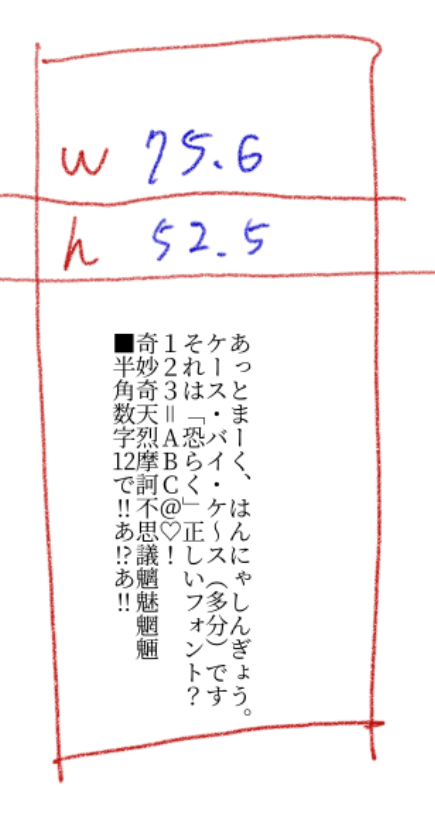
This is an image where only the font has been changed to the original Mincho font.


text↓

あっとまーく、はんにゃしんぎょう。
ケース・バイ・ケ~ス(多分)です
それは「恐らく」正しいフォント?
123=ABC@♡!
奇妙奇天烈摩訶不思議魑魅魍魎

■半角数字12で!!あ!?で!!!

Alright, I think I may need to change a bit of the logic. It gets a bit buggy at such large font sizes as 80 in that small box. I can scale it, but end of the day since the script limits itself to 1 font size, it probably would be better to do the calculations manually. And display it as a fixed font size.

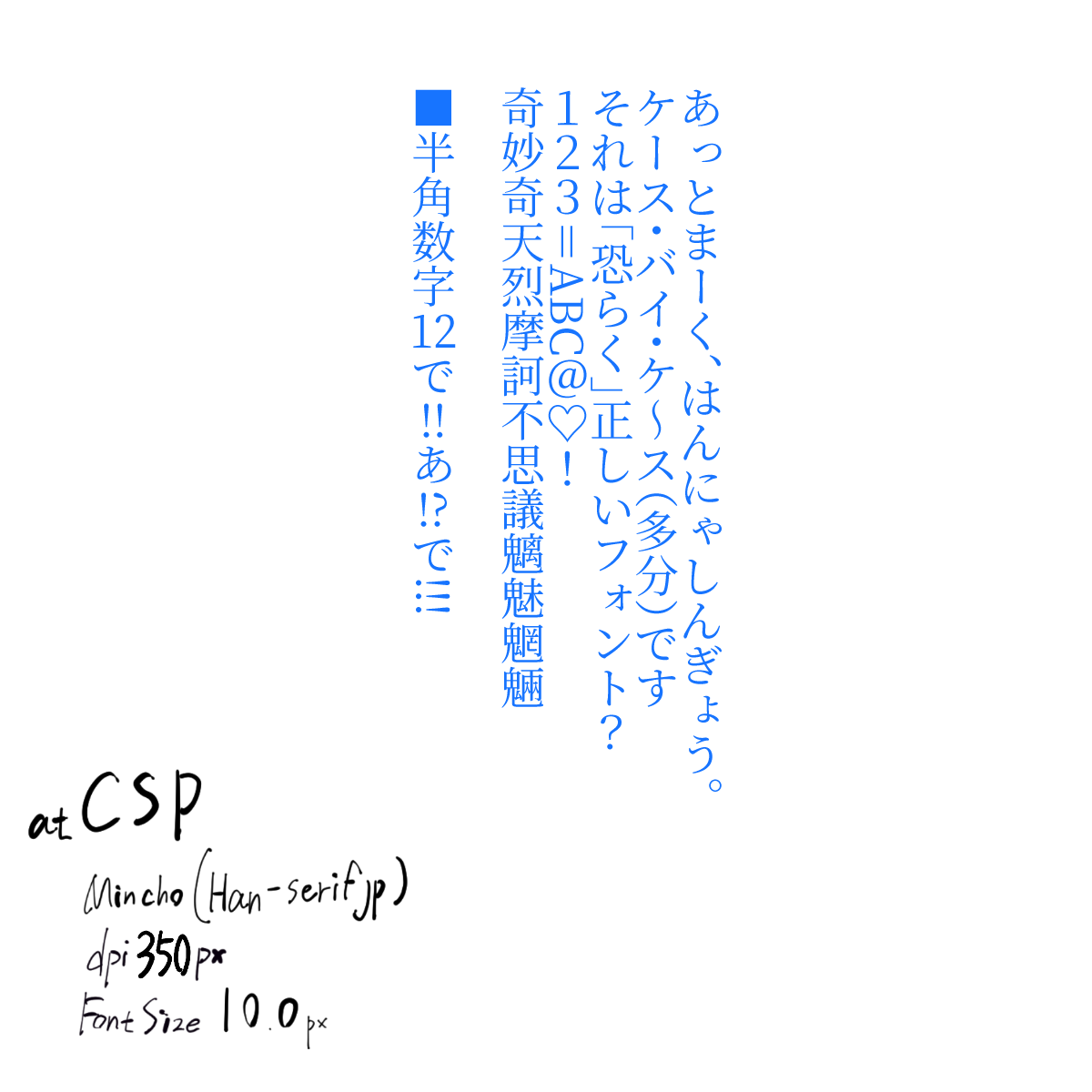
Here is an image with a smaller font size, just in case.

DPI 350
Font size 10.0px

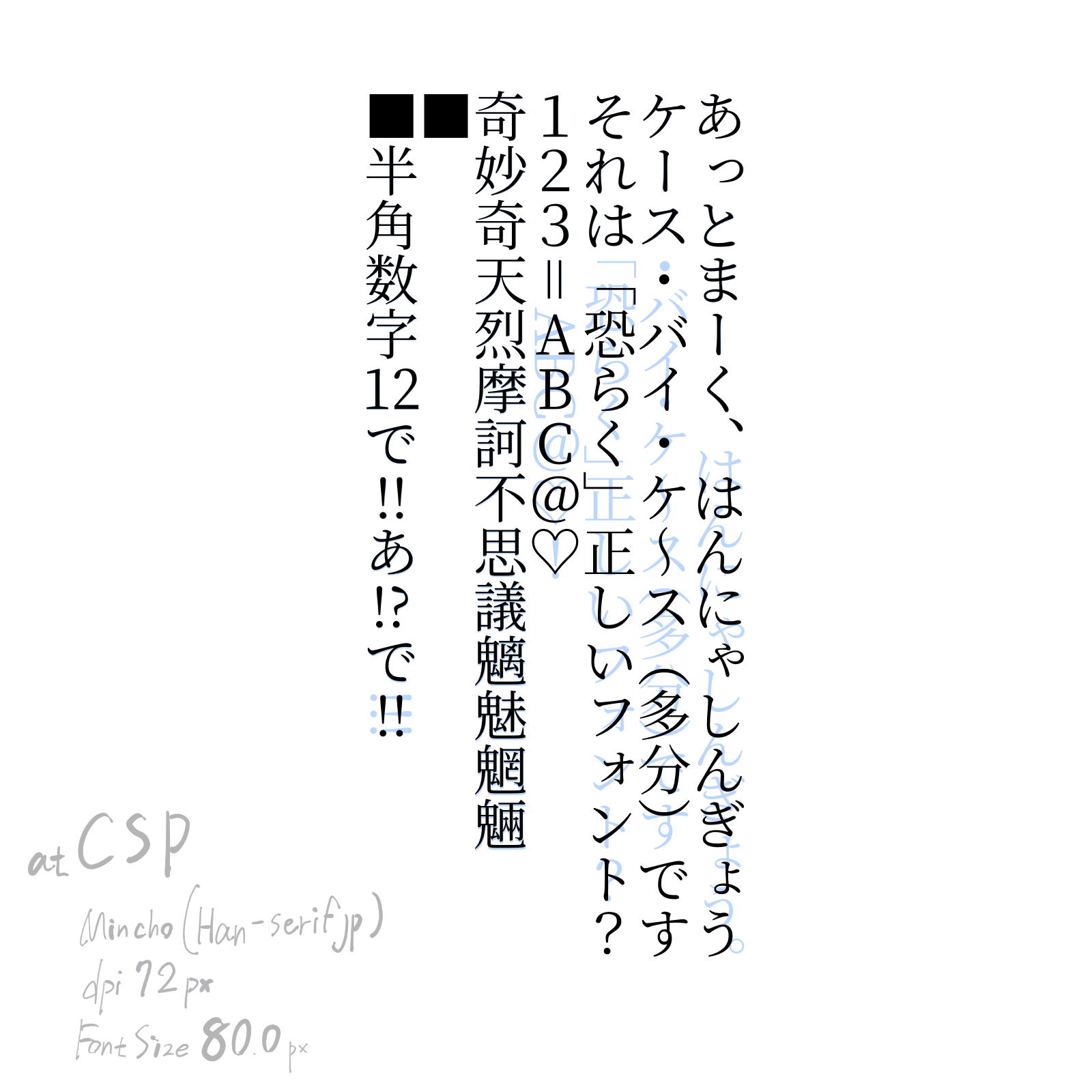
It’s fine, I need to do it anyways. That said I have a few questions concerning the outcome:

That is at 52.5% height and 75.60% width

It is “near” pixel perfect, just the punctuation is off, and can you explain the ABC stuff and the 3 exclamation marks?

Edit: Also, I had to add an extra square cause space acted weirdly so it needs a workaround. Which isn’t a problem. That said, I’ll probably call it a day here, we are getting pretty close

Here is the latest script:

from PyQt5.QtGui import *
from PyQt5.QtWidgets import *
from PyQt5.QtCore import *
import re
import time

def openWindow():
    defaultFont = 'Source Han Serif Vertical'
    defaultFontSize = 10.0
    defaultLineWidth = 100
    defaultLineHeight = 100
    defaultAlign = 'center'
    defaultTransform = ''
    defaultCharMode = 1  
    
    w = QDialog()
    layout = QVBoxLayout(w)
    
    fontCmb = QFontComboBox()
    layout.addWidget(fontCmb)
   
    hlayout = QHBoxLayout()
    
    fontSize = QDoubleSpinBox()
    hlayout.addWidget(QLabel("Font Size:"))
    hlayout.addWidget(fontSize)

    widthSize = QDoubleSpinBox()
    widthSize.setMaximum(200)

    hlayout.addWidget(QLabel("Line Width:"))
    hlayout.addWidget(widthSize) 

    heightSize = QDoubleSpinBox()
    heightSize.setMaximum(200)

    hlayout.addWidget(QLabel("Line Height:"))
    hlayout.addWidget(heightSize)
    
    layout.addLayout(hlayout)

    textBox = QPlainTextEdit()
    layout.addWidget(textBox)

    hlayout2 = QHBoxLayout()

    button1 = QPushButton("Add Text")
    button1.clicked.connect(w.accept)
    hlayout2.addWidget(button1)

    editContent = readSvgContent()
    print (editContent)
    if editContent is not None:

        match = re.compile('^.*?\<text.*?id="(vf_.*?)".*$', re.DOTALL).search(editContent)
        
        if match:
            matchData = match.group(1).split('_')
            defaultLineWidth = float(matchData[1])
            defaultLineHeight = float(matchData[2])
            matchTransform = re.compile('^.*?\<text.*?transform="(.*?)".*$', re.DOTALL).search(editContent)
            if matchTransform: defaultTransform = matchTransform.group(1)
            matchFont = re.compile('^.*?\<text.*?font-family="(.*?)".*$', re.DOTALL).search(editContent)
            if matchFont: defaultFont = matchFont.group(1)    
            matchFontSize = re.compile('^.*?\<text.*?font-size="(\d+)".*$', re.DOTALL).search(editContent)
            if matchFontSize: defaultFontSize = float(matchFontSize.group(1))
    
            editContent = editContent.replace('<tspan y="0"></tspan>','<p>&nbsp;</p>')
            editContent = editContent.replace('<tspan>','<p>')
            
            print (editContent)
            textBox.document().setHtml(editContent)
            button1.setText("Edit Text")
        else:
            editContent = None


    button2 = QPushButton("Cancel")
    button2.clicked.connect(w.reject)
    hlayout2.addWidget(button2)
    
    layout.addLayout(hlayout2) 
    
    def changeFont():
        font = textBox.document().defaultFont()
        font.setFamily(fontCmb.currentFont().family())
        textBox.document().setDefaultFont(font)
        textBox.setPlainText(textBox.toPlainText())

    fontCmb.currentFontChanged.connect(changeFont)

    def changeFontSize():
        font = textBox.document().defaultFont()
        font.setPointSizeF(fontSize.value())
        textBox.document().setDefaultFont(font)
        textBox.setPlainText(textBox.toPlainText())

    #fontSize.valueChanged.connect(changeFontSize)

    fontCmb.setCurrentFont(QFont(defaultFont))
    changeFont()
    fontSize.setValue(defaultFontSize)
    #changeFontSize()
    widthSize.setValue(defaultLineWidth)
    heightSize.setValue(defaultLineHeight)

    w.show()
    if w.exec_() == 0: return
    
    def align(fw,gw):
        if defaultAlign == 'center':
            return (fw-gw/2)
        elif defaultAlign == 'right':
            return (fw-gw/2)
        elif defaultAlign == 'left':
            return fw    
            
   
    lines = textBox.toPlainText().split("\n")
    fontWidth = 0
    hPos = 0
    pretty = "\n"

    blockCount = textBox.document().blockCount()
    iblock = textBox.document().begin()
    
    outFontSize = fontSize.value() 
    
    metrics = QFontMetricsF(QFont(fontCmb.currentFont().family(), outFontSize))

    fontWidth = metrics.averageCharWidth()
    hPos = (blockCount * fontWidth * widthSize.value()) / 100

    print ( "Font Metrics", metrics.minLeftBearing(), metrics.minRightBearing(), metrics.ascent(), metrics.capHeight() )
    print ( metrics.tightBoundingRect('.'), metrics.tightBoundingRect('a'), metrics.averageCharWidth()  )
    #return


    output = '<text '
    output += 'id="vf_'+ str(widthSize.value()) +'_'+ str(heightSize.value()) +'_'+str(time.time())+'" '
    output += 'transform = "'+defaultTransform+'" '
    output += 'font-family="'+fontCmb.currentFont().family()+'" '
    output += 'font-size="'+str(outFontSize)+'">' + pretty    
    while iblock != textBox.document().end():
        blockText = list(iblock.text())
        blockLineCount = iblock.layout().lineCount()
        fontHeight = 0
        output += '<tspan y="0">' + pretty
        for i in range(blockLineCount):
            line = iblock.layout().lineAt(i)
            
            storeChar = None

            for i2 in range(line.textLength()):
                glyph = line.glyphRuns(line.textStart()+i2, 1)[0]
                #print ("G", glyph.rawFont().maxCharWidth(), glyph.rawFont().averageCharWidth(), glyph.boundingRect().width(), glyph.boundingRect().height(), blockText[i2], glyph.glyphIndexes(), glyph.rawFont().glyphIndexesForString(blockText[i2]) )
                #return
                rawFont = glyph.rawFont()
                 
                r = glyph.boundingRect()
                r = QRectF( 0,0, r.width()*(outFontSize/10), r.height()*(outFontSize/10)  )
                print ( blockText[i2], r, metrics.averageCharWidth() )
                #r = glyph.boundingRect()
                #if defaultCharMode == 0 or r.width() > rawFont.averageCharWidth()/1.5:
                if defaultCharMode == 0 or r.width() > metrics.averageCharWidth()/1.5:
                    if storeChar is not None:
                        output += '<tspan dy="'+str( (fontHeight*heightSize.value())/100 )+'" x="'+str(hPos + (( align(fontWidth,storeChar[1].width()) * widthSize.value())/100)  )+'">'+storeChar[0]+'</tspan>' + pretty
                    output += '<tspan dy="'+str( (fontHeight*heightSize.value())/100 )+'" x="'+str(hPos + (( align(fontWidth,r.width()) * widthSize.value())/100)  )+'">'+blockText[i2]+'</tspan>' + pretty
                    storeChar = None
                elif storeChar is None:
                    storeChar = [blockText[i2],r]
                else:
                    output += '<tspan dy="'+str( (fontHeight*heightSize.value())/100 )+'" x="'+str(hPos + (( align(fontWidth, r.width()+storeChar[1].width() ) * widthSize.value())/100)  )+'">'+storeChar[0]+blockText[i2]+'</tspan>' + pretty
                    storeChar = None
                    
                fontHeight = r.height() 
       
        iblock = iblock.next()
        hPos -= (fontWidth * widthSize.value()) / 100
        output += '</tspan>' + pretty
    output += '</text>' + pretty    


    doc = Krita.instance().activeDocument()    

    svgWidth = str( (doc.width()/72)*doc.resolution() )
    svgHeight = str( (doc.height()/72)*doc.resolution() )
 

    svgContent = '''<?xml version="1.0" standalone="no"?>
<!DOCTYPE svg PUBLIC "-//W3C//DTD SVG 20010904//EN" "http://www.w3.org/TR/2001/REC-SVG-20010904/DTD/svg10.dtd">
<!-- Created using Krita: https://krita.org -->
<svg xmlns="http://www.w3.org/2000/svg" 
    xmlns:xlink="http://www.w3.org/1999/xlink"
    xmlns:krita="http://krita.org/namespaces/svg/krita"
    xmlns:sodipodi="http://sodipodi.sourceforge.net/DTD/sodipodi-0.dtd"
    width="''' + svgWidth + '''pt"
    height="''' + svgHeight + '''pt"
    viewBox="0 0 ''' + svgWidth + ' ' + svgHeight + '''">
<defs/>''' + output + "</svg>"    
    print( svgContent )
    writeSvgContent(svgContent, doc.activeNode(), (editContent is not None) )

def writeSvgContent(svgContent, layer, editMode):
                mimeOldContent=QGuiApplication.clipboard().mimeData();
                mimeStoreContent=QMimeData() 
                for mimeType in mimeOldContent.formats(): 
                    mimeStoreContent.setData(mimeType,QByteArray(mimeOldContent.data(mimeType))) 
                if editMode: Krita.instance().action('edit_cut').trigger()
                mimeNewContent=QMimeData()
                mimeNewContent.setData('image/svg', svgContent.encode())
                QGuiApplication.clipboard().setMimeData(mimeNewContent)
                Krita.instance().action('edit_paste').trigger()
                QGuiApplication.clipboard().setMimeData(mimeStoreContent)
                return None


def readSvgContent():
    returnContent = None
    node = Krita.instance().activeDocument().activeNode()
    if node.type() != 'vectorlayer': return None
    mimeOldContent=QGuiApplication.clipboard().mimeData();
    mimeStoreContent=QMimeData() 
    for mimeType in mimeOldContent.formats(): 
        mimeStoreContent.setData(mimeType,QByteArray(mimeOldContent.data(mimeType))) 
                    
    Krita.instance().action('edit_copy').trigger()
    mimeContent=QGuiApplication.clipboard().mimeData();

    for mimeType in mimeContent.formats(): 
        if mimeType.startswith('image/svg'):
            returnContent = str( QByteArray(mimeContent.data(mimeType)) , 'utf-8')
            break
    
    QGuiApplication.clipboard().setMimeData(mimeStoreContent)    
    return returnContent


openWindow()
I hope that explains it.
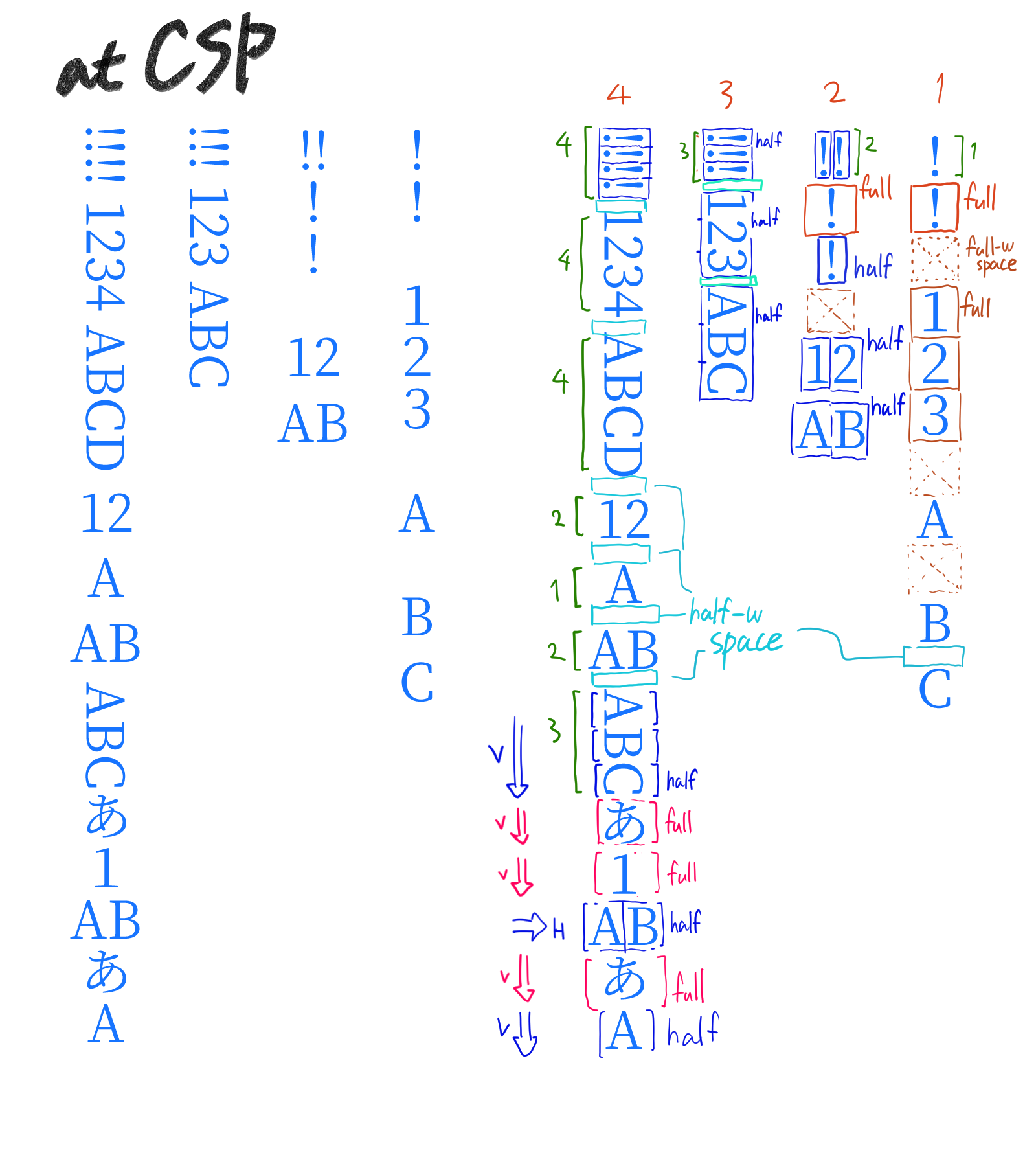
CSP’s decision is as follows.

(Full-width characters will be written vertically.
(If there is only one half-width character, it will be written vertically.
(If there are two half-width characters, the text will be written horizontally.
(Half-width characters will be written vertically if they are followed by three or more half-width characters.
(If a space or a full-width character is inserted, the continuity of half-width characters will be broken.

The alphabet in this text is half-width characters.
Although not often used, full-width alphabets also exist.
Arabic numerals are available in both half-width and full-width.
You can also use full-width or half-width whitespace, so be careful.
(Half-width spaces will always remain in vertical writing even if they are entered consecutively. There’s no point in making it horizontal.

" " Half-width whitespace
" " Full-width whitespace
(Full-width whitespace is turned into half-width by itself in the forum function...)
(Anyway,full-width whitespace is used in Japanese.
Japanese programmers often make mistakes with this.)

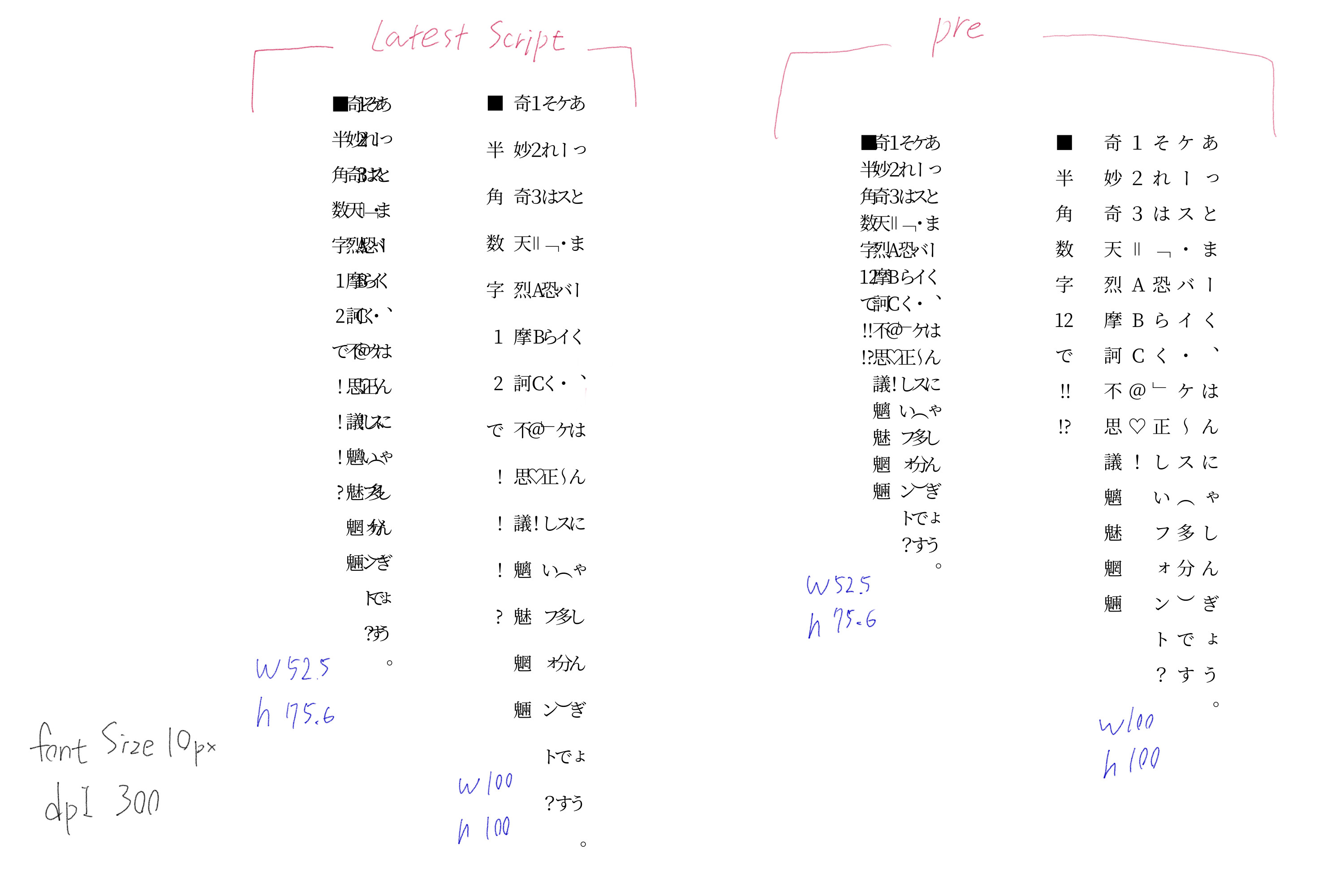
By the way, in the latest version of the script, the horizontal writing in vertical writing does not seem to work.
Here is a side-by-side comparison with the old script.


:
Supplement
Win10
Krita5.0.0 -prealpha(git d148faf)
I’ve been creating text in this environment.

Wow, this has been going on for a while. I wonder if the Krita devs notice this and will implement a vertical function soon.

Not any time soon, I’m sorry.

Well, that’s unfortunate, There is a market in japan who would love to try this but Still understandable.

Yes… We wanted to implement this, but that was 2017 when the Dutch tax office made so much trouble that I basically lost a year of coding just handling that. After that, we implemented the current text shape as a stop-gap measure so we would have at least something.

Sigh, okay there is good news and bad news… the bad news is no good way to automated have horizontal facing glyphs and vertical facing glyphs under a single font with current Krita.

The good news is, I can technically create 2 fonts, 1 for vertical and one for rotation and switch between the fonts automatically based on that logic I guess… I’ll see how it goes.

Hmm, what dpi and font size?

The problem is that QT doesn’t offer a convenient way to do this, so it requires a lot of redoing things from scratch if it wants to be done properly. As what I am doing now is a bit of a hack. That said, when it is finished, I’ll probably add it to the Lazy Text Tool final version. And also release an automated way to convert any font.

I forgot the values so I recreated the images.

Both font sizes are 10px
DPI is 300

But the results don’t seem to change whether the font size is 80px or 30px.

Postscript
My expression “10px” was not good.
The font size is 10.

Wow, I’m sorry.
I had entered the width and height interchangeably.
Your specification is perfect.


By the previous script.

Nice, that’s good to hear.

As for my progress so far, here is what I got:

So need to fix up the positioning of the rotated font, and find a solution to the punctuations.