Added support for native panning and native zoom.
Thanks so much. I’ll test soon. <3
Sadly the new version gives me crash as soon as I toggle it.
https://cdn.discordapp.com/attachments/838374815211061291/886498574853079100/error0912.txt
Right, I forgot that you use subwindow mode instead of tab mode. Fixed.
So it has probably been a while since people started using the LazyTextTool prototype, and I was wondering if anyone has noticed cases where it is messing up on reading the formating of some text for one reason or another.
If so, can I have the kra or svgs of the messups? I don’t need the extra stuff, just the text. And you can change the content if it is something sensitive. Also if possible, put all of them into 1 file.
I started redoing the text tool from scratch, and I want some test cases to use as examples to be sure it works properly.
KnowZero At first I have to thank you to try to fix some of main Krita’s weaknesses. The type tool, the transform tool, and the slow filters are in my opinion the big Krita’s problems.
That said I’ve tried your Lazy text tool and the idea is very good. I really like the tool options pop up, maybe more tools can have this feature in the future.
Let’s go to the problems with the tool. The report of the fellow above happened with me too. When I copy the text from the internet there is an error and the edit is not confirmed. And when I confirmed the change the text changed with a completely different layout.
I’m using windows 10 and Krita 5.0.2
Try copying the text into notepad first. The text has some formatting that simply isn’t making it into the svg filtering.
Originally, I planned to rewrite the LazyTextTool to be better, actually I am about 80% done with the rewrite. But currently there is a rewrite going on of the text engine for Krita. From the screenshots that I’ve seen it looks pretty good. So I’ll wait to see how the progress on that goes. I also plan to add a few more python apis for 5.1 to make some of the aspects work better.
6 Likes
A border line usable text tool for krita? Thank god.
(It really shouldn’t [be/have to be] a plugin tho.)
How do I install this? Trying to use Krita full time but finding the text tool very frustrating and high friction to use.
Go to code → Download Zip, once downloaded in Krita you go to tools->scripts->import python plugin from file, it will ask you to activate it, say yes then restart krita. Once started go to tools->scripts->LazyTextTool and enable it (since its a prototype you have to enable it every time you open Krita)
1 Like
I did this but it doesn’t activate, what can I do?
 Hello @Antonio_Monopoli and welcome to the forum!
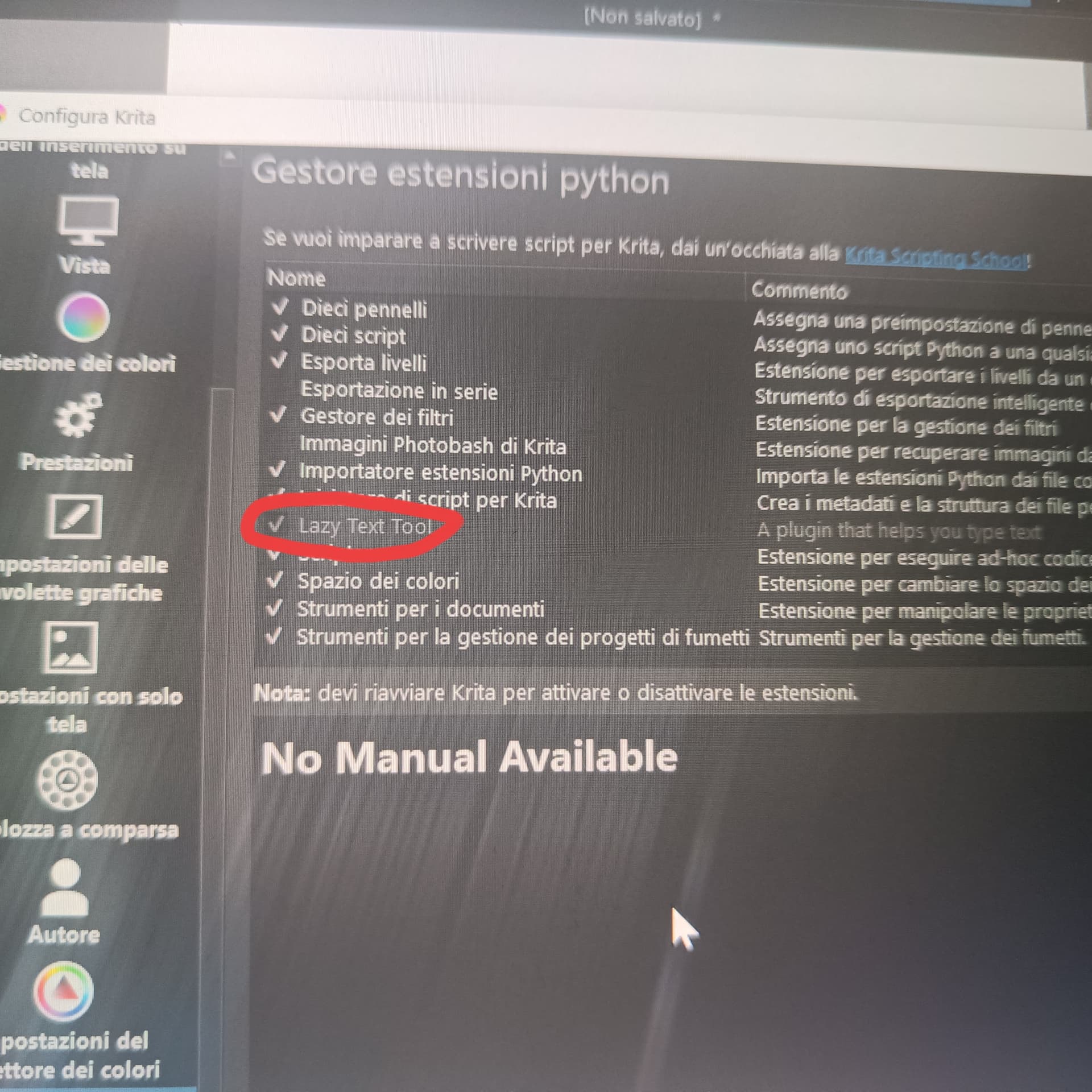
You can check if the checkmark in front of Settings → Configure Krita → Python Plugin Manager → Lazy Text Tool is set, and if it is not then set it, confirm that with the OK-Button in the bottom right corner of that dialog and restart Krita.
And if that is set, did you go over Tools → Scripts → Toggle Lazy Text Tool, to activate/deactivate it then?
If so, and it doesn’t work for you, then tell us the exact version of Krita you’re using.
Krita’s version is shown in the splash screen when you start Krita, furthermore, you can find it via Help → Show system information for bug reports behind Version:, also tell us from where you got your copy of Krita.
Please also tell us which operating system you are using.
Furthermore, tell us if you could install other plugins without issues, or if this is the first plugin you installed, respectively the first plugin that does not work?
Michelist
My version is 5.1.1 on Windows 10 And it’s my first plugin
So the check mark in front of Lazy Text Tool is set?

And you have also activated it via Tools → Scripts?

Even if your version suggests that you’ve been using Krita for a while, it doesn’t answer any questions.
Where did you get your version of Krita from? →
And you haven’t answered these questions yet, either:
Michelist
I tried installing other plug ins, and they work, I installed Krita from the official krita website, Furthermore, the plugin doesn’t appear in the tool…
But it is activated in the Python Plugin Manager? And you confirmed the activation with the OK-Button and re-started Krita after that?
Can you try updating to Kritas most recent version, the 5.2.2?
Or, if you need such functionality this much, try out the Krita 5.3.x nighties where the new text-tool is, at least the parts of it that are working so far, already implemented? Because that is what will replace the LTT.
The nightlies can be found here:
https://cdn.kde.org/ci-builds/graphics/krita/master/windows/
If you choose the setup-version or the portable-version (the bottom ZIP) of Krita is up to you. The advantage of the portable is that it will use the settings of your current installation, shares them with it.
Michelist
It is activated, If I install the new version, will the data I have on Krita now be deleted?
No, you will have the same user interface as you use it right now. At least nearly, Krita got a third toolbar, and you have to activate that toolbar via Settings → Toolbars Shown, or you put it into the toolbar you had it in so far via Settings → Configure Toolbars. (I guess they have put Undo and Redo into the new Edit Toolbar to make it known to the users.)
Krita’s settings are not stored with the installation, just to protect your settings to the UI.
Michelist
That screenshot means there is something wrong with this plugin in your installation.
But that is an issue where I can’t help you further, here we need @KnowZero or someone else with deeper knowledge of coding I assume.
Michelist