This is both ridiculous and eye-opening 
2 Likes
In Clip Studio Paint there is a similar feature to eraser mode in Krita, which is a switch to transparent color, turning the current brush into an eraser. This is bound to shortcut C. Then there are brushes that are marked as erasers (erase is the blend mode for these) which are accessed via the shortcut E. Perhaps Krita can do a similar strategy, as it does seem less confusing to new users?
EDIT: just saw ths response from other people too, sorry for the repeat.
But perhaps there could be a way to bound a shortcut to a specific brush tag? In CSP the tools are organised in folders like Eraser, Pencil, Brush etc. Each of these categories can have a different shortcut, which are all editable. I can put any tool in a category if I would want to.
If Krita would want to implement a system that does not change the fundamental way the tools are organised (tags) perhaps having the ability to create a shortcut to switch to a Tag category - and by extention the last selected tool within that Tag group - this might make it possible to have a normal eraser preset under E.
(post deleted by author)
You might be right, but as I have set it to button 1 of my Wacom stylus, with color picking on button 2, this would make little diffrence to me 
It always feel so crazy to me when I read that other people remove their middle mouse button from their stylus. It would be too cumbersome for me to move the canvas around. Middle mouse button on stylus + modifier keys is the GOAT of canvas navigation.
This shows how subjective things like keyboard shortcuts can be.
It’s just like with the ctrl or alt key for color picker, don’t understand why that’s such a big deal. Sometimes I have to drive with other people’s car and they have their reverse on the left on the stick instead of the right and then I’m confused but after knowing it I never spend a single thought about it again, just shift differently then. When I switched to Kita it was just the same with shortcuts I was used from PS and SAI.
3 Likes
people remove those?
my screen tablet is not a touch device. so most of my rotate, pan, zoom in/out are tied to a modifier + mmb on the second stylus button.
Back on the topic.
Is there anything else people transferring to krita from [csp/ps] get confuse?
Maybe a thread here under in KA under tutorials can be made as something.
<<Transferring From CSP/PS to Krita; Here are the commonly ask questions.>>
Press Space to move around, hold Space and press and hold Ctrl and move up or down to zoom.
By the way, in Krita you have to press Space then Ctrl, in CSP you can press both buttons in whatever order for this to work (and move left/right instead of up/down)
1 Like
I remember someone made a YouTube video for people making the switch when CSP changed to subscription, but I don’t know how good it was and based on the wave of complains I saw here and social media people didn’t really care anyway. Most wanted a drop-in replacement for CSP, not learn a new software. (And I can’t blame them because there were a lot of people essentially saying: “just use Krita, it’s exactly the same”, which of course isn’t true)
1 Like
You can changed zoom direction from up/down to left/right in configuration.
General → Tools → Use horizontal axis for Canvas Zoom Action
In my case, I was able to activate zoom tool normally, whether I pressed Ctrl or Space first.
1 Like
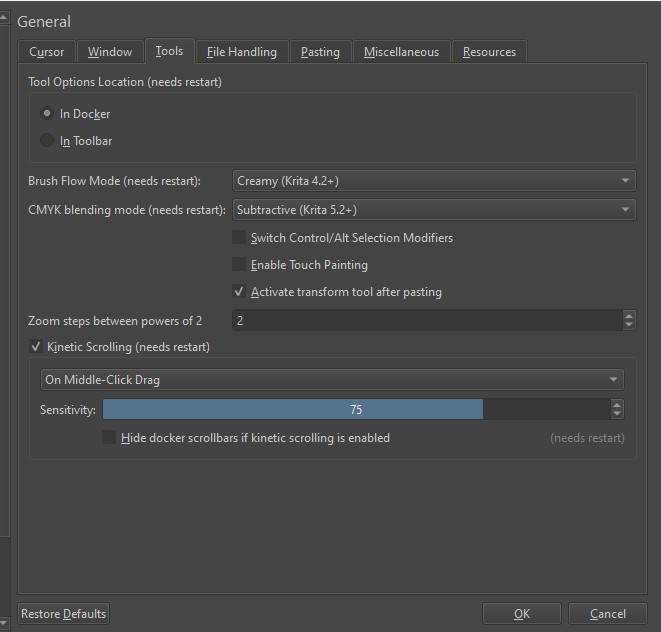
Could also be the OS you are using. I got it using Windows.
Michelist
 My mistake, I’m using the nightly build of Krita 5.3. This feature is not available in 5.2.
2 Likes
LOL, me too!
Michelist
1 Like
I honestly cant go back to 5.2 now since starting testing 5.3. 
It be an amazing release once its here officially.
5 Likes
I may be one of the weird people that don’t use pen buttons most of the time. I think I only use it to stimulate a right click to interact with the menus, which doesn’t happen too often. I do everything with the keyboard.
1 Like
I am one of the same, i find it cumbersome to use the button on a pen. However, I have substituted all other things with gestures on my Galaxy tab.
1 Like
Ehh, I’m a little confused about reference tool. It doesn’t work like PureRef so it kinda defeats the purpose if it?
It is not designed to be like pureref. Currently you can bring images and resize, rotate ,reduce opacity saturation and place them aside the canvas. There are feature requests to improve it like adding features to pin the reference image to the canvas cropping etc. You can search for those thread here.
If you want pureref functionality you can check out beeref.
I use One by Wacom Medium (CTL-672) and I noticed that my bottom stylus button uses a hand tool to move a canvas on press, even if I disable it in drivers. Does anyone else experience this issue? And what could cause it?
1 Like
I don’t believe that for one second. Nobody throws a complete program in the bin because they have to learn a new shortcut or change it in preferences! If they do, they are just throwing tantrums.