Hi, I had Krita 5, when I wanted to lighten or darken a selection of the painting, the shortcut CTRL U, would open up an option, where there was sliders lighten/darker, and two other options. Now I have Krita 5.1.1, that shortcut is not available. How can darken or lighten a selected part of my painting?
Thanks
Sydney
Hi Sydney,
It still works on my installation but you can get to the HSV Adjustment filter (Ctrl+U) by clicking on Filter (top menu) > Adjust > HSV Adjustment.
Take a look and see if this works.
Hi Sooz
Thanks, it works fine. While I have you, is there anyway, to create a color palette, from the original image?
Thanks
Sydney (AKA Zayde)
Yes, you can capture the colours from your image if you have the Advanced Colour Wheel docker. There’s a tiny icon at the bottom of the docker that pulls all colours from your image when you click the icon. The icon looks like a broken circle.
If you have an image with significantly more colors and want to extract them from the image using @sooz’s method, you can follow the description on my screenshot.
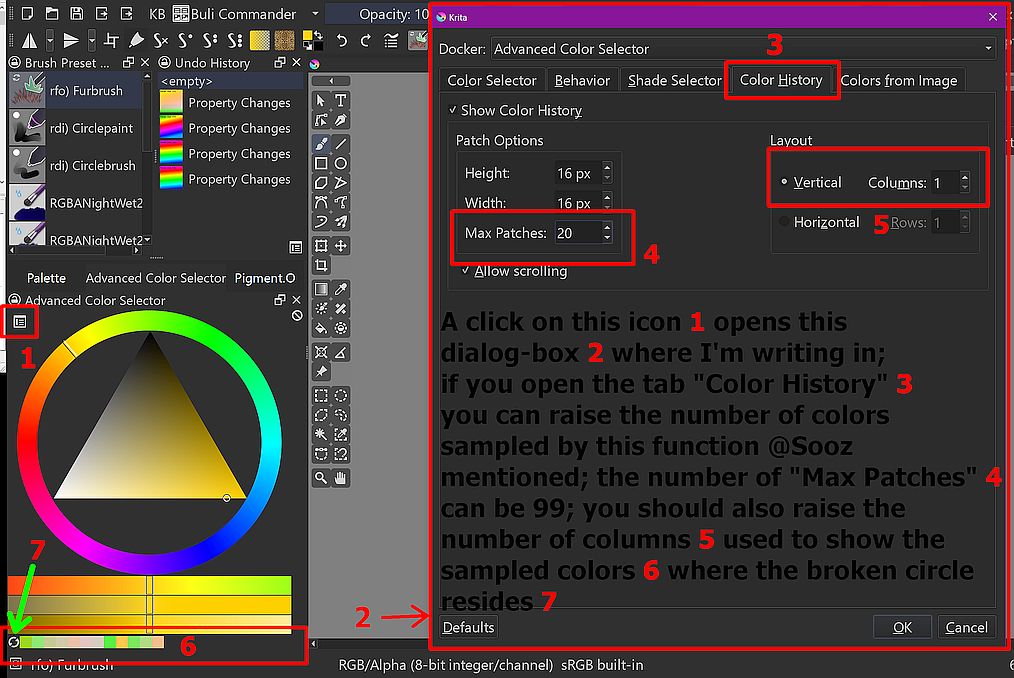
And in case you can’t read the text on the screenshot, I’ll print it again here:
A click on this icon 1 opens this dialog-box 2 where I’m writing in; if you open the tab “Color History” 3 you can raise the number of colors sampled by the function @sooz mentioned; the number of “Max Patches” 4 can be 99; you should also raise the number of columns 5 used to show the sampled colors 6 where the broken circle resides 7
Michelist
1 Like
This topic was automatically closed 15 days after the last reply. New replies are no longer allowed.