Line Jitter 线条抖动

你好,我最近刚开始使用krita时出现了一个问题.
Hello, I recently had a problem when I started using krita.
这个是用鼠标画的示例↓ This is an example drawn with my mouse↓

我的操作系统为windows 10, 版本号22H2, 64位.
我的krita版本为5.2.2.
My operating system is Windows 10, version number 22H2, 64-bit.
My krita version is 5.2.2.

最近在用鼠标测试这个软件的时候发现在把画布拉的越远画出来的线条就越参差不齐,我能确定这不是我手抖,因为我也抖不出这么细微的抖动, 请问这个问题该怎么解决?
When testing this software with a mouse recently, I found that the lines I draw become more jagged the farther I stretch the canvas. I can assure you it’s not due to my hand shaking, as I can’t produce such subtle jittering intentionally. How can this issue be resolved?

Hello @Zihong_Xie and welcome to the forum :slight_smile:

It looks like your canvas has a low resolution and you are drawing with a small size brush. That will be a problem.

A mouse has a low position resolution compared to a stylus+tablet so that also is a problem for the quality of a drawn line.

You can try using a larger canvas size and a larger brush tip size. That should improve the appearance of the lines.

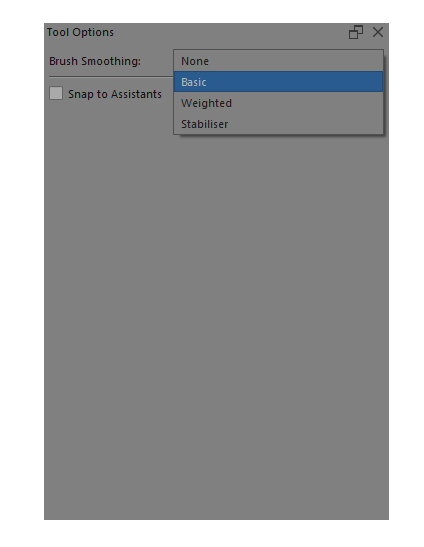
Another thing you can try is to use Brush Smoothing. This is selected in the Tool Options docker when you are using the Freehand Brush tool:

There are four options; None, Basic, Weighted and Stabiliser on a drop down list.
The characteristics of the Weighted and Stabiliser smoothing action can be adjusted.
Try them and experiment with their settings to see what they can do for you.

5 Likes

This topic was automatically closed 4 days after the last reply. New replies are no longer allowed.