Linux Nightly AppImages Do Not Open

Hello,

Previously, I was able to download the latest nightly, install it on my system, and run the program.

For the past few weeks after downloading the latest, I attempt to install them, only to run into the same issue that the installation failed to to being unable to register the appimage in my system.

I have attempted to use a variety of installers (AppImage Launcher, Gear Lever, App Hub, and I have appimaged installed) and also tried to just execute and run the program, and each end the same way.

This has been occurring for a while, a bit before the latest stable Krita version came out in January, so I tried to run the latest stable from January which installed and ran perfectly; resulting that the issue only lies in the nightlies.

I have attempted to install the latest Krita 5.3.0 prealphas and the latest Krita 6.0.0 (from these sites: Artifacts · Graphics / Krita · GitLab Pipelines · Graphics / Krita · GitLab Index of /ci-builds/graphics/krita/master) and downloading just the appimage and the appimage with the corresponding zsync, and all have ending the same manner.

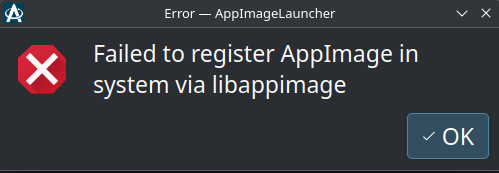
This is the error popup that I get when I use AppImage Launcher (my main program that has opened every other appimage on my system and always worked when I used Krita)

Is there a way to run one of the latest Krita nightlies?

Thank you for your time and help.

System Information

Operation System

  • OpenSUSE Tumbleweed 20250403
  • KDE Plasma 6.3.4 Version: X11

Hardware

  • NVIDIA GeForce RTX 4070
  • AMD Ryzen 9 5950X 16-Core Processor

I don’t have Linux any longer but I remember all I had to do is right click on the downloaded appimage and make it executable in properties then double-click the file.

1 Like

Here on OpenSuse Leap 15.6, just tried it and I have no problem launching either Krita 5.3 nor Krita 6

Well, Krita 6 does give the following error(as it always had):

SAFE ASSERT (krita): "result" in file /builds/graphics/krita/libs/resources/KisResourceCacheDb.cpp, line 1931

But if I keep clicking ignore it still runs.

Try running it in terminal and see what it says. It’s possible there is some dependency change that calls a deprecated function somewhere or something.

If you don’t mind, could you give me the command to run Krita via terminal?

I have right-clicked it in Dolphin and selected run in terminal, but I had the same result.

Thank you @sooz and @KnowZero for your help.

In dolphin, right click on appimage, then copy location. Then open up terminal seperetely, and paste it there. Then hit enter.

It may give same error, but more important is what errors the terminal says.

After attempting to run Krita 6.0 via terminal, it fails again.

This is the error I receive.
/usr/bin/AppImageLauncher: /lib64/libcurl.so.4: no version information available (required by /usr/bin/../lib/x86_64-linux-gnu/appimagelauncher/libappimageupdate.so)
Squashfs image uses (null) compression, this version supports only xz, zlib.
ERROR: appimage_shall_not_be_integrated : sqfs_open_image error: /home/snow-white/Downloads/_packaging/krita-6.0.0-prealpha-20ca858c2d-x86_64.AppImage
AppImageLauncher error: appimage_shall_not_be_integrated() failed (returned -1)
Squashfs image uses (null) compression, this version supports only xz, zlib.
ERROR: appimage_is_terminal_app : sqfs_open_image error: /home/snow-white/Downloads/_packaging/krita-6.0.0-prealpha-20ca858c2d-x86_64.AppImage
AppImageLauncher error: appimage_is_terminal_app() failed (returned -1)
fuse: memory allocation failed
squashfuse 0.5.2 (c) 2012 Dave Vasilevsky

Usage: squashfuse [options] ARCHIVE MOUNTPOINT

(null) options:
-o offset=N offset N bytes into ARCHIVE to mount
-o subdir=PATH mount subdirectory PATH of ARCHIVE
-o notify_pipe=PATH named pipe that will receive ‘s’ (success)
or ‘f’ (failure) when the mountpoint is ready
-o timeout=N idle N seconds for automatic unmount
-o uid=N set file owner to uid N
-o gid=N set file group to gid N

FUSE options:
-h --help print help
-V --version print version
-d -o debug enable debug output (implies -f)
-f foreground operation
-s disable multi-threaded operation
-o clone_fd use separate fuse device fd for each thread
(may improve performance)
-o max_idle_threads the maximum number of idle worker threads
allowed (default: -1)
-o max_threads the maximum number of worker threads
allowed (default: 10)
fuse: memory allocation failed
squashfuse 0.5.2 (c) 2012 Dave Vasilevsky

Usage: squashfuse [options] ARCHIVE MOUNTPOINT

(null) options:
-o offset=N offset N bytes into ARCHIVE to mount
-o subdir=PATH mount subdirectory PATH of ARCHIVE
-o notify_pipe=PATH named pipe that will receive ‘s’ (success)
or ‘f’ (failure) when the mountpoint is ready
-o timeout=N idle N seconds for automatic unmount
-o uid=N set file owner to uid N
-o gid=N set file group to gid N

FUSE options:
-h --help print help
-V --version print version
-d -o debug enable debug output (implies -f)
-f foreground operation
-s disable multi-threaded operation
-o clone_fd use separate fuse device fd for each thread
(may improve performance)
-o max_idle_threads the maximum number of idle worker threads
allowed (default: -1)
-o max_threads the maximum number of worker threads
allowed (default: 10)
squashfuse 0.5.2 (c) 2012 Dave Vasilevsky

Usage: squashfuse [options] ARCHIVE MOUNTPOINT

(null) options:
-o offset=N offset N bytes into ARCHIVE to mount
-o subdir=PATH mount subdirectory PATH of ARCHIVE
-o notify_pipe=PATH named pipe that will receive ‘s’ (success)
or ‘f’ (failure) when the mountpoint is ready
-o timeout=N idle N seconds for automatic unmount
-o uid=N set file owner to uid N
-o gid=N set file group to gid N

FUSE options:
-h --help print help
-V --version print version
-d -o debug enable debug output (implies -f)
-f foreground operation
-s disable multi-threaded operation
-o clone_fd use separate fuse device fd for each thread
(may improve performance)
-o max_idle_threads the maximum number of idle worker threads
allowed (default: -1)
-o max_threads the maximum number of worker threads
allowed (default: 10)
Can’t open squashfs image: Bad address

Cannot mount AppImage, please check your FUSE setup.
You might still be able to extract the contents of this AppImage
if you run it with the --appimage-extract option.
See FUSE · AppImage/AppImageKit Wiki · GitHub
for more information
execv error: No such file or directory

I searched online to find an answer and I noticed that many OpenSUSE Tumbleweed users face this same issue with other appimages; however, as in my case, other appimages run perfectly.

I do not know what to do, if this is an error on my part or in the nightly.
Seems like an issue with Appimagelauncher that interferes even if you launch it manually.

What happens when you add --appimage-extract and extract the appimage manually, does it let you?

/usr/bin/AppImageLauncher: /lib64/libcurl.so.4: no version information available (required by /usr/bin/../lib/x86_64-linux-gnu/appimagelauncher/libappimageupdate.so)
This doesn’t look like a squashfs image.
Failed to open squashfs image

Try this

export APPIMAGELAUNCHER_DISABLE=true

in the terminal, then try running it

With the command to run the program or before?

Do it before, it sets an ENV variable to not use appimagelauncher

you can also do it like this:

APPIMAGELAUNCHER_DISABLE=true /path/to/my.appimage

of course the actual path should be your appimage

After using the second option, I got this.

/usr/bin/AppImageLauncher: /lib64/libcurl.so.4: no version information available (required by /usr/bin/../lib/x86_64-linux-gnu/appimagelauncher/libappimageupdate.so)
fuse: memory allocation failed
squashfuse 0.5.2 (c) 2012 Dave Vasilevsky

Usage: squashfuse [options] ARCHIVE MOUNTPOINT

(null) options:
-o offset=N offset N bytes into ARCHIVE to mount
-o subdir=PATH mount subdirectory PATH of ARCHIVE
-o notify_pipe=PATH named pipe that will receive ‘s’ (success)
or ‘f’ (failure) when the mountpoint is ready
-o timeout=N idle N seconds for automatic unmount
-o uid=N set file owner to uid N
-o gid=N set file group to gid N

FUSE options:
-h --help print help
-V --version print version
-d -o debug enable debug output (implies -f)
-f foreground operation
-s disable multi-threaded operation
-o clone_fd use separate fuse device fd for each thread
(may improve performance)
-o max_idle_threads the maximum number of idle worker threads
allowed (default: -1)
-o max_threads the maximum number of worker threads
allowed (default: 10)
fuse: memory allocation failed
squashfuse 0.5.2 (c) 2012 Dave Vasilevsky

Usage: squashfuse [options] ARCHIVE MOUNTPOINT

(null) options:
-o offset=N offset N bytes into ARCHIVE to mount
-o subdir=PATH mount subdirectory PATH of ARCHIVE
-o notify_pipe=PATH named pipe that will receive ‘s’ (success)
or ‘f’ (failure) when the mountpoint is ready
-o timeout=N idle N seconds for automatic unmount
-o uid=N set file owner to uid N
-o gid=N set file group to gid N

FUSE options:
-h --help print help
-V --version print version
-d -o debug enable debug output (implies -f)
-f foreground operation
-s disable multi-threaded operation
-o clone_fd use separate fuse device fd for each thread
(may improve performance)
-o max_idle_threads the maximum number of idle worker threads
allowed (default: -1)
-o max_threads the maximum number of worker threads
allowed (default: 10)
squashfuse 0.5.2 (c) 2012 Dave Vasilevsky

Usage: squashfuse [options] ARCHIVE MOUNTPOINT

(null) options:
-o offset=N offset N bytes into ARCHIVE to mount
-o subdir=PATH mount subdirectory PATH of ARCHIVE
-o notify_pipe=PATH named pipe that will receive ‘s’ (success)
or ‘f’ (failure) when the mountpoint is ready
-o timeout=N idle N seconds for automatic unmount
-o uid=N set file owner to uid N
-o gid=N set file group to gid N

FUSE options:
-h --help print help
-V --version print version
-d -o debug enable debug output (implies -f)
-f foreground operation
-s disable multi-threaded operation
-o clone_fd use separate fuse device fd for each thread
(may improve performance)
-o max_idle_threads the maximum number of idle worker threads
allowed (default: -1)
-o max_threads the maximum number of worker threads
allowed (default: 10)
Can’t open squashfs image: Bad address

Cannot mount AppImage, please check your FUSE setup.
You might still be able to extract the contents of this AppImage
if you run it with the --appimage-extract option.
See FUSE · AppImage/AppImageKit Wiki · GitHub
for more information
execv error: No such file or directory

This is with you doing extract or running it normally?

The previous one I sent was normally, this is the error with --appimage-extract

/usr/bin/AppImageLauncher: /lib64/libcurl.so.4: no version information available (required by /usr/bin/../lib/x86_64-linux-gnu/appimagelauncher/libappimageupdate.so)
This doesn’t look like a squashfs image.
Failed to open squashfs image

I think at this point your only options are either:

  1. remove the appimagelauncher (you probably don’t want to do this)
  2. try the new 3.0 alpha of appimagelauncher

For the uninstalling AppImage Launcher option, the reason I am hesitant to uninstall the program is because other have done this and the results were the same, and also because I do not know how to have the app images as icons in the menu without it. Is there another to achieve this?

For the alpha 3.0 version, would this version fix the issue or is the issue something else entirely different? Also, would I need to uninstall the previous version for the alpha version to work?

As you saw the problem was that the appimagelauncher is hijacking stuff, and I’ve seen mentioned of it fixing stuff.

The alpha link is under assets, you either want the x86 rpm version or the appimage version.

In theory, it should upgrade if you use the rpm version.

There is also another option I just remembered that may work, Distrobox. Since its ran in a container, likely appimagelauncher won’t be able to intercept it.

Distrobox? Is that something similar to AppImage Launcher, such as it creating the app images into icons in the menu or does it work differently, I haven’t heard of it before?

A quick question if you don’t mind me asking, is there a way to have app images organized (in a certain place and searchable as icons in the menu) without AppImage Launcher, like manually creating these icons or another program?

Distrobox is more similar to flatpak (but not exactly). It works by running a stripped down version of another linux inside a container, thus letting you install any package inside a different linux version.

If you’ve ever heard of Docker, its like a fancy wrapper around docker.

Many immutable linux distros use distrobox to supplement missing flatpak apps or run terminal apps.