When I used Windows before I ruined my computer and had to buy this wretched Chromebook, things were easy. Software was easily available and easy to install. Just run the .exe file or if it is portable, place it anywhere you like. Chromebook was so limited that I set up a Debian Linux VM. Trouble is, Linux software devs often don’t understand “user friendly.” My latest headache is finding out what to do with .deb files. I had assumed they were self-extracting but sadly I had to add another special piece of software to my tiny Chromebook memory just for those files. It only unzips them and I had to search long and hard to find where to place them only to find I am not allowed to paste them in the appropriate folder. I assume it is because, in true Linux security-paranoid style, I am not the owner of my own computer. Give me Windows any day!
Usually, DEB packages are installed via your software-center or Synaptic, and if not with GUI then you use apt-get / aptitude if I remember that correctly (last time I installed such without GUI was in the last millennium).
Michelist
Add/Edit: Wow, never thought how time runs, I think it was 1998 I had Debian, but not for long.
I am not a Debian user but I think you could install it through terminal with apt package manager or dpkg.
I think running “sudo dpkg -i package-deb” would do the trick.
How would I use that to install PureRef?
Interestingly I have never manually had to fiddle around with a deb file in 20 years of primarily using Linux (except maybe when it is a weird alpha build of a software I probably did myself), and I would consider myself a power user.
On windows there are a bunch of directories you are not allowed to paste stuff into unless you are a privileged user, especially since Windows 10. It is not about not being the owner of your computer.
What stops you from using Windows again?
Yes, just looked it up, the command is
sudo dpkg -i DEB_PACKAGE
where DEB_PACKAGE is the name of the package.
And removing it goes via
sudo dpkg -r PACKAGE_NAME
Michelist
I never had that problem with Windows as they use a simple precaution screen that allows you to choose whether or not you want to play with those folders. Linux simply forbids it unless you first do some terminal commands to change permissions and that is a whole other skill. I can’t use Windows at the moment because Windows computers are prohibitavely expensive.
I didn’t know what pure-ref was but looking at their website, they have a deb file to download for linux. When you have downloaded the deb file. open the terminal and us “cd” command to go into Downloads folder. then just type the following command
“sudo dpkg -i package-name”
Just put the first couple of letters and press tab and it will autofill the full name.
I can tell you Windows folders you can not enter this way.
And who does not know how to enter them shouldn’t try it, it is better than to reinstall your system. 
Michelist
That’s not Linux’s doing it’s the Desktop Environment and can be different on each. Some do also simply ask you for your password and then do the command as root. I think KDE’s Dolphin does it like this although I’m not 100% sure, I experienced some mixed behavior which is another issue in itself.
It’s utterly pointless! You need a phd in Linux commandline terminology. cd produces “too many arguments” so I tried moving the package to my Home folder and terminal still couldn’t find it. I’m not going to bother. If developers can’t simply produce self-installing packages that work with a GUI double-click then it is only the intellectual elite that will ever be using their products and you can count me out of that group. I just want a computer that is easy to use!
My guess you have spaces in your path that are not surrounded by quotes. Something like /home/username/Downloaded Files/ instead of "/home/username/Downloaded Files/".
Which distribution do you even use? Can’t you just install PureRef from the “store” or whatever the name of the Distros package manager GUI is?
I have tried sudo apt-get install but it cannot find the package that way. I will see if I can use your example above to navigate to my downloads folder.
I don’t know if Nautilus has the same shortcut but in Dolphin you can open a command line window in the file browser by pressing F4 key (I belive Nautilus has this too, but maybe on a different key). This opens the terminal in the very directory you are right now, with Nautilus in split view, and clicking on the folder icons also automatically cd’s you to the right spot.
I just visited their Website and they have an AppImage just like Krita has but they call it Portable. This should get you started without any command line struggles.
Chromebook doesn’t have function keys.
You can find it somewhere in the menu bars then.
I just visited their website and they have an AppImage just like Krita has but they call it “Portable”. This should get you started without any command line struggles.
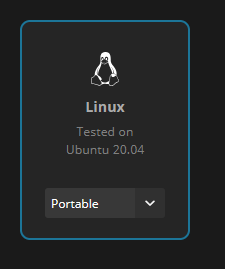
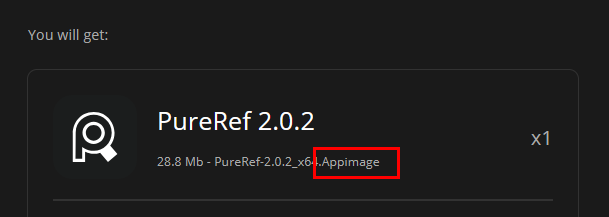
It is not accepting “Linux Downloads” maybe because of the space.
I can’t find the appimage anywhere on their site.
As mentioned, they call it “portable”. See the Screenshots I posted. Select Portable instead of DEB from the drop-down.
You also can escape spaces in paths by putting a \ in front of them, like Linux\ Downloads but double or single quotes around the whole path, should normally work. You can hit tab (if Chromebook has a tab key) to autocomplete paths in terminal, it will normally do the escaping for you.
Oh yes, I didn’t notice there was a dropdown list. Thank you so much for your patience and putting up with my frustrated groaning.