It needs to be in line with other icons we use. We can’t make a single icon different. In this case it is using icons from breeze. I think there is other distinguishable icon already which can be used.
I feel adding in more options is also a adding more clutter. The settings section is already filled with many options. When having a warning solves the problem why add more maintenance burden for the developers by making it an option. This also sets a precedence, there will be many people with different workflow and each one will demand an option to be added in the setting.
As a side note I see this always in free software debates, just add it in the options as an easy way out and then people complain that things have too many options and is overwhelming. Take plasma for example, people like the options but then people also complain that they have to navigate through many options in the system settings.
I have used Krita for about 5 years or more now and I only learnt that there were warning messages like 2 weeks ago after looking into these type of posts. I tend to plan ahead but I should have come across one eventually if you consider probability of a encounter with one. And yes I have messed up before several and several times before!
These posts are always filled with user error and telling people they suck at saving is a drag but that does nothing for the lost work as it is post fact and will still be trippable again even for experienced users. While it being correctly doing what the name(save versus export) implies you just need to learn just ONCE.
If you see this forum from an outside perspective and the common complaints around here you would assume there is a issue for sure with the saving system and one tablet model that is not supported.
I think the saving one is way easier to fix and actually should not be a issue.
I worked at a printer shop for a while and I know people mess up from time to time saving their files, but this seems way too often. I just think less options would make everything easier. Force people into the RIGHT path.
Sure. Although, one checkbox in General > File Handling doesn’t seem so cluttering to me.
I understand that many people ask for their own different “one little thing”. It’s all a question of “would enough people benefit from the same one thing to make it worth adding?”
I don’t know the answer in this case but it seems there are at least a few people who are asking for something similar.
And a little more FOSS apps interoperability never hurts. That’s my bonus 5 cents.
Save and export are not the same thing. Export is a save as that doesn’t change the filename of the open image. This has been a convention in UX since the early nineties.
Well I know that now…
You will not see it happen unless you know that is your looking for and how it works. I know how it works and still fall onto that mistake myself.
A Dictionary should be neutral to explain without my personal view in account (see point 3).
What did happen different for the user… nothing really.
It did Save right on both methods? Yes
they did get what they wanted on both? Yes
Are they the same thing for the end result? Yes.
So when do they learn the difference? probably when they actually loose data and cry about how can they get their data back of forums or reports and i am sure you get bug reports on this account too as the save feature is not working. and then lets hope they don’t messup again but you know they will.
As you can imagine you can’t Save all your Krita data with other file fomats such as JPG or PNG for it to be considered an actual Conventional Save. Nor you can Export into a KRA to be used in other applications, this also would mean you should be able to Import a KRA by logic alone instead of doing a Open for it to be a Conventional Export, but still I agree on this simplification in the end. But is this convention? In my view it really is not.
If you look into any other program that manages several file formats in their work flow (3D, pos-production, video editing) all of them are in line with the same philosophy considering Save and Export behavior. Sadly 2D programs are the only ones that mix it all up and only GIMP seems to get this right. This because JPGs and PNGs per example are not GIMP formats nor they are hinted to be. And all these complains happen because they are hinted they are.
A good program to check as an example is Blender, there you can see very well the distinction on save, exporting and importing.
You conveniently left the last part, in export the current file is not changed to the newly saved one. In save and save as the current open file is replaced with the new file.
Nevertheless it is not that we get a hundreds of report for save behaviour. Apart from blender (which is a 3d application and you get save and save as for image render when you render the image) and GIMP I do not see any application restricting the save format to its own native one.
Photoshop, you both have save save as and export in all of them you can choose any format and while choosing jpg png it shows small warning sign like we do.
Inkscape you can save in file format other than the native svg when doing save and save as
Mypaint you can again select the file format of your choice no restrictions.
Corel painter again same behaviour
Now tell me why we should we drop what majority of the industry apps are doing just to make it similar to a 3d application and an outlier 2D image manipulation software, in both cases the application are not in the same area as Krita other than being FOSS.
To summarise I don’t think we should restrict the file format in the save dialog like GIMP does. I am sure GIMP must have had many complaints about this restriction too, even I didn’t like it when they did it.
Also the initial issue was about opening a png/jpg file and then saving it. This problem was solved by showing a warning. Considering majority of the target audience of Krita are painters who would most of the time create an image from scratch I don’t think current save dialog is a problem for them. Why should we change the behaviour based on the workflow of people who are not even in the target audience of the software. Just to annoy the majority of users?
I left it out because it not what the user does nor it is visible if your not looking for it (requires you knowing that happens to begin with considering the initial file)
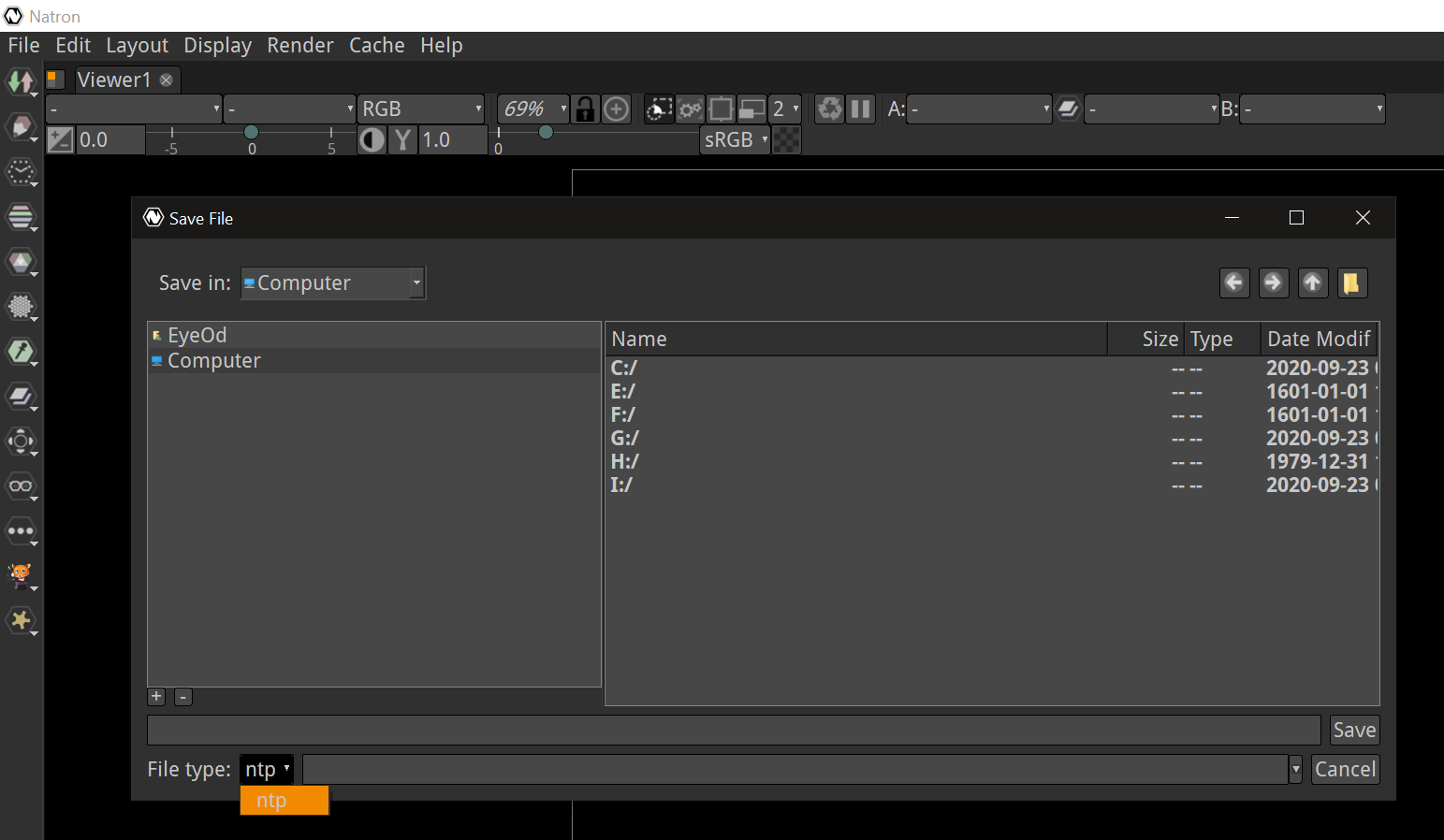
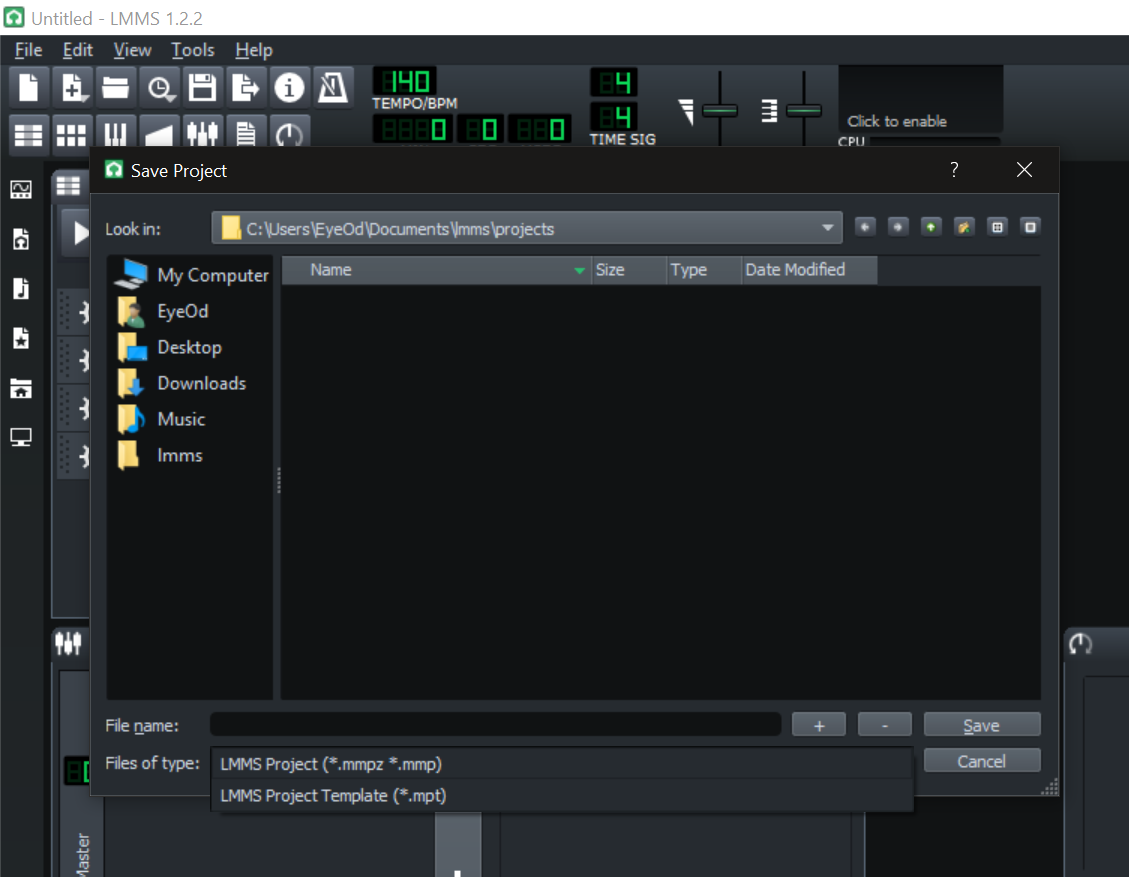
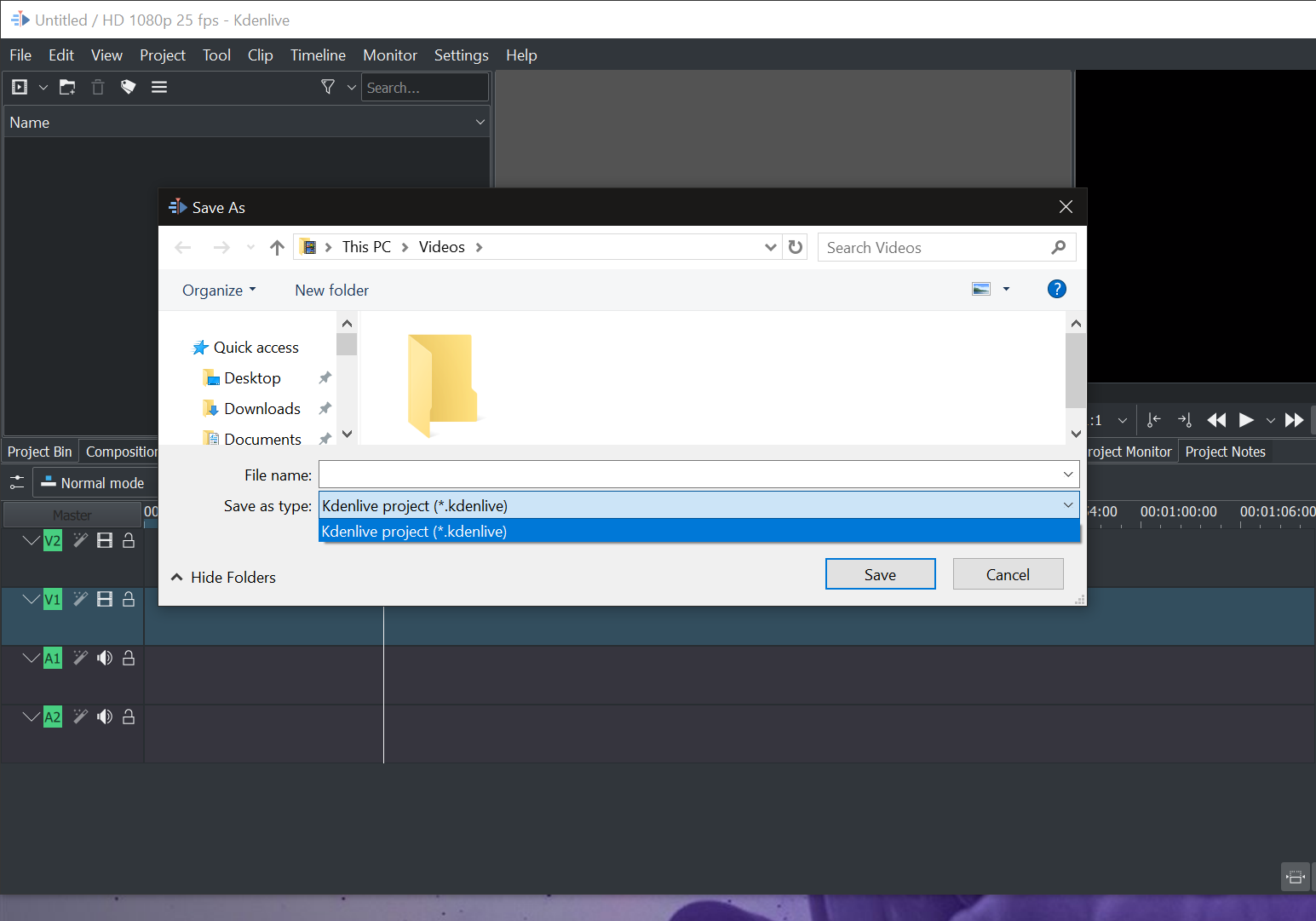
I formated my computer today so I still only have a couple programs installed yet:
kdenlive
These are other easily accessible programs but I can get other “industry” programs examples also to show.
Photoshop, Inkscape, MyPaint and Corel are all 2D programs and all really have the same issue. But that fact is a 2D curiosity when saving not a Convention by any means when compared to the overall Save/Export philosophy in editing programs.
I am not off topic, it is the topic…
the warning solved it? it seems the warning did nothing and still remains not relevant to solve this issue considering users posts.
if you take a overall view on this forum you will see your target audience complaining all of the same thing all the time >3> what you say sound really curious. Accidents happen but being predisposed to accidents to happen is also another thing. This issue is so frequent that gives the impression that Krita simply is not able to save and is very buggy to the outside if someone reads the issues that have been happening. The option is simply misleading and users fail to make the choice correctly and then this is considered as the path of growing as a digital artist which leaves me speechless to hear. I really think you should hear your target audience better.
I don’t think it so frequent other wise we would have had a number of people reporting bugs for save behavior. And the apps that you showed as example are all not related to digital painting.
The proposal is to make warning more prominent.
Really, you will dismiss all of them as wrong and show example of apps which are not in the same domain of Krita? Comparing a video editor, a video compositor, a 3d application, audio workstation with a 2d digital painting application and disregarding other application which have closer target audience of 2d illustrators and painters seems really far fetched.
As an example of how this is detrimental to our main target audience that is the painters here is a quote of comment by @Deevad from the article above
Save and Export
I understand the statement, the research, and all what leaded to this choice. I like the feature, and I think it adapt very well for destructive image format as JPG, or exotic files like PSD.
I don’t understand why the same treatment with *.PNG and *.ORA or other non destructive and open-format. Here I work exclusively with Open Raster , to communicate in a workflow with Mypaint and Krita. Of course one of the first thing I do is to remap the Ctrl+Shift+S to Export as, and Ctrl+S to Overwrite.
But it makes the name in task bar always ‘untitled’ ; and also ask everytime ’ the document is not saved’ on close if not a *.xcf document was done… What a workflow breaker for painter.
I don’t want Gimp to become so centric around *.xcf ; and *.xcf have poor colaboration with other softwares. So, please let a little place for *.ora and *.png thanks in advance.
And they also had to add another option of overwrite for quick saving of files.
I don’t think our majority users are using workflow from GIMP. If you search the web for gimp new save feature you will see top search result show people posting on forum hating this change. Clearly we would get more post for this change than the posts we get to implement GIMP’s behaviour in Krita.
I tried to search https://bugs.kde.org and I couldn’t find a single bug where people lost their work due to save. I have never seen any overwhelming number of people on IRC or any other place complaining about it too.
Now I have given example of other similar application in the same area and also have given some anecdotal cases as support for not having this. Can you please share some data from your side other than example of unrelated applications?
Bottomline : the issue is mostly workflow-related.
Painting workflow vs Photo editing workflow. Krita can do both. But I’m repeating myself so I’ll stop arguing.
Yes but it is not the target or goal. it can do it because there is some overlap. I know you said to make it optional and I don’t know how easy or hard it to do it since I am not a dev. But implementing something as default (like other suggested) for the workflow which is not in the vision statement of goal of the software seems counter intuitive
You are wrong in this statement. The result is very different and observable by the user. After exporting the document it will still be marked as “dirty”. The user will see a star sign at the window title and will get a warning message box when trying to close the document without. The only way to avoid that is to use normal Save method.
Dude I use this for over 5 years how have I not seen this? I am actually even more upset I have not seen this happen. I know I have a method and I tend to have very few losses but still. It is mathematically unlikely to have not seen this happen.
The warning sign is when you save the document into non krita format and when some data may get lost while saving in the said format. There is a yellow triangle with exclamation mark. Which will now be a bit more prominent. This sign is accompanied by explanation about what the warning is and what data is about to be lost. This warning usually occurs right in the top of the save dialog of the said format. Now if the user is careless and ignore this warning and explanation, then he needs to learn not to do so. I and boud shared some screenshot take a look at that.
The dirty thing that @dkazakov said is about marking the document unsaved in the title bar with an asterisk character. This is also a general convention and user is supposed to know it and I think many do too.
You didn’t notice it because you are thinking about restricting default save dialog which is different from this topic where the user is saving an existing image (png/jpg) where the save dialog doesn’t even appear. In this case just the save options of png and jpg are shown and the user despite seeing the jpg/png options (which clearly show that it is not being saved in kra and also has warning sign and explaination) saves the document in jpg/png thinking that their layers are intact or thinking that earlier they have saved the kra thus losing the data.
Instead of making Krita like GIMP can we harass the GIMP devs to change their save system back to how it used to be?
Seriously though - I don’t think there is a perfect solution to the saving problem. If you make it more convoluted you make it so for everyone - and on balance I think the occasional mishap and loss of work is preferable to a more intrusive and complex saving solution.
Messing up can be frustrating and even upsetting, but I’d rather risk that than get annoyed by popups multiple times a session, or a GIMP style solution where I feel like I’m being bullied into using the native format.
In another sense it’s about allowing mistakes and people learning/becoming more alert and pro-active as a consequence vs. expecting the program to hold your hand every step of the way.
Sorry if I’m just repeating or going off topic in any way; I think I got the gist of the discussion but it’s a very long thread!
All of that said, when GIMP 3.0 comes out in the year 3598, I’ll most likely do all my photo editing there and drop Krita so, I guess I can be patient and let a vampire bite me so I’ll still be standing when it happens
 thanks in advance.


 ) will automatically manifest your thoughts in hyper realistic VR.