I’d rather say Gimp will have CMYK support and perhaps a vector layer type at this time, but let’s not get our hopes too high though 
well if you do not consider GIMP a valid program to be set as an example for a Drawing application to and their save/export system. not to mention all other programs in existence in the Real Convention of Save and Export in programs. Yes there is no examples be said, but you also ignore the world. There is no arguments is you ignore all arguments that is right.
So many times I heard “don’t make features requests because this or that program does it this way” and now I get the sermon of the opposite… I can swallow it but I will never like it nor give credit to that argument now on either side.
Either way considering the warnings namely the Dirty signal.
I have use a ton of programs that have the dirty sign and i know what it is long before I entered Krita. if I did not notice it it was surely of too reasons
- not noticeable enough
- blends in all too well as a file name text
This is the realm of UI arguments but here it goes.
First of all you can’t see which tab is the selected tab… in Atom the blue line on the left indicates that and you know you should be looking at (something that really falls flat on its face on Krita and why probably I never look that way) and then the Dirty sign is a blue dot on the Right. That blue is used as a selection color in atom in this theme. Strangely enough in Krita is also another shade of blue in most themes and would actually be like this if chosen to do this.
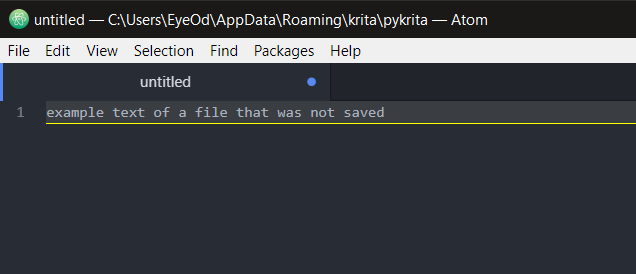
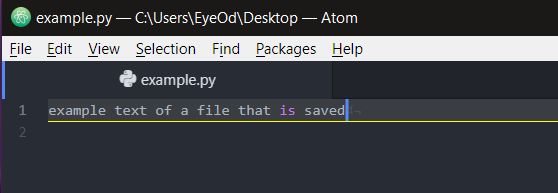
My suggestion here is “as done in other programs” is to set a ICON for the text of the tab with the color of the theme your using on the tab instead on just relaying on text which I find very unnoticeable just like the other export warning that goes without saying.
What saves me most of the time is the fact I come from 3D so each time I start a new file I immediately save the file into a new name path and while I work I hit Ctrl+S without thinking but regardless I should have seen this before.
This topic should be closed, locked and deleted.
On my side, I’m really a simple guy and maybe my arguments are not the best, but…
When I open a file, I just expect when I save it to keep the original format.
That’s all.
Otherwise, to select another file format:
- I do a “Save as” (in general to choose the native file format) and continue to work on the new saved file
- I do an “Export” and then I continue to work with my current opened file
So, if I open a JPEG or a PNG file for a quick modification, I expect to save the file in the original format.
As far as I can remember in the last 30 year, I did it in this way.
Too late for me to change 
I practically stopped to use GIMP when the Save/Export method has been changed… (that’s one -not all- of reasons why I started to use Krita instead…)
Another example is how the Microsoft Office suite works: open a CSV file in Excel, and hey, just save it (CTRL+S): you’ll be warned that as you’re not saving your file as a native Microsoft Excel file format you may loose some information.
But yes, natively Microsoft do what seems the more natural for me: try to save file in its original format.
And maybe one day, Microsoft will decide to implement the GIMP way of save.
I hope that when these dark days come, I will already be retired from office and therefore no longer have the obligation to use the any of Microsoft products
Grum999
It’s a bit radical, no? 
This place should be a place where all ideas and point of view can be discussed, I think.
Unfortunately, not everyone necessarily expresses their point of view in the most courteous manner…
This shouldn’t be a reason to prevent this discussion.
And future discussion.
I hope.
Grum999
Let us cool down a bit and revisit this sometime later.
Closing this for a day