Hello, I’m making this post to ask your opinion and advice about the gradient-map feature in krita.
In my last art work that I posted(Finised artwork for testing gradient-map) i colored the main character with the Mark Brunet’s method using the gradient-map but i used too many maps and the krita file ended up being too heavy (5,5 GiB).
To not make the file even heavier than what already is, i colored the background and the background characters without using the gradientmap.
In the end i ended up having too many layers and the majorety of them were masks (11 masks almost) linked to the gradeint map.
This feature is very useful especially if I want to change the color without changing the value but if there is a way to use it without making the krita file heavy than it would be nice.
What is the size of the canvas and which colour space and bit-depth are you using?
Is that 5.5 GB the size of the .kra file itself, as seen in a File Manager or is it the RAM meter reading on the status bar of krita?
Looking at the gradients I have, the largest one is 2.2 kB and most are much smaller than that. So even if the .kra file carries the gradients around inside itself, I can’t think why they should cause a significant size increase.
There is a possibility that you’ve accidentally created off-canvas content that you’re not aware of.
If so, try doing Image → Trim to Image Size to remove it then see if that helps.
Edit:Add: I’ve just made a 1920 x 2361 RGB/A 8-bit default canvas with 11 fully painted layers, each with a different gradient map filter mask on them.
The .kra file is 166 MB in size. So, puzzlement continues.
Exactly! Gradients are only carried as what they are in the Krita files, data values formatted as text, so like vector elements they take up very little space.
I would rather imagine that the size growth is due to the effects of masking the gradients, and suspect that it is about the size in memory, but may be wrong.
Michelist

Hello, when i opend the krita file the size chanded and it is 4.4 GiB (not 5.5GiB like before) in the firist screenshoot, but when i checked the file on windows with right click → property the size was 172 MB as you can see here
Now i have tried your method about the “Trim image size” and it helps
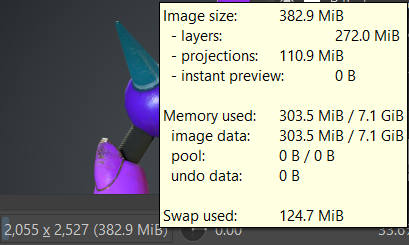
As you can see the size is 382.9 MiB on krita
and the size of the file on my computer is now 44.1MB
The problem was the off-canvas content, when the file gets heavy it became laggy and deficult to navigad.
Depending on what you do, sometimes unknown to you, off-canvas content can be created.
If you’re definitely not using off-canvas content techniques and the size seems to be unusually large then Trim to Image Size is a useful thing to do.
The reduction from 5.9 GB to 4.4 GB when you had a freshly opened .kra file was probably because you had Undo/Redo restoration data stored after editing during the previous session.
Won’t the problem be the size of your image and the resolution you are using? The final size of your image is 1920 x 2361 pixels and the original size, according to the screenshot of your second post is: 2055 x 2527 pixels.
If your objective is to post an image to the internet, a large size like this makes your kra file heavier and will be of no use when posting your work, as the forum reduces the image’s visualization.