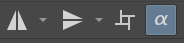
Hello!
I’m working on a plugin where I add a new button to the toolbar at the top of the screen and I’m having a lot of trouble getting the button’s appearance to match the rest of the bar. Ideally I’d like to just take all of the styling from the wrap-around-mode button and transfer it to mine, but I haven’t been able to find a good way to do that. I’ve gotten most of the way there with this code, but the colors and outline still don’t match:
        self.tool_button.setText("New layer alpha inheritance")
        self.tool_button.setToolTip("New layer alpha inheritance")
        self.tool_button.setBaseSize(wraparound_button.baseSize())
        self.tool_button.setAutoFillBackground(wraparound_button.autoFillBackground())
        self.tool_button.setBackgroundRole(wraparound_button.backgroundRole())
        self.tool_button.setForegroundRole(wraparound_button.foregroundRole())
        self.tool_button.setContentsMargins(wraparound_button.contentsMargins())
        self.tool_button.setContextMenuPolicy(wraparound_button.contextMenuPolicy())
        self.tool_button.setGeometry(wraparound_button.geometry())
        self.tool_button.setMaximumSize(wraparound_button.maximumSize())
        self.tool_button.setMinimumSize(wraparound_button.minimumSize())
        self.tool_button.setStyle(wraparound_button.style())
        self.tool_button.setSizePolicy(wraparound_button.sizePolicy())
        self.tool_button.setToolButtonStyle(wraparound_button.toolButtonStyle())
        self.tool_button.setPalette(wraparound_button.palette())
        self.tool_button.setGraphicsEffect(wraparound_button.graphicsEffect())
(also setting each of these fields manually feels hecka jank haha)
Here’s a picture of the button as it currently exists: